
You are viewing a potentially older version of this package.
View all versions.

| Date uploaded | 2 months ago |
| Version | 1.0.0 |
| Download link | jake-BloodEffectDisabler-1.0.0.zip |
| Downloads | 32 |
| Dependency string | jake-BloodEffectDisabler-1.0.0 |
This mod requires the following mods to function

BepInEx-BepInExPack_AcrossTheObelisk
BepInEx pack for Across the Obelisk. Preconfigured and ready to use.
Preferred version: 5.4.23README
Blood Effect Disabler
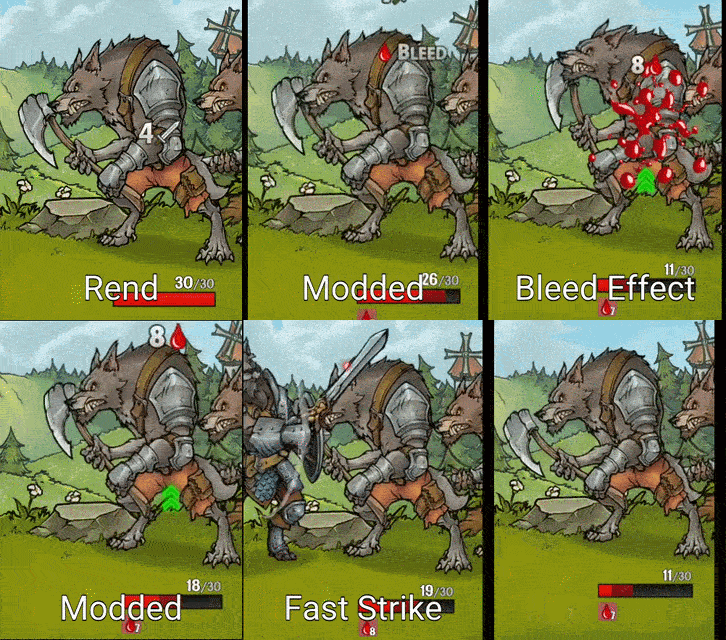
Kids-Friendly Mode
Removes blood and leech visuals entirely.
Made so I can play with my kids (and not get side-eyed by my wife).
Installation (automatic)
- Download and install Thunderstore Mod Manager or r2modman.
- Click Install with Mod Manager button on top of the page.
- Run the game via the mod manager.
Installation (manual)
- Download and install BepInEx
- Click Manual Download at the top of the page.
- In Steam, right-click Across the Obelisk and select Manage->Browse local files.
- Extract the archive into the
game folder\BepInEx\plugins\. Your Across the Obelisk folder should now contain a BepInEx folder. - Run the game.
Note:
This package includes two .dll files. The appropriate version will be used automatically depending on your BepInEx version (5 or 6).
