

AdditionalFastTravel
Adds additional fast travel capabilities via chat commands.
| Date uploaded | a month ago |
| Version | 1.1.1 |
| Download link | AtlyssModding-AdditionalFastTravel-1.1.1.zip |
| Downloads | 611 |
| Dependency string | AtlyssModding-AdditionalFastTravel-1.1.1 |
This mod requires the following mods to function

BepInEx-BepInExPack
BepInEx pack for Mono Unity games. Preconfigured and ready to use.
Preferred version: 5.4.2100README

Additional Fast Travel
A mod for Atlyss that gives the player additional fast travel options, to warp to any point of interest in any area at any time.
Features
- Allows you to teleport to any area and any point of interest
- Quick and easy usage with three chat commands
- Works in singleplayer and multiplayer
- Has basic support for MapLoader maps
Usage
This mod adds three extra chat commands the player can use to teleport themselves to any point of interest in any publicly accessible area in the game.
This can be achieved by initially using the /warp command to teleport to a given area, and then using the /goto command to move to a specific indicated location in the area.
All commands support partial matching for names of areas and points of interest, and will go directly to that location if there is a single unambiguous match.
Using /warp
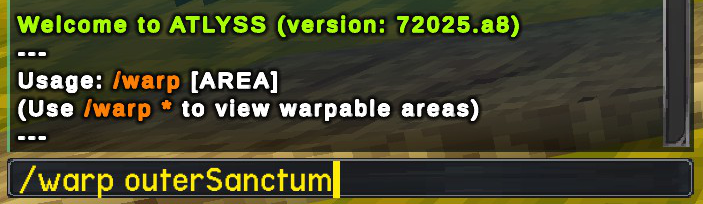
Using the /warp command will prompt the player to select an area name to warp to. Using the warp command with a given area name will teleport the player to the default spawn location of that area.
You can also specify a goto as a second parameter to warp to the area and then go to the point of interest.
For dungeons, it will default to Normal difficulty. Use /dungeon if you want a different difficulty.
Example usages:
/warp- list available warps/warp Sanctum- warp to Sanctum/warp Sanctum Shop- warp to Sanctum and goto the Shop point/warp arc,/warp trial- warp to Arcwood Pass and Trial of the Stars through partial matching
Using /goto
Using the /goto command inside of a given area will list a selection of points of interest for the area is currently in (Examples for the Sanctum hub area includes the fishing lake, Sally's shop and the Outer Sanctum portal).
Using the /goto command with a given area of interest will move the player instantly to the respective location in the current area.
For custom maps, /goto will pickup any SpawnPoint objects and make them available to players.
Example usages:
/goto- list available points of interest/goto Shop- goto the Shop point/goto way- goto Waypoint through partial matching
Using /dungeon
The /dungeon command allows warping to a dungeon map and setting the difficulty of the dungeon.
Example usages:
/dungeon CrescentGrove Hard- warp to Crescent Grove and set dungeon difficulty to Hard/dungeon CrescentGrove Normal- warp to Crescent Grove and set dungeon difficulty to Normal/dungeon CrescentGrove Easy- warp to Crescent Grove and set dungeon difficulty to Easy
Limitations
To prevent abnormal behavior, it is not possible to use the commands while inside a dungeon instance. You may still Recall as normal out of a dungeon instance.
Credits
Mod created by Clearwater
ATLYSS created by Kiseff
Donations
If you enjoyed this mod, please consider donating to Clearwater! All received donations will go directly towards server hosting costs, which will allow them to keep the servers online for some of their other mods. Thank you!

CHANGELOG
Changelog
All notable changes to this project will be documented in this file.
The format is based on Keep a Changelog, and this project adheres to Semantic Versioning.
[1.1.1] - 2026-May-24
Fixed
- Adjusted the names of some goto locations and fixed some invalid / broken gotos
[1.1.0] - 2026-May-23
Added
/warp [area] [goto], acts as a/warp [area]followed by/goto [goto]once the player loads into the new map/dungeon [area] [difficulty], allows warping to given map and set the dungeon difficulty to one ofEASY,NORMAL, orHARD
Changed
- The area and location names in commands now use partial matching and will warp directly if the match is unambiguous
/warp arcwill usually warp you directly to Arcwood Pass,/warp trialto Trial of the Stars, etc./goto waywill usually matchWaypointand go there, etc.
- Updated the names of goto locations
Fixed
- Changed loading log message so that it is no longer a Warn
- Goto no longer messes with underwater state, shaders, map region triggers, etc.
- Commands should now work correctly in multiplayer
[1.0.1] - 2026-May-15
Fixed
- Updated to work with 12025.a3
[1.0.0] - 2025-July-30
Changed
Initial mod release
