

Better Proximity Voice
Best-in-class Big Walk voice controls: adjustable proximity range, 2D audio, named speaker HUD, quick actions, and polished in-game feedback.
| Date uploaded | a day ago |
| Version | 1.4.0 |
| Download link | n0__name-Better_Proximity_Voice-1.4.0.zip |
| Downloads | 319 |
| Dependency string | n0__name-Better_Proximity_Voice-1.4.0 |
This mod requires the following mods to function

BepInEx-BepInExPack_IL2CPP
BepInEx pack for IL2CPP x64 Unity games. Preconfigured and ready to use.
Preferred version: 6.0.755README
Better Proximity Voice
A standalone voice-chat settings menu for Big Walk. It does not include or depend on the internal dev menu.
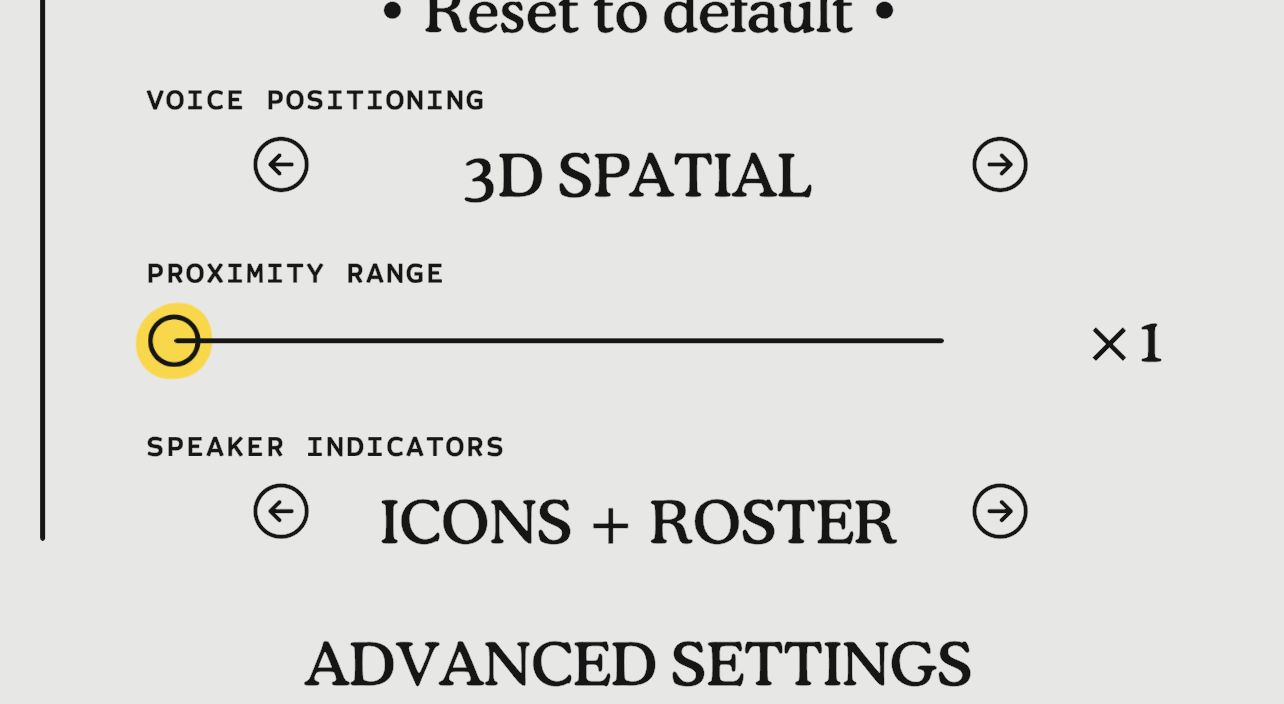
Open Big Walk's Settings > Audio menu to use native Voice Positioning, Proximity Range, and Speaker Indicators rows. Choose Advanced Settings there, or press Alt+V, for the complete panel. From there you can:
- increase received proximity-voice range from vanilla (
×1) to×20; - switch all received voices between positional 3D audio and non-positional 2D audio;
- show a named, distance-coloured speaker indicator over whoever is talking;
- see a polished active-speaker roster with live voice levels; and
- see every connected player's name, distance, and talking state in the menu.
Optional quick controls can switch 3D/2D voice, cycle range presets, or toggle the HUD without opening the menu. They are deliberately unbound by default so the mod does not claim global keys that another mod may use. Bind them directly in the voice menu: click a binding and press a chord, use Escape to cancel, or Delete to unbind. Changes save immediately. Manual BepInEx config editing remains available but is not required. Every quick action has a short confirmation toast.
The native Proximity Range slider selects every whole-number multiplier from ×1 to
×20. Advanced Settings also keeps the five named presets and an Exact field for
typing decimal values directly.
Settings persist in BepInEx\config\com.bigwalk.voicesettings.cfg and are reapplied as
players join. The range change is local playback only: it does not change another
player's settings or require them to install the mod.
2D mode removes positioning and distance fade entirely. Use it when intelligibility is more important than knowing where a voice came from.
Configuration
| Setting | Default | Purpose |
|---|---|---|
OpenMenu |
LeftAlt + V |
Optional shortcut for Advanced Voice Settings; native controls require no shortcut. |
ToggleAudioMode |
Unbound | Switches between spatial 3D and non-positional 2D voice. |
CycleRange |
Unbound | Cycles the five range presets. |
ToggleHud |
Unbound | Toggles the speaker HUD. |
RangeMultiplier |
1 |
Local received-voice distance multiplier (1-20). |
TwoDVoice |
false |
Makes received voices non-positional. |
Enabled |
true |
Shows speaking indicators. |
ShowNames / ShowDistance |
true / true |
Labels active talkers in the world. |
ActiveSpeakerRoster |
true |
Shows the live lower-right speaker roster. |
HudScale |
1 |
Scales all HUD elements (0.75-1.5). |
TalkThreshold |
0.004 |
Adjusts how much voice activity lights an indicator. |
Install
Install with a Thunderstore mod manager (Gale or Thunderstore Mod Manager), or drop
BigWalk.VoiceSettings.dll into BepInEx\plugins\.
CHANGELOG
Changelog
1.4.0
- Add Voice Positioning, Proximity Range, and Speaker Indicators directly to Big Walk's native Audio settings.
- Add a native Advanced Settings row leading to the complete panel and shortcut rebinder.
- Preserve the game's fonts, menu sounds, mouse input, and controller navigation by cloning live settings rows.
- Add overflow-aware Audio scrolling with wheel/drag input and automatic controller selection tracking.
- Make the entire Audio panel a scroll target, including blank space between and around controls.
- Replace the native range presets with an exact
×1-×20slider; retain named presets and decimal input in Advanced Settings. - Make Reset Audio restore vanilla 3D Spatial voice and
×1range along with default speaker indicators. - Remove the redundant custom pause-menu button.
1.3.0
- Add complete in-menu shortcut rebinding with modifier-chord capture.
- Support Escape to cancel and Delete/Backspace or Clear to unbind.
- Persist new bindings immediately; manual BepInEx config editing is no longer needed.
- Keep vanilla
×1range and 3D Spatial audio as fresh-install defaults.
1.2.0
- Add a native-styled Voice Settings button to both host and client pause menus.
- Replace bare function keys with configurable modifier-aware shortcuts.
- Use
Alt+Vas the only default shortcut; all quick actions are unbound by default. - Show current bindings and warn about duplicate bindings inside the voice menu.
1.1.0
- Show real sanitized player names and distances on speaking indicators.
- Add a compact active-speaker roster with live amplitude meters.
- Add dedicated 3D Spatial and 2D Everywhere audio-mode controls.
- Add five named range presets and show the effective received-voice edge.
- Add configurable F4/F5/F6 quick actions with polished confirmation toasts.
- Add HUD name, distance, roster, and scale settings.
- Improve menu contrast, typography, sizing, and live player information.
1.0.0
- Initial standalone release with range scaling, 2D voice, speaker indicators, and an F2 settings menu.
