

QoL Unknown
This mod is a general quality of life mod for Casualties: Unknown, meant to introduce accessibility and QoL features without changing the core mechanics of the game.
| Date uploaded | 5 days ago |
| Version | 1.1.5 |
| Download link | Jimmyking-QoL_Unknown-1.1.5.zip |
| Downloads | 409 |
| Dependency string | Jimmyking-QoL_Unknown-1.1.5 |
This mod requires the following mods to function

BepInEx-BepInExPack
BepInEx pack for Mono Unity games. Preconfigured and ready to use.
Preferred version: 5.4.2305README
QoL: Unknown




QoL: Unknown is an all-in-one quality-of-life mod for Casualties: Unknown. It adds accessibility, comfort, and convenience features without touching the core mechanics of the game.
Every system is optional, and everything has its own toggle!
This mod works alongside other public mods, including content mods built on CUCoreLib and the Together multiplayer mod.
Below is a list of some of the added features of this mod: (click to expand!)
Saving & Seeded Runs
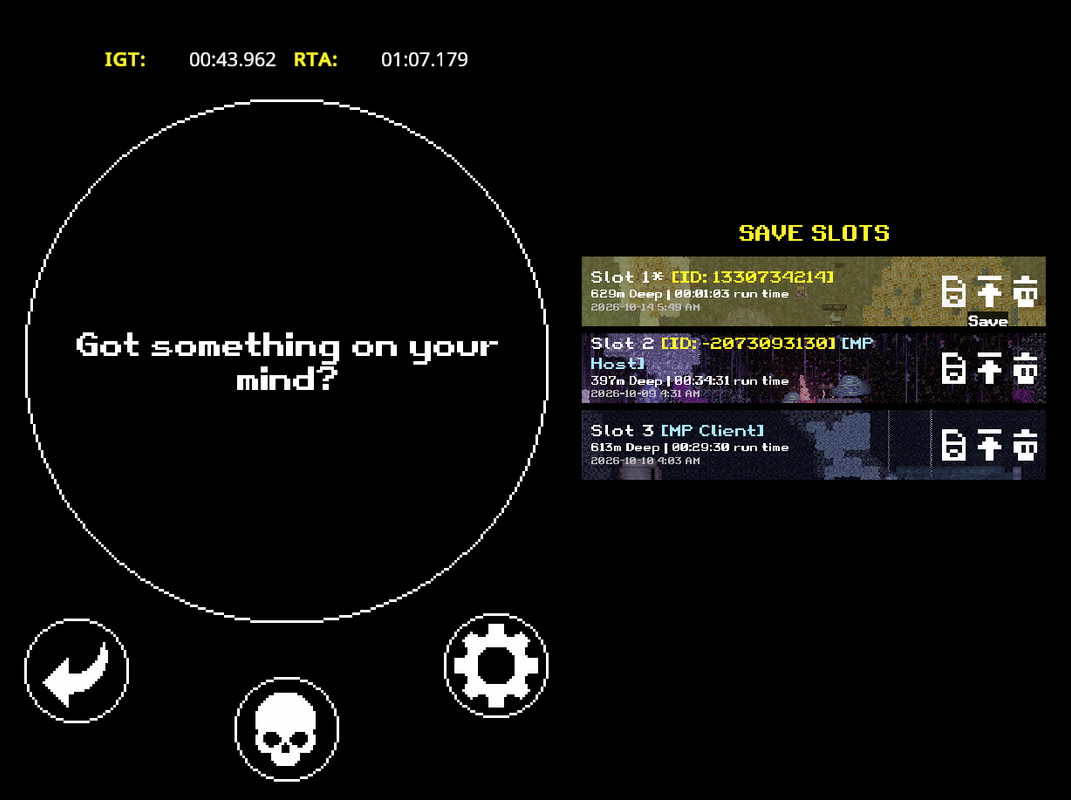
- Mid-layer saves that retain world generation, traps, enemies, etc...
- Seeded runs for consistent worlds. (This syncs worlds down to the same keycode and items from drop pods!)
- Autosave every three minutes in the background while you are alive and standing
- Loading restores your position, layer state, radline state, run settings and timers
Inventory & Crafting
- Quick-transfer for liquids and items via Shift + Drag
- Inventory auto-sort, prioritizing saved slots at low total weight, and lowest weight otherwise
- Scroll bars for containers that go offscreen
- Quick item pickup using middle-mouse button, which quickly stash your item into containers or equip the item
- Quick Stash picks up the item nearest your cursor and files it into a held or worn container, with a configurable keybind
- An opened ground container can be emptied using its real world position and normal distance rules
- A scrollable carousel once you have more than seven equipped items
- Enhanced the crafting menu item preview, with component autocraft and multi-craft additions
- Bulk crafting with an adjustable quantity selector
- Improved recipe search, and drag an item onto the crafting menu to see every recipe that uses it
- Recipe fixes for liquid containers and non-empty container ingredients
Gameplay & World
- 1-tile water no longer pushes the player, and water physics is more lenient
- Layer modifiers are able to be adjusted individually (e.g., enabling only dried layers)
- Difficulty sliders are no longer restricted, and can be set to above normal limits
- Sound cannon indicator
- Extra settings to retain several v6 behaviour traits
- Individual entity density options. This can increase geysers amounts if you really like them, or remove spiders fully if you have arachnophobia
- Individual structure density options (if you really (don't) want lifepods or other structures)
- Attack Assist redirects melee attacks toward nearby valid animals
- Optional V6-style early Ilmenite and Titanium generation
- Faster lockpicking and shorter keypad codes (opt-in)
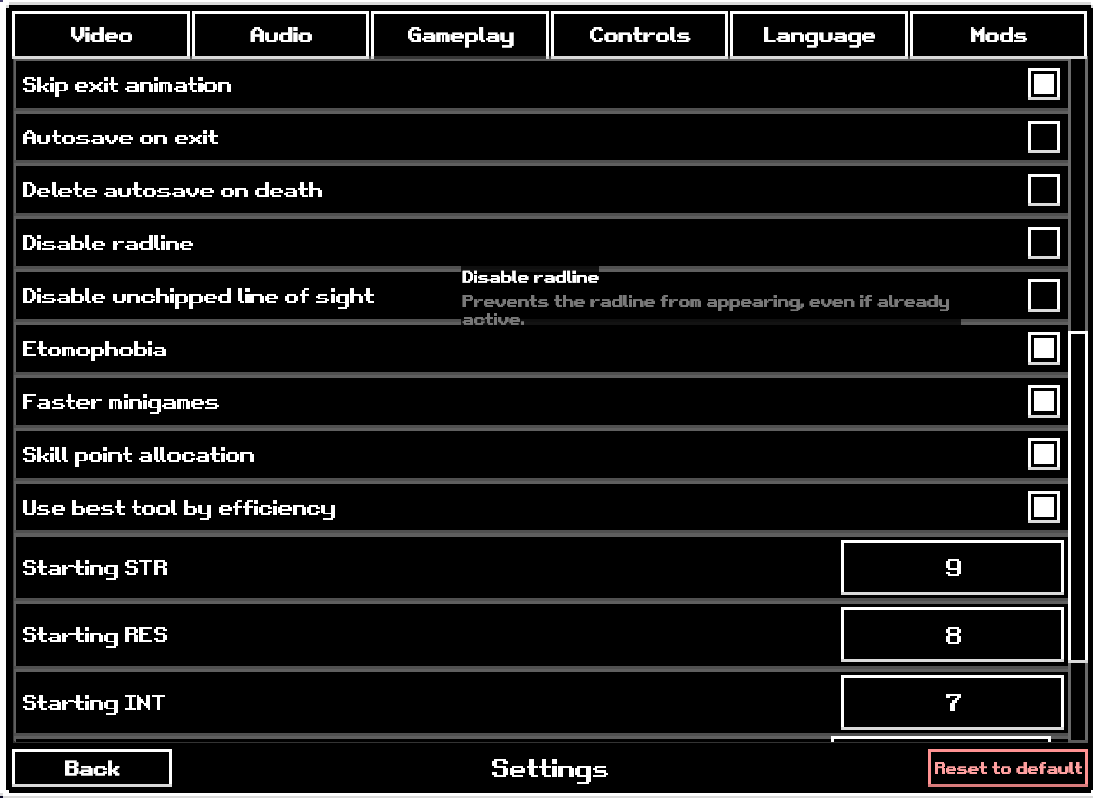
- Pre-run skill point allocation, plus configurable starting STR, RES and INT
- Reusable run-setting presets: save a run code, rename the group, right-click a preset to delete it
- Layer bottoms do not lock you into requiring to head to the next layer or save
UI, UX & Visuals
- Automatic integrated Discord Rich Presence game support
- Added up/down arrow navigation to select different choices for autofill in the console, as well as other console improvements
- Console spawn command now autofills and has a visual guide
- In-game custom keybind page with support for two-key keybinding and QoL/more base-game keybinds
- Controller support for Xbox/XInput-based controllers, with saved custom bindings
- One-click locale download button
- Framerate, resolution, window settings
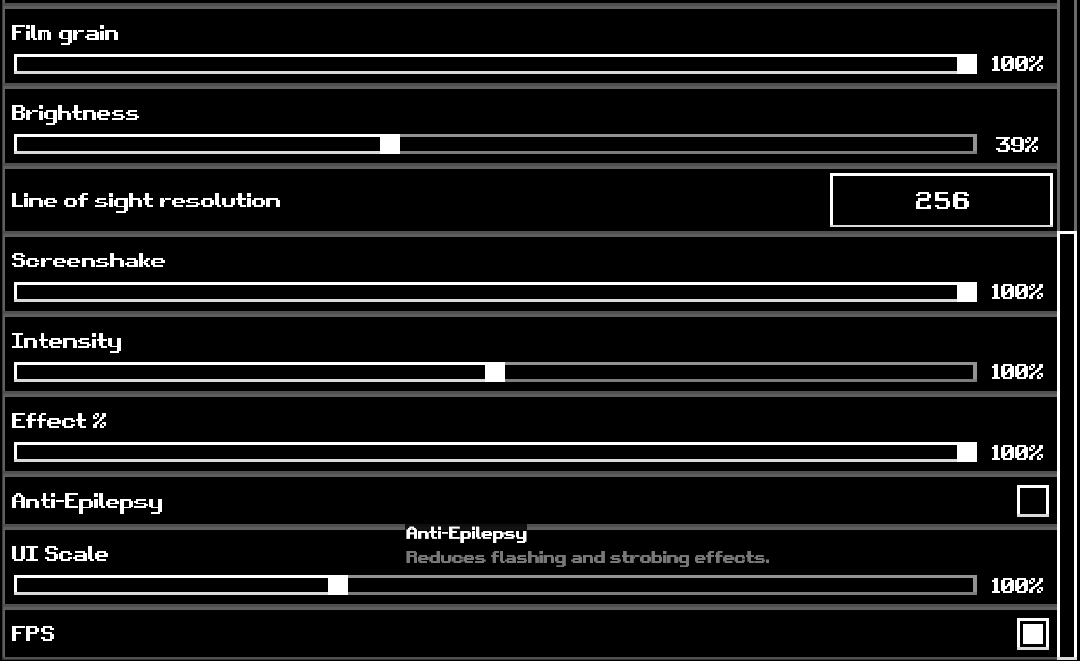
- Adjustable UI scale from 75% to 150%, with fixes for dragged items, tooltips, wound items and the selected-item UI at non-default scales
- Adjustable effect scale, to tone down effect intensity
- A mod manager category to see updates, enable or disable installed mods, and open their Nexus page
- Optional FPS counter, and general performance increases
- Casualty history, via reports on the death screen with previous/next navigation
Accessibility
-
Anti-flash/epilepsy toggle
-
Adjustable luminosity and bloom settings
-
Adjustable screen effect intensity
-
Etomophobia toggle
-
Instant radline toggle to enable/disable radline
-
Line-of-sight optimizations, with the option to disable the unchipped overlay entirely
-
Optional pause when the window loses focus
-
Screen-space UI compatibility fixes for alternate screen and game resolutions
Audio Safety
- Master volume & sound slider
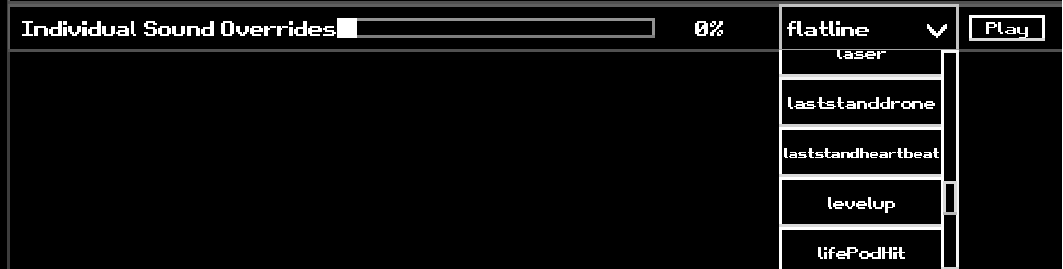
- Individual sound overrides, audio safety toggles
- Reduces known excessively loud sounds and limits unsafe pitch spikes
- Stabilised music volume handling
- Overrides persist, and can be reset one at a time or all at once
Mod Support / Multiplayer
- Host-authoritative seeded world generation and seed synchronisation
- Multiplayer-aware bulk crafting requests
- Item movement, inventory and spawned-object synchronisation safeguards
- Custom item, liquid, status, worldgen, (etc) save support
- Client spawn and heal commands client <-> server forwarding
- Host save and load bundles, plus importing an eligible single-player slot when hosting
- Client reconnect and teleport-to-host recovery after the host loads a save
- Sound cannon and network-player integration
- Custom item autocrafting and automatic compression
Note: Almost all features listed above include toggles for customization!
Installation
Install with a mod manager (Thunderstore Mod Manager), and you should be set!
For a manual install, place QoL Unknown.dll inside your game's BepInEx/plugins folder:
Casualties Unknown/
└── BepInEx/
    └── plugins/
        ├── QoL Unknown.dll
        └── (as well as any additional mods!)
On Linux, add WINEDLLOVERRIDES="winhttp=n,b" %command% to the Steam launch options.
FAQ
My game doesn't show the mod!
- There is a known BepInEx issue where mods may fail to load if your path to the game folder contains Unicode characters. If so, try moving the game folder.
- Otherwise, you may have messed up the BepInEx or mod installation. Please follow the installation instructions carefully.
- If you still don't see the mod, ensure this mod supports your game version, and send me a ping in the Discord thread!
What versions does this mod work on?
| Mod Version | Game Version |
|---|---|
| v1.1.x (current) | Full game |
| v1.0.5 | v7.1 |
| v1.0.4.8 | v7.1 |
| v1.0.4.5 | v7.1 |
| v1.0.4.4 | v7.1 |
| v1.0.4.3 | v6.1 |
| v1.0.4.1 | v5.1.0, v6.0, v6.1 (Steam release) |
| v1.0.3.2 | v5.0.3, v5.0.2, v5.0.1, Version 5 Pretest 5 (Itch.io) |
Where are my saves kept?
- All saves and autosaves are kept in
%appdata%/LocalLow/Orsoniks/CasualtiesUnknown/as .sv files - Manual slots are
slot_1.svtoslot_3.sv, and the autosave isautosave.sv
Does this work mid-run? Will my saves be deleted?
- Migrating from a non-modded run to a modded run works normally! (and vice versa)
- All your save data will stay the same, and you can continue off from where you left off.
Does this support multiplayer?
- Yes! Not all players need the mod for it to work, and it functions independently for each player who has it.
- See the Mod Support section above for which systems activate when a session is live.
Suggestions, issue reports regarding bugs, or installation difficulties are welcome in the Issues tab on Github or in the Discord Thread!
CHANGELOG
Changelog
v1.1.5
- Fixed full saving (backgrounds, minibarrels, buttons, etc...)
- Squishing items works if you have scrolling and stacking disabled
- 10% chance you spawn with a prosthetic when quickstarting :)
- World placement safety setting. This should hopefully not break any other mods, but has the spawn placement better (i.e. you don't spawn in the middle of 80 granite, or ontop of a trap)
- A considerable amount of optimization, I finally got around to doing this. Bleh, profiling is annoying
- Some settings flags that once required restarts are now applied live
- Large worlds should work now. Small ones still need a bit of work to get past WWMR (thanks to the mantle, which will get fixed another time ^^;)
- Fixed radline persisting via saves, if you go to the next layer when radline is active
v1.1.4
- In-depth saving now saves all world interactions, at the cost of compatibility. Turns off by default for heavy modded runs :)
- Crafting now allows you to select what item is being used (!!!)
- Quickstart. Start your run further down with randomized equipment, skills, and exp
- Saving/loading for drillpods
- Toggle equipment visibility, via the label setting
- Add additional colors and an RGB selector to labeling items
- Setting search bar
- Dynamic tech scanner setting, which allows it to flip left/right depending on where the chip is in relation to you
- Layer chunk size setting
- Minor visual updates, clarity, and cohesion
- Fix some drones and SFX persisting
- Mp3 player shows custom songs first, rather then last
- Better autosave support
- Minor fixes (e.g. RU locale for ending screen, different timedate system support for IGT tracking, etc..)
v1.1.3
- C:U v1.0.2 support (Yay! More stuff made it from this mod into the fullgame)
- One day I'll need to send the saving code to Orsoniks, haha ;p
- Achievement flag resets on new run creation (Not a qol issue, just fixing a game bug)
- EXP counter visual fix for autocrafted materials
- Fixed saving with disabled multiplayer
- Command to switch character mid-game (
switchcharacter) - Fixed item renaming
- Default colours with the setting enabled are more subtle
- Items no longer squish in containers (unless container scrolling & stacking is turned off)
- The drop capsule keypad minigame now goes above the save/continue UI
- Fixed certain timed achievements not potentially working with saves
- Fix depth meter not displaying the correct time in CRIMSON ASCENT
- Removed screen limit if zoom is enabled
- Add canvas to autocraft list
- Radline timer now saves to saves
v1.1.2
- Added clicking and shift-clicking to see recipe item craft/craftables
- Added setting to restore yellow favouriting
- Added auto-colored item (by type) setting
- Fixed crafting not showing the right item previews
- Removed modlist auto game reboot for security reasons
- Fixed autosave time mismatch, leading to incorrect saves
- Characters are properly saved now
- Holy shit, geofruit cake
- Fix cargo flag not saving
v1.1.1
- Fixed settings menu not appearing for a considerable number of people (whoops!)
- More optimizations
- Slimmed down file size
- Made code slightly more transparent
- Okay, finally fixed that funny bug where settings did not show up ;p
- Fixed sound cannon indicator being disabled
- Added setting to enable achievements despite using console commands (for saveandexit or other game bug persistence issues)
- This will be removed once the game gets hotfixed to solve this issue :)
v1.1
- Full release support!
- Added experimental camera zoom setting, though subject to change
- Added options to stacking
- Prevent Creature Griefing dropdown
- Trader items now show all properties, including liquids
controlrepeatcommand, to stoprepeatcommandsgetbodyfield/getlimbfieldconsole commandsapplylayermodifierautofill- Removed attack assist and sound cannon indicator (Yay, they were added to the game itself!)
- Fixed elder thornback spawn override not working
- Autosave no longer saves in the tutorial
- Autocrafting fixes and adjustments for modded content
v1.0.5.2
- Multiplayer v5.1.4 compatibility (crafting)
- Unlimited save slots! Woah. And save slot renaming
- Autocraft is unrestricted, and should work with modded items. Yay!
- Added more metadata of save slots, so it should now show the modlist for each save
- Added bookmark recipe and show uncrafted recipes buttons
- Quickstash improvements
- No more accidentally clicking the geofruit icon when leaving the settings menu
- Fixed bulk crafting duplication
- Disabled liquid container stacking in other containers
- Tutorial scene selection menu can now be interacted with during world loading, and can go left/right with the A/D (or respective) keybinds
- Added
listcustomcommandscommand - Mods above the known nexus version no longer display said version in the mods tab
- Fixed tool efficiency toggle
- Inventory interaction now works on out-of-inventory (in-world) items
- Disabled elder thornback autotargeting
- Fixed wrench and tweezer minigames not showing
- Optimized crafting menu UI building some more
- Item highlighting (Ctrl) now highlights many more items, and does not jitter as much
- Now supports CUCoreLib entities, structures, and sounds for individual entity/sound overrides
- UI clarity, improvements, and UITooltip additions
- Hotfix, fixed stacked items not expanding if a liquid container was in the same bag
v1.0.5.1
- Fixed crafting on clients in multiplayer not working (If you are using cucorelib and still experiencing issues, consider also updating to nightly)
- Add
bind removecommand to the bind command - Fixed lockpicking tool failure injuring hands rather then the tool's condition
- Container item compression now skips liquid containers
v1.0.5.0
I honestly have no clue what I added, I wasn't keeping track. Several changes are definitely missing from this changelog :p
- v5 multiplayer compatibility
- You can now keybind keys to a combination, e.g.
ctrl/alt/shift + q - Mods menu now has presets, and version checking is better now
- Autocraft is much, much better now
- Explicit CUCoreLib support! (not a dependancy though)
- Added
noautocraftfor that
- Added
- Autofill to locate command and skiplayer
- Inventory sorting is much better and should be optimal
- Fixed antirad issue
- Fixed saveandquit crashing
- Crafting stuff has been optimized heavily, and doesn't cause a minor hiccup
- Saves now save the timer
- Added auto-aiming for enemies (the same code will be coming to the full game upon release)
- Added command streaming for multiplayer, so if the host and client both have qol, you can run commands such as
healandspawnon the client without issue - Your seed rand() changes when you die
- Lockpicking kit, wrench, and tweezers get used even in your inventory (also in fullgame)
- Etomophobia toggle
- Item stacking in containers (can be disabled via the geofruit menu, of course)
v1.0.4.8
- Fixed large issue with mod not working in singleplayer. Whoops!
- Update mod version
v1.0.4.7
- Re-added multiplayer saving + loading, with extra support and compatibility
- Multiplayer spawn and heal command should sync better
- Fixed bulk crafting
- Fixed stalactite behaviour
- Fixed version mismatch for modlist, update version checking (see https://github.com/jimmyking9999999/Metadata)
- Fixed quick liquid draining
v1.0.4.6
- Mod manager, update checker, nexus integration
- New multiplayer version support
- Clients can now run
spawnandhealcommands if the host has QoL (and commands are on) - Autosave on exit/delete autosave on exit settings
- Casualty reports (view your old death stats)
- Audio safety expanded to add drones
- Liquids are drained instantly if you release a press ontop the drain button
- Fixed lifepods not saving properly
- Individual sound settings can go up to 120%
- Custom settings now save properly in each of the save slots
- CUCoreLib support + integration
- Skullcrushers (and stalagctites) can no longer instantly gib you on spawn (added spawn protection)
- You no longer spawn submerged in liquid (more spawn protection)
- You can take items from containers around you on the ground (game issue, but this might be the last demo before release, so...)
- Shift+drag no longer drops your containers
- High crafting quality tools are preferred over low ones, favourite to change
- Added new pause menu dialogue
- Unchipped fps increase
v1.0.4.5
- Bunch of hotfixes, thanks for all of your reports!
- Readded the Faster minigames toggle for lockpicking and keypad length QoL. Whoops. I forgot to migrate this setting over haha
- Scrollbars for settings, yay!
- Reworked mod setting registration, should be more reliable
- Fixed recipe contrast
- Fixed audio overrides not affecting some sounds
- Fixed custom mod settings and keybinds not always restoring saved values correctly.
- Fixed radline disabling
- Fixed jump pad lighting
- Added better defensive coding, settings changes should work a lot better with other mods
v1.0.4.4
- Settings menu fully integrated into v7's setting menu
- Shift-click the exit to exit without blowing up expy's brain (or enable the setting!)
- Mod keybinds
- Customizable Discord RPC
- V7 compatibility
- Removed features that the game has now integrated (yay!)
- Readd pause on alt-tab (setting)
- Save and timer UI migrated into the new pause/settings layout
- Equipment/wearable scrolling (no more not being able to access your wearables!)
- Bulk crafting improvements, fixed filtering by item
- Anti-glare, UI scaling, and lighting compatibility fixes. Readded the v6 brightness setting as an intensity slider
- Added worldgen compatibility toggles, i.e. disable radline, and ilmenite worldgen
- Increased cap of settings (loot/trap multi)
- Run preset options (click on 'copy to clipboard')
- A bunch of other bugfixes and features that I may have forgotten
v1.0.4.3
- Fix version check issue
- Fix FPS lag issue in multiplayer
(Sorry about the inconvenience! I should have tested last version further)
v1.0.4.2
- Fixed double-crafting
- Added QoL to disable megalovania (2296) from causing explosions only when the keypad has said code
- Fixed multiplayer saving:
- Client saves can only be loaded in singleplayer
- Host saves can be loaded at any time, and reset everything for the world to said savepoint, including clients
- MP seed drift fix (maybe?)
- Limitations: Multiplayer seeds and singleplayer seed terrain gen will most likely differ, so you may load into new terrain if migrating from singleplayer -> multiplayer or vice versa
v1.0.4.1
- Full multiplayer support! (Flashlight, saves, personal settings, quickstash, quicksort, seeds, worldgen, accessibility settings, etc...)
- Flickering issues should be mitigated, but may not be fully stable at weird resolutions + UI scales
- Locale fixes for ... text and multi-atlasing
- Quicksort qol (i.e. secondary ordering is by tool quality rather then alpabetical) and favourited items are respected
- Crafts now have a amount field, so you don't have to press 20 times when boiling water
- Crafts will automatically craft nails/scrap cubes/wood component items/other intermediaries if you have the needed raw ingredients and display if doing so
- New settings (brain damage, discord embed, etc...) are added, but will be adapted into the new v7 settings menu
- Various fixes. Sorry for the wait!
v1.0.4
Unsurprisingly, adds more QoL. I lost my changelogs, so this doesn't show all of the changed features/fixes :<
- Fixes save & worldgen issues (hopefully)
- Fixes spawn trap/location issues
- Elder thornbacks now cannot spawn ontop of you in layer 5
- UI Scale slider
- Screen effect slider (This affects every moodle! So you won't get greyscale from bloodloss, the flashing red from pain, etc...)
- Anti-flash/epilepsy toggle (Reduces jumppad flash, sets brain damage flash to 20% opacity, sound cannons are less visually intensive)
- Removed the flashlight flash toggle (no one uses this...)
- Improve vanilla commands (i.e,
fuckloreis now a toggle and always skips lore) - Add sound cannon indicator (4 stages which either has ui or text, depending on chipped status and hearing loss)
- 6.1 Migration fixes (You can search by craft now!)
- Improved older features (Discord RPC, middle-click, console improvements, autosave, etc..)
- Did you know that you can hold shift and press up/down arrow to scroll up/down in the console history?
- Favoriting will work even if you don't have the 'F' key in your keybinds.json
- Sound settings persist across layers
- Toggle for faster minigames. Locks are 120% speed with double the degree threshold, and keypads are only 6-10 digits
healcommand now heals limbs and hollow- Added additional console commands (
disablelineofsight) - Added new font for special character support, credits to @istoilov86 (Retro Gaming Extended)
v1.0.3.4
- V5.0.3. Basegame Migration (sorry, no backfill...)
- New Ctrl/Shift inventory keybinds & toggles
- New main menu overhaul
- Audio safety affects gunshot sounds
- Settings fixes. The settings menu should work much smoother
- Container sorting/quickstash adjustments
- VSync toggle
- Capped FPS for main menu
- Removed scrambled text leeway as it was added to main game (Yay!)
All settings, saves, and data should persist from prior mod versions :)
v1.0.3.3
Minor bugfixes from migrating to v5.0.3
- Fixed sound slider issue
- Fixed commands not working properly
- Fixed update check
- Tab closes shop menus
- Crafting search now can filter via component
- Console autofocuses with
` - Added a FPS option to the options menu
- No one told me the crafting preview looked this bad >.> (fixed that)
- Minor additional optimization and code tweaks
v1.0.3.2
This update mainly introduces fixes so that this mod works with v5.0.3 in-game, with a few additions
- Added more font support for ZH unicode character ranges
- Created a few additional console commands, as hidden requests
- Adjusted LMB text skipping, due to new lore tablets
- Add confirmation to exiting to main menu
- Fixed settings menu, added persistence on a few options
- Adjusted crafting UI to work with & enhance new in-game UI
- Water pushing is a bit more lenient
- New instant radline setting
- Improved console spawn command
- Fixed DiscordRPC issues
- Fixed autosorting breaking with empty containers
- Autosort now prioritizes most free slots open for lower total weights
- Fixed quick pickup from putting equip-only items in the body slots
For older changelogs, see comments on major version commits: https://github.com/jimmyking9999999/QoL-Unknown/commits/main/
