
CotLSpineLoader
Also known as [CultTweaker]! This mod allows you to add custom stuff yourself, such as custom player skins, items, structures and more!
| Date uploaded | 5 months ago |
| Version | 1.0.4 |
| Download link | InfernoDragon0-CotLSpineLoader-1.0.4.zip |
| Downloads | 294 |
| Dependency string | InfernoDragon0-CotLSpineLoader-1.0.4 |
This mod requires the following mods to function

README
Links
- Read more about my mods at my Website
- Join the discord server for support, feedback, suggestions and general modding talk: modding discord
- If you like the mod, consider donating here! Thank you for checking out the mod!
Cult Tweaker + Spine Loader
Features:
- Fleece Transmog for all player skins
- Custom Player Spines [Multi Skin Select]
- Full Follower Customization
- Override Existing Structure Designs
- Custom Data Loader - create your own custom stuff!
- Custom Items
- Custom Food [WIP]
- Custom Structure
- Custom Tarot Cards
- More to be supported soon!
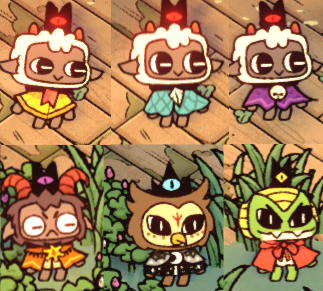
Fleece Transmog for all player skins
By pressing F7 (player 1), or F8 (player 2), you can swap between all possible visual fleeces on each of the player skins (lamb, goat, snake, owl) on the fly! You can swap visual fleeces anytime, anywhere.
Custom Player Spine
Add your own Player Spine into the game! Completely change the look of your lamb!

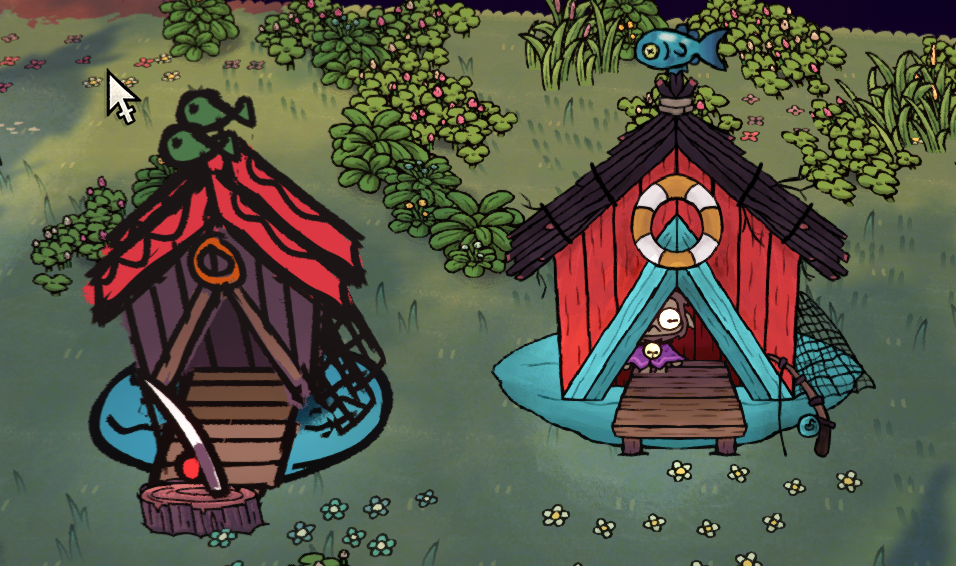
Override Existing Structure
Change the looks of any Structure! (right side is changed)
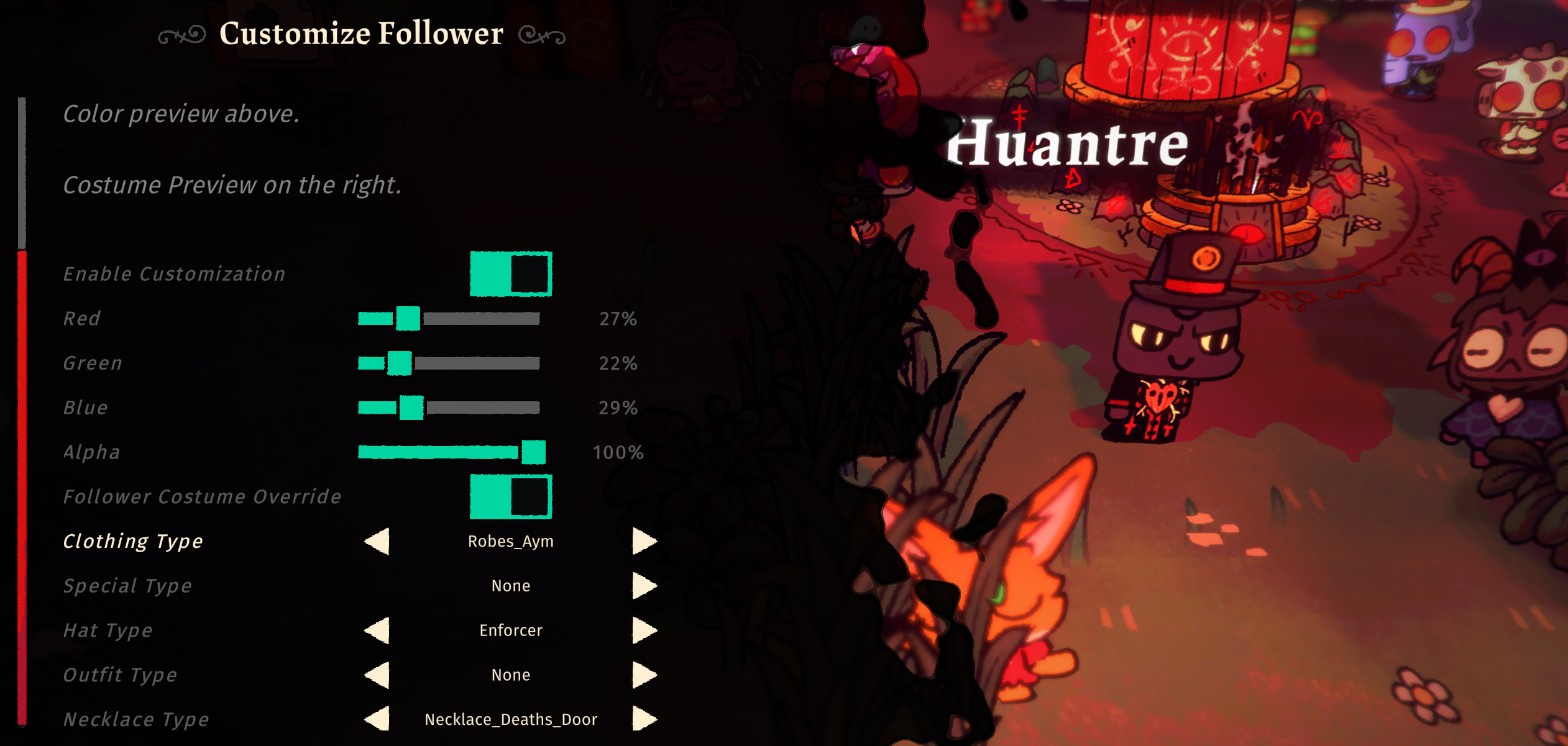
Full Follower Customization
Fully control each follower's looks and outfits! You can change their Color (R,G,B,A) and what they wear (outfit, hat, necklace). This will override whatever job outfit they have and always wear the custom look instead. You must toggle "Enable Customization" for Follower Costume Override to work as well.
Custom Data Loader
You can now create your own stuff to be added into the game without code!
Currently supports Custom Items, Food, Structures, Tarot Cards.
You may use the templates provided via NexusMods for creation of custom data. The templates are in JSON format and is easy to follow.
How to Load Player Skins
After installing this plugin correctly, you should be able to navigate to Bepinex > plugins > CotLSpineLoader > PlayerSkins folder and setup your custom spine skins there.
Base Player Template Skin
- If you want to build your own skins, you may get the Base Player Template Skin via NexusMods
Exporting a usable Spine Skin
- Ensure that you have exported the Spine Skin via
3.8.99 Spine - Export as a JSON file.
- Output:
Nonessential data: TRUE, Animation cleanup: TRUE, Warnings: TRUE - Texture atlas:
Pack TRUEwith default Pack Settings - If any warnings occur, it may be best to fix them, or the skin may not load into game.
Setting up the Player Spine Skin for Custom Spine Loader
- In the
PlayerSkinsfolder, create a new folder for each individual spine that you want to load into game - The folder should be named as your skin name, for this example, we will use
DEBUGSKINas the skin name - In the folder
PlayerSkins/DEBUGSKINadd the following files - A .json file that is your exported Spine Skeleton
- An .atlas file that is your exported Spine Atlas
- Any amount of .png files that are packed together with it
- A config.json file which specifies settings, more info below.
A Complete Skin folder would look something like this
| CultTweaker.dll
| PlayerSkins
    | DEBUGSKIN
        | player-main.json
        | player-main.png
        | player-main.atlas
        | config.json
Config File For Spine Skins
Each Spine Skin folder must have a config.json file in it. The following is how you should create the file:
{
    "defaultSkin": "CustomSkinName",
    "skins": [
        "CustomSkinName",
        "CustomSkinName2"
    ]
}
defaultSkin will be the first skin that is loaded when the game starts
skins is an array of any amount of strings of the Skins that exist in your Spine Skeleton that you want to load into game
How to override existing structure designs
Create a folder named after the structure you want to override in BuildingOverrides folder. Add images and a config.json file.
A Complete structure skin folder would look something like this
| CultTweaker.dll
| BuildingOverrides
    | FISHING_HUT
        | fishing_hut_BACK.png
        | fishing_hut_FRONT.png
        | config.json
Config file for Structure Overrides
Each Structure Override Skin folder must have a config.json file in it. The following is how you should create the file:
{
    "overrides": [
        {
            "spriteImageName": "fishing_hut_BACK.png",
            "offset": { "x": 0, "y": 0, "z": 0 },
            "scale": { "x": 1, "y": 1, "z": 1 },
            "rotation": { "x": 0, "y": 0, "z": 0 }
        },
        {
            "spriteImageName": "fishing_hut_FRONT.png",
            "offset": { "x": 0, "y": 0, "z": 0 },
            "scale": { "x": 1, "y": 1, "z": 1 },
            "rotation": { "x": 0, "y": 0, "z": 0 }
        },
    ]
}
Change your offset and rotation accordingly, so as to build your structure design.
Few things to note when building the custom structure design:
- when sprites are rendered at ROTATION 0,0,0 it will place the sprite flat against the ground.
- an OFFSET Z of at least -0.027 should be applied to flat sprites to remove z fighting, then to place other sprites above it, go more negative such as -0.04
- if the sprites should be facing the camera, a ROTATION of 300,0,0 is necessary
Known Issues
- The Custom Player Spines may not have the correct color when attacking with certain weapons.
Supporters
- Midboy
- Anorak2023
Contributors
- Thumbnail Art by LiteLikesArt
- Preview Skin by Fiore
- Preview Fishing Hut Structure by hallejr
Developed by InfernoDragon0
Try CotLMiniMods for lots of custom stuff, or Supercharged Tarots for overpowered tarots, and Supercharged Followers to bring your followers to battle!
CHANGELOG
Changelog
v1.1.1
- Added hide slot for follower skins to hide specific slots
- Removed test code for custom dungeons to prevent errors
v1.1.0
- Added Custom Dungeons
- Fixed an issue with Custom Structures not loading fully (use new custom structure template)
v1.0.7 / v1.0.8
- Added Scale setting (1x to 5x) to followers
- Player Spine loader now supports co-op separate spine loading
- Re-added Intro fleece to the fleece transmogs
- Player Spines now load in instantly instead of loading it when entering the base for the first time
- This allows the custom lamb skins to be used in Intro
v1.0.6
- Fixed an issue where fleece cycling did not include parts of certain fleeces
v1.0.5
- Fixed an issue where fleece cycling was going over array bounds
- Fixed an issue where fleece cycling caused a softlock
- Added Custom Player Spine Fleece Cycling support
- Added a toggle to turn on or off fleece cycling (F9)
- Added Custom Follower Form + Variant support
- Added a config to dump follower spine slots
v1.0.4
- Fixed an issue where red overlays are present on custom player spines
v1.0.3
- Fix an issue where Fleece Cycling did not override some extra parts of the fleece
- Full Follower Customization Support
v1.0.2
- Fix an issue where picking up weapons caused an error
v1.0.1
- Fleece Cycling for all player skins
v1.0.0
- Name Changed to CultTweaker
- Support for Woolhaven
- Custom Data Loader - create your own custom stuff!
- Custom Items
- Custom Food [WIP]
- Custom Structure
- Custom Tarot Cards
- More to be supported soon!
v0.0.5
- Add Structure Overrides
v0.0.3
- Add Custom Follower Color Control
v0.0.2
- Added Multi-skin support per Spine skeleton
v0.0.1
- Initial Release
