
You are viewing a potentially older version of this package.
View all versions.
CheatMenu
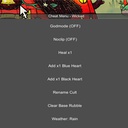
Provides a list of cheats/utilities in an easily accessible GUI
| Date uploaded | 3 years ago |
| Version | 1.0.0 |
| Download link | Wicked-CheatMenu-1.0.0.zip |
| Downloads | 258 |
| Dependency string | Wicked-CheatMenu-1.0.0 |
README
cheat-menu-cotl
Provides a list of cheats/utilities in an easily accessible GUI.
Features & Usage
Press the M key to activate the cheat menu and click on any of the buttons to enable/disable the specific cheats.md
To see what cheats/utilities the mod offers see below: Available Cheats
Installation
- Make sure you have BepInEx installed (Guide)
- Download the DLL the latest DLL from the releases tab
- Copy the DLL file to BepInEx/Plugins folder
- Important: Some COTL mods require that the BepInEx configuration has a diferent entrypoint. Download this file and place it in BepInEx/config
- Start the game and enjoy the mod!
Dependencies
Developer Dependencies
- Gaze
- Used for file watching to run the build when changes occur.
- dotnet-script
- Used to run the readme generator
- pdb2mdb
- Used to create visual studio debugging files
Developer Setup
- Ensure dotnet is in your
PATH - Install Gaze and put it in your
PATH - Download pdb2mdb and put it in the
toolsdirectory (even if you don't need the visual studio debugging symbols). - Set environment variable
CULT_OF_THE_LAMB_PATHto the root directory of the game - Run either
./build.bator./watch.batunder scripts
License / Credits
Feel free to look around the code and modify for personal use, if you want to release a version of your code please reach out to me first!
If you just want to add a specific 'Cheat' to the mode feel free to open a pull request or open an issue.
