

PersonalLogistics
Manage inventory by requesting items from logistics stations as well as recycling items by sending them to logistics stations. Can also send littered items to logistics network. Now with updated UI
| Date uploaded | 4 years ago |
| Version | 2.3.0 |
| Download link | Semar-PersonalLogistics-2.3.0.zip |
| Downloads | 589 |
| Dependency string | Semar-PersonalLogistics-2.3.0 |
This mod requires the following mods to function

xiaoye97-LDBTool
Library that allows mods to add and edit Proto data. Also allows you to see Proto data, config ID's of mod Protos and change localized strings
Preferred version: 2.0.1

CommonAPI-CommonAPI
A modding library for Dyson Sphere Program. Currently is under development.
Preferred version: 1.3.0
CommonAPI-DSPModSave
Library that allows to store mod save data separately from vanilla saves
Preferred version: 1.1.3
nebula-NebulaMultiplayerModApi
API for other mods to work with the Nebula Multiplayer Mod. (Does NOT require Nebula)
Preferred version: 1.1.2README
Personal Logistics
Summary
This mod is an inventory management system backed by your logistics network. Features:
- Set auto-request amounts for items. For example, always keep 4 stacks of conveyor belts in your inventory
- Set auto-recycle limits for items (can be 0) to automatically send extras of those items the logistics stations
- Send littered items to your logistics stations instead of holding 'Z' and running around like a crazy person
- Add fuel from your inventory to the Mecha automatically. Combine this with an auto-request of your preferred fuel to keep the Mecha running at full power
- Keep the Mecha's warper supply topped off from your inventory
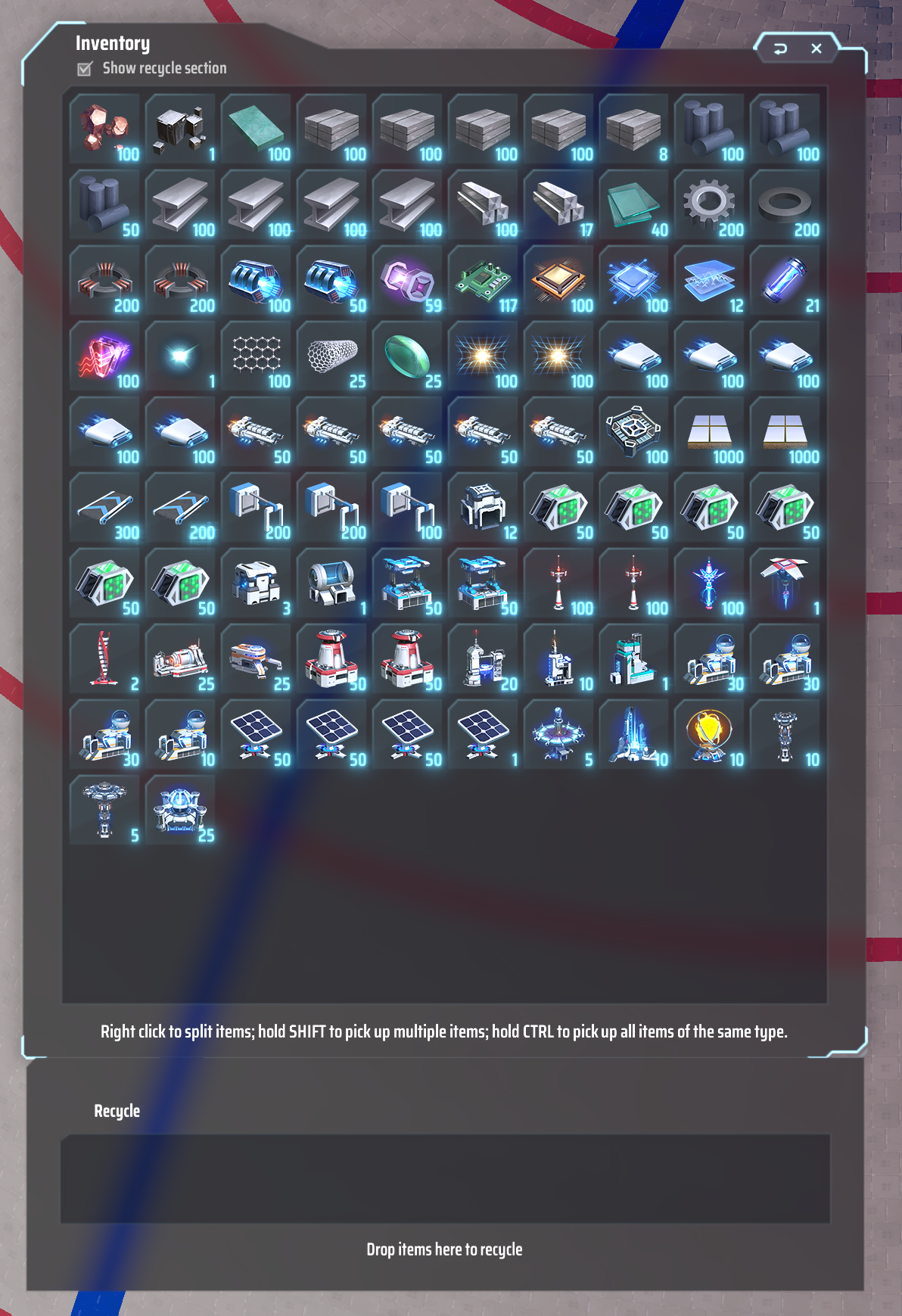
- Adds a Recycle area to the inventory window where you can drop items you don't want
Open the request management window using this button
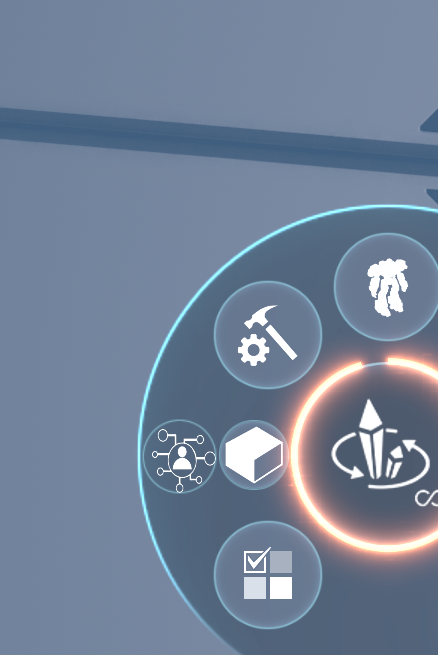
Manual recycling
Recycle items from inventory by dropping them into the Recycle window. To disable, set the ShowRecycleWindow config property to false. Items added here will first go the local
Buffer (details below) and then will be sent to the nearest Logistics Station with capacity. Of course, if you try and recycle an item you're currently requesting, it's just going
to come back to your inventory.
Note that items that have no Logistics Stations will not be removed from Recycle area
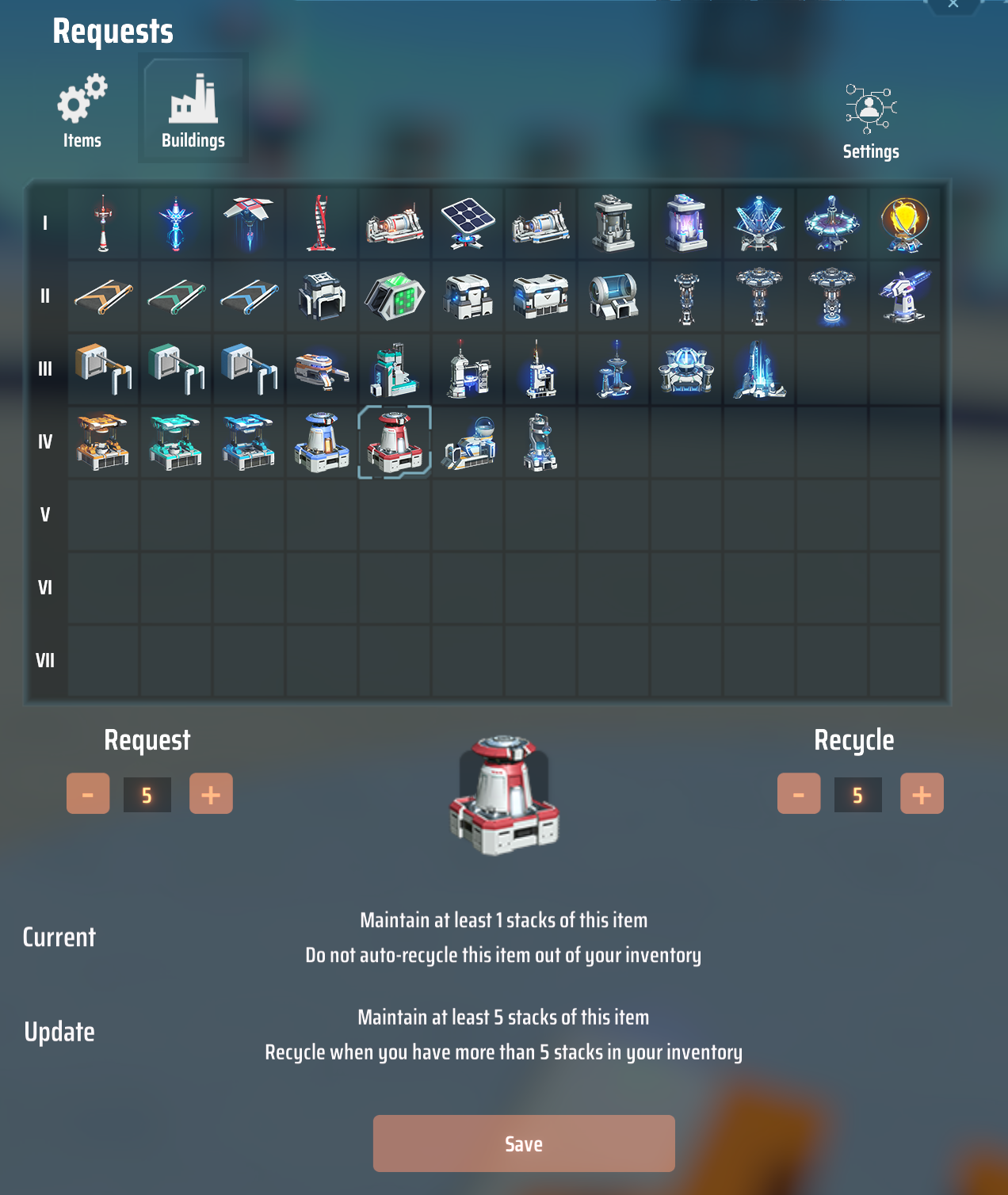
Requests window
Configure mod to always keep 5 stacks of Plane smelters in inventory and also to send extra Plane smelters to logistics stations (when you have more than 5 stacks)
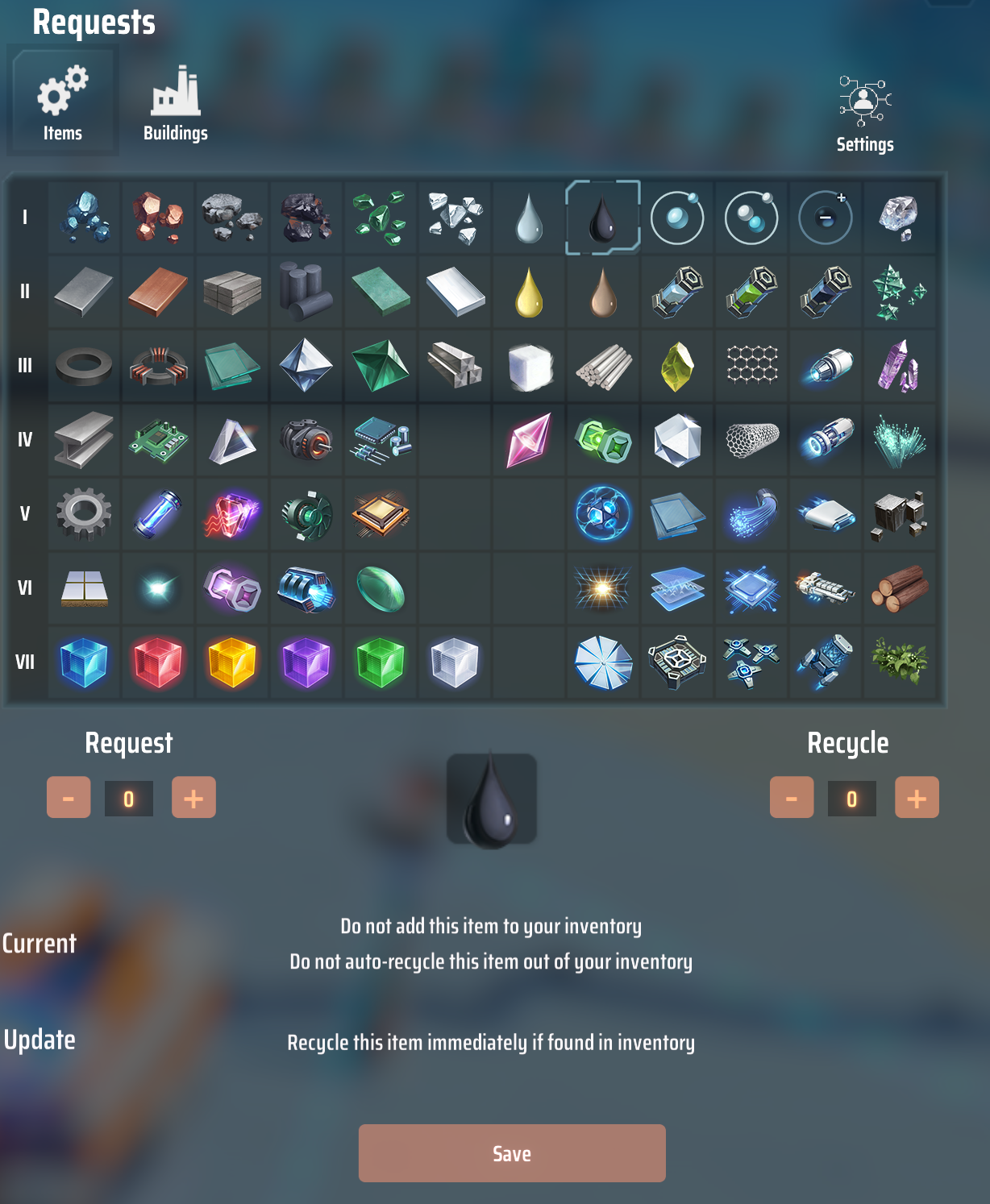
Keep that crude oil out of inventory completely.
Trash can be sent to logistics network also (disable using SendLitterToLogisticsNetwork config property)
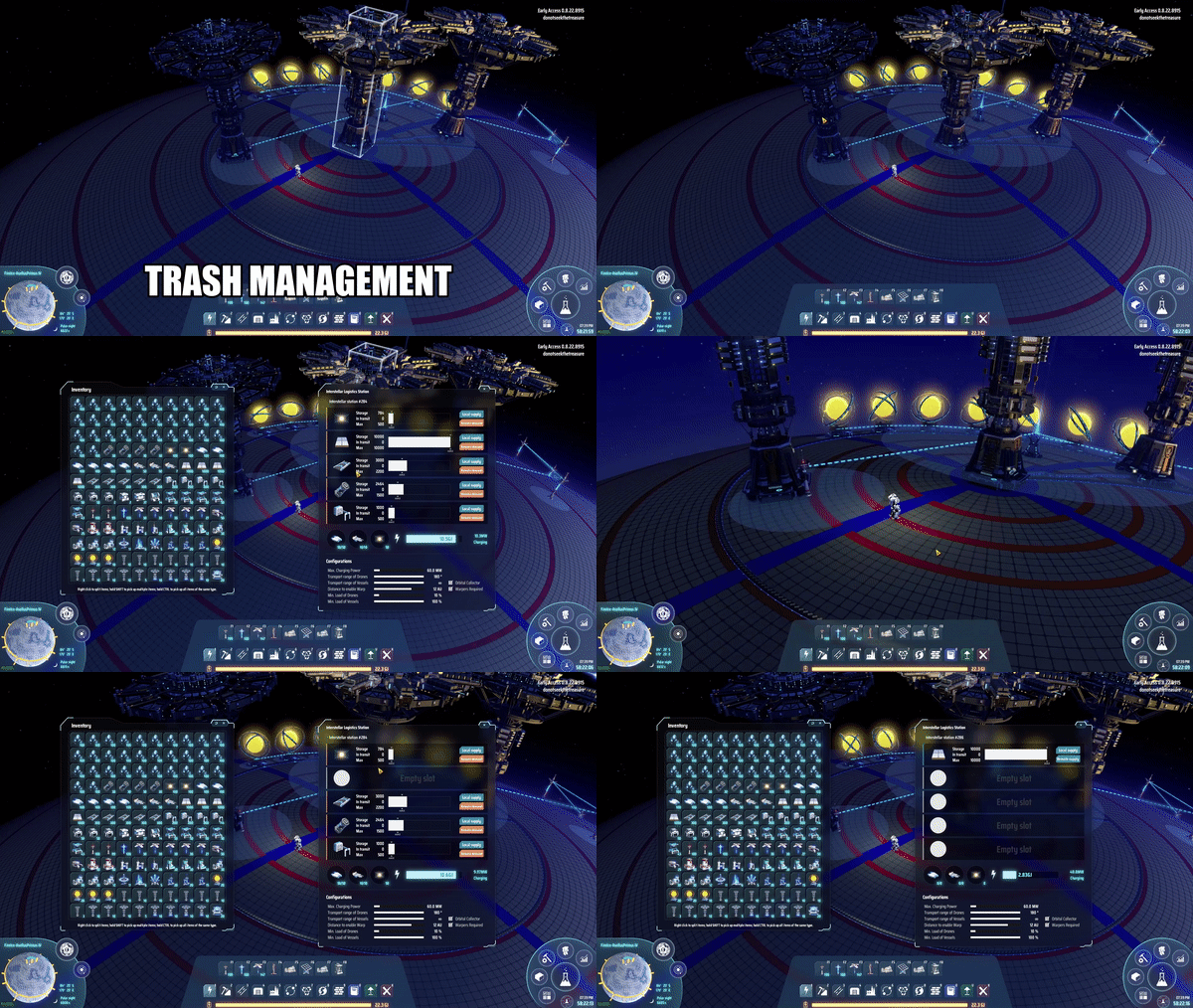
(New in 2.3.0)
Numerical indicators on item icons in Requests window let you quickly see what is currently requested/banned.
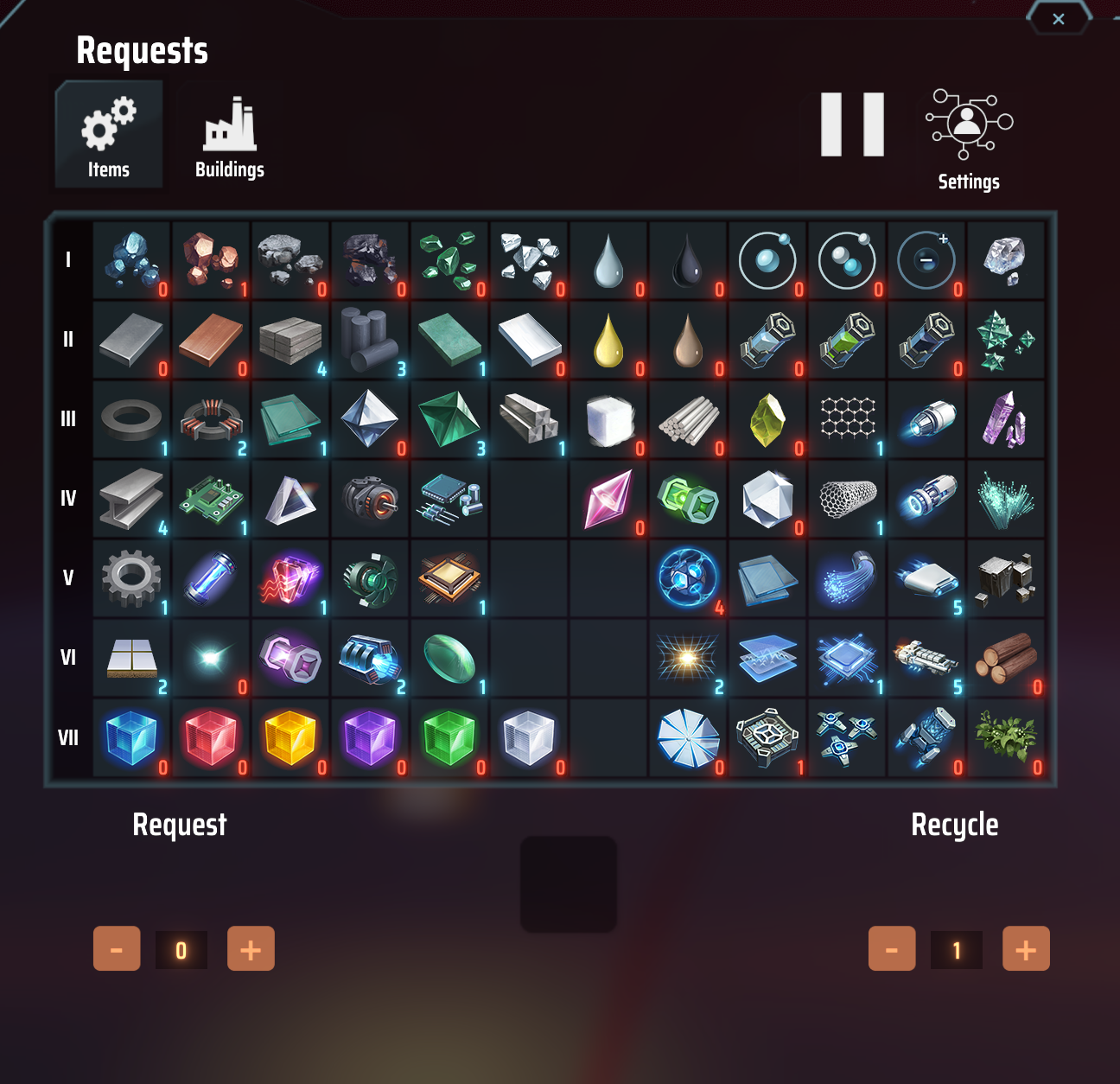
Numerical indicator FAQ
Q: I hate these new indicators, they look terrible
A: That's not really a question, but you can disable them by opening the legacy UI, going to Config section and
 disabling 'showAmountsInRequestWindow'. Or edit the config the old-fashioned way

Q: What does the red '0' next to iron ore mean?
A: That item is banned, not allowed to be in your inventory. It will be immediately auto-recycled

Q: Ok, so why does copper ore have a red '1' next to it?
A: That item is not being auto-requested, AND anything more than 1 stack of it in your inventory it will be auto-recyled

Q. In the example above why doesn't titanium glass have a number next to it?
A. That item is not managed by the Personal Logistics System, it's ignored

Q. All right, what about regular glass, does the blue '1' next to it mean that 1 stack of that item is kept in inventory?
 How do I know what the max allowed for that item is?
A. Yes, 1 stack will be kept in your inventory, but there's only so much info you can convey with an overview UI like this.
 To see the auto-recycle amount you have to click the item for more details

Q. These questions are dumb
A. Check the contact info at the end of this readme and send in smarter ones?
Details
Usage
This mod does not alter save games in any way, and as of the latest release available on 2021-Dec-02 does not trigger the game's abnormality checks so should not affect achievements or milestones. Its intent is to improve QOL and a good deal of effort has been taken to respect the game's built-in costs for item transportation. Logistics vessel speed is the limiting factor on item delivery (as well as warper availability) so leveling up vessel speed should provide noticeable increases in transportation time
Buffer
Requested items are loaded into a local buffer which requests 1 logistic vessel capacity worth at a time. This is done to save on warpers & energy needed by vessels for transporting items. It also allows for faster loading when laying down blueprints.
The buffer is persisted locally next to your game save (using DSPModSave) so that your items won't get lost if you load up a different save.
To clear your local buffer of an item type, you can set that item to be neither requested nor banned (Request 0, Recycle Inf). The buffer won't be cleared immediately, so if you are uninstalling the mod,
make sure to look at the Buffered items window (click Buffered button in the config window) to make sure everything is returned to either your inventory or to logistics stations.
Litter
By default, littered items will be sent to the closest logistics station with capacity to hold them. This can be disabled using the SendLitterToLogisticsNetwork config property. Litter, like banned items are first sent to the local buffer where they will be automatically sent to stations (provided the item type is not currently requested).
Littered items are not completely intercepted to avoid affecting the game's responsiveness. Instead, when littered items are detected a task is created that gets processed later. That task will only cleanup litter that is less than 1km away from the player, (so basically on the local planet). Because of this, some litter may be missed.
Mecha
In some cases, warpers and energy from the Mecha will be used. This happens when the nearby source for an item is a station with low energy or no warpers. When this happens a UI message will be shown.
Add Fuel to Mecha Fuel Chamber
The plugin can be configured to automatically keep your Mecha's fuel chamber filled. This must be enabled in the Config section (Add fuel to mecha fuel chamber). Which items are used are decided in the using these priorities (highest priority first)
- Item is currently being burned by Mecha and either an empty slot is available or a partially filled slot for that item type exists (top priority)
- Item is in one of the slots, but stack is not full. Note that empty slots will be filled with this item, if available
- Item is requested from logistics network and empty slot exists for it
- Item is fuel - any available fuel in inventory will be used to fill Mecha, starting with the fuel with the highest energy
Add Warpers To Mecha
Similar to adding fuel, the mecha's supply of warpers can be kept topped-off using this setting in the Config section of UI. This will only be done automatically if the logistics network has warpers available and the requested minimum for warpers is at least 1 (can't be banned or unset).
Build Preview Navigation (removed)
This functionality has been moved to a separate plugin, LongArm. See FlyToBuild under the Build Helper Modes section
Request Modes
The Station Request Mode config option can be used to change which stations will be used for supplying your mecha's inventory. The different modes are
All- Takes items from any station that has it, regardless of supply or demand. Closest stations have highest priorityAnySupply- Takes items from any station with item set to, "Supply" (PLS) or "Remote Supply", "Local Supply" (ILS)IlsDemandRules(default) - Follows the same rules as a nearby ILS with Remote Demand/Local Demand set. Will not take from PLS on other planetsIlsDemandWithPls- (Deprecated) acts mostly the same asAnySupply
Note that pre-2.2.1 All was the default. The change to the default value only affects new users since it is stored
as a config property which does change unless you delete the config file
Translations
Some work has been done to support localization. Sadly the only translations right now come either from the game (by re-using labels that the game uses) or from Google Translate. This is very much a WIP so please send along any recommendations for better translations. At the moment, the only languages supported by the game are EN, CN & FR.
How to install
This mod requires BepInEx to function, download and install it first: link
Manually
First install the CommonAPI mod. Next install
the DSPModSave mod. Next, extract the archive file and drag PersonalLogistics.dll and pui into
the BepInEx/plugins directory.
Mod manager
Click the Install with Mod Manager link above. Make sure dependencies are installed, when prompted
Changelog
v2.3.0
Feature: added numerical indicators to Requests window icons to make it easier to tell what is requested/banned at a glance
v2.2.1
Bugfix: fixed issue where item icons would not appear in the recycle area (Thanks Speedy on Discord for report)
v2.2.1
Bugfix: fixed a longstanding issue where the nearest station would be used to compute costs even if most of the items are actually coming from other, more distant stations. Now the station that supplies the most items in the shipment is used for computing the cost. (Thanks Speedy on discord for bug report) Tweak: adjusted incoming item text to be a little easier to read against light colored backgrounds
v2.2.0
Feature: added play/pause button to request window Refactor: overhauled state persistence to a more robust approach
v2.1.1
Bugfix: fixed issue with loading save where actions for items in recycle area were persisted
v2.1.0
Feature: switched desired inventory state to be persisted with game save, removed support for copying state from another seed. Added persistence for recycle window contents
v2.0.4
Feature: Added popup confirmation before the first time trashed items are recycled automatically.
v2.0.3
Features:
- Added tip for +/- buttons to indicate shift/control for 5 or max
- Added configurable minimum delay for recycle area. Gives more time to get items back if they were accidentally added
v2.0.2
Bugfix: handled destruction of logistics station while items are being removed from it Bugfix: fixed issue where recycled item icons were not appearing (blank white square)
v2.0.1
Bugfix: resolved issue where request window would not open until after inventory was first opened.
v2.0.0
- Overhauled UI for configuring requested items. Updated tooltips to refer to the number of stacks requested/auto-recycled instead of counts. Legacy request config window is left in place for now, in case of bugs. It can be accessed by clicking the Settings button in the Request Window
Contact
Bugs? Contact me on discord: mattersnot#1983 or create an issue in the github repository.
Icon credit, B.E. Cimino
