
| Date uploaded | 5 years ago |
| Version | 1.0.0 |
| Download link | appuns-DSPItemIdentifier-1.0.0.zip |
| Downloads | 311 |
| Dependency string | appuns-DSPItemIdentifier-1.0.0 |
README
ItemIdentifier
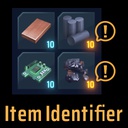
easy to identify the type of item. Fuel or Liquid or Buildable item. アイテムの種類を簡単に判別できます。燃料、液体、建築可能アイテム
Features 特徴
The number of items of the specified type turns yellow. This works with player's inventory and storage and mecha fuel chanber. Press F4 key to select the type : Fuel(default) => Liquid => Buildable item => Nothing => Fuel You can change the key in the config file. Default Value : F4 After first time you launch the game with this mod, the config file will be generated. steamapps/common/Dyson Sphere Program/config/Appun.DSP.plugin.ItemIdentifier.cfg
指定された種類のアイテムの個数が黄色で表示されます。(通常はは水色) これは、インベントリとストレージと燃焼室に適応されます。 F4キーを押して、対象のタイプを選択することができます。 燃料→液体→建築可能アイテム→なし→燃料 コンフィグファイルでキーを変更することができます。 steamapps/common/Dyson Sphere Program/config/Appun.DSP.plugin.ItemIdentifier.cfg
How to install インストール方法
-
Install BepInEx
-
Drag DSPItemIdentifier.dll into steamapps/common/Dyson Sphere Program/BepInEx/plugins or /plugins/DSPItemIdentifier
-
BepInExをインストールします。
-
DSPItemIdentifier.dllをsteamapps/common/Dyson Sphere Program/BepInEx/pluginsか/plugins/DSPItemIdentifierに配置します。
Change Log
1.0.1 released リリースしました。
