
This package has been marked as deprecated, and it's suggested another
alternative is used.
You are viewing a potentially older version of this package.
View all versions.

BetterStats
Add more information to the production stats panel
| Date uploaded | 5 years ago |
| Version | 1.3.0 |
| Download link | brokenmass-BetterStats-1.3.0.zip |
| Downloads | 5169 |
| Dependency string | brokenmass-BetterStats-1.3.0 |
This mod requires the following mods to function

README
BetterStats
This mod improves the production stats panel to add the count of producer/consumer and the maximum theoretical production/consumption (i.e.: the maximum you can produce if you have no power issue or input/output bottleneck), taking into account mining productivity multipliers.
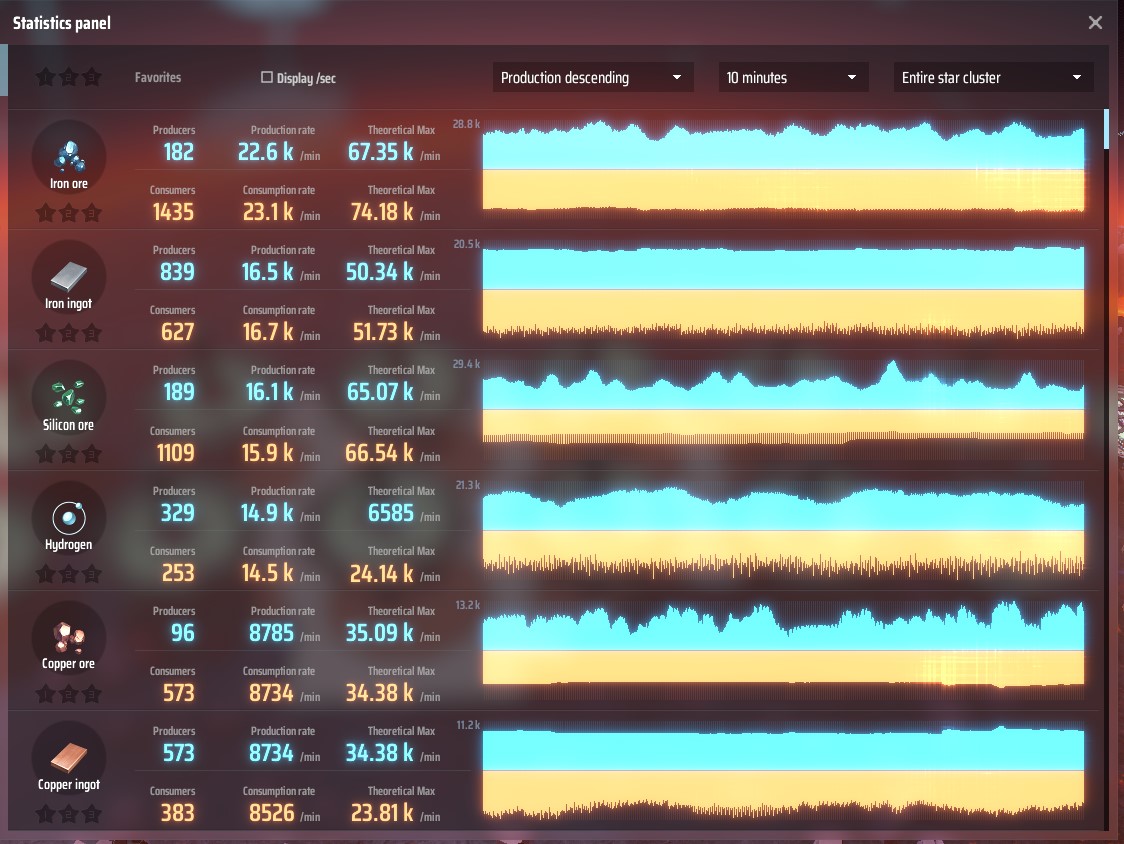
Configuration
After a first launch you will find the configuration file BepInEx\config\com.brokenmass.plugin.DSP.BetterStats.cfg.
You can customise the production ratios that govern text highlighting (red for lack of production ; yellow when max consumption is way above max production)
Changelog
v1.3.0
- FEAT: Highlights in red items where production is insufficient (Thanks ThomasBlt)
- FIX: fix error if the game 'language' uses
.as decimal separator instead of,(thanks ThomasBlt)
v1.2.1
- FIX: Fix compatibility with game version 0.7.18.7275 (thanks burdoto / wmtorode / ThomasBlt)
v1.2.0
- FEAT: allow to filter stats by item name
- FEAT: Count critical photon production (thanks zhangxp1998)
v1.1.2
- FIX: Fix fractionators incorrectly reporting production as consumption
- FIX: Limit miners production to max output possible (30item/s max belt speed) (thanks zhangxp1998)
v1.1.1
- FEAT: Include production of Orbital Collector stations
v1.1.0
- FEAT: Improved UI
- FEAT: Allows to display stats per seconds instead of per minute (thanks wingless)
- FEAT: Shows number of producer and consumers
v1.0.0
- Initial Release
To build this mod
Inspired by https://docs.bepinex.dev/master/articles/dev_guide/plugin_tutorial/1_setup.html
Setup visual studio
- Install Visual Studio (not visual studio code)
- In Visual Studio, create a new blank project and there choose "add more tools" and add .Net developpement support
- Install .Net Framework 3.5 (be careful to choose "Framework")
project setup
- In Visual Studio, choose import and then select "BetterStats.csproj"
- In the right tree, right click references and then select "add references" and add the requered references (most of them located in C:\Program Files (x86)\Steam\steamapps\common\Dyson Sphere Program\DSPGAME_Data\Managed ; others are from BepinEx)
- You will find the last DLL "Assembly-CSharp.refstub.dll" in https://discord.com/channels/806549677209944084/806556447885623336/809241758323572766
Icon made by Freepik from www.flaticon.com
