

MinerVeinCoverage
Shows the maximum miner extraction speed in the Miner UI.
| Date uploaded | 4 years ago |
| Version | 1.2.0 |
| Download link | enriquein-MinerVeinCoverage-1.2.0.zip |
| Downloads | 319 |
| Dependency string | enriquein-MinerVeinCoverage-1.2.0 |
README
MinerVeinCoverage
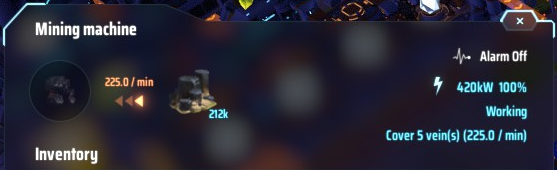
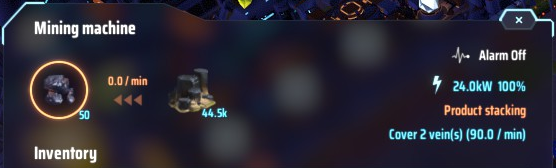
Dyson Sphere Program mod that adds the maximum mining speed in the Miner UI. It will add the text "(X / min)" (where X is the maximum extraction rate for this miner) at the end of the "Cover X vein(s)" text. See screenshots for a much better visual explanation.
The value takes into account all of your vein upgrades and also works when the miner is idle or even unpowered.
Screenshots
Under normal operation (with 5 vein upgrades)
Idle miner because of full belt (with 5 vein upgrades as well)
Installation
The easiest way to install the mod is to use the r2modman mod manager. If you havent installed it yet, you can get it from here). Then after you create your profile for Dyson Sphere Program, search for MinerVeinCoverage, select it and download it.
If prompted to download with dependencies, select Yes.
Remember to launch the game using the "Start modded" option in r2modman's sidebar, otherwise it will not be able to load the mods.
Manual installation
I have always used r2modman to mod games made with Unity, so the following manual instructions are based on what I've seen from other mods, so your mileage may vary. If you are doing manual installs, I assume you know what to do with this. Feel free to drop me a note or send a pull request with a fix to these instructions if I'm wrong.
- Download the mod's zip file from the mod's GitHub repo's releases tab.
- Install BepInEx from here
- Install LDBTool from here
- Create folder named
MinerVeinCoverageinDyson Sphere Program/BepInEx/plugins - Copy
MinerVeinCoverage.dllfrom the mod's zip file intoDyson Sphere Program/BepInEx/plugins/MinerVeinCoverage/.
Hopefully that should work.
Contact, feedback, comments, suggestions, bug reports
Please open an issue in the mod's GitHub repository.
