
You are viewing a potentially older version of this package.
View all versions.

DashboardOverhaul
A series of enhancements for the in-game Dashboard / 为游戏内仪表盘提供一系列优化
| Date uploaded | 2 days ago |
| Version | 1.2.0 |
| Download link | fyyy-DashboardOverhaul-1.2.0.zip |
| Downloads | 46 |
| Dependency string | fyyy-DashboardOverhaul-1.2.0 |
This mod requires the following mods to function

README
DashboardOverhaul
为游戏内仪表盘提供一系列优化与改进。零额外依赖、不改存档格式、始终生效。 A series of enhancements for the in-game Dashboard. No extra mod dependencies (BepInEx only), no save-format change, always on.
功能 / Features
- 顶部标签栏,最多 9 个页面 / Top tab bar, up to 9 pages
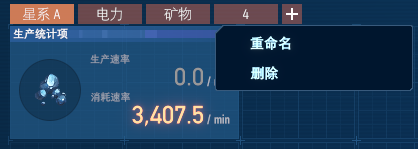
- 切换 / 新建 / 删除 / 重命名 页面 / Switch · add · delete · rename pages
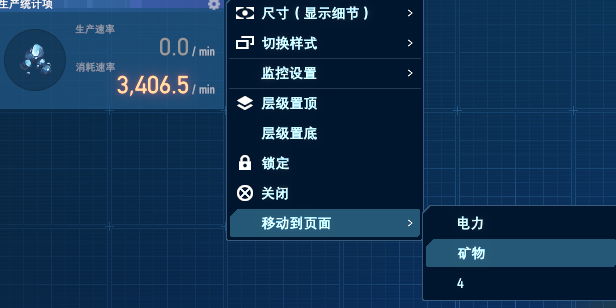
- 把单个图表移动到其它页面 / Move an individual chart to another page
- 页面与页名随存档保存 / Pages & names persist in your save
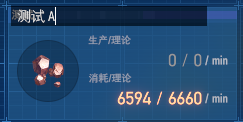
- 重命名 / 删除 单个图表的统计项(图表右键菜单,或双击标题重命名)/ Rename · delete a chart's statistic (chart right-click menu, or double-click the title to rename)
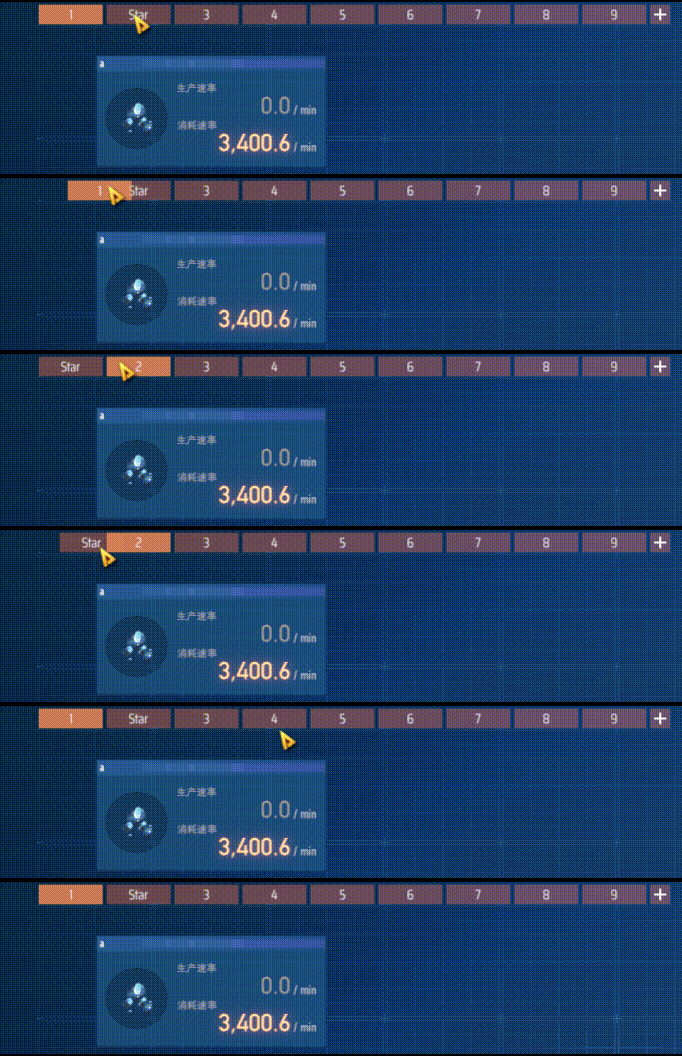
- 拖动页面标签重新排序 / Drag page tabs to reorder pages
使用 / How to use
- 像往常一样打开仪表盘,标签栏出现在顶部 / Open the Dashboard as usual — the tab bar is at the top
- 切换页面:点击标签 / Switch: click a tab
- 新建页面:点击
+/ Add: click+ - 重命名:双击标签,或 右键标签 → 重命名 / Rename: double-click a tab, or right-click → Rename
- 删除页面:右键标签 → 删除(有图表会先确认;至少保留一页)/ Delete: right-click a tab → Delete (confirms if it has charts; one page must remain)
- 重新排序页面:左右拖动标签(未命名页面的序号会随位置更新)/ Reorder pages: drag a tab left or right (an unnamed page's number follows its position)
- 移动图表:右键任意图表 → 移动到页面 → 选目标页 / Move a chart: right-click a chart → Move to page → pick a page
- 重命名图表:右键图表 → 重命名,或双击图表标题 / Rename a chart: right-click → Rename, or double-click the chart title
- 删除统计项:右键图表 → 删除统计项(会移除该统计项在所有页面的图表,有确认)/ Delete statistic: right-click → Delete statistic (removes that statistic's charts on every page; confirms first)
截图 / Screenshots
页面标签 + 右键菜单 / Page tabs + context menu:
拖动标签重新排序页面 / Drag a tab to reorder pages:
把图表移动到其它页面 / Move a chart to another page:
在图表上直接重命名统计项(双击标题或右键 → 重命名)/ Rename a chart's statistic in place (double-click the title, or right-click → Rename):
CHANGELOG
Changelog / 更新日志
All notable changes to DashboardOverhaul are documented here. 本文件记录 DashboardOverhaul 的版本变更。
[1.2.0] - 2026-06-22
页面重新排序 / Page reordering.
新增 / Added
- 拖动页面标签即可重新排序,其它标签实时让位;新顺序随存档保存 / Drag a page tab to reorder pages — the other tabs slide aside in real time; the new order persists in your save
- 未命名页面在标签上显示其位置序号,重排后自动更新(新建页面默认无名)/ An unnamed page shows its position number on the tab and updates after a reorder (new pages start unnamed)
[1.1.0] - 2026-06-22
图表统计项管理 / Chart statistic management.
新增 / Added
- 重命名单个图表的统计项,从图表右键菜单或双击标题 / Rename a chart's statistic from the chart right-click menu or by double-clicking its title
- 删除统计项,从图表右键菜单(会移除该统计项在所有页面的图表,有确认)/ Delete a statistic from the chart menu (removes that statistic's charts on all pages; confirms first)
[1.0.0] - 2026-06-21
首个发布版 / Initial release.
新增 / Added
- 顶部标签栏,最多 9 个仪表盘页面 / Top tab bar, up to 9 Dashboard pages
- 切换 / 新建 / 删除 / 重命名 页面 / Switch · add · delete · rename pages
- 把单个图表移动到其它页面(图表右键菜单 → 移动到页面)/ Move an individual chart to another page (chart right-click → Move to page)
- 标签栏随侧边栏滑动避让 / Tab bar slides clear of the sidebar
- 中英双语;无额外依赖;不改存档格式;始终生效 / Bilingual (EN / 中文); no extra mod dependencies (BepInEx only); no save-format change; always on
