

DashboardOverhaul
A series of enhancements for the in-game Dashboard / 为游戏内仪表盘提供一系列优化
| Date uploaded | 5 days ago |
| Version | 1.3.0 |
| Download link | fyyy-DashboardOverhaul-1.3.0.zip |
| Downloads | 106 |
| Dependency string | fyyy-DashboardOverhaul-1.3.0 |
This mod requires the following mods to function

README
DashboardOverhaul
为游戏内仪表盘提供最多 9 个可切换页面。页面、页名及顺序随存档保存。 Adds up to nine switchable Dashboard pages. Pages, names and order persist in the save.
使用 / How to use
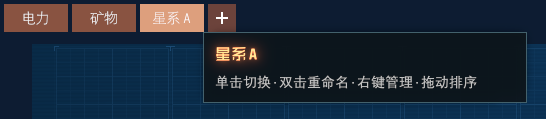
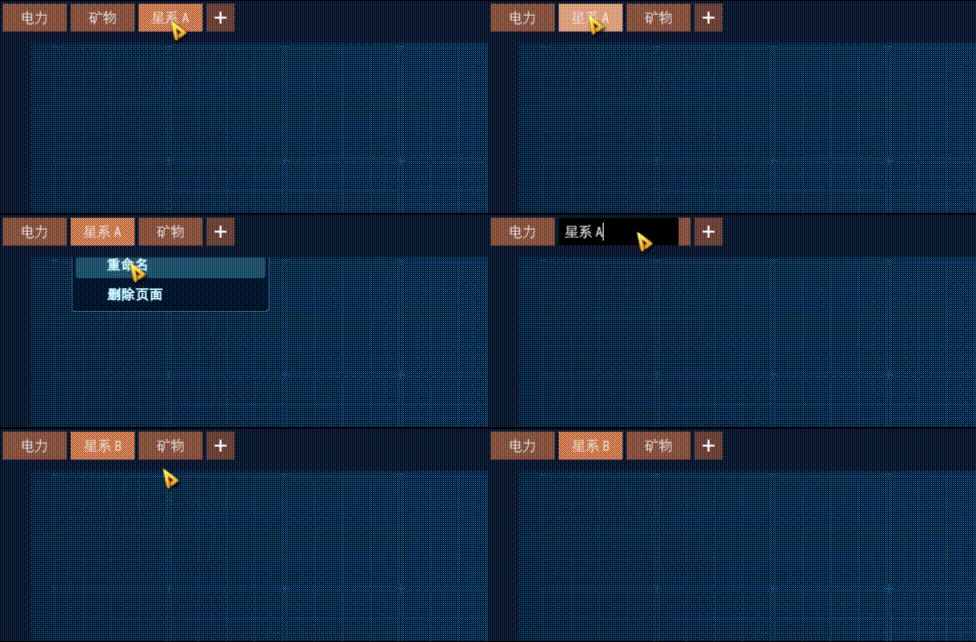
- 页面:单击顶部页签切换;双击页签或从右键菜单重命名;拖动页签排序。悬停可查看完整页名和操作提示。/ Pages: click a top tab to switch, double-click or choose Rename from its right-click menu, and drag to reorder. Hover for the full page name and controls.
- 新建页面:点击
+在末尾添加空白页;达到 9 页上限时按钮禁用并显示原因。/ Add a page: click+to append an empty page. At the nine-page limit, the button is disabled with an explanation. - 删除页面:右键页签选择“删除页面”。有图表时确认框显示页名及图表数量;统计项仍保留在侧栏。最后一页不能删除。/ Delete a page: choose Delete page from its right-click menu. If it has charts, a confirmation shows the page name and chart count; statistics remain in the sidebar. The last page cannot be deleted.
- 侧栏:使用游戏原生箭头开合侧栏。侧栏覆盖图表,图表、背景和网格保持原位;页签位于图表及侧栏菜单上方。/ Sidebar: use the game's native arrow to toggle it. The sidebar overlays charts while the charts, background and grid stay in place; tabs remain above charts and sidebar menus.
- 空白页:没有统计项时可打开统计窗口;已有统计项时可打开侧栏添加图表。有其他非空页面时,可复制其布局和显示设置;复制的图表与原页共用统计项。/ Empty pages: open the statistics window if no statistics exist, or open the sidebar to add charts from existing statistics. If another page has charts, copy its layout and display settings; the copied charts share their statistics with the source.
- 移动图表:右键图表选择“移动到页面”和目标页;完成后的“前往”可切页并高亮该图表。目标页没有空位时,图表留在原页。/ Move a chart: choose Move to page and a destination from the chart menu. The resulting Go to page action switches pages and highlights the chart. If there is no room, the chart stays on its original page.
- 重命名统计项:右键图表选择“重命名统计项”,或双击图表标题;菜单或提示显示关联图表数量。该统计项的图表标题、提示及侧栏名称同步更新。/ Rename a statistic: choose Rename statistic from the chart menu or double-click its title. The menu or notice shows the affected chart count; chart titles, tooltips and the sidebar name update together.
- 移除图表或删除统计项:图表菜单中的“移除此图表”只移除当前图表;“删除统计项及其全部图表”会确认名称和影响数量,并移除其他页面、监控视图中的关联图表及侧栏统计项。/ Remove a chart or delete a statistic: Remove this chart affects only the current chart. Delete statistic and all its charts confirms the name and affected count, then removes associated charts on other pages and in watch views, along with the sidebar statistic.
- 编辑名称:Enter 提交,Esc 取消;失焦或切页提交,关闭仪表盘或回收目标图表时取消未完成的编辑。/ Edit names: Enter commits and Esc cancels. Losing focus or switching pages commits; closing the dashboard or recycling the target chart cancels unfinished edits.
界面与操作演示 / Screenshots & demos
空白页 / Empty page

页面管理 / Page management
悬停页签可查看完整页名和操作提示。 Hover over a tab for its full name and controls.
拖动页签调整顺序,再从右键菜单重命名。 Drag a tab to reorder the pages, then rename it from the right-click menu.
图表操作 / Chart actions
从空白页打开统计窗口、添加图表并移至另一页;移动提示可前往目标页。演示末尾显示删除统计项的确认。 Open statistics from an empty page, add a chart and move it to another page. The move notice offers navigation to the destination; the demo ends with a statistic-deletion confirmation.

CHANGELOG
Changelog / 更新日志
All notable changes to DashboardOverhaul are documented here. 本文件记录 DashboardOverhaul 的版本变更。
[1.3.0] - 2026-09-22
- 顶部页签改为独立顶栏,按窗口宽度调整,并提供更大的点击区域、悬停/焦点状态和完整页名提示。/ The top tabs now use a separate responsive header with larger hit areas, hover/focus states and full-name tooltips.
- 侧栏打开时覆盖固定位置的图表、背景和网格,不再推动它们。/ The sidebar now overlays charts, background and grid without shifting them.
- 新页追加到末尾;达到 9 页上限或仅剩一页时禁用相应操作并提示原因。/ New pages append at the end; actions disabled at the nine-page limit or on the last page explain why.
- 删除含图表的页面时,确认框显示页名、图表数量,以及统计项仍保留在侧栏。/ Deleting a page with charts shows its name, chart count and retained sidebar statistics in the confirmation.
- 图表菜单明确区分“移除此图表”和“删除统计项及其全部图表”;重命名与删除统计项时显示关联图表数量,并同步名称提示。/ The chart menu distinguishes removing one chart from deleting a statistic and all its charts; rename and delete show the affected count, and name tooltips update.
- 移动图表后可前往目标页并高亮图表;目标页无空位时原图表保持不变。/ After moving a chart, the notice can open its destination and highlight it; a full destination leaves the original chart unchanged.
- 空白页新增打开统计窗口、打开侧栏及复制其他非空页面的入口;复制布局和显示设置,统计项仍共享。/ Empty pages now offer shortcuts to statistics, the sidebar and copying a populated page; copies share statistics but keep independent display settings.
- 名称编辑新增 Esc 取消与切页前提交;图表回收时取消未提交的统计项名称编辑。/ Name editing now cancels on Esc and commits before a page switch; recycling a chart cancels its pending statistic rename.
[1.2.0] - 2026-06-22
页面重新排序 / Page reordering.
新增 / Added
- 拖动页面标签即可重新排序,其它标签实时让位;新顺序随存档保存 / Drag a page tab to reorder pages — the other tabs slide aside in real time; the new order persists in your save
- 未命名页面在标签上显示其位置序号,重排后自动更新(新建页面默认无名)/ An unnamed page shows its position number on the tab and updates after a reorder (new pages start unnamed)
[1.1.0] - 2026-06-22
图表统计项管理 / Chart statistic management.
新增 / Added
- 重命名单个图表的统计项,从图表右键菜单或双击标题 / Rename a chart's statistic from the chart right-click menu or by double-clicking its title
- 删除统计项,从图表右键菜单(会移除该统计项在所有页面的图表,有确认)/ Delete a statistic from the chart menu (removes that statistic's charts on all pages; confirms first)
[1.0.0] - 2026-06-21
首个发布版 / Initial release.
新增 / Added
- 顶部标签栏,最多 9 个仪表盘页面 / Top tab bar, up to 9 Dashboard pages
- 切换 / 新建 / 删除 / 重命名 页面 / Switch · add · delete · rename pages
- 把单个图表移动到其它页面(图表右键菜单 → 移动到页面)/ Move an individual chart to another page (chart right-click → Move to page)
- 标签栏随侧边栏滑动避让 / Tab bar slides clear of the sidebar
- 中英双语;无额外依赖;不改存档格式;始终生效 / Bilingual (EN / 中文); no extra mod dependencies (BepInEx only); no save-format change; always on
