
| Date uploaded | 4 years ago |
| Version | 0.3.6 |
| Download link | hetima-LSTM-0.3.6.zip |
| Downloads | 734 |
| Dependency string | hetima-LSTM-0.3.6 |
README
LSTM - Logistics Station Traffic Manager
Mod for Dyson Sphere Program. Needs BepInEx.
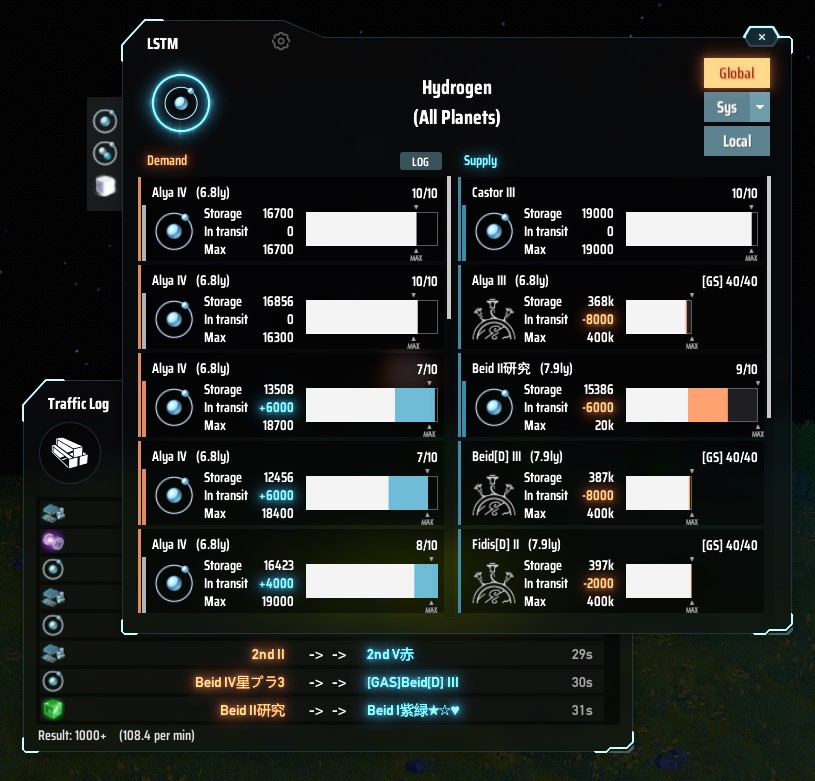
Lists the supply and demand balance of the Logistics Station by item and by planet.
-
Show overall status for each item
-
Show the status of all stations on specific planet
-
Improve transport behavior
-
Display the target planet in the starmap (Universe Exploration lv4 is required)
-
Display navigation of the target station location
-
Open station window directly (right-click locate button)(only current local planet) (New in 0.3.6)
How to open a window
- from keyboard shortcut (default is LCtrl+T)
- from button added on station window
- from button added on planet detail panel on the starmap
- from button added on production list on the statistics panel (default is off)
When opening with the keyboard shortcut, if the item information is found under the mouse pointer, it is used as a item filter (e.g. Inventory, Storage, Replicator, Statistics Panel and much places where item icon is displayed).
Compatibility with other mods has not yet been checked.
TrafficLogic
Change transport behavior. Can be turned on and off individually. Default is all off. It must be turned on in the configuration file to be used.
Incompatible with some mods (GalacticScale, StationRangeLimiter, etc.). TrafficLogic will not work if you use these mods.
Smart Transport TLSmartTransport (experimental)
Priority will be given to nearby stations as much as possible. For now, only remote transports is supported.
This is a rough implementation, so it may not work as expected. If this is enabled, TLDCBalance will be forced disabled because of some incompatibilities. Only this setting can be used with some of the above mods, but using with IntelligentTransport may have unexpected results.
Consider Opposite Range TLConsiderOppositeRange
The partner's maximum transport distance will now be calculated too, and the transport will not be executed unless both maximum transport distances are exceeded. Applies to all transport, local and remote.
As an exception, remote transports with a maximum demand capacity of less than 1,000 and the Space Warper will be transported ignoring this settings.
Remote Cluster TLRemoteCluster
Groups stations together and separates them from other groups or unconfigured stations.
You can include the string [C:name] in the station name to belong to the name cluster, where C: is UPPER CASE.
Once a cluster has been established, stations can only be transported by stations that belong to the same cluster.
The cluster name any has a special meaning. A cluster with this name can interact with all other clusters and unconfigured stations. Demanding from any cluster is likely to upset the balance of other clusters, so it is better to keep it supply only.
As an exception, the Space Warper will be transported ignoring the cluster settings.
For now, the only way to set it up is to edit the name directly (You can edit the name in the station window by clicking on it. This is a default game feature). Please wait for additional features such as a settings UI.
Local Cluster TLLocalCluster
This is the same function as Remote Cluster. Applies to local transport. The configuration is almost the same as Remote Cluster, with [c:name] in the station name, where c: is lower case.
Remote Cluster and Local Cluster can be configured simultaneously.
Example: [C:r01][c:l01]station#1
Remote Distance/Capacity Balance TLDCBalance
Increase and decrease the maximum transport distance according to the storage ratio. In addition to turning the function itself on and off, you also need to set how much you want to change the distance. The value is a number between 1.0 and 100.0.
TLDCSupplyMultiplier: multiply the distance by x while the supply storage is 70%-100%.TLDCDemandMultiplier: multiply the distance by x while the demand storage is 0%-30%.TLDCSupplyDenominator: divide the distance by x while the supply storage is 0%-30%.
When the value is set to 1, the distance does not change. There is no setting to reduce the demand distance. It does not affect storage with a maximum capacity of less than 2,000.
Remote Demand Delay TLRemoteDemandDelay
Delays the triggering of remote demand. This applies to slots with a maximum storage capacity is 5,000 or more. Remote demand will not be executed until the total stock (actual stock + the amount in transit) falls below 98%. This subtle deviation solves a situation where there is no room for a local demand to occur.
Configuration
LSTM has some settings depend on BepInEx (file name is com.hetima.dsp.LSTM.cfg).
| Key | Type | Default | Description |
|---|---|---|---|
| mainWindowHotkey | shortcut | LCtrl+T | Hotkey to open/close LSTM window |
| switchDisplayModeHotkey | shortcut | Tab | Hotkey to switch display mode of LSTM window (New in 0.3.6) |
| showButtonInStationWindow | bool | true | Add open LSTM button to Station Window |
| showButtonInStatisticsWindow | bool | false | Add open LSTM button to Statistics Window |
| actAsStandardPanel | bool | true | true: close with other panels by esc key. false: one more esc needed |
| dropSorterKeyEracesNavi | bool | false | clear navi line when "Remove Copied Sorter Previews" shortcut is pressed |
| indicatesWarperSign | bool | false | true: show sign on the list if station has warper |
| reactClosePanelKeyE | bool | true | true: close window when close panel key(E) is pressed (New in 0.3.6) |
TrafficLogic settings
| Key | Type | Default | Description |
|---|---|---|---|
| TLSmartTransport | bool | false | enable TrafficLogic:Smart Transport |
| TLConsiderOppositeRange | bool | false | enable TrafficLogic:Consider Opposite Range |
| TLRemoteCluster | bool | false | enable TrafficLogic:Remote Cluster |
| TLLocalCluster | bool | false | enable TrafficLogic:Local Cluster |
| TLDCBalance | bool | false | enable TrafficLogic:Remote Distance/Capacity Balance |
| TLDCSupplyMultiplier | float | 1.0 | Multiplier for Remote Supply Distance/Capacity Balance (1-100) |
| TLDCDemandMultiplier | float | 1.0 | Multiplier for Remote Demand Distance/Capacity Balance (1-100) |
| TLDCSupplyDenominator | float | 1.0 | Denominator for Remote Supply Distance/Capacity Balance (1-100) |
| TLRemoteDemandDelay | bool | false | enable TrafficLogic:Remote Demand Delay |
説明
輸送ステーションの状況をアイテムごとや惑星ごとに一覧表示して需給バランスを確認できます。
-
アイテムごとに全体の状況を表示
-
惑星内の全ステーションの状況を表示
-
輸送ロジックの改良
-
対象の惑星を星間ビューで表示(宇宙探査レベル4が必要)
-
対象のステーションの場所をナビ表示
-
ステーションウィンドウを開く(ナビボタンを右クリック)(現在の惑星のみ対象) (New in 0.3.6)
ウィンドウの開き方
- キーボードショートカット(デフォルトは LCtrl+T)
- ステーションウィンドウに追加されるボタンから
- 星図の惑星情報パネルに追加されるボタンから
- 統計パネルに追加されるボタンから(デフォルトはオフ)
キーボードショートカットで開くときに、マウスポインタ上にアイテム情報を見つけたらそのアイテムでフィルタ表示します(インベントリ、ストレージ、合成機、統計パネル、その他のアイコンが表示されている場所)
TrafficLogic
輸送の挙動を変更します。個別に設定でオンオフできます。デフォルトはすべてオフです。使用するには設定ファイルでオンにする必要があります。
一部のmod(GalacticScale, StationRangeLimiter 等)とは互換性がありません。これらのmodを使用している場合 TrafficLogic は機能しません。
Smart Transport TLSmartTransport (experimental)
なるべく近くのステーションを優先して輸送します。いまのところリモートのみ対応です。
雑な実装なので期待通りには動かないかもしれません。これをオンにすると TLDCBalance は若干相性が悪いため強制的にオフになります。この設定のみ上記の一部modと併用可能ですが、IntelligentTransport との併用は予期せぬ結果になるかもしれません。
Consider Opposite Range TLConsiderOppositeRange
相手の最大輸送距離も考慮されるようになり、双方の最大輸送距離を越えていないと輸送が実行されなくなります。ローカル/リモートすべてのステーションに適用されます。
例外としてリモート demand の最大貯蔵量が1,000未満の場合と、 空間歪曲器 はこの設定を無視して輸送されます。
Remote Cluster TLRemoteCluster
ステーションをグループ化し、他のグループや未設定のステーションと切り離します。
ステーション名に [C:name] という文字列を含めることで name のクラスターに属します。 C:は大文字 です。
クラスターが設定されたステーションは同じクラスターに属するステーションとしか輸送できなくなります。
any というクラスター名は特別な意味を持ちます。この名前のクラスターは他のすべてのクラスター、および未設定のステーションとやりとりできます。 any クラスターで要求を実行すると他クラスターのバランスが崩れる可能性が高いので、供給専用にした方が良いでしょう。
例外として 空間歪曲器 はクラスター設定を無視して輸送されます。
今のところ直接名前を編集するしか設定方法がありません(ステーションウィンドウの名前をクリックすることで編集できます。これはデフォルトの機能です)。設定UIなどの機能追加をする予定なのでお待ち下さい。
Local Cluster TLLocalCluster
Remote Cluster と同じ機能です。ローカル輸送に適用されます。設定方法は Remote Cluster とほぼ同じで、ステーション名に [c:name] と記述します。 c:は小文字 です。
Remote Cluster と Local Cluster は同時に設定できます。
例:[C:r01][c:l01]station#1
Remote Distance/Capacity Balance TLDCBalance
貯蔵量に応じて最大輸送距離を増減させます。機能自体のオンオフに加えて、どのくらい距離を変更するか設定する必要があります。値は1.0~100.0の数値です。
TLDCSupplyMultiplier: supply の貯蔵量が 70%-100% の間は距離をx倍にTLDCDemandMultiplier: demand の貯蔵量が 0%-30% の間は距離をx倍にTLDCSupplyDenominator: supply の貯蔵量が 0%-30% の間は距離を1/x倍に
値を1にすると距離は変化しません。demand の距離を縮める設定はありません。最大貯蔵量が2,000未満のストレージには影響しません。
Remote Demand Delay TLRemoteDemandDelay
リモート輸入の発動を遅らせます。最大貯蔵量5,000以上のスロットが対象で、総在庫(実在庫+輸送中の数)が98%を下回るまでリモート輸入を実行しません。これによりローカル側の demand やベルト搬入が発生する隙がない状態を回避できます。
Release Notes
v0.3.6
- Right-click locate button to open the station window (only current local planet).
- add config
reactClosePanelKeyEclose window when close panel key(E) is pressed. default is true. - Press Tab to switch between planet name and station name (add config
switchDisplayModeHotkeyfor customize this)
v0.3.5
- Added setting
indicatesWarperSign TLRemoteDemandDelaywill now be applied to all remote demands
v0.3.4
- Support for capacity upgrade in game version 0.9.24
v0.3.3
- Added TrafficLogic setting
TLSmartTransport TLConsiderOppositeRangeignores when the capacity of demand is small- Fix
TLDCBalancewrong demand range
v0.3.2
- Rebuild for 0.8.23.9808
- Added TrafficLogic setting
TLRemoteDemandDelay
v0.3.1
- Added TrafficLogic setting
TLDCBalance - TLConsiderOppositeRange ignores Space Warper
- Local list will be sorted by items
v0.3.0
- Added key feature that called "TrafficLogic"
- Added TrafficLogic setting
TLConsiderOppositeRange,TLRemoteClusterandTLLocalCluster - Added setting
dropSorterKeyEracesNavi
v0.2.3
- Rebuild for 0.8.22.9331
- Added setting
actAsStandardPanel(I forgot to list it)
v0.2.2
- Fix local station name was not displayed
- Changed the internal design of the button display (a bit more stable when off but needs restart)
v0.2.1
- To display planet in the starmap, "Space Exploration" Lv4 is required
v0.2.0
- Added keyboard shortcut for open/close window
- Each Orbital Collector in same gas giants was combined into a row
- Improve performance
v0.1.0
- Initial Release for 0.8.21.8562
