

DSPMiaoToolbox
妙妙工具箱【测试版】(作者:妙妙在路上 抖音@妙妙在路上)。如果此工具箱对您制作蓝图时有帮助,欢迎您来抖音给我点个关注!❤❤❤❤❤。默认快捷键【Alt+5】,小功能详见readme。 English: Miao Toolbox [Test] — small helpers for blueprint building. Default hotkey Alt+5. See readme.
| Date uploaded | 6 days ago |
| Version | 2.23.21 |
| Download link | miaomiaodouyin-DSPMiaoToolbox-2.23.21.zip |
| Downloads | 90 |
| Dependency string | miaomiaodouyin-DSPMiaoToolbox-2.23.21 |
This mod requires the following mods to function

README
妙妙工具箱(DSPMiaoToolbox)
戴森球计划(Dyson Sphere Program)多功能工具箱 · Requires BepInEx 5.4.17
🌐 中文(点此展开 )
中文
作者:妙妙在路上(抖音@妙妙在路上) 此工具箱是为极限密铺蓝图创作而设计,如果此模组对您有帮助,请来抖音给个关注!❤❤❤❤❤ 模组会跟随游戏语言自动切换中英文UI显示。 模组有些思路是抄的Soar和时桑等大佬的,感谢各位尊贵的大佬!
最早是把几个功能重复、配置分散的小模组合并成一个 DLL 方便管理,后来干脆把自己日常玩的时候想要的功能一个个都写进去了。现在这一个包里包含:传送带间距、蓝图工具箱、蓝图拖拽对齐、回归线自由摆放、悬停坐标、无碰撞摆放、隐藏建筑、指北针、统计信息悬浮显示、传送带定高、悬浮传送带、建造秒完成、建造师模式、传送带切割、一键填埋矿脉、分拣器伸入、星球透视、地下建筑清理、批量拿取传送带货物。
所有功能的开关和快捷键都集中在游戏内的「妙妙蓝图工具箱」窗口(Alt+5)里改,改完立即生效并写回各自的 cfg,不用退出游戏。
UI有些按钮标了颜色,增加可读性,机械化走线时不至于点错功能 :)
需要 BepInEx 5.4.17。
更新
- 「蓝图快速偏移输出」对话框新增「线性变换」页(2.23.19):蓝图框选模式 Alt+V 弹出的对话框现在有两种模式——「偏移」(X/Y/Z 格偏移,原有)与「线性变换」(三轴缩放 X/Y/Z + 绕竖直轴旋转角度,可正负;X 缩放基准点 最左/中心/最右,Y 缩放与旋转基准 包围盒中心/左侧中点/右侧中点/原点,旋转方向×建筑朝向 四选一)。回车即把线性变换写入当前框选蓝图并直接进入粘贴模式(与工具箱 Alt+5 的线性变换同一实现,含环形坐标解卷绕与传送带/分拣器连接件修复)。常用于:按机甲纬度把整排厂房斜着缩放贴齐回归线、旋转整组建筑对齐斜向产线。
- 新增「蓝图快速偏移输出」(蓝图框选模式 Alt+V,2.23.17~2.23.20):蓝图模式框选建筑后按 Alt+V,弹出一个综合对话框——输出顺序:先缩放/旋转(绕基准点),再按 X/Y/Z 平移(格)。三行输入:平移 X/Y/Z(格,精确到小数点后 4 位)、缩放 X/Y/Z(倍率,1=不变)、旋转角度(度,正=逆时针);X 缩放基准点(最左/中心/最右)、Y 缩放与旋转基准(中心/左中/右中/原点)、旋转方向·建筑朝向四选一。一个「输出蓝图」按钮 = 把缩放/旋转+偏移写入当前框选蓝图并直接进入粘贴模式,等效原版【立即使用】但带上了全部变换;只填平移=纯偏移输出,只改缩放/旋转=纯变换输出,全默认=原样快速使用。Esc=取消;快捷键可在 Alt+5 工具箱「快捷键修改」页改(默认 LeftAlt + V,与「悬浮传送带」上下文互斥)。Z 超界会整体回滚提示;2.23.18 修复偏移未生效(RefreshBlueprintData 覆盖问题,现写入克隆副本再按原版序列进入粘贴模式)。
- 修复「按住 Shift 保持高度 + 90° 拐弯带某一段间隔失效」(2.23.16):根因在游戏本体 PlanetAuxData.SnapLineNonAlloc 内部——它按「每节点爬升层数」分支,该值落在 [1,2) 层时触发的"楼梯倍增"逻辑会用 Slerp 成对插点把节点密度翻倍且分布不均(某段 pole 密排、另一段长距离无 pole),≥2 层时甚至折叠重排已排好的路径。保持高度时间距前置只在 PlanetGrid 层拉平,aux 收到的仍是带高差的原始端点,楼梯分支被触发后保持高度后置再压平高度也无法挽回密度破坏。现已在 aux 入口加前缀:保持高度激活时把 end 拉平到 begin 半径,使 aux 的爬升=0、半径坡道水平,楼梯分支不再触发,间距前置排好的均匀节点原样通过(实测 X7+Y3 爬升 5 层场景全节均匀 1.75 格)。
- 修复「按住 Shift 保持传送带高度」中途静默失效:Shift 采样原用 Unity
Input.GetKey,当游戏窗口失焦(切出去看别的窗口)/后台/输入法打断时会返回 false——拉带拉到一半保持高度突然失效,整条带被垂直抽稀按「爬升→地面」接管,落到地面且节距缩到 1.45 格,X 段看起来就是「间隔失效」。现改用 Win32GetAsyncKeyState读取物理键盘状态(与本模组 F9 热键同方案),完全不受焦点与线程影响;并在状态翻转时输出节流诊断日志便于定位。 - 修复回归线传送带间距「开了也没效果/失效」的 2.23.x 回归:2.23.x 加入的「中间节点吸附行星网格」会把自由间距刻意离格的节点(1.6~1.8 格)逐个吸附到最近的整数小格顶点,节距被量化成 1 格/2 格交替;2 格(2.51m,超过原版 √5.3)的节再被中点劈开时又恰好落回被跳过的格点,最终输出与原版 1 格路径逐点一致——表现就是「间距完全不生效」。现已在平地/斜坡/劈分中点三处全部移除该吸附(蓝图安全整数格模式不受影响,吸附本就是恒等操作);同时修复劈分循环的次数配额把普通扫描也计入、长带(约 80 格以上)会残留超长节导致拉不出传送带的问题。
- 间距开关状态不再「隐身」:工具箱窗口(Alt+5)「快捷键和功能开关」页新增「回归线传送带间距」总开关(与 F9 完全同步、写入 TropicBeltSpacing.cfg)——此前该功能只能在 cfg 里或按 F9 切换,误关后游戏内没有任何可见状态,是最常见的「间距失效」原因;现在拉传送带时若间距处于关闭状态,会低频弹出提示(每 10 分钟最多一条)提醒「已关闭,按 F9 或在工具箱中开启」。
- F9 加固:正在输入框打字时不再误触开关;F9 切换时的配置落盘失败只记日志,不再让快捷键整个会话失效(旧版任何 Update 异常都会停用 F9)。
- 工具箱界面:自适应缩放 + 紧凑排版,1920×1080 下两页内容完整显示;窗口加长 3 行。
- 新增「批量拿取传送带货物」:按住 Shift+Ctrl 左键点击传送带,一次性拿取该带及全部上游传送带上的货物(直接进背包)。「快捷键和功能开关」页有开关(默认开)。
- 新增「删除蓝图在沙盒模式里物流塔材料锁定功能」:删除沙盒模式保存的蓝图内物流塔锁定。
安装
用 r2modman / Thunderstore Mod Manager 导入本包,或者手动把 BepInEx/plugins/DSPMiaoToolbox/ 整个目录放进游戏的 BepInEx/plugins/ 下面。
建议先把原来装的独立版小模组(TropicBeltSpacing、DSPBlueprintOffset、DSPHideSurface 这些)卸掉再装本包,功能重复虽然不至于出错,但没必要装两份(装了独立版 DSPHideSurface / PlanetVeinBurier 时,工具箱内置的对应功能会自动休眠)。DSPBlueprintOffset 和 DSPBPColliderSnap 首次运行时会自动把旧模组目录里的配置复制过来,之前自定义的快捷键都能保留。
更新版本直接覆盖 DLL 就行,cfg 全部向后兼容,迁移逻辑会自动处理(比如快捷键拆分、默认值变更这类事都会一次性自动迁,不会覆盖你自己改过的键位)。
功能逐条说明
下面按功能逐个讲。每条都会写清楚:它是干什么的、怎么用、默认快捷键、有哪些可以调的地方。
1. 传送带间距(F9 开关)
拉传送带的时候自动把节点间距放大,用更少的传送带覆盖同样的距离,省料也省设施。
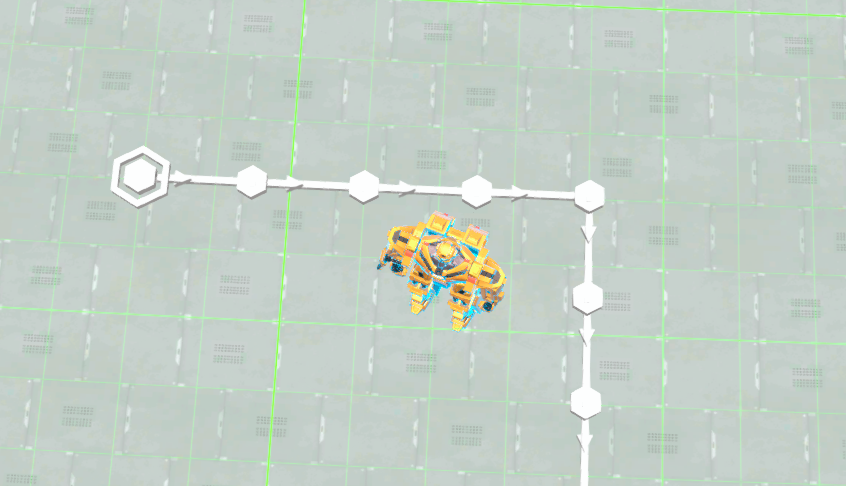
- 默认「自由间距」模式:1.6~1.8 当地格一节,每节不超过 √5.3 米(2.302m,原版硬上限减 3cm 余量),所以建出来的带子蓝图在原版游戏里照样能重建。
- 「蓝图安全(整数格)」模式:严格只用原版的整数格节点,间距全部是整数格,对蓝图洁癖玩家友好。cfg 里
BlueprintSafe可开。 - 爬坡自动处理:有高度差的路段会自动缩小水平间距,避免 2 格节撞上 TooFar 判定。
- 垂直抽稀(默认开):竖直往上拉带时,把高度差均分成不超过 1.45 格的节,每一段都走游戏的「直接连接」机制,又省料又美观。斜坡带同样生效。
- 远距延伸(默认开):原版网格行走最多 256 个点,1 格间距下大概 322m 就到顶了。开启后超远的传送带会自动按当前间距继续延伸,最远约 580m,末端精确落在终点上。
- 太近的强制连接(默认开):两端接口落在同一个网格里(间距不足 1 格)时原版是绝对连不上的,这里会直接建一节短带把它们连起来;拉带过程中双击 R 也有类似效果。
- F9 一键开关全部间距逻辑。cfg 里还有 SkipClimb、SkipVertical(特殊地形整条交给原版)、LogSpacing(日志)等细项可调。
2. 蓝图工具箱(Alt+5 开关窗口)
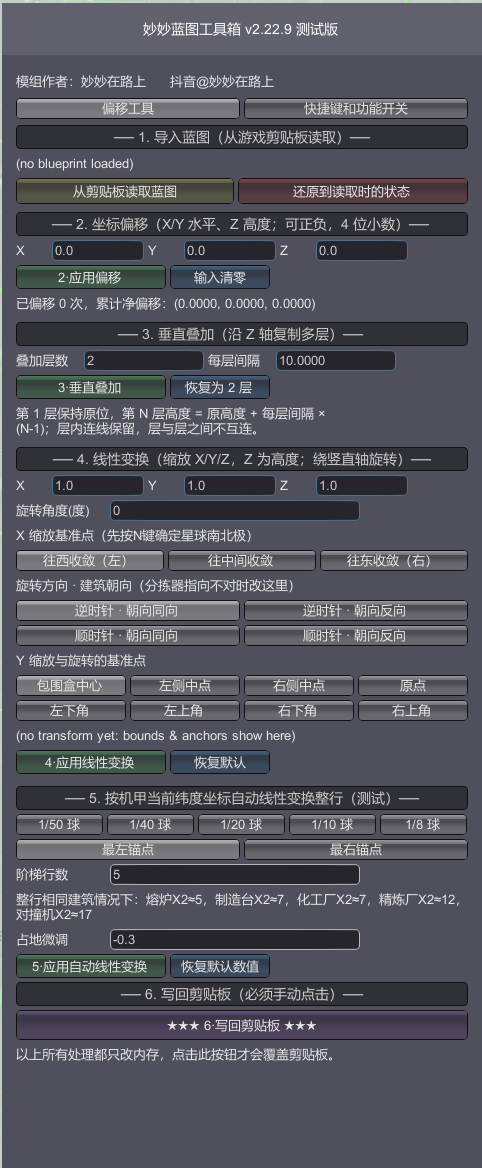
打开「妙妙蓝图工具箱」窗口,里面是蓝图的各种变换工具,两个页签:「偏移工具」和「快捷键和功能开关」。
坐标偏移:把整张蓝图沿 X/Y/Z 平移。输入框支持 4 位小数,可以反复叠加(工具会记录累计净偏移)。每次操作后都能点「还原到读取时的状态」一键撤销。
垂直叠加:把蓝图沿 Z 轴复制成多层,层与层之间不互连。层数和每层间隔自己填。
线性变换:三轴缩放 + 绕竖直轴旋转,支持选择基准点/基准轴(居中、选第一个建筑等模式)。配合回归线自由摆放,斜着贴着赤道摆一排厂房就靠这个。
数字输入纠错:输入框对中文输入法相当宽容——全角数字、中文句号、手滑多敲的小数点(0..25)、从别处复制粘贴带进来的零宽字符,都能自动纠正。真纠不了的会明确告诉你哪个框、原文是什么。
连接修复:偏移/叠加之后传送带和分拣器的连接关系会自动修复——重复的传送带节去重、拉开的空档按缺口补节(直线 2~4 格)、跨距不再是 1~3 格直线的分拣器自动移除。建筑上限也从原版的 255 解锁到了 15000。
写回剪贴板:改完点这个按钮,蓝图以新状态写回剪贴板,再去游戏里粘贴就是改好的。
3. 蓝图拖拽碰撞对齐(Ctrl+Shift+N 开关)
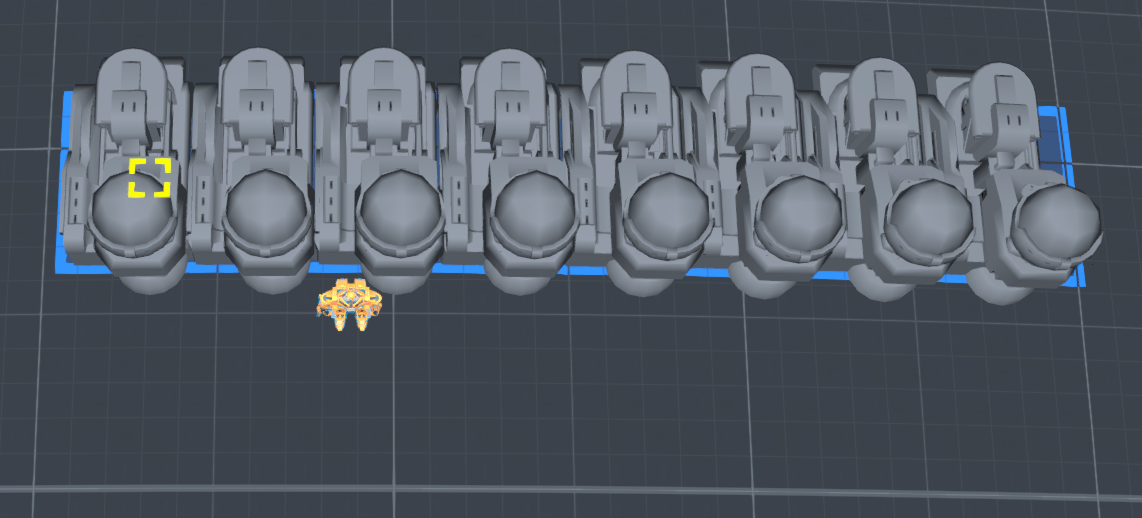
粘贴蓝图拖拽摆放时,按整组建筑真实的碰撞盒角跨度来贴合排布,而不是原版那样忽略地面网格导致建筑之间留缝或者重叠。鼠标靠近已建建筑时会自动磁吸贴合。拖拽复制的份数上限同样解锁到 15000,默认99,设置数量太大会导致游戏性能暴降!
4. 悬停坐标(Ctrl+Shift+K 开关,默认关)
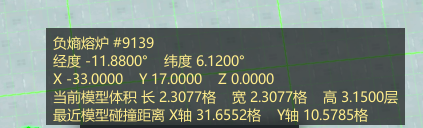
鼠标悬停在建筑上时显示:当前经纬度、与建筑 X/Y/Z 轴的距离、建筑模型体积、最近碰撞距离。对同类高塔(风电、物流塔这类)会额外显示最近同类的碰撞距离,用来对齐 spacing 很方便。
5. 蓝图回归线自由摆放(Alt+U 开关,默认关)
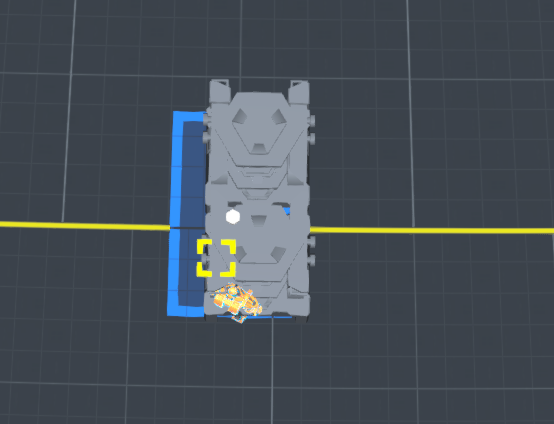
粘贴蓝图时无视回归线(纬度 45~48)的摆放限制和地基平台越界判定,蓝图跟着光标连续移动、不瞬移。同时统一做刚性摆放锁死蓝图物理尺寸——东西向格距按锚点纬度做 1/cos 补偿(球面经线收敛),任意纬度不变形不碰撞,跨回归线零跳变。默认关闭是因为改动原版摆放规则比较激进,需要的时候 Alt+U 打开。
6. 无碰撞摆放(Alt+W 开关)
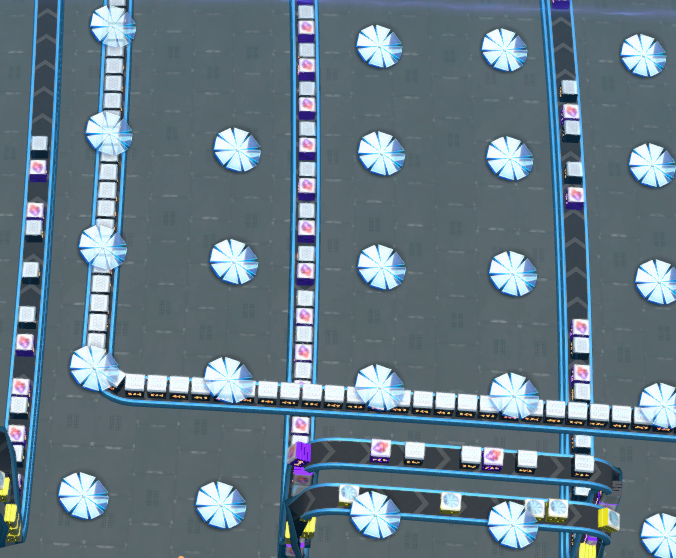
开启后摆放建筑忽略碰撞体积,可以重叠放置;机甲行走时也能穿过建筑。摆放蓝图时同样放行碰撞判定。手动摆放只放行「唯一失败原因是碰撞」的情况,缺料、距离太远这些其它错误照常拦截,不会误放。
7. 隐藏建筑模型(Alt+A 三态循环)
按一次隐藏所有建筑模型,再按一次连分拣器(爪子)也隐藏,第三次恢复显示。隐藏状态下传送带、矿脉、植被、蓝图虚影照常显示,被隐藏的建筑也无法被鼠标选中(拾取射线做了过滤),不会挡住你的点击。换星球自动保持生效。
8. 星球缩略图指北针(Alt+N 开关,默认开)
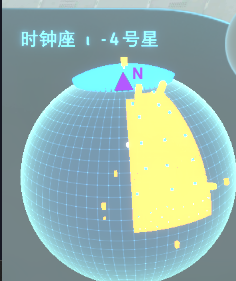
左下角星球卡片上显示紫色 N + 箭头,随视角实时旋转指向星球北极。此功能主要目的是为了直观的体现偏移是+还是-数。还有个调试模式会在小地图上叠加 P/+Y/-Y 标记用来校准。
9. 统计信息显示(Alt+M 开关,默认开)
此功能是为了在制作蓝图时方便观察各中间产物的详细信息,当前版本下可以同时监控 15 种材料(单列显示)。筛选是按照统计面板的★标记统计的。同时也兼容了击杀统计显示(某些黑雾农场可能用得到)。
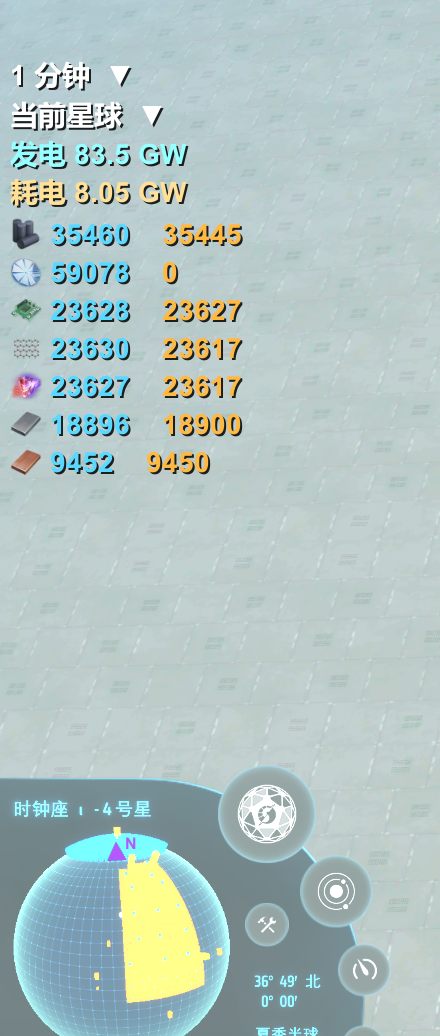
左下角星球卡片上方的实时信息悬浮显示,从上到下:
- 时间筛选(最上排):1 分钟 / 10 分钟 / 1 小时 / 10 小时 / 100 小时 / 总计,六档与面板时间框一致。
- 范围选项卡:统计全星区 / 当前星球 / 各行星系 / 各星球……选项与统计面板的范围下拉框动态同步,在这里选等于直接切面板的范围,两处永远一致。飞离星球(太空/星系视图)时如果选的是「当前星球」,会自动按统计全星区口径兜底显示。
- 发电性能(青色)和实时耗电(橙色):口径与统计面板一致。实时耗电是电网当下实际送达的功率,供电不足时会真实反映缺口。
- 收藏夹筛选行:统计面板里收藏(★ 标记)的物品会显示在这里——单列显示,每行是物品图标 + 生产数值 + 消耗数值,口径与面板同行数字完全相同,最多 15 种。统计面板击杀页收藏的敌人(枪骑、强袭者这些)也会显示为敌人图标 + 击杀数。物品按生产+消耗降序、击杀按击杀数降序。面板没勾选任何收藏筛选时,显示全部已收藏物品。数字不带 /min 后缀。
10. 工具箱快捷按钮
星球卡片右侧边缘有个圆形「妙」字按钮(原生按钮克隆,带悬停提示和点击音效),点击开关工具箱窗口。不想显示可以在 cfg 里关。
11. 传送带定高(Alt+C)
拉传送带时按 Alt+C 打开高度输入框,输入高度后点「应用」(或回车),整条带子精确抬到这个高度。
- 支持小数点后 4 位,按输入精确生效、不取整到层——输入 3.63 就是恰好 3.63 格。
- 单位可以选「格」或「米」(1 格 = 1.3333 米),输入时也可以加后缀临时切:
4格/4c= 4 格,5m= 5 米。 - 再按一次 Alt+C(或 Esc)关闭输入框;解除定高 = 输入 0 后点应用,或者退出建造时自动解除恢复贴地。
- 定高生效期间原版的传送带高度增减键被接管;解除后照常可用。
- 窗口打开期间在输入框里打字不会误触游戏键位。
12. 拉传送带时按住 Shift 保持高度
拉带过程中按住 Shift 不松,整条带子保持在起点的高度水平延伸(不随地形起伏),松开恢复原版。和定高功能自动互让:定高生效时 Shift 保持高度让位,松开 Shift 后定高继续。
13. 悬浮传送带(Alt+V)【重制版】
手持传送带,鼠标悬停在任意一格传送带上按 Alt+V,弹出设置窗口——只设置当前悬停传送带的 Z 轴(不动 XY),输入目标 Z 层数后点生成(或回车),在悬停那格传送带的正上/下方生成一格同向传送带,立即完工。
- 输入 = 目标 Z 层数,0 层 = 悬停带正下方的地基面/地面:公式与游戏拉带提示的「建造高度」显示完全同口径(不含 0.2 米实体基准)。悬停贴地带(0 层)输入 3.63 → 生成后建造高度显示 3.63(无 0.15 偏差);输入 -0.5 → 地基面下方 0.5(可埋地做隐藏走线)。正负不限、不做任何贴地钳制。
- 生成手持等级的传送带:手持 1 级带就生成 1 级、手持 2 级就生成 2 级,以此类推(与悬停带的型号无关)。窗口里会显示当前手持的等级。
- 完全免料:不检查、不消耗背包和物流清单里的任何物品,直接生成。
- 仅保留防输入离谱的兜底(半径不小于星球半径 20%)。
- 窗口显示悬停带的离地层数(与建造高度同口径)和海平面 Z 作参考,行尾带版本号(用来核对游戏实际加载的 DLL 版本);生成后的提示报实际建成的离地层数(与建造高度同值,可直接对照验收)。
- 高度可以微调到小数,用来做高低分层输送带、跨带桥接都很方便。
14. 建造秒完成(Alt+B 开关,默认开)
开启后:缺料的待建建筑(蓝图粘贴出来的白影)会自动从背包补料,凑齐立即建成;手动放置或粘贴时已经付了料的建筑直接完工,不再等无人机过来。每 6 tick 分片扫描一轮,大基地也不卡。
如果装了 starfi5h 的 DeliverySlotsTweaks,本模组会自动接管其 GetItemCount/TakeItem 静态替换,建造师模式和秒完成照样工作,不会出现「点击建造栏仍提示物品不足」的问题。
15. 建造师模式(免费建造)
开启后背包数量判定被接管为 888:建造不消耗物品、背包为空也能建,底部建造栏的数量恒显示 888。和秒完成是两个独立开关——建造师管「免费」,秒完成管「速度快」。
16. 传送带切割(Alt+X)
鼠标悬停在某节传送带上按 Alt+X,断开它与下游传送带的连接。传送带本体保留、不掉落物品,用来把一条长带截成两段独立运转。
17. 一键填埋/恢复矿脉(Ctrl+Shift+M)
第一次按:整星掩埋全部矿脉(复用游戏沙盒的原生「改造整星」机制,不消耗地基);第二次按:恢复矿脉,资源储量不变。装了独立版 PlanetVeinBurier 的话本功能自动休眠,不会冲突。
18. 分拣器伸入(按住 LeftCtrl)
注意!此功能无法保存合法蓝图!也可以理解为毫无意义的功能!主要是我为了查看每种建筑加了爪子后的模型大小关系。
拉爪子(分拣器)连接到建筑时按住 LeftCtrl:整个爪子沿「从底座指向建筑」的方向向建筑滑动 0.27 格(cfg 可调),头充分伸进建筑端口、连接视觉到位。松开按键恢复原版位置。
19. 星球透视 + 地下建筑清理
星球透视(默认 Ctrl+Shift+X 开关):隐藏星球的地表地形网格,让你直接看到地表下面的矿脉、地基、建筑底部与下层结构(建筑/矿脉模型保持可见)。可选同时隐藏地基改造层、水面(看海底)、大气层、云层(cfg 控制)。只切换渲染器显隐,不改地形数据、不影响存档;透视时自动延长鼠标拾取射线(原版 480 → 6000),整星视角也能点选地下建筑。
地下建筑清理(默认按住 Alt+Y + 左键点击):透视开启时按住快捷键左键点击屏幕,弹出原版确认框,确认后一键删除地基面以下的全部建筑(原独立版判 -1 层;工具箱版默认判 -2.1 层,约 2.8 米,避免误删贴地建筑)。
- 判定层数可在工具箱 UI 调节:「快捷键修改」页「地下建筑清理(按住)」行下方的「地下清理判定层数」输入框(负数 = 地面以下,0 层 = 地基面/地面,1 层 = 1.333333 米;范围 -0.05 ~ -100),应用后写 cfg 立即生效。
- 两条快捷键都能在「快捷键修改」页修改。
- 删除走原版拆除管线(RemoveEntityWithComponents),自动清理传送带网络/分拣器/电力等引用;物品返还可选(cfg「删除时返还物品」)。
- 仅对所在行星生效;若安装了独立版 DSPHideSurface,工具箱内置功能自动休眠,二者留一即可。
20. 批量拿取传送带货物(按住 Shift+Ctrl + 左键点击)
空手时按住 LeftShift + LeftCtrl,鼠标左键点击一条传送带——一次性拿取被点击传送带上的全部货物,并沿输入连接递归找出全部上游传送带,把它们载有的货物也一并拿取(直接进背包,带原版拾取计数弹窗)。
- 上游链递归包含:直连的上游带、汇入的左右输入带全部覆盖,逐级向上直到源头(遍历上限 2000 条,防环形链死循环的安全兜底)。
- 只在空手时触发(手持建造物品时点击不响应,不会干扰正常建造/拉带);打字与鼠标在 UI 上时同样不触发。
- 走原版拿取管线(CargoTraffic.PickupBeltItems),自动清理带面货物引用,物品直接进背包并弹原版计数。
- 开关、修饰键(默认 LeftShift + LeftControl)、是否含上游、遍历上限都可在 cfg(DSPBlueprintOffset.cfg「拿取传送带货物/BeltGrab」)里调。
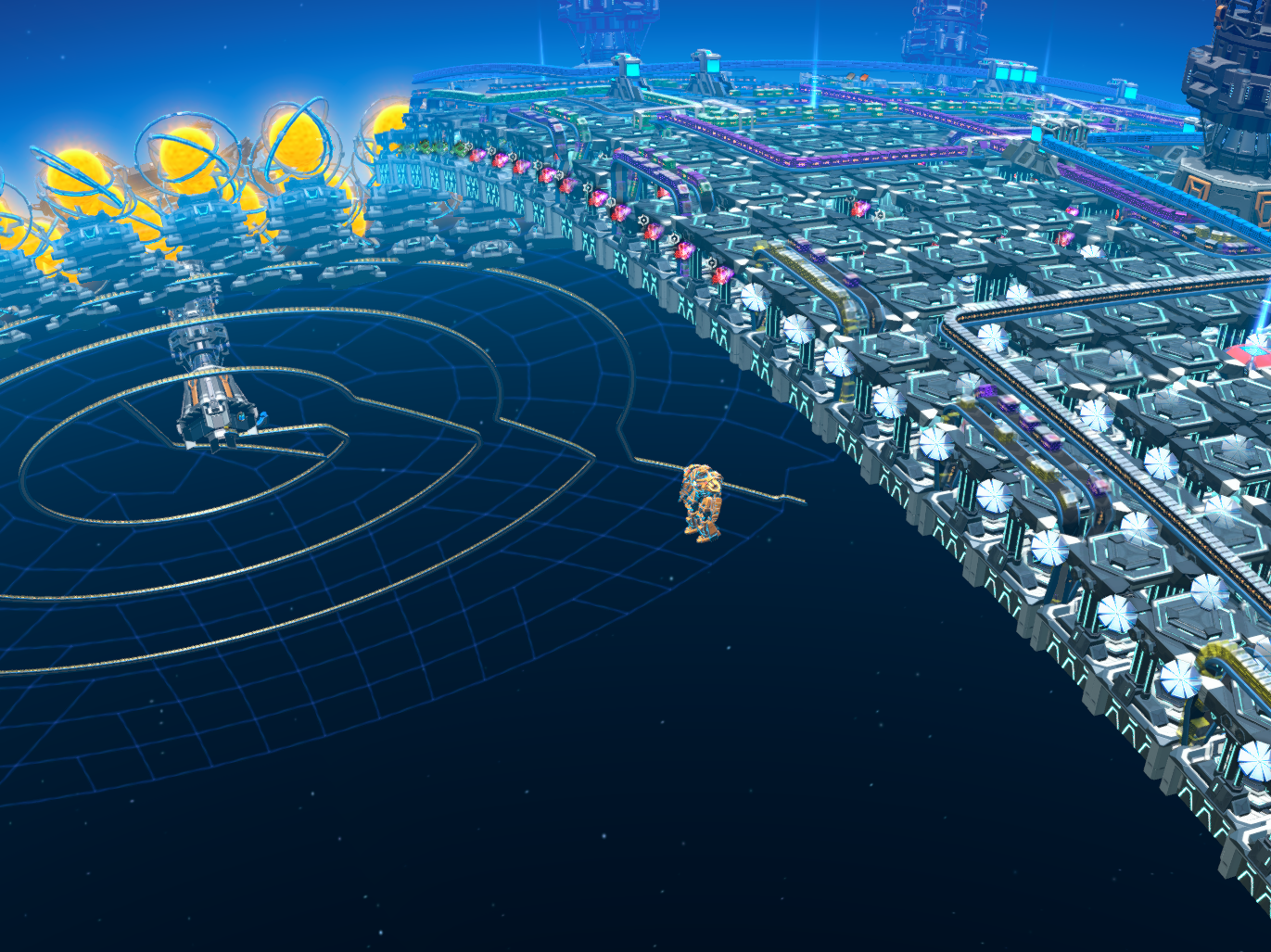
快捷键一览
| 快捷键 | 功能 | 默认 |
|---|---|---|
| F9 | 传送带间距 开/关 | 开 |
| Alt+5 | 工具箱窗口 开/关 | 关 |
| Alt+W | 无碰撞摆放 开/关 | 关 |
| Alt+A | 隐藏建筑模型 三态循环 | 显示 |
| Alt+N | 星球指北针 开/关 | 开 |
| Alt+M | 统计信息显示 开/关 | 开 |
| Alt+B | 建造秒完成 开/关 | 开 |
| Alt+U | 蓝图回归线自由摆放 开/关 | 关 |
| Ctrl+Shift+K | 悬停坐标 开/关 | 关 |
| Ctrl+Shift+N | 蓝图拖拽碰撞对齐 开/关 | 关 |
| Ctrl+Shift+M | 一键填埋/恢复矿脉 | — |
| Alt+X | 传送带切割 | — |
| Alt+V | 悬浮传送带 | — |
| Alt+C | 传送带定高输入框 | — |
| 按住 LeftCtrl | 分拣器伸入 | 开 |
| 拉带时按住 Shift | 保持当前高度 | 开 |
| Ctrl+Shift+X | 星球透视开关 | 关 |
| 按住 Alt+Y + 左键 | 地下建筑清理(透视时) | — |
| 按住 Shift+Ctrl + 左键 | 批量拿取传送带货物(含上游) | — |
所有快捷键都能在游戏内「快捷键修改」页改(格式:键名用 KeyCode 枚举名,+ 分隔,顺序随意,例如 LeftAlt + N、K + LeftShift + LeftControl),改完立即生效并写回 cfg。
配置文件
各功能的 cfg 保持原模组的位置与文件名:
BepInEx/config/TropicBeltSpacing.cfg—— 间距相关的所有细项(蓝图安全、垂直抽稀、远距延伸、强制连接、日志等)BepInEx/plugins/DSPMiaoToolbox/DSPBlueprintOffset.cfg—— 蓝图工具箱、统计信息显示、指北针、无碰撞、隐藏建筑、秒完成、星球透视/地下清理等合并版新增功能BepInEx/config/dsh.hovercoord.cfg—— 悬停坐标BepInEx/plugins/DSPMiaoToolbox/DSPBPColliderSnap.cfg—— 蓝图拖拽碰撞对齐BepInEx/config/BPTropicFree.cfg—— 回归线自由摆放
r2modman 的 Config editor 可以直接编辑 2 号和 4 号(在 DSPMiaoToolbox 模组目录下)。统计范围、时间档、各快捷键、地下清理判定层数也可以直接在游戏内悬浮显示和「快捷键修改」页改,效果与改 cfg 完全相同。
兼容性
- 与 LongerBelts 等改传送带路径的模组兼容(间距逻辑会自动接管其路径生成,可用
UseVanillaGridPath关闭接管)。 - 与 DeliverySlotsTweaks 兼容:自动接管其背包替换,建造师模式/秒完成正常工作。
- 装了独立版 PlanetVeinBurier 时,内置的一键填埋功能自动休眠。
- 装了独立版 DSPHideSurface 时,内置的星球透视/地下清理功能自动休眠(二者留一即可)。
- 合并模组的补丁目标互不重叠,合并后行为与分开安装完全一致。
- 与 NebulaMultiplayerMod 有兼容问题,联机会导致数据不同步。
从源码构建
powershell -ExecutionPolicy Bypass -File .\build.ps1 -Zip
# 可选参数:
#   -GameDir "X:\...\Dyson Sphere Program"
#   -BepInExCore "X:\...\BepInEx\core"
已知的小事项
- 统计信息显示在飞离星球(太空/星系视图)时仍会显示,此时如果范围选的是「当前星球」会自动按统计全星区兜底,落回星球后恢复。
- 无碰撞摆放会保留游戏对「物流运输站相隔太近」的判定:即便开启无碰撞,物流站间距过近时依然会被拦截(TowerTooClose 检查保留)。
- 蓝图安全模式的间距模式下,如果拉带距离特别短且不在整数格上,会强制直连一节短带(可在 cfg 关闭 ForceConnectTooClose,改为直接失败)。
- 隐藏建筑模型后,被隐藏的建筑不可被鼠标选中是刻意设计(方便点击被挡住的设施)。
- 机甲无碰撞开启时会顺带能穿过敌人(玩家和实心建筑同在碰撞层 12,Unity 层级机制所限)。
🌐 English(click to expand)
English
Author: MiaoMiaoOnTheRoad (Douyin@MiaoMiaoOnTheRoad) This toolbox was built for extreme-dense blueprint layouts. If this mod helps you, please follow me on Douyin! ❤❤❤❤❤ The mod's UI automatically switches between Chinese and English to match the game language. Some ideas were borrowed from great modders like Soar and Shi Sang — many thanks to them all!
This started as a merge of several small mods with duplicated features and scattered configs, combined into a single DLL for easy management. Over time I kept adding everything I wanted during my own playthrough. This one package now includes: belt spacing, blueprint toolbox, blueprint drag alignment, free placement across tropics, hover coordinates, no-collision placement, hide buildings, planet compass, stats overlay, precise belt height, hover belt, instant build, builder mode, belt cutter, vein burier, sorter advance, planet x-ray, underground cleaner, belt cargo grab.
All feature toggles and hotkeys live in the in-game "Miao Blueprint Toolbox" window (Alt+5). Changes apply instantly and are written back to each module's cfg file — no game restart needed.
Some buttons in the UI are colour-coded for readability — no misclicks while running repetitive belt routes :)
Requires BepInEx 5.4.17.
Update
- Fixed the 2.23.x regression where belt spacing had no visible effect (spacing ON yet belts come out vanilla 1-grid): the "snap intermediate nodes to the planet grid" step added in 2.23.x quantized the mod's intentionally off-grid fractional nodes (1.6–1.8 cells) onto the nearest integer minor-grid vertices, turning spacing into alternating 1-cell/2-cell gaps; splitting the over-limit 2-cell segments then re-snapped each midpoint exactly onto the skipped vertex, so the final output matched the vanilla walk point for point. The snap is now removed in the flat path, the slope path, and the midpoint splitter (blueprint-safe integer mode is unaffected — snapping is an identity operation there). Also fixed the splitter's iteration budget counting plain scans, which left over-long segments on long drags (≳80 grids) and made the belt impossible to place.
- Spacing ON/OFF state is no longer invisible: the toolbox window (Alt+5, "Hotkeys & Toggles" tab) now has a master toggle for Tropic Belt Spacing, fully in sync with F9 (written to TropicBeltSpacing.cfg) — previously it could only be changed via cfg or the F9 popup, and an unnoticed accidental F9 press (the most common cause of "spacing stopped working") left no visible state anywhere. When spacing is OFF and you pull a belt, a throttled reminder now appears (max once per 10 minutes).
- F9 hardening: no longer fires while typing in a text field; a cfg save failure during toggling only logs an error instead of disabling F9 for the whole session.
- Fixed: TropicBeltSpacing right-angle corner belts at non-integer heights not reaching the accurate max interval.
- Toolbox UI: auto-fit scaling + compact layout (both tabs fully visible at 1920×1080) and the window extended by 3 rows.
- New: Belt cargo grab — hold Shift+Ctrl and left-click a belt to pick up all cargo on it and on every belt feeding into it upstream (straight into your inventory). Toggle on the "Hotkeys & Toggles" tab (default on).
- New: Remove station material lock — removes the sandbox material lock from logistics towers in blueprints saved from sandbox mode.
Install
Import this package with r2modman / Thunderstore Mod Manager, or drop the whole BepInEx/plugins/DSPMiaoToolbox/ folder into the game's BepInEx/plugins/.
It is recommended to remove the old standalone mods (TropicBeltSpacing, DSPBlueprintOffset, DSPHideSurface, etc.) first — duplicates won't crash anything, but there is no point running both (with standalone DSPHideSurface / PlanetVeinBurier installed, the matching built-in features sleep automatically). On first run, DSPBlueprintOffset and DSPBPColliderSnap automatically migrate configs from the old mod folders, so previously customized hotkeys are kept.
To update, just overwrite the DLL. All cfg files are backward compatible; migrations run automatically (hotkey splits, default changes, etc.) and never overwrite keys you customized yourself.
Features, one by one
Each entry below covers: what it does, how to use it, the default hotkey, and what can be tuned.
1. Belt spacing (toggle with F9) Automatically enlarges belt node spacing while pulling belts — fewer belts for the same distance, saving materials and buildings.
- Default "free spacing" mode: 1.6–1.8 local grids per segment, each ≤ √5.3 m (2.302 m — the vanilla hard limit minus a 3 cm margin), so blueprints built this way can still be rebuilt in vanilla.
- "Blueprint-safe (integer grid)" mode: strictly vanilla integer-grid nodes only, all spacing in whole grids — for players who want pixel-perfect legal blueprints. Enable via
BlueprintSafein the cfg. - Climbs handled automatically: horizontal spacing shrinks on climbs so 2-grid segments don't hit the TooFar check.
- Vertical thinning (default on): when pulling belts upward, the height difference is split into segments of at most 1.45 grids, each using the game's "direct connect" mechanic — material-saving and clean. Works on slopes too.
- Long reach (default on): vanilla grid walking caps at 256 points (~322 m at 1-grid spacing) and very long belts simply can't be pulled. With this on, over-long belts keep extending at the current spacing up to ~580 m, with the end node landing exactly on target.
- Force connect (default on): when both belt ends land inside the same grid (< 1 grid apart), vanilla absolutely refuses to connect — this builds a short belt to join them anyway; double-tapping R while pulling does something similar.
- F9 toggles all spacing logic at once. Fine knobs in the cfg: SkipClimb, SkipVertical (hand special terrain to vanilla), LogSpacing (logging), etc.
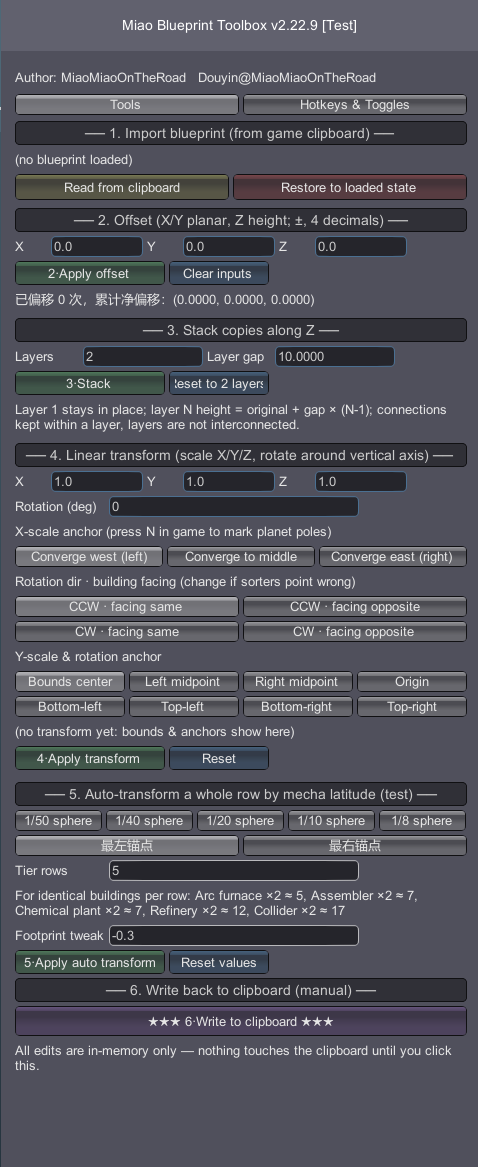
2. Blueprint toolbox (Alt+5 toggles the window) Opens the "Miao Blueprint Toolbox" window with the blueprint transform tools. Two tabs: "Tools" and "Hotkeys & Toggles".
Offset: translate the whole blueprint along X/Y/Z. Input boxes accept 4 decimals and operations stack (the net offset is tracked). Every operation can be undone with one click via "restore to loaded state".
Stack: copies the blueprint into multiple layers along Z; layers are not interconnected. Layer count and per-layer gap are yours to fill.
Linear transform: scale on all three axes + rotate around the vertical axis, with anchor presets (centre, first building, etc.). Combined with free tropic placement, this is how you line up a row of assemblers hugging the equator.
Number input correction: the input boxes are very forgiving of Chinese IME artefacts — full-width digits, CJK periods, accidental double dots (0..25), zero-width characters pasted in from elsewhere — all auto-corrected. When truly unparseable, it tells you which box failed and what the raw text was.
Connector repair: after offset/stack, belt and sorter connections are repaired automatically — duplicate belt segments deduped, opened gaps of 2–4 straight grids refilled, sorters whose span is no longer a 1–3-grid straight line removed. The building cap is also unlocked from the vanilla 255 to 15000.
Write back to clipboard: after editing, click this button and the blueprint is written back to the clipboard in its new state — paste it in game and you get the edited version.
3. Blueprint drag collider alignment (Ctrl+Shift+N toggles)
When dragging pasted blueprints, layout fits by the real collider corner spans of the whole group instead of ignoring the ground grid and leaving gaps or overlaps between buildings. Dropping near existing buildings magnet-snaps to their collider edges. The drag-copy cap is unlocked to 15000 — default 99; very large counts will tank your FPS!
4. Hover coordinates (Ctrl+Shift+K toggles, default off) While hovering a building it shows: current latitude/longitude, X/Y/Z axis distances to the building, model volume, and nearest collider distance. For same-type towers (wind turbines, storage towers, etc.) it also shows the distance to the nearest same-type collider — very handy for aligning spacing.
5. Free placement across tropics (Alt+U toggles, default off) When pasting, ignores the tropic (latitude 45–48) placement restriction and foundation platform bounds; the blueprint follows the cursor continuously without teleporting. It also applies uniform rigid placement that locks the blueprint's physical size — east-west grid pitch is compensated by 1/cos(latitude) (spherical meridian convergence), so it never deforms or collides at any latitude, with zero jitter across tropic lines. Off by default because it changes vanilla placement rules quite aggressively — Alt+U when you need it.
6. No-collision placement (Alt+W toggles) While on, buildings ignore collider volumes and can overlap; the mecha walks through buildings too. Blueprint pasting also bypasses collision checks. Manual placement only bypasses when collision is the ONLY failure — missing items or range errors are still blocked normally.
7. Hide building models (Alt+A, 3-state cycle) First press hides all building models, second press also hides sorters, third shows everything again. While hidden, belts, veins, vegetation and blueprint ghosts stay visible, and hidden buildings cannot be picked with the mouse (raycast filtered) — they never block your clicks. Persists across planet changes.
8. Planet compass (Alt+N toggles, default on) Purple N + arrow on the planet card at the bottom left, rotating in real time to point at the planet's north pole. The main purpose of this feature is to show at a glance whether an offset is + or −. A debug mode also overlays P/+Y/-Y markers on the minimap for calibration.
9. Stats overlay (Alt+M toggles, default on) Made for watching detailed info of intermediate products while building blueprints — the current version can monitor up to 15 materials at once in a single column. Filtering follows the ★ favourites in the statistics panel. Kill statistics are supported too (some dark-fog farms may want this).
The live overlay above the planet card, top to bottom:
- Time filter (top row): 1 min / 10 min / 1 h / 10 h / 100 h / Total — six levels matching the panel's time box.
- Scope filter: all galaxy / local planet / each system / each planet... — options are live-synced with the statistics panel's scope dropdown; choosing here directly switches the panel's scope, and the two always agree. Away from a planet with "local planet" selected, it automatically falls back to all-galaxy for display.
- Power gen (cyan) and power load (orange): same metrics as the statistics panel. Load is what the grid actually delivered right now, so shortages show up honestly.
- Favourites column: items starred (★) in the statistics panel show here — a single column, one row per item: icon + production + consumption, exactly the same numbers as the panel row, up to 15 items. Enemies starred on the kill page (Gun Rider, Marauder, etc.) show as enemy icon + kill count. Items sorted by production+consumption descending, kills by kill count descending. Numbers carry no /min suffix; with no favourite filter selected in the panel, all starred entries show.
10. Toolbox quick button A round 妙 button on the right edge of the planet card (native button clone with hover tip and click sound) toggles the toolbox window. Can be disabled in the cfg.
11. Precise belt height (Alt+C) While pulling a belt, Alt+C opens a height input box; type a height and click Apply (or press Enter) — the whole belt is lifted to exactly that height.
- Up to 4 decimals, applied exactly as typed — no rounding to layers. 3.63 means exactly 3.63 grids.
- Units: "grid" or "meters" (1 grid = 1.3333 m); type a suffix to switch on the fly:
4格/4c= 4 grids,5m= 5 m. - Alt+C again (or Esc) closes the box; enter 0 and apply to return belts to the ground, or exit build mode to disarm automatically.
- While armed, the vanilla belt height keys are taken over; disarm restores them.
- Typing in the input box never leaks keystrokes to game hotkeys.
12. Hold Shift while pulling belts to keep height Hold Shift during the pull and the whole belt stays at the starting height (flat, ignoring terrain); release to return to vanilla. Cooperates with precise belt height: when belt height is armed, Shift-hold yields, and resumes after.
13. Hover belt (Alt+V) [remake] Hold a belt, hover over any belt cell and press Alt+V: a settings window opens — it only sets the Z axis of the hovered belt (XY untouched). Enter the target Z layer count and click Build (or press Enter): one same-direction belt is generated above/below the hovered cell and finishes instantly.
- Input = target Z layers, with 0 = the foundation/ground surface right under the hovered belt — the formula matches the game's "build height" tip exactly (no 0.2 m entity-base offset). Hovering a ground-level belt and typing 3.63 → the belt reads exactly 3.63 in build height (no 0.15 error); typing -0.5 puts it 0.5 below the foundation (hidden routing allowed). Positive or negative, no clamping.
- Builds the tier you hold: holding a mk I belt builds mk I, holding mk II builds mk II, and so on (independent of the hovered belt's tier). The window shows the tier currently in hand.
- Completely free: no items are checked or consumed from the inventory or logistics list — it simply builds.
- The only safeguard is a degenerate-input floor (radius ≥ 20% of the planet radius).
- The window shows the hovered belt's above-ground layers (same convention as build height) and sea-level Z for reference, plus a version tag to verify which DLL the game actually loaded; the result tip reports the actual built above-ground layers (same value build height shows, for direct verification).
- Offsets accept decimals — handy for layered conveyors and bridging over belts.
14. Instant build (Alt+B toggles, default on) When on: under-fed ghosts (e.g. from pasted blueprints) automatically pull the missing items from your inventory and finish as soon as they're complete; manually placed or pasted buildings that were already paid for finish immediately without waiting for drones. Scans in shards every 6 ticks so even huge bases stay smooth.
If starfi5h's DeliverySlotsTweaks is installed, this mod automatically takes over its GetItemCount/TakeItem static replacements, so builder mode and instant build keep working — no more "not enough items" when clicking the build bar.
15. Builder mode (free building) When on, inventory count checks are taken over as 888: building costs nothing and works with an empty inventory, and the build bar always shows 888. Separate from instant build — builder mode handles "free", instant build handles "fast".
16. Belt cutter (Alt+X) Hover over a belt segment and press Alt+X to disconnect it from the downstream belt. The segment itself stays and no items drop — useful to split one long belt into two independent runs.
17. Vein burier / restore (Ctrl+Shift+M) First press buries all veins on the planet (reusing the sandbox's native "reform planet" mechanic, no foundations consumed); second press restores them with reserves unchanged. Automatically sleeps if the standalone PlanetVeinBurier mod is installed.
18. Sorter advance (hold LeftCtrl) Note! Belts placed this way cannot be saved as a legal blueprint — honestly, it is a niche feature I added mainly to inspect model size relationships with sorters attached.
While connecting a sorter to a building, holding LeftCtrl slides the whole sorter (base + head) 0.27 grid toward the building (configurable) so the head properly reaches into the port. Release to restore.
19. Planet x-ray + underground cleaner [merged from DSPHideSurface] Planet x-ray (default Ctrl+Shift+X toggle): hides the planet's surface terrain mesh so you can directly see veins, foundations, building bases and lower structures under the surface (buildings/veins stay visible). Optionally hides the terrain reform layer, ocean (see underwater), atmosphere and clouds (via cfg). It only toggles renderer visibility — no terrain data is changed, saves unaffected; while x-ray is on the mouse pickup ray is automatically extended (vanilla 480 → 6000) so underground buildings can be clicked from a whole-planet view.
Underground cleaner (hold Alt+Y + left-click by default): with x-ray on, hold the hotkey and left-click the screen — a vanilla confirmation box pops up, and confirming deletes all buildings below the foundation surface (the standalone mod judged at layer -1; the toolbox version defaults to layer -2.1, ≈2.8 m, to avoid deleting near-surface buildings by mistake).
- The depth is adjustable in the toolbox UI: on the "Hotkeys & Toggles" page, the "underground clean depth" box right under the "underground cleaner (hold)" hotkey row (negative = below ground, 0 = foundation/ground surface, 1 layer = 1.333333 m; range -0.05 ~ -100). Applying writes the cfg and takes effect immediately.
- Both hotkeys are editable on the same page.
- Deletion uses the vanilla removal pipeline (RemoveEntityWithComponents) which cleans belt networks / sorters / power references; item refund is optional (cfg).
- Only works on the planet you are on. If the standalone DSPHideSurface is installed, the built-in feature sleeps automatically — keep either one.
20. Belt cargo grab (hold Shift+Ctrl + left-click) With an empty hand, hold LeftShift + LeftCtrl and left-click a belt: all cargo on the clicked belt is picked up at once, and the input connections (back / left / right) are followed recursively through every upstream belt, grabbing their cargo too — straight into your inventory with the vanilla pickup popups.
- Upstream chains included: the direct upstream belt plus any side-input belts are all covered, level by level back to the source (walk capped at 2000 belts as a runaway-loop safeguard).
- Only triggers with an empty hand (clicking while holding a build item is left alone, so normal building/pulling is never disturbed); also skipped while typing or when the cursor is over UI.
- Uses the vanilla pickup pipeline (CargoTraffic.PickupBeltItems), which cleans belt-cargo references and puts items straight into your inventory with the vanilla counter popups.
- Toggle, modifier keys (default LeftShift + LeftControl), include-upstream and the walk cap are all configurable in the cfg (DSPBlueprintOffset.cfg, "拿取传送带货物/BeltGrab").
Hotkeys
| Hotkey | Function | Default |
|---|---|---|
| F9 | Belt spacing on/off | on |
| Alt+5 | Toolbox window | off |
| Alt+W | No-collision placement | off |
| Alt+A | Hide building models (3-state) | shown |
| Alt+N | Planet compass | on |
| Alt+M | Stats overlay | on |
| Alt+B | Instant build | on |
| Alt+U | Free placement across tropics | off |
| Ctrl+Shift+K | Hover coordinates | off |
| Ctrl+Shift+N | Blueprint drag collider alignment | off |
| Ctrl+Shift+M | Vein burier / restore | — |
| Alt+X | Belt cutter | — |
| Alt+V | Hover belt | — |
| Alt+C | Belt height input | — |
| Hold LeftCtrl | Sorter advance | on |
| Hold Shift (pulling) | Keep belt height | on |
| Ctrl+Shift+X | Planet x-ray toggle | off |
| Hold Alt+Y + left-click | Underground cleaner (x-ray on) | — |
| Hold Shift+Ctrl + left-click | Belt cargo grab (incl. upstream) | — |
Every hotkey can be changed in-game on the "Hotkeys & Toggles" tab (format: KeyCode names joined with +, order free, e.g. LeftAlt + N, K + LeftShift + LeftControl). Changes apply instantly and are written to the cfg files.
Config files
Each feature keeps its original module's cfg location:
BepInEx/config/TropicBeltSpacing.cfg— all belt-spacing fine options (blueprint-safe, vertical thinning, long reach, force connect, logging, etc.)BepInEx/plugins/DSPMiaoToolbox/DSPBlueprintOffset.cfg— toolbox, stats overlay, compass, no-collision, hide buildings, instant build, planet x-ray / underground cleaner and the other merged featuresBepInEx/config/dsh.hovercoord.cfg— hover coordinatesBepInEx/plugins/DSPMiaoToolbox/DSPBPColliderSnap.cfg— blueprint drag collider alignmentBepInEx/config/BPTropicFree.cfg— free placement across tropics
r2modman's Config Editor can edit #2 and #4 directly (under the DSPMiaoToolbox mod folder). Scope, time level, hotkeys and the underground-clean depth can also be changed in-game with the same effect.
Compatibility
- Works with LongerBelts and other belt-path mods (spacing logic takes over their path generation;
UseVanillaGridPathdisables the takeover). - Works with DeliverySlotsTweaks: its inventory replacement is taken over so builder mode / instant build keep working.
- Auto-sleeps when the standalone PlanetVeinBurier mod is present.
- Auto-sleeps when the standalone DSPHideSurface mod is present (planet x-ray / underground cleaner).
- The merged modules have non-overlapping patch targets; merged behaviour equals separate installation.
- Known issue with NebulaMultiplayerMod: playing multiplayer together causes data desync.
Build from source
powershell -ExecutionPolicy Bypass -File .\build.ps1 -Zip
# Optional parameters:
#   -GameDir "X:\...\Dyson Sphere Program"
#   -BepInExCore "X:\...\BepInEx\core"
Known notes
- The stats overlay keeps showing in space/system view; if scope is "local planet" it automatically falls back to all-galaxy, and restores when you land.
- No-collision placement preserves the vanilla "logistics stations are too close" check: even with no-collision enabled, stations that are too close together are still blocked (TowerTooClose kept).
- In blueprint-safe spacing mode, very short non-grid-aligned pulls force-connect a short segment (disable ForceConnectTooClose in the cfg to make it fail instead).
- Hidden buildings being un-selectable is intentional (so you can click what was behind them).
- With no-collision on, the mecha also walks through enemies (players and solid buildings share physics layer 12 — a Unity limitation).
