
BuildToolOpt
Reduce lag when placing building. Allow directly replace PLS with ILS. Import blueprint from clipboard directly when Ctrl+V. (Optional)Build ghost/hologram when lack of items. 优化建筑工具:替换升级物流塔,优化蓝图UI,(可选)建设虚影,(可选)减少物流塔建造卡顿
| Date uploaded | 2 weeks ago |
| Version | 1.1.7 |
| Download link | starfi5h-BuildToolOpt-1.1.7.zip |
| Downloads | 1048 |
| Dependency string | starfi5h-BuildToolOpt-1.1.7 |
This mod requires the following mods to function

README
BuildToolOpt
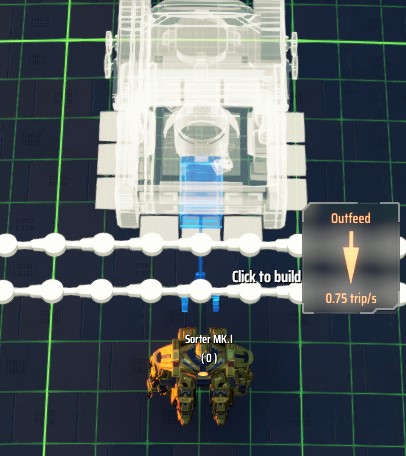
Provides optimization and extra QoL features to build tool and blueprint UI.
对建筑工具和蓝图 UI 提供优化和额外的便利功能。
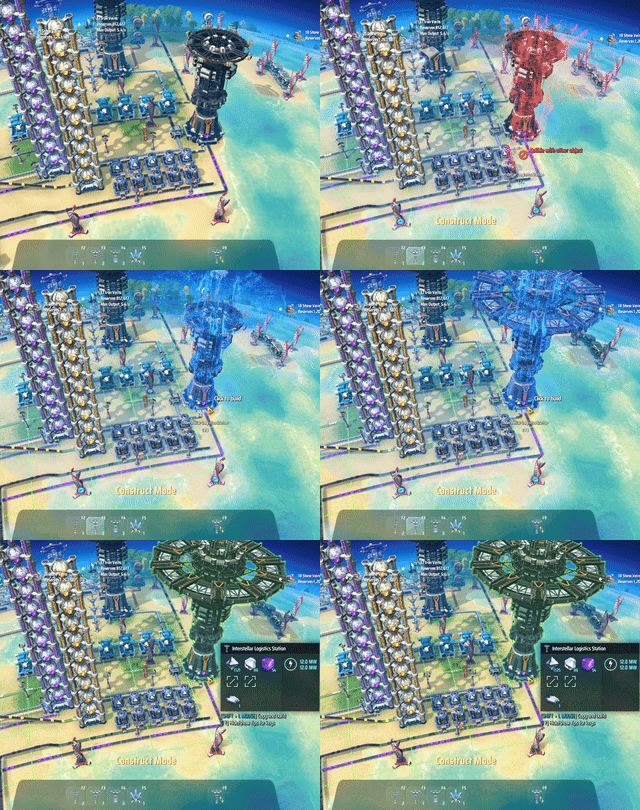
替换升级物流塔相当于作了以下的步骤:
- 复制物流塔设定
- 将塔内的所有物品取出
- 拆除旧塔
- 放上贴上旧塔设定的新塔
- 重新连上传送带
- 尝试将物品放回塔内,无法放入的则收进背包
Configuration
Run the game one time to generate BepInEx\config\starfi5h.plugin.BuildToolOpt.cfg file.
配置文件(.cfg)需要先运行过游戏一次才会出现。修改后需重启游戏才会生效。
## Settings file was created by plugin BuildToolOpt
## Plugin GUID: starfi5h.plugin.BuildToolOpt

[BuildTool]

## Remove c# garbage collection of build tools to reduce lag
## 移除建筑工具的强制内存回收以减少铺设时卡顿
# Setting type: Boolean
# Default value: true
RemoveGC = true

## Trigger garbage collection when game pause (esc menu). Enable this option if memory usage grow rapidly.
## 在游戏暂停时(Esc)回收内存
# Setting type: Boolean
# Default value: false
GC when pause = false

## Directly replace old station with new one in hand
## 可直接替换物流塔
# Setting type: Boolean
# Default value: true
ReplaceStation = true

## Place white holograms when lacking of item (may cause lag in build mode)
## 即使物品不足也可以放置建筑虚影(可能使建造模式卡顿)
# Setting type: Boolean
# Default value: false
EnableHologram = false

## Optimize RefreshTraffic to reduce lag when placing or removing stations
## 优化RefreshTraffic以减少建造/拆除星际物流塔的卡顿
# Setting type: Boolean
# Default value: false
EnableStationBuildOptimize = false

[UI]

## Optimize blueprint UI to reduce lag time
## 优化蓝图UI减少卡顿
# Setting type: Boolean
# Default value: true
UIBlueprintOpt = true

## Allow blueprint folders to use signal icons
## 允许蓝图文件夹使用信号图标
# Setting type: Boolean
# Default value: true
UIBlueprintFolderSignalIcon = true

## Use Advanced mining machine when clicking Q mouseover veins
## 将滑鼠悬停在矿脉上Q时,使用大矿机
# Setting type: Boolean
# Default value: true
UIMiningMachineKey = true

## Directly parse blueprint data from clipboard when Ctrl + V
## 热键粘贴蓝图时,直接读取剪切板
# Setting type: Boolean
# Default value: true
ClipboardPaste = true
Compatibility
NebulaMultiplayer
ReplaceStation, EnableHologram and EnableStationBuildOptimize will be disabled.
当与联机mod共用时, 替换物流塔和建筑虚影功能以及物流塔建造优化将暂停使用
CheatEnabler (v2.4.0)
(Compat) When replacing a station, Finish build immediately in CheatEnabler will be temporarily disabled until replace is done.
(兼容) 使用替换物流塔功能时mod会暂时关闭CE的建造秒完成功能直到替换完成
DSPCalculator (v0.5.17)
按住Shift键并单击建筑物图标将复制该建筑物虚影及其配方设置至手中。
Shift-clicking on building icon will copy that building with recipe settings to hand.
BlueprintTweaks (v1.6.8)
Add some features of BlueprintTweaks when it is not present (require CommonAPI enable)
- Toggle blueprint view mode by hotkey (
J) - Enable changing building tier in bluepirnt pannel.
添加部分蓝图增强MOD的功能(需要有CommonAPI前置):
- 添加切换蓝图视图模式热键(
J) - 在蓝图面板中更改建筑层级。
CHANGELOG
v1.1.7
- Add config option
EnableUIMiningMachineKey(Default: true)
v1.1.6
- Add config option
UIBlueprintFolderSignalIcon(Default: true)
v1.1.5
- Fix a bug regarding vessels that go to the dismantling station.
v1.1.4
EnableStationBuildOptimizenow apply to station dismantling too.
v1.1.3
- Fix operation setting not showing in blueprint copy mode.
v1.1.2
- Adapt to game version 0.10.33.26941
- Fix the issue that sorter holograms cannot be placed.
v1.1.1
EnableStationBuildOptimizenow apply to station2station and route changes too.
v1.1.0
- Add CommonAPI feature: Toggle Blueprint View Mode hotkey (Default:
J) - Add CommonAPI feature: Change building tier in blueprint pannel.
Previous Changelog
v1.0.11
- Fix compatibility with GenesisBook for DSPCalculator shift-click enhance.
v1.0.10
- Add DSPCalculator v0.5.11 enhance: Shift-clicking on building icon will copy that building with recipe settings to hand.
v1.0.9
- Fix a bug that replace station doesn't clean up the localOrder/remoteOrder of other stations correctly.
v1.0.8
- Add config option
EnableStationBuildOptimize(Default: false)
v1.0.7
- Add config option
GC when pause. - Update Cheat Enabler compat to v2.3.26
v1.0.6
- Adapt to DSP v10.30.23292
- Set config
EnableHologramdefault value to false.
v1.0.5
- Use GetHashCode together with length to reduce false negative of clipboard content change detection
v1.0.4
- Add config option
UI - ClipboardPaste - Update cursorText to show if the replacing station is too close to other stations
v1.0.3
- Adapt to DSP 0.10.29.21904
v1.0.2
- Disable replace station function for Orbital Collector.
- Add CheatEnabler v2.3.9 compat.
v1.0.1
- Disable replace station function for Advanced Mining Machine.
v1.0.0
- Initial release. (DSP-0.10.28.21308)
