

BuildToolOpt
Reduce lag when placing building. Allow directly replace PLS with ILS, and show allowed range. Import blueprint from clipboard directly when Ctrl+V. (Optional)Build ghost/hologram when lack of items. 优化建筑工具:替换升级物流塔,提示塔间距,优化蓝图UI,(可选)建设虚影,(可选)减少物流塔建造卡顿
| Date uploaded | a week ago |
| Version | 1.2.0 |
| Download link | starfi5h-BuildToolOpt-1.2.0.zip |
| Downloads | 547 |
| Dependency string | starfi5h-BuildToolOpt-1.2.0 |
This mod requires the following mods to function

README
BuildToolOpt
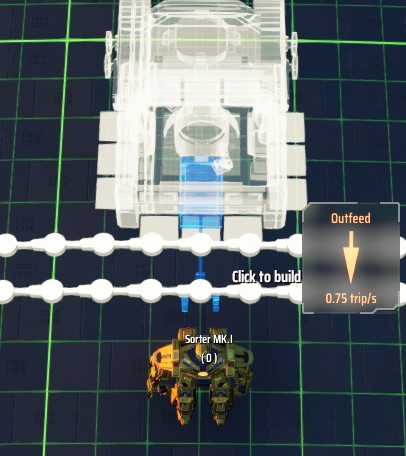
Provides optimization and extra QoL features to build tool and blueprint UI.
对建筑工具和蓝图 UI 提供优化和额外的便利功能。
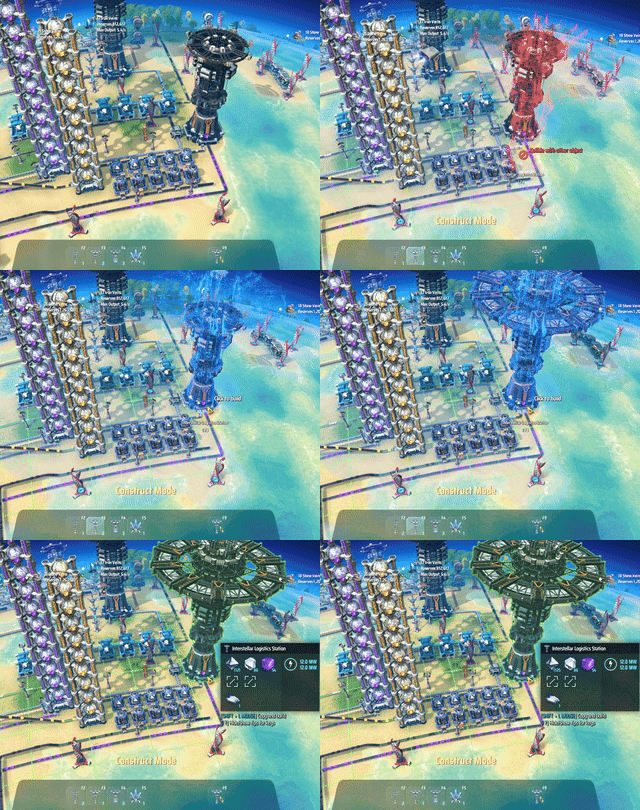
替换升级物流塔相当于作了以下的步骤:
- 复制物流塔设定
- 将塔内的所有物品取出
- 拆除旧塔
- 放上贴上旧塔设定的新塔
- 重新连上传送带
- 尝试将物品放回塔内,无法放入的则收进背包
Configuration
Run the game one time to generate BepInEx\config\starfi5h.plugin.BuildToolOpt.cfg file.
配置文件(.cfg)需要先运行过游戏一次才会出现。修改后需重启游戏才会生效。
## Settings file was created by plugin BuildToolOpt
## Plugin GUID: starfi5h.plugin.BuildToolOpt

[BuildTool]

## Remove c# garbage collection of build tools to reduce lag
## 移除建筑工具的强制内存回收以减少铺设时卡顿
# Setting type: Boolean
# Default value: true
RemoveGC = true

## Trigger garbage collection when game pause (esc menu). Enable this option if memory usage grow rapidly.
## 在游戏暂停时(Esc)回收内存
# Setting type: Boolean
# Default value: false
GC when pause = false

## Directly replace old station with new one in hand
## 可直接替换物流塔
# Setting type: Boolean
# Default value: true
ReplaceStation = true

## Display the minimum spacing circle for station placement
## 显示物流塔之间最小间距的范围圆
# Setting type: Boolean
# Default value: true
ShowSpacingIndicator = true

## Place white holograms when lacking of item (may cause lag in build mode)
## 即使物品不足也可以放置建筑虚影(可能使建造模式卡顿)
# Setting type: Boolean
# Default value: false
EnableHologram = false

## Optimize RefreshTraffic to reduce lag when placing or removing stations
## 优化RefreshTraffic以减少建造/拆除星际物流塔的卡顿
# Setting type: Boolean
# Default value: false
EnableStationBuildOptimize = false

[UI]

## Optimize blueprint UI to reduce lag time
## 优化蓝图UI减少卡顿
# Setting type: Boolean
# Default value: true
UIBlueprintOpt = true

## Allow blueprint folders to use signal icons
## 允许蓝图文件夹使用信号图标
# Setting type: Boolean
# Default value: true
UIBlueprintFolderSignalIcon = true

## Directly parse blueprint data from clipboard when Ctrl + V
## 热键粘贴蓝图时,直接读取剪切板
# Setting type: Boolean
# Default value: true
ClipboardPaste = true
Compatibility
NebulaMultiplayer
ReplaceStation, EnableHologram and EnableStationBuildOptimize will be disabled.
当与联机mod共用时, 替换物流塔和建筑虚影功能以及物流塔建造优化将暂停使用
CheatEnabler (v2.4.0)
(Compat) When replacing a station, Finish build immediately in CheatEnabler will be temporarily disabled until replace is done.
(兼容) 使用替换物流塔功能时mod会暂时关闭CE的建造秒完成功能直到替换完成
DSPCalculator (v0.5.17)
按住Shift键并单击建筑物图标将复制该建筑物虚影及其配方设置至手中。
Shift-clicking on building icon will copy that building with recipe settings to hand.
BlueprintTweaks (v1.6.8)
Add some features of BlueprintTweaks when it is not present (require CommonAPI enable)
- Toggle blueprint view mode by hotkey (
J) - Enable changing building tier in bluepirnt pannel.
添加部分蓝图增强MOD的功能(需要有CommonAPI前置):
- 添加切换蓝图视图模式热键(
J) - 在蓝图面板中更改建筑层级。
CHANGELOG
v1.2.0 (Credit: TTenYX)
- Station replacement now also works on hologram prebuilds: hover a station ghost with a tower in hand to replace it. The ghost's settings carry over to the new tower; with a real tower it is built immediately, without one a new hologram is placed. With
EnableHologramenabled, unbuilt stations can swap types between holograms. - Replacing a station without owning the tower no longer gets blocked: the old station is dismantled and the new tower is placed as a hologram prebuild. The old station's drones/ships/warpers/storage are refunded to the package, and the hologram requires exactly one tower to complete, so replacing is always balance-neutral.
- Fix station replacement granting an extra tower item: the payment is verified against the real item count in the package grids and hand, and reconciled after the replacement.
- Fix hologram-built dispensers not binding to the storage below them (couldn't recognize stored items, paste blueprints, or establish routes). Hologram spray coaters and turrets also get their connections written now. Requires
EnableHologram. - Remove
EnableUIMiningMachineKey(switch to Advanced mining machine with Q over veins). The feature is now built into the game since v0.10.35.29057. The leftover entry in old config files is harmless and can be deleted.
v1.1.8
- Add config option
ShowSpacingIndicator(Default: true)
v1.1.7
- Add config option
EnableUIMiningMachineKey(Default: true)
v1.1.6
- Add config option
UIBlueprintFolderSignalIcon(Default: true)
v1.1.5
- Fix a bug regarding vessels that go to the dismantling station.
v1.1.4
EnableStationBuildOptimizenow apply to station dismantling too.
v1.1.3
- Fix operation setting not showing in blueprint copy mode.
v1.1.2
- Adapt to game version 0.10.33.26941
- Fix the issue that sorter holograms cannot be placed.
v1.1.1
EnableStationBuildOptimizenow apply to station2station and route changes too.
v1.1.0
- Add CommonAPI feature: Toggle Blueprint View Mode hotkey (Default:
J) - Add CommonAPI feature: Change building tier in blueprint pannel.
Previous Changelog
v1.0.11
- Fix compatibility with GenesisBook for DSPCalculator shift-click enhance.
v1.0.10
- Add DSPCalculator v0.5.11 enhance: Shift-clicking on building icon will copy that building with recipe settings to hand.
v1.0.9
- Fix a bug that replace station doesn't clean up the localOrder/remoteOrder of other stations correctly.
v1.0.8
- Add config option
EnableStationBuildOptimize(Default: false)
v1.0.7
- Add config option
GC when pause. - Update Cheat Enabler compat to v2.3.26
v1.0.6
- Adapt to DSP v10.30.23292
- Set config
EnableHologramdefault value to false.
v1.0.5
- Use GetHashCode together with length to reduce false negative of clipboard content change detection
v1.0.4
- Add config option
UI - ClipboardPaste - Update cursorText to show if the replacing station is too close to other stations
v1.0.3
- Adapt to DSP 0.10.29.21904
v1.0.2
- Disable replace station function for Orbital Collector.
- Add CheatEnabler v2.3.9 compat.
v1.0.1
- Disable replace station function for Advanced Mining Machine.
v1.0.0
- Initial release. (DSP-0.10.28.21308)
