
RateMonitor
(WIP) Area select machines with Alt + X, calculate their production rates and track their working ratio. (开发中) 速率仪: Alt + X 区域框选建筑,计算产量及监控工作效率
| Date uploaded | a year ago |
| Version | 0.1.0 |
| Download link | starfi5h-RateMonitor-0.1.0.zip |
| Downloads | 110 |
| Dependency string | starfi5h-RateMonitor-0.1.0 |
This mod requires the following mods to function

README
RateMonitor 速率仪
Area select machines with Alt + X, calculate their production rates and track their working ratio. The mod is inspired by Rate Calculator
Alt + X 区域框选建筑,计算产量及监控工作效率。此mod由RateCalculator启发。
The mod is still work in progress. Expect bugs and miscalculation!
仍在开发中。可能会出现错误和计算错误!
Area Selection Tool 区域框选工具

Area select machines with Alt + X. Support machine types currently:
- factory catagory (assembler, smlter, etc)
- miner catagory
- fractionator
- ejector
- silo
Alt + X 区域框选建筑。目前支持的建筑种类有:
- 工厂类别(联合机,熔炉等)
- 采矿类别(矿机、大矿机、抽水站等)
- 分馏塔
- 电磁弹射器
- 垂直发射井
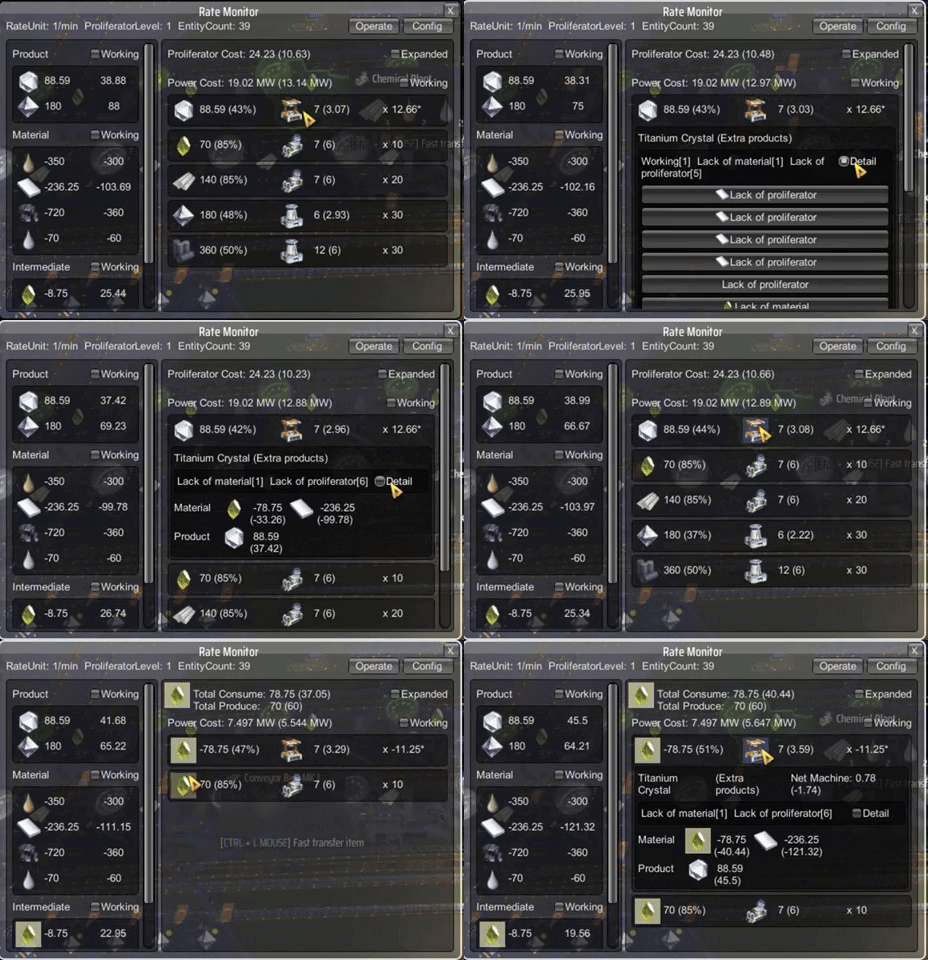
After selection done, a gui window will appear. Click on the item icon to focus, click on the building icon to expand that recipe entry.
选择完成后,将出现一个 GUI 窗口。单击项目图标以聚焦,单击建筑图标以展开该配方条目。
Interface Overview
When opened, the Rate Monitor window displays multiple panels showing your factory’s statistics.
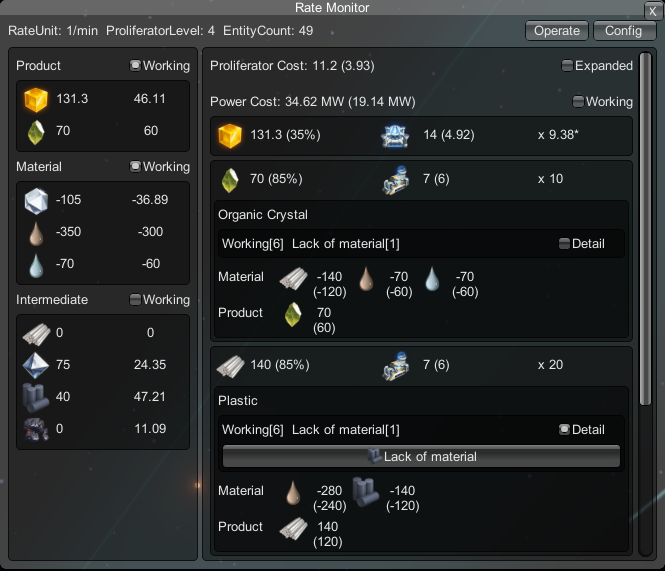
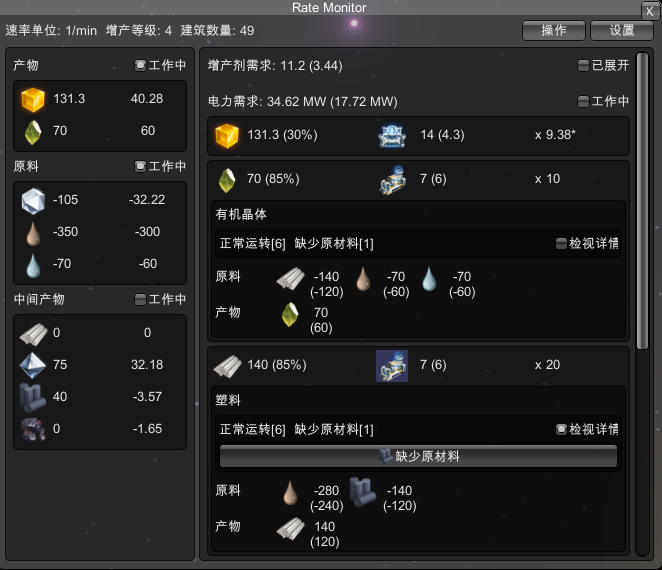
Header
- Rate Unit: The time unit for the data. Common settings include “per minute”(1/min) or “per second”(60/min)
- Proliferator Level: Shows the current level of proliferator effects (if applicable) on the production lines being tracked.
- Entity Count: Displays how many machines or entities (assemblers, smelters, chemical plants, etc.) are included in this monitor’s calculation.
- Operate: Open the operation panel to do actions.
- Config: Open the settings panel to change the config file.
Material / Intermediate / Product Panel
- Material: Lists raw or input materials (e.g., iron ore, copper ore, coal).
- Intermediate: Lists partially processed goods (e.g., steel, plastic).
- Product: Lists final products (e.g., energetic graphite, refined oil).
The left numbers are theoretical net rate (maximum production - maximum consumption), assuming all machines run at full speed.
The right numbers are estimated net rate, calculated by (machine working ratio * theoretical net rate).
Clicking on the item icon can focus on the item, filter to only show the recipes related to it.
Recipe Info Panel
Click on the middle building icon button to expand the recipe content.
The entry format is:
Production net rate (working ratio %) = Total machine count (wokring machine count) x Net rate per machine
Item Focus Mode
When clicking on item icon, that item will be yellow highlighted. Click again to unfocus.
The entry content will display the Net Machine Count, formula is:
All total net rate / Net rate per machine
The value indicates if the machine-recipe groups have a net surplus/deficit. Negative values mean the machines are under-supplied.
Installation 安装
Via r2modman, or manually download the file and put RateMonitor.dll in BepInEx/plugins folder.
通过管理器r2modman,或者手动下载文件并将RateMonitor.dll放入BepInEx/plugins文件夹。
Configuration 配置文件
Run the game one time to generate BepInEx\config\starfi5h.plugin.RateMonitor.cfg file.
配置文件(.cfg)需要先运行过游戏一次才会出现。修改后需重启游戏才会生效。
## Plugin GUID: starfi5h.plugin.RateMonitor

[General]

## Level of proliferator [1,2,4]. Auto dectect: -1
## 增产效果等级[1,2,4] 自动侦测:-1
# Setting type: Int32
# Default value: -1
# Acceptable value range: From -1 to 10
Proliferator Level = -1

## The theoretical max rate always apply proliferator, regardless the material.
## 计算理论上限时是否强制套用增产设定(否=依照当下原料决定)
# Setting type: Boolean
# Default value: false
Force Proliferator = false

[KeyBinds]

## Hotkey to toggle area selection tool
## 启用框选工具的热键
# Setting type: KeyboardShortcut
# Default value: X + LeftAlt
SelectToolKey = X + LeftAlt

[UI]

## Timescale unit (x item per minute)
## 速率单位(每分钟x个物品)
# Setting type: Int32
# Default value: 1
# Acceptable value range: From 1 to 14400
Rate Unit = 1

## Show Real-time Monitoring Rate
## 显示即时监控速率
# Setting type: Boolean
# Default value: true
Show Realtime Rate = true
ChangeLogs
- v0.1.0: Initial released. (DSP 0.10.32.25781)
Acknowledgements
Specail thanks to following mods and their authors:
Rate Calculator: Main mod idea inspiration.
DSPCalculator: Rate calculation.
All trademarks, copyright, and resources related to Dyson Sphere Project itself, remain the property of Gamera Game and Youthcat Studio as applicable according to the license agreement distributed with Dyson Sphere Program.
CHANGELOG
Changelog
v0.4.2
- Adpat to game version 0.10.34.28347. No longer supports 0.10.33 and below versions.
v0.4.1
- Adapt to game version 0.10.33.26941. No longer supports 0.10.32 and below versions.
v0.4.0
- Support fuel generator and spray coater.
- Detail summary now shows the lacking item for lack material and lack proliferator machines.
- Prevent mouse wheel zoom in/out in mod window.
- Fix input field error in settings panel.
- Refactor code.
v0.3.2
- Change button behavior: Clicking the button when the window is open will now close the window and selection tool. If Ctrl is pressed, it will activate the selection tool instead.
- Esc can now close the widow.
- Add the 'Recalculate' button to the expanded title to refresh the building settings of selected machines.
v0.3.1
- Add a button besides mecha energy bar to open mod window and selection tool (configurable).
- Reorganize config group. Some UI settings may be reset.
- Enable navigate to machine group that is working 100%
- Add "<" button in top-right to load the last selection.
v0.3.0
- Add config UI: Font Size. Default value is 16.
- Add expandable button (+) in title to quick change rate unit and count multiplier.
- The count multiplier affect machine count. It resets to 1 after title is folded.
- When the window is open, Ctrl+right click can continue to add selected buildings (repeatable), and Shift+right click can remove selected buildings.
- When pressing hotkey but the selection tool is not available, it will open the mod window with the last selection.
- The selection tool can now penetrate the mod window to finishing selecting.
v0.2.0
- Support ray receivers and energy exchangers production calculation.
- Make rate panel and window resizeable and memorize the settings.
- Allow user to select the whole remote planet by stats or control window.
- Add more UI config settings.
v0.1.0
- Initial release. [0.10.32.25781]
