

AdventureGuide
In-game quest companion with GPS navigation. 170+ quests with walkthroughs, item sources, and world markers. Click any step, follow the arrow.
| Date uploaded | 2 weeks ago |
| Version | 2026.718.0 |
| Download link | WoW_Much-AdventureGuide-2026.718.0.zip |
| Downloads | 363 |
| Dependency string | WoW_Much-AdventureGuide-2026.718.0 |
This mod requires the following mods to function

BepInEx-BepInExPack
BepInEx pack for Mono Unity games. Preconfigured and ready to use.
Preferred version: 5.4.2304README
Adventure Guide
Every quest. Every item source. Click and go.
In-game quest companion for Erenshor. 170+ quests with step-by-step walkthroughs, GPS navigation, and floating world markers above every quest-relevant NPC.
Navigate to anything
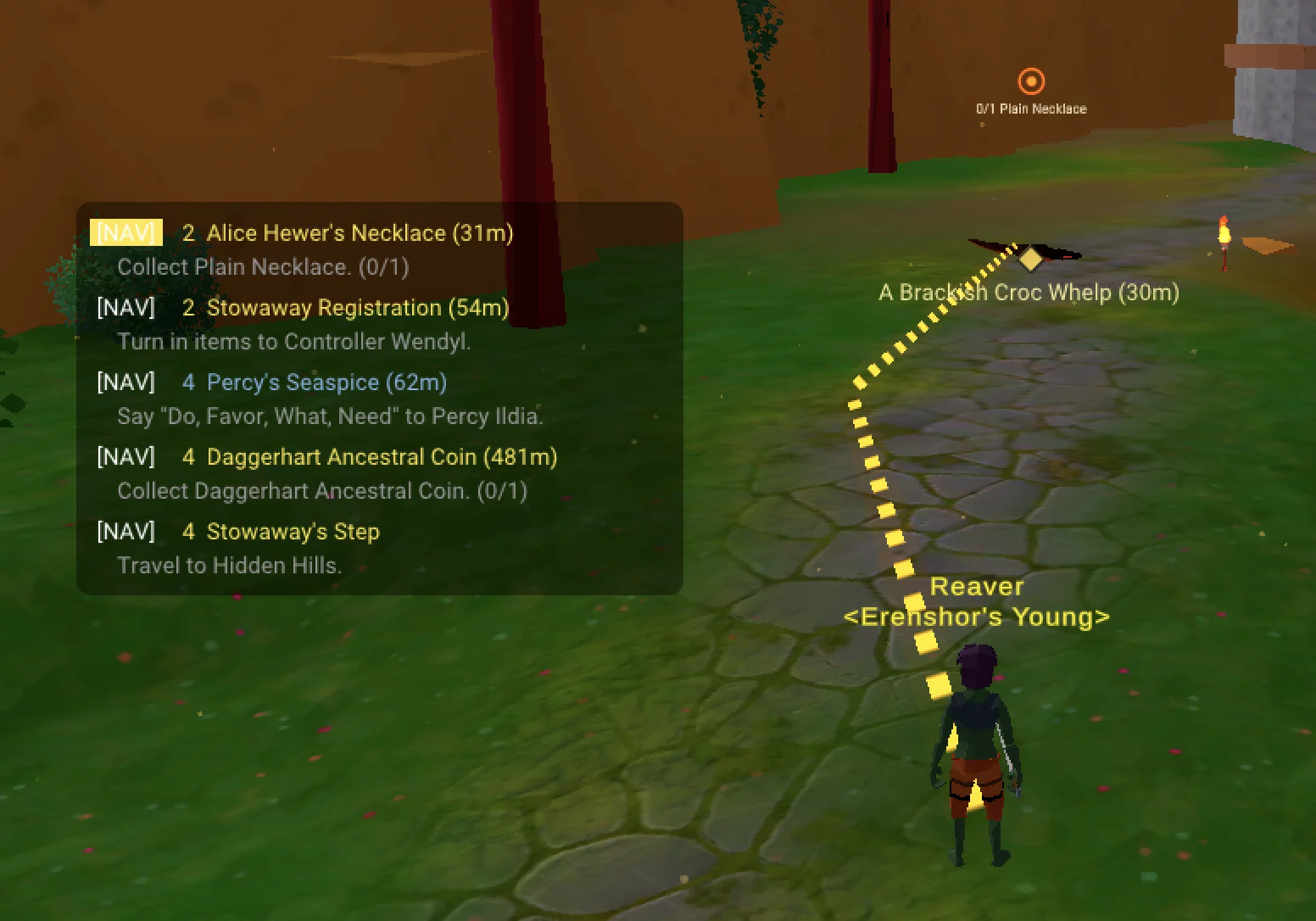
Every quest step has a [NAV] button. Click it and a directional arrow points you to your target — across zone boundaries, chaining through multiple connections to get you there.
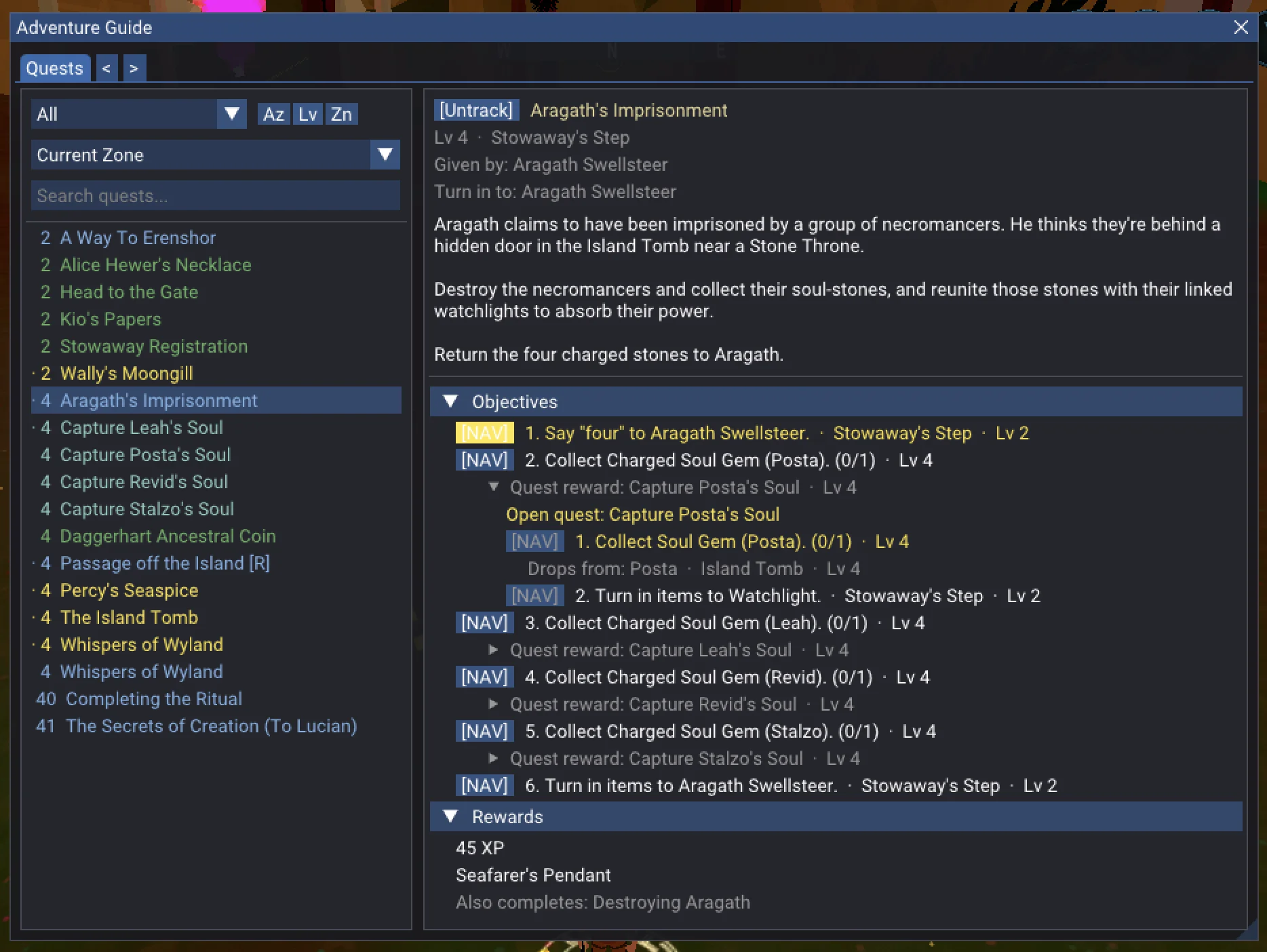
Need an item? Every source is listed — enemy drops, vendors, mining nodes, fishing spots, crafting recipes, quest rewards. Click any source and the arrow takes you to it. When a source is another quest's reward, that quest's walkthrough unfolds inline with its own nav buttons.
See what you've been missing
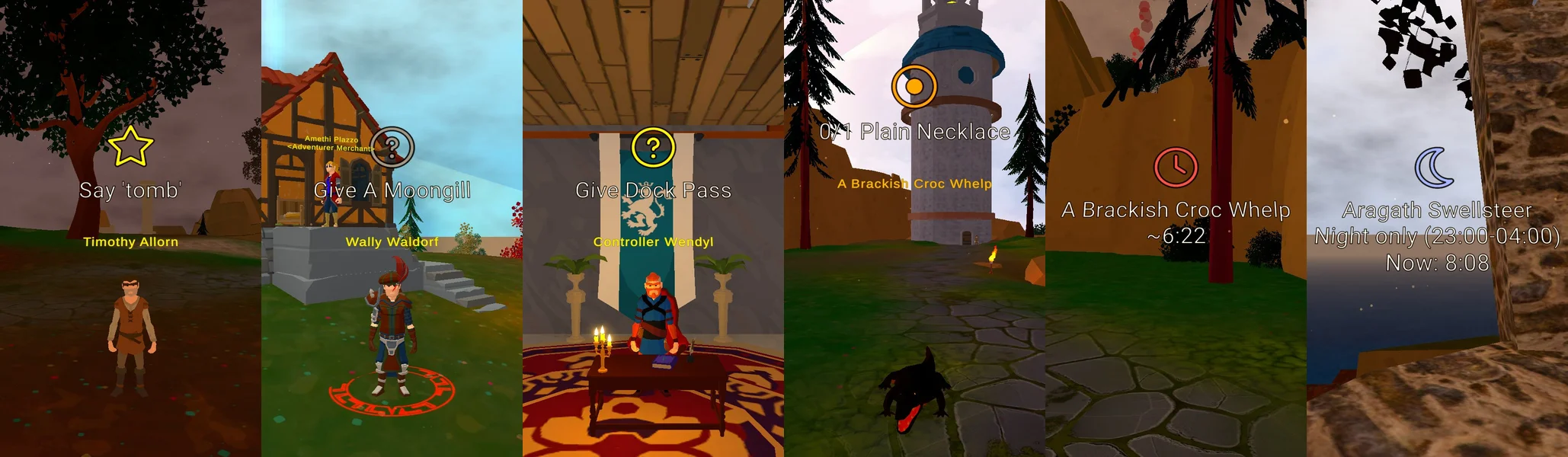
Floating icons appear above NPCs in the game world — quest givers you've walked past, turn-in targets waiting for your items, enemies you need to hunt down. Kill a quest mob and its marker switches to a live respawn countdown. Night-only spawns show the spawn window and current game time so you know when to come back.
Know the whole path
Each step tells you who to talk to, what to say, where to go, and what items to collect. Level estimates on quests and steps show what you're ready for and help you tackle things in the right order. Come back after a week and your progress, item counts, and active step are right where you left them.
Keyboard shortcuts
| Key | Action |
|---|---|
| L | Open the Adventure Guide |
| K | Open the quest tracker |
| P | Toggle ground path overlay |
Configuration
All settings are in BepInEx/config/wow-much.adventure-guide.cfg
(generated on first launch), or edit in-game with
Configuration Manager
(F1).
| Setting | Default | Description |
|---|---|---|
| ShowArrow | on | GPS arrow pointing to navigation target |
| ShowGroundPath | off | Ground path line using NavMesh pathfinding |
| ShowWorldMarkers | on | Floating quest icons above NPCs |
| TrackerEnabled | on | Quest tracker overlay |
| TrackerAutoTrack | on | Auto-track newly accepted quests |
| ReplaceQuestLog | off | J opens Adventure Guide instead of the game's quest log |
| UiScale | auto | UI size factor (-1 = auto-detect from resolution) |
| TrackerBackgroundOpacity | 0.40 | Tracker overlay transparency |
| TrackerSortMode | Proximity | Sort tracked quests: Proximity, Level, or Alphabetical |
| MarkerScale | 1.0 | World marker size multiplier |
CHANGELOG
Changelog
v2026.718.0
- Fix error spam in the log after returning to the main menu.
v2026.717.0
- Hide the navigation arrow, ground path, and world markers while Hide UI mode (F7) is active.
v2026.713.0
- Add Planar March quest data.
- Update NPC and item locations.
- Untrack completed quests more reliably.
- Keep the Untrack button available on completed quests.
- Suppress incorrect respawn markers on quest-gated and scripted spawns.
- Fix a crash on game exit.
v2026.327.2
- Fixed mod not working if HideManagerGameObject is not set in BepInEx config
v2026.327.1
- Fixed compatibility issue when installed via Thunderstore (assembly conflict with Unity's built-in types)
v2026.327.0
- Added keyboard shortcut to toggle the ground path on/off (default: P, configurable in settings)
- Tracker window hides automatically when covered by native game UI panels
- Ground path now connects directly from your position to the target without floating gaps
- Ground path dashes remain stable as you walk — only the short endpoint segments adjust, reducing visual noise
- Navigation path and arrow diamond now render at a consistent height above terrain
v2026.326.1
- Updated mod icon
v2026.326.0
- Initial release: 170+ quests with step-by-step walkthroughs, GPS navigation arrow, ground path, floating world markers, and quest tracker
