

TimbnZombieCustomizer
Restyle your zombies' hairstyle, hair color and clothes color in the same customization window you use for your own character.
| Date uploaded | a week ago |
| Version | 1.2.0 |
| Download link | Timbn-TimbnZombieCustomizer-1.2.0.zip |
| Downloads | 32 |
| Dependency string | Timbn-TimbnZombieCustomizer-1.2.0 |
This mod requires the following mods to function

BepInEx-BepInExPack
BepInEx pack for Mono Unity games. Preconfigured and ready to use.
Preferred version: 5.4.2305
Timbn-TimbnCore
The shared framework every Timbn mod for Graveyard Keeper 2 is built on. Install it when a Timbn mod needs it. On its own it adds a Mod Settings window for your mods.
Preferred version: 2.2.0README
Timbn Zombie Customizer
Restyle your zombies' hairstyle, hair color and clothes color in the same customization window you use for your own character.
How To Use
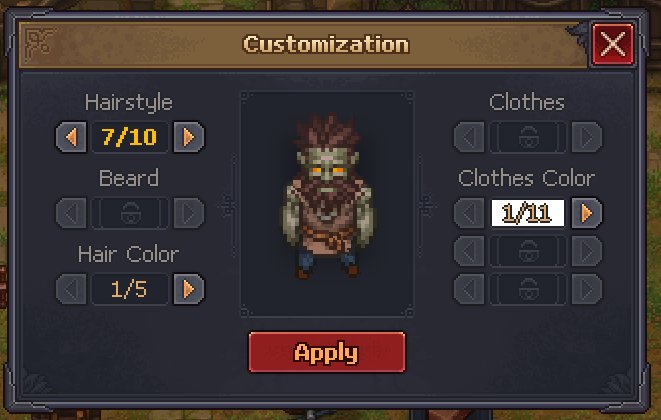
Inspect a zombie and click its portrait at the top of the window. The customization window opens with your zombie in the preview. It works on zombies that are standing, working, or lying on the ground.
What You Can Change
-
Hairstyle. Ten heads, the same ones the game gives new zombies. Most are hairstyles with or without a beard, one is bald with a beard, and one is a hood.
-
Hair color. Five colors for the hair and beard (auburn, light brown, ash gray, blue black and red). The hood has no hair, so this does nothing on it.
-
Clothes color. Ten tints for the clothes, plus none (red, orange, yellow, green, teal, blue, purple, pink, gray and dark). Zombies only have one outfit in the game, so this tints it rather than swapping it, and the hands take the tint too. Each zombie keeps the color you gave it.
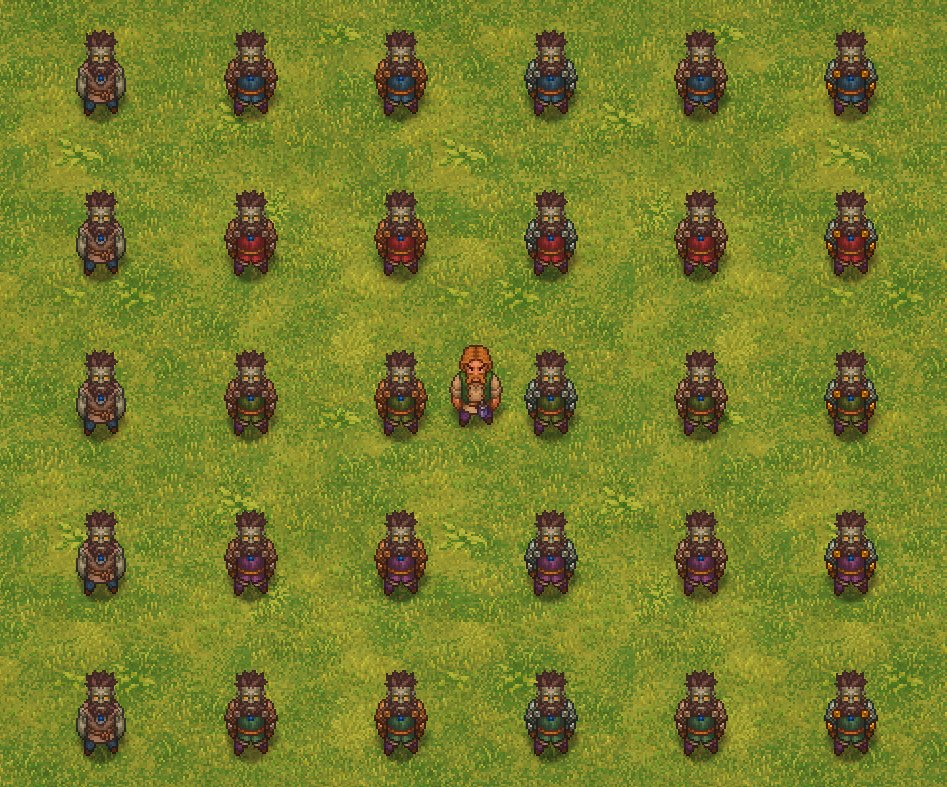
Rows with nothing to choose from for a zombie, like Beard and Clothes, are grayed out.
Settings
- The ten clothes colors the window offers (
Clothes Colors / ClothesColor1toClothesColor10, written as RRGGBBAA hex). With Configuration Manager you can choose them with its in game color picker.
Changing a color later only changes what the window offers. Zombies keep the color they already have.
Good To Know
- The look is saved with your game
- Zombies at a mine or a garden wear their work hat while working and keep their beard and hair color
- Zombies in armor keep their hairstyle and hair color
- A zombie you are carrying or one lying on the ground shows its hairstyle and hair color but not its clothes color, which comes back when it stands up
- If you uninstall the mod, hairstyles and hair colors stay but clothes colors go away
- Your own character's look is never changed
Requirements
- BepInExPack
- Timbn Core 2.2.0 or newer
Troubleshooting
If a game update changes something a Timbn mod relies on, that mod stays off instead of running half broken, and BepInEx/LogOutput.log says which part failed. Include the startup line from that log when reporting a problem.
CHANGELOG
Changelog
1.2.0
- Now runs on Timbn Core 2.2.0.
- The Mods window shows an About card for this mod, with a description and links to its pages, and lists it under Timbn Mods.
1.1.0
- Now runs on Timbn Core 2.0.0.
- Rows with nothing to choose for a zombie, like Beard and Clothes, are grayed out.
- A zombie at a mine or a garden keeps its beard and hair color under its work hat.
1.0.0
- First release. Restyle your zombies' hairstyle, hair color and clothes color in the game's own customization window, opened from a zombie's portrait.
