

Audio Mod
An audio mod that adds audio to the game for an enhanced experience.
| Date uploaded | 7 months ago |
| Version | 0.2.0 |
| Download link | PatrickH-Audio_Mod-0.2.0.zip |
| Downloads | 65 |
| Dependency string | PatrickH-Audio_Mod-0.2.0 |
This mod requires the following mods to function

BepInEx-BepInExPack
BepInEx pack for Mono Unity games. Preconfigured and ready to use.
Preferred version: 5.4.2100README
Grey Hack Audio Mod
This mod adds computer-like audio feedback to Grey Hack, enhancing immersion by simulating real system sounds.
You will hear things such as boot-up beeps, hard-drive access, system error beeps, OS alerts, and more.
Features / Included Sounds
The mod currently includes the following audio effects:
| Audio File | Description |
|---|---|
bootup-beep.wav |
Startup BIOS-style beep |
cpu-fan-loop.wav |
Looping CPU fan noise |
game-over.wav |
Failure/game-over sound |
harddrive-loop.wav |
Hard-disk idle/working loop |
harddrive-spindown.wav |
Hard-disk powering down |
harddrive-spinup.wav |
Hard-disk powering up |
os-action-fail.wav |
Action failed sound |
os-boot.wav |
OS boot chime |
os-error.wav |
OS error alert |
os-notification.wav |
Notification ping |
system-failure-loop.wav |
Critical failure loop |
trace-beep.wav |
Network trace alert beep |
Installation
✅ BepInEx 5 Manual Install (recommended)
- Install BepInEx 5 for Grey Hack
(This mod is designed for BepInEx 5) - Place the mod
.dllfile into:
Grey Hack/BepInEx/plugins/
- Place the Audio folder from this mod into:
Grey Hack/BepInEx/plugins/Audio/
- Launch the game — the sounds will play automatically.
⚠️ BepInEx 6 Support
If you require the BepInEx 6 version, download it here:
🔗 https://github.com/Patrick-van-Halm/greyhack.audio-mod/releases/latest
Custom Audio
All sounds are completely user-replaceable.
To customize audio:
-
Ensure the game is closed.
-
Go to the specific BepInEx plugin folder
- Thunderstore installation
- Go to the Settings > Locations > Browse profile folder. (This opens a new explorer folder)
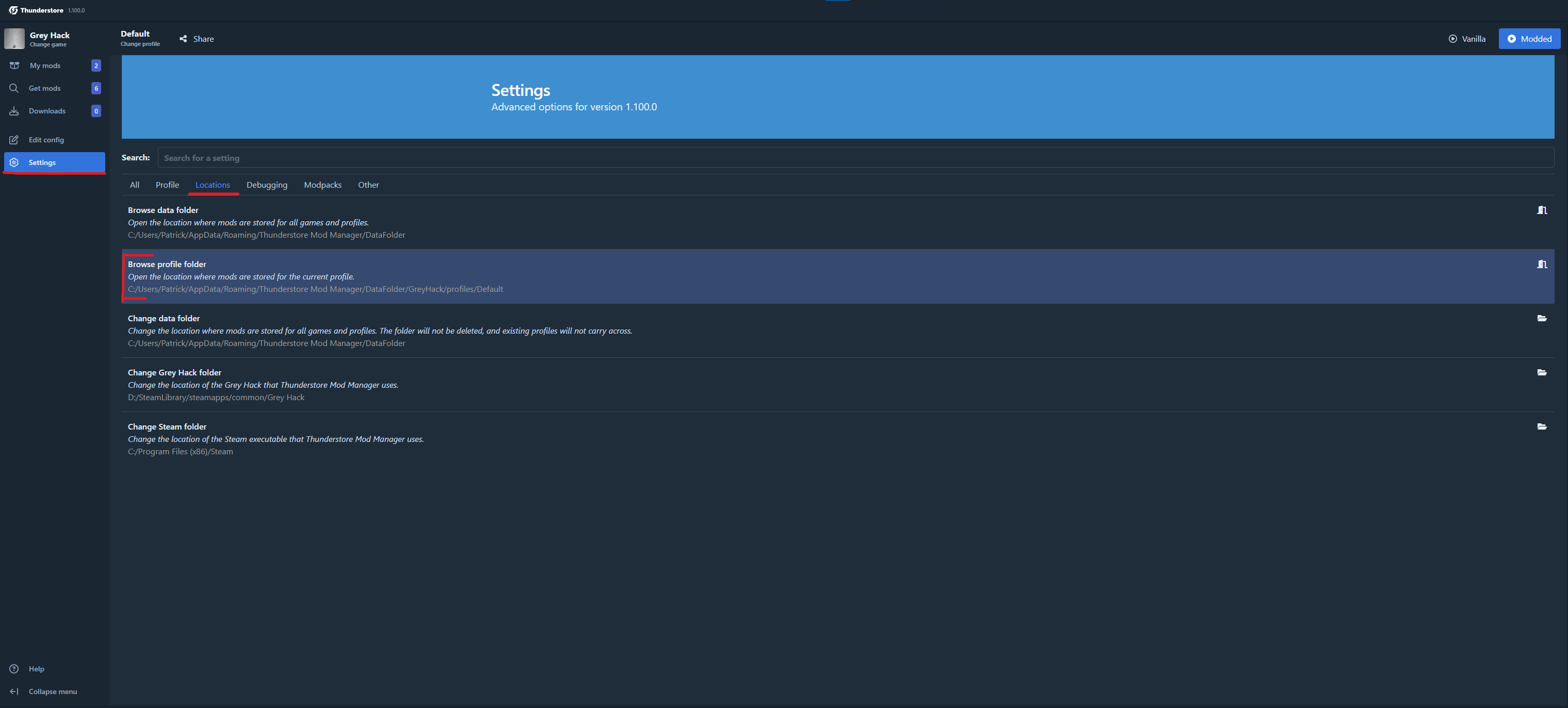
- Go to the installed mod folder:
BepInEx/plugins/AudioMod/ - Go to the Settings > Locations > Browse profile folder. (This opens a new explorer folder)
- Manual Installation
- Go to the installed mod folder:
<Grey Hack Installation Folder>/BepInEx/plugins/AudioMod/
- Thunderstore installation
-
Go into the Audio folder (here are the audio clips stored)
Audio/ -
Replace any
.wavfile with your own version using the same file name.Example: replace
os-error.wavwith your own error sound. -
Restart the game.
About
This mod aims to make Grey Hack feel more like interacting with a physical machine, adding ambient and reactive system audio to deepen immersion and atmosphere.
Enjoy the enhanced hacking experience! 🎧💻
CHANGELOG
Changelog
0.1.0
- Initial release
0.1.1
- Rework project structure and add BepInEx 6 build support (downloadable here)
- Improve README.md
0.1.2
- Improve readme and versioning
0.2.0
- Added support for game version v0.9.6153, this introduced a new feature called the SFX player. This update of the mod disables the current SFX audio effects in the base game since these are in the mod already. Once there are new audio effects introduced to the game that are not in the mod yet the mod will allow these.
- Add ability to control the loudness of SFX using the in-game SFX volume slider in the Audio settings.
0.2.1
- Rename changelog.md to CHANGELOG.md to show it the changelog in the mod manager.
- Fix issue with Thunderstore folder structure.
- Remove readme img from build files.
