

ForgeAudio
Public GTFO audio library: Ogg Vorbis cues, positioned and attached playback, voice budgets, occlusion and sounds every player hears.
| Date uploaded | 2 days ago |
| Version | 1.0.0 |
| Download link | NAinfini-ForgeAudio-1.0.0.zip |
| Downloads | 46 |
| Dependency string | NAinfini-ForgeAudio-1.0.0 |
This mod requires the following mods to function

BepInEx-BepInExPack_GTFO
BepInEx pack for GTFO. Preconfigured and includes Unity Base DLLs.
Preferred version: 3.2.4
NAinfini-ForgeCore
Public GTFO mod foundation: asset bundles, logging, settings, pools, networking, input leases, local saves and calls into the game's own systems.
Preferred version: 1.0.0README
ForgeAudio
A shared sound library for GTFO mods. Mods drop Ogg files in a folder and play them by name. ForgeAudio mixes every mod's sounds together, so they follow the game's volume sliders, share voice limits and quiet down behind walls.
ForgeAudio does nothing on its own. You normally install it because another mod needs it, such as Forge Ordnance.
Report bugs on GitHub, or find me on the GTFO Modding Discord as nainfini.
What it does
- Plays sounds flat, at a point in the level, or following an object.
- Follows the game's sound sliders: Music for music, Dialogue for voices, SFX for everything else.
- Limits how many sounds of one kind play at once, across all mods. A stronger or nearer sound pushes out the weakest one.
- Lets a loud sound, such as an explosion, quiet debris and ambience sounds from every mod for a moment.
- Makes sounds quieter behind walls and closed doors.
- Can play one of the game's own sound events at a point for a mod, unchanged and through the game's own mix.
- Plays a mod's sound for every player at once, at the same place, without the mod writing network code.
- Varies volume and pitch from play to play and never repeats the same variant twice in a row.
- Lets a mod replace or silence one player's own footsteps, jump and landing sounds, for example while that player wears an exosuit. Every other player and every other game sound is untouched. It sends nothing over the network.
Settings
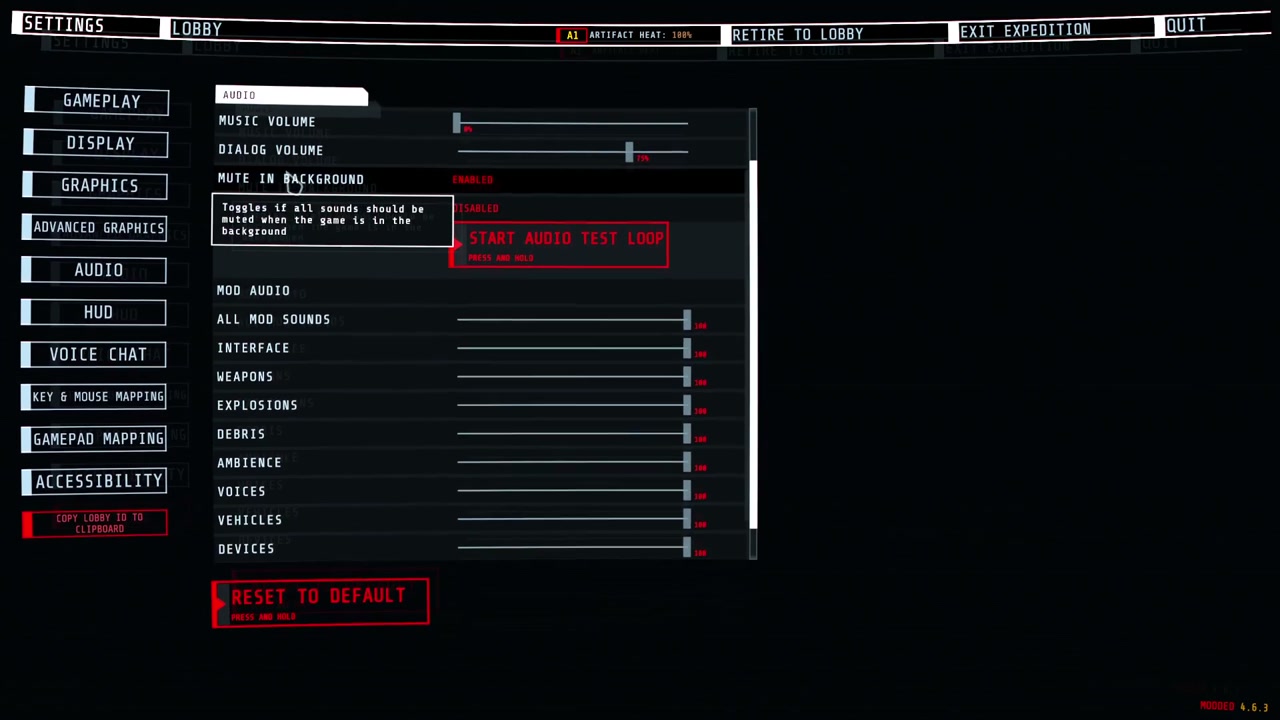
When a mod that also uses ForgeUI is installed (Forge Ordnance and Forge Weapon Energy Lab do), the game's Settings → Audio page has, under the game's own sliders, a MOD AUDIO group: one slider for all mod sounds and one for each category (ForgeUI draws the rows; ForgeAudio keeps the values). They apply to every mod's sounds on top of the game's own sliders, take effect at once and are saved in BepInEx/config/NAinfini.ForgeAudio.cfg (Volume / Master and one entry per category, 0 to 1, default 1). The page's Reset puts them back to full.
| Category | Covers |
|---|---|
ui |
Menus, prompts, confirmations and warnings |
weapon |
Gunfire, reloads |
explosion |
Blasts, impacts |
debris |
Shrapnel, rubble |
ambience |
Beds, hums, loops |
voice |
Speech, radio |
vehicle |
Suits and pods: steps, servos, engines |
device |
Beacons, turrets, supply pods, terminals |
music |
Music |
Mods that use ForgeAudio have no volume settings of their own.
Installation
Install with r2modman or the Thunderstore Mod Manager. It also installs BepInExPack_GTFO and ForgeCore. For a manual install, put the files in their own folder under BepInEx/plugins and install both of them too.
For mod authors
The developer guide explains how to add sounds to your mod.
License
Code: MIT. It includes NVorbis (MIT) to decode Ogg Vorbis; its license ships in the package.
CHANGELOG
Changelog
1.0.0
Version number only: the first release was 0.1.0, and 1.0.0 is the version the Forge packages share from now on. Packages that depend on this library need 1.0.0 or later. Interface change: VolumeControl no longer carries English and Chinese labels (English, Chinese) and AudioVolumes.HeadingEnglish / HeadingChinese are gone; use VolumeControl.TextKey and AudioVolumes.HeadingKey, language keys that ForgeUI's language files hold.
0.1.0
First release.
- Drop
.oggfiles in anaudiofolder next to your DLL, callAudioKit.Loadonce and play cues by name. - 2D, positioned and following playback. Sounds follow the game's volume sliders and mute in the background.
- One shared mix for every mod: nine categories (
ui,weapon,explosion,debris,ambience,voice,vehicle,device,music), each with one voice limit over all mods. A stronger or nearer sound pushes out the weakest one. Volume / Masterand one volume per category, as sliders under the game's own on its Settings, Audio page (and in the kit's config). The page's Reset puts them back to full.- Buses group cues. A bus can limit how many of its sounds play at once and can quiet other categories while it plays.
- Cues are layered mixes: several clips with offsets, gains, ranges, fades, pitch, low-pass and distance ranges, mixed once at load so a cue costs one voice. A length cap fades the mix out.
- Variants: each play picks one clip from a layer's pool. A random play never repeats the cue's previous variant when it has two or more. An explicit
PlayOptions.Variantplays as given. - A cue's
gainorgainDbcan be a[min, max]range: each play picks a volume, evenly in decibels. AudioLibrary.Cuefinds a cue once;AudioCue.PlayEverywhereplays it for every player at the same point with the same variant, pitch and volume, through the kit's own network channel. Later joiners do not hear earlier plays; loops are refused.- Space settings per cue: placement, near and far distance, linear, log or point curves, blend, spread, doppler. A distance-limited layer can replace the near mix with a far one.
Sustainkeeps a loop on an object playing through level changes, checkpoint reloads and device changes.- Budgeted wall and door muffling, and automatic dimension from the sound's position; a followed sound whose object teleports or warps takes the new dimension, and a spectating listener hears the dimension of the player watched.
- A followed object that is destroyed fades its sound out in 150 ms.
- Failures are explicit and name the mod and cue. The shared log holds real failures only, and a repeated failure is written once per key.
- Ogg Vorbis decoding with NVorbis in bounded time, with sample-exact loops. A broken file only silences the cues that use it.
AudioKit.PostGameEventplays one of the game's own sound events at a point, by event ID or byAK.EVENTSname, through the game's own mix, so mods never call the game's sound code.AudioKit.ClaimBodySoundsreplaces or silence one player's own footsteps, jump and landing sounds, with priorities between mods and automatic release at level exit; unclaimed players sound as before.AudioKit.ClaimWeaponActionslets a mod play its own cue on a weapon's reload start, reload end and empty-magazine click, by weapon instance, with the same priorities and level-exit release.- Author tools: convert a folder of WAV, MP3 or FLAC files to Ogg Vorbis, validate a folder exactly as the game loads it, and render a cue's preview at any distance.
- Voice slot (
library.Voice), cue check (library.Require), silent prewarm (library.Prewarm),PlayandSustainon a game object,DimensionAt(position, preferLocalPlayer).
