

ForgeUI
Shared GTFO interface for mods: lobby buttons, pickers, menu pages, HUD elements and ready-made HUD templates, in the game's own style.
| Date uploaded | a week ago |
| Version | 0.1.0 |
| Download link | NAinfini-ForgeUI-0.1.0.zip |
| Downloads | 71 |
| Dependency string | NAinfini-ForgeUI-0.1.0 |
This mod requires the following mods to function

BepInEx-BepInExPack_GTFO
BepInEx pack for GTFO. Preconfigured and includes Unity Base DLLs.
Preferred version: 3.2.4
NAinfini-ForgeCore
Public GTFO mod foundation: asset bundles, logging, settings, pools, networking, input leases, local saves and calls into the game's own systems.
Preferred version: 1.0.0README
Forge UI
A shared interface library for GTFO mods. It draws mod buttons, pickers, menu pages and HUD elements in the game's own style, so several mods never cover each other or the game's own HUD.
Forge UI does nothing on its own. With no mod using it, the game looks exactly as it does without it. You normally install it because another mod needs it, such as Forge Ordnance.
Report bugs on GitHub, or find me on the GTFO Modding Discord as nainfini.
What mods can add
-
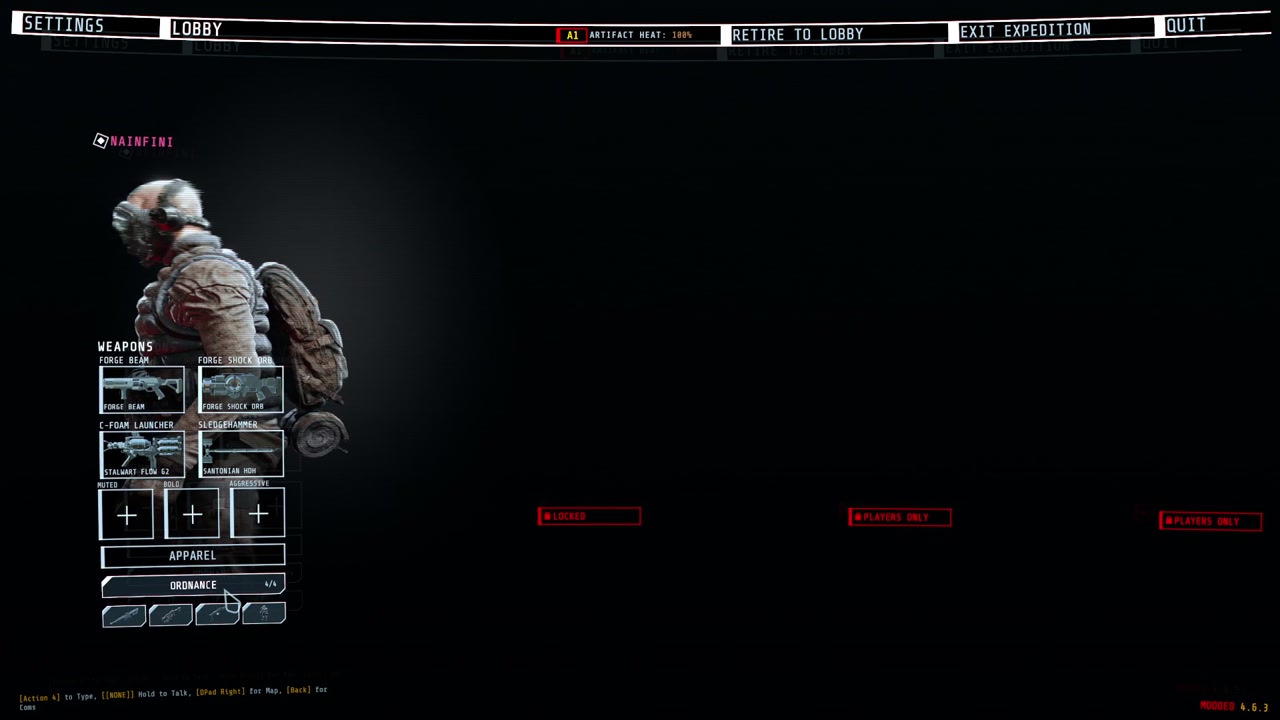
Lobby buttons under APPAREL that open loadout-style pickers.
-
Buttons and pages on the top menu bar.
-
HUD elements in named screen regions. All mods share one layout, one banner queue and one notice list.
-
Ready-made HUD pieces: ability slots, key prompts, big centre text, corner notices, world markers, hit markers and damage numbers.
-
A full-screen power-on layer, one at a time across all mods.
-
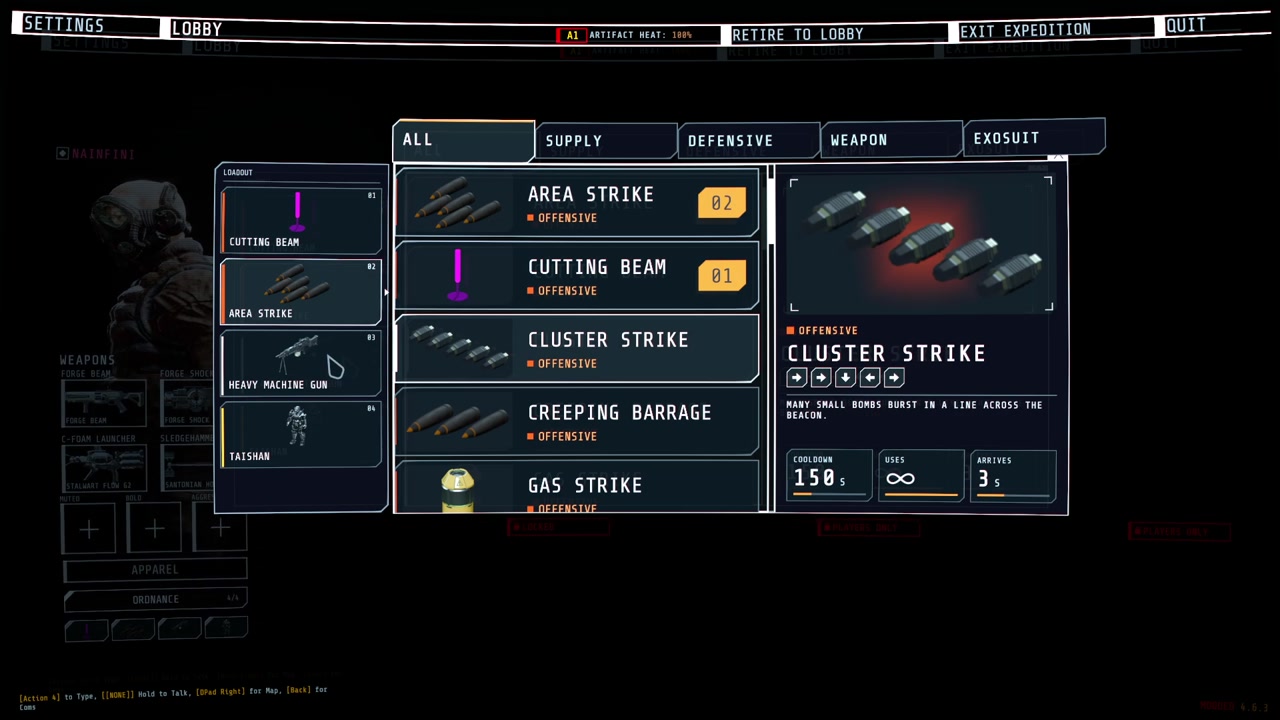
Call-in list and inventory drawn in the same style:
-
Cockpit pieces for vehicles and suits: hiding the game's HUD while piloting (and putting it back), moving the chat, a wide segmented armour bar, arcs beside the crosshair, a ring of contacts out of sight with a turn-around hint, ability slots, a hull damage disc, hit-direction flashes and a faint helmet visor with struts and cracks, plus the game's objectives, prompts, subtitles, inventory and teammates (with infection and ammunition) redrawn in the same style.
-
Hit-direction flashes and the visor shade are merged by priority and drawn in one full-screen pass (colour flash, corner shade, low-health pulse, blur, colour split).
-
Enemy health bars for the enemies you hit and can see: each hit's lost piece flashes and shrinks, a small damage number rises (a burst adds up into one), and a kill leaves a short mark and a small confirmation by the crosshair.
-
A line in the player's own chat box, shown only on their machine, for notices that belong to no screen element.
-
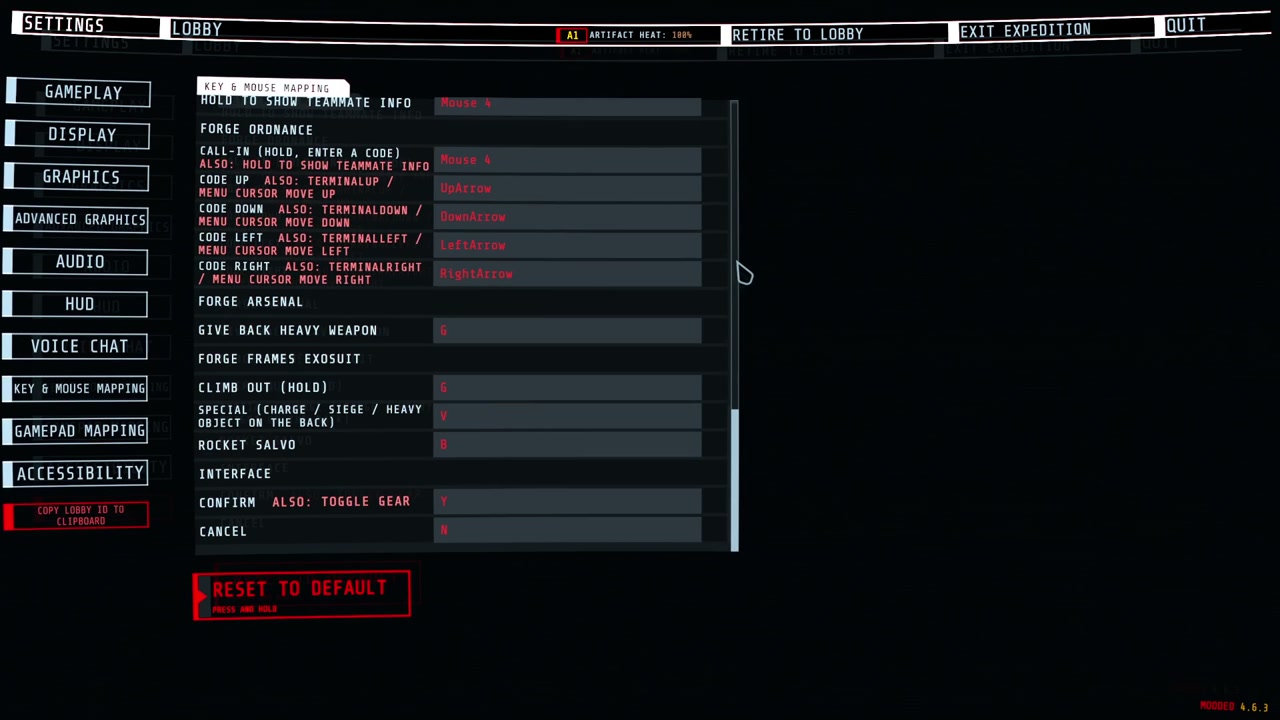
Keys you can change: every mod's keys are listed in the game's own settings (Controls), under the game's keys, one heading per mod. Click a key and press the new one; Esc cancels, Backspace or Delete unbinds, the page's reset puts them back. A key two actions or the game also use is marked.
-
Texts in several languages: each mod ships one file per language, and every text switches as soon as you change the language.
Installation
Install with r2modman or the Thunderstore Mod Manager. It also installs BepInExPack_GTFO and ForgeCore. For a manual install, put ForgeUI.dll in its own folder under BepInEx/plugins and install both of them too.
Settings
After the first launch, the settings are in BepInEx/config/NAinfini.ForgeUI.cfg. Offsets are in pixels at 1080p. Positive values move right or up.
| Setting | Default | Meaning |
|---|---|---|
Lobby / ButtonOffsetX, ButtonOffsetY |
0 | Move every lobby button added by mods. Use it when another mod draws over them. |
Hud / OffsetX, OffsetY |
0 | Move every HUD element added by mods. |
Hud / SafeMargin |
48 | How far HUD elements keep from the screen edge. Raise it on a TV that crops the picture. |
Language / Language |
Auto | Language of the text in every mod that uses the kit. Auto follows the game's language; en, zh or another code forces one. A mod with no file for that language shows English. |
Screen / Visor |
On | Draws the helmet visor some mods show. Turn it off for a clear screen. |
Screen / VisorFrame |
0.13 | Opacity of the visor's struts and corner brackets, 0 to 1. |
Screen / CracksMax |
0.3 | Highest opacity of visor cracks. They never cover the middle of the screen. |
Screen / HitFlashPeak |
0.35 | Peak opacity of the hit-direction flash on the screen edge. |
Screen / HitFlashSeconds |
0.3 | How long a full hit flash lasts, 0.1 to 2 seconds. |
Screen / Glow |
1 | Strength of the soft glow round the lit parts of HUD pieces mods draw, 0 to 2. 0 turns it off. |
Screen / Fringe |
On | A faint 1 px red and blue colour fringe on those pieces, like a display seen through a visor. |
EnemyHealthBars / Enabled |
On | Draws the enemy health bars, damage numbers and kill marks mods switch on. Off hides them in every mod. Written the first time a mod uses them. |
A value that is not a number warns once and uses 0.
Keys you changed are kept in BepInEx/config/NAinfini.ForgeUI.keys.cfg; a key you never changed follows the mod's default.
Reporting a problem
Include the game build, your installed mods, a screenshot and BepInEx/LogOutput.log.
For mod authors
The developer guide has the quick start and the API.
License
Code: MIT.
Fonts, under the SIL Open Font License 1.1 (full texts in fonts/):
- Rajdhani, © 2014 Indian Type Foundry.
- Glow Sans SC Condensed (未来荧黑), © 2021 Project Welai; the package carries its common-character subset.
CHANGELOG
Changelog
1.0.0
Version number only: the first release was 0.1.0, and 1.0.0 is the version the Forge packages share from now on. Packages that depend on this library need 1.0.0 or later. Interface change: SettingsSlider takes a language TextKey instead of English and Chinese labels, and SettingsPages.AddAudioSliders takes one headingKey instead of two heading texts. The audio volume labels now live in ForgeUI's language files. CommandMotion, EnemyBarBook, FloatingNumbers, IconBook, EdgeFlashes, ScreenEffectBook, WaypointBook and WaypointMath are now internal: nothing outside the package used them.
- Item pictures wait for the game to build an item's model and fall back to the model prefab, so a consumable still in a backpack no longer loses its picture.
- A borrowed objective timer is taken down when released even if the game or another mod changed its text meanwhile.
0.1.0
First release.
- Lobby buttons for mods, stacked under APPAREL, with one offset setting for all of them.
- Pickers in the game's own loadout pop-up: a slot column, tabs, a card list, a details box with badges, and refusal text.
- Top menu bar buttons and pages that open in the game's menu pop-up.
- One shared HUD. Each mod registers HUD elements by region and priority instead of by position. The kit stacks them, keeps the game's weapon list and health bar free, and folds away the weakest element when a region is full.
- Hide the game's own HUD by lease: HideGameHud (all but a keep list) and HideGameHudParts (only the named parts) share one request table; each part is hidden at its root objects, at a cost independent of how many pieces the game draws, and restored exactly on release.
- One shared banner queue and one shared notice list for every mod.
- Ready-made HUD pieces: ability slot, key prompt, banner, notices, world marker, hit marker, damage numbers, hint line and a command list.
- Wrappers for the game's world marker, interaction prompt (with its hold ring) and weapon list line, so mods never touch the game's HUD code.
- A full-screen power-on layer with seams and boot message, one exclusive layer at a time across all mods.
- Picture files load as picker icons.
- Key actions: mods register their keys once and read them every frame; players change them in the game's own settings (Controls), choosing per key how it fires (on press, on release, short press, long press, double press), how long a long press lasts and how far apart a double press may be, what happens on a key the game also uses, with conflicts marked and changes saved in
NAinfini.ForgeUI.keys.cfg. - Texts in several languages: each mod ships
lang/<language>.json, titles, pages and HUD labels take a key, and everything switches when the language changes. ALanguagesetting follows the game's language by default. Missing texts fall back to English, and the files are checked against each other at first use. - Cockpit pieces: hide the game's HUD by parts while a mod needs the whole screen (counted per mod, released on death, level end and disconnect), move the chat, a wide curved segmented bar with shield, health and infection strips, crosshair arcs, a ring of contacts out of sight with a turn-around hint, a hull damage disc, an inventory with a card for the selected slot, ability slots with cut corners, small text readouts, a fading key prompt, world marker bars and icons, picker stat rows and lobby icon rows.
- The game's objectives (with timers and map prompts), interaction prompt, subtitles, inventory, warden intel, boosters, pickups, the player's health and the teammates (with infection, ammunition and status) can be read and redrawn in the kit's style, in the game's language.
- Screen overlays: hit-direction flashes on the screen edge, and a helmet visor with corner shade, struts and brackets (each with its own opacity), three layers of cracks from a picture, heat on the bottom edge, interference and a boot sweep, faint by default and kept off the middle of the screen; strength settings under
Screen. - One cockpit look: cut-corner plates and frames, slanted cells and cell gauges in
HudCanvas; lit parts of HUD pieces glow softly (Screen / Glow) with a faint 1 px colour fringe (Screen / Fringe); a timeline for boarding and leaving. - The kit's own fonts: Rajdhani for Latin letters and digits and Glow Sans SC Condensed for Chinese, falling back to the game's font. Every HUD piece can pick them; the cockpit pieces use them by default.
- Enemy health bars that mods switch on: only enemies in sight; the bars show each hit's damage, add up bursts into one number and mark kills.
- Hiding the game's HUD also covers the cracked-glass camera effect; the kit's pieces follow the game when it puts its HUD away (map, terminal, menu); the player's grabbed or stunned state can be read.
- Icon packs: mods register pictures as
Pack:nameand anyone looks them up by that name, and the game's own icons byGame:name; every duplicate, missing name and unreadable file is reported once. - Missing texts fall back to the same language family first (
zh-hanttozh), then English. - Settings for the lobby and HUD offsets, the HUD safe margin, and the language.
- Click callbacks for the library's silent presses. The library plays no sounds of its own.
UIKit.PostChatNoticeputs a line in the player's own chat box on this machine only, so mods never call the game's chat code.
