
HideoutProgression
Sequel to SafehouseProgression. Adds bartering, improved UI Tablet, TnH looting, and traders (TBD). [Devlogs on YouTube]
By NGA
| Date uploaded | 2 years ago |
| Version | 0.1.3 |
| Download link | NGA-HideoutProgression-0.1.3.zip |
| Downloads | 133 |
| Dependency string | NGA-HideoutProgression-0.1.3 |
This mod requires the following mods to function


NGA-VaultSaveCompatibility
[Beta] Skips over broken/deleted mods when loading a Vault save-file. Made for Safehouse Progression to avoid losing loadouts and houses.
Preferred version: 0.1.0
NGA-SceneSaveEverywhere
Enables Anton's scene saving EVERYWHERE. All vanilla maps, TnH, modded maps, and Wurst-modded maps! Works with Safehouse Progression :)
Preferred version: 0.1.0
NGA-JsonFileIO
BETA! (For making mods) Code lets you read/write JSONs full of key-value pairs to your plugin folder.
Preferred version: 0.0.3
NGA-ProgressionTablet
[Required for Hideout Progression mod]. Includes hideout management tablet and stylus.
Preferred version: 0.1.0
NGA-LootInTNH
[Beta] Find loot related to your TnH character in Supply Points. Option to disable constructor.
Preferred version: 0.1.0
NGA-ProfileSaveFolder
(For modders) Serves as external location where all JsonSaveSystem save files can reside. See details in Thunderstore.
Preferred version: 1.0.0README
Hideout Progression 0.1.0
The sequel to "SafehouseProgression" and "Safehouse for H3MP" mods.
Biggest NEW features:
- New bartering system: Buy weapons in your hideout from the ItemSpawner
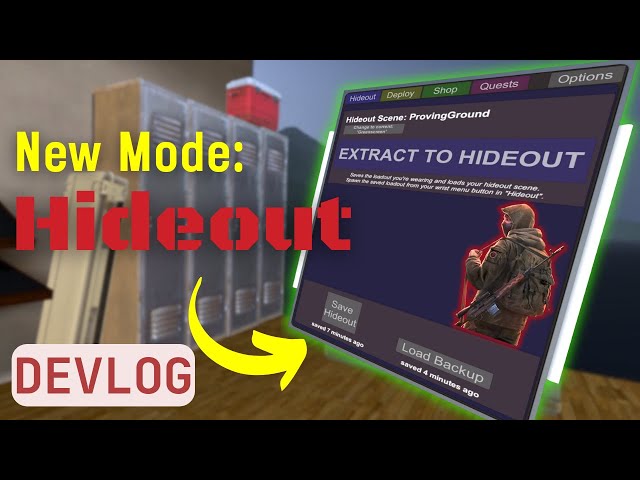
- Hideout Management Tablet (UI): You can manage all hideout-related info using an iPad.
- You won't have to "type-in" your safehouse maps anymore!
- Simplified Wrist-menu buttons
- Does not interfere with older versions of SafehouseProgression.
- Loot-in-TnH mod integration: Quest items and unique rewards will appear when looting Supply points in TnH.
- New quests system (TBA): Complete quests in Sandbox, TnH, and Supply raid modes for different Traders to unlock cheaper prices or rewards.
For detailed explanation of mechanics, please see the [YouTube Tutorial] and any new Devlogs.
Brief summary below:
- Enter the scene you wish to be your safehouse.
- On your
wrist menuclick: "Hideout > Spawn Tablet" - In the
Hideout tabof the tablet, press "Set this scene as Safehouse" (gray botton near top).
i. Confirm the scene name matches your scene
ii. Decorate your safehouse - Purchase gear from the Itemspawner if you have any funds
i. Will only work if the Hideout Tablet is spawned. ii. Only weapons cost money, proportional to their class
iii. Funds displayed in the bottom-left corner of the Itemspawner, beneath the item details
iv. Equip all items on your quickbelt - In the
Deploy tabof the tablet, selectDEPLOY
i. All items equipped in your quickbelt will be saved
ii. Your scene will be saved
iii. You will spawn in theMAIN MENU - Play any mode you like
- On your
wrist menuclick: "Hideout > Spawn Loadout"
i. The loadout you had when you pressed "DEPLOY" will appear on your quickbelt
ii. The loadout pressing "Spawn Loadout" again will not spawn your gear, it's now spent - On your
wrist menuclick: "Hideout > Extract-to-Safehouse"
i. All items equipped in your quickbelt will be saved
ii. You will spawn at your Safehouse - In the
Deploy Tabof the tablet, select "Spawn loadout into Quickbelt"
i. The loadout you saved when you pressed "Extract-to-Safehouse" will now be in your quickbelt - In the
Shop Tabof the tablet, grab the stylus and point it at your loot, pressSELL
i. The loot will be deleted and its value added to your "Funds"
ii. You can withdraw.69 Cashmoneyon denominations of $1,5,10,20,100,1000 using the bottom button
Known Bugs
- Quests and Options tabs are not active yet
- Go report new ones here: >>[Feedback form]<<
Planned Features
- [✓] Release public Alpha with features
- [_] Add traders and quests
Versions
0.1.2
- FIX: Added missing dependency (would break if installed on empty profile)
0.1.0
- NEW: Make UI Tablet for Basic Safehouse for H3MP functionalities.
- NEW: Make UI and Stylus for Shop selling section
- NEW: Modify ItemSpawnerV2 to sell items when you're inside your safehouse AND the tablet is spawned.
