
Minimap
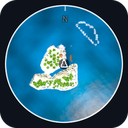
A live minimap in the corner. It renders the world under you in real time, marks you, your boat and your crew, and works with custom islands out of the box.
| Date uploaded | a day ago |
| Version | 1.1.0 |
| Download link | YoxiUI-Minimap-1.1.0.zip |
| Downloads | 922 |
| Dependency string | YoxiUI-Minimap-1.1.0 |
This mod requires the following mods to function

BepInEx-BepInExPack
BepInEx pack for Mono Unity games. Preconfigured and ready to use.
Preferred version: 5.4.2100README
Minimap
A live minimap in the corner of the screen for How to Fish.
No panel, no frame, just the world in a circle. And it is not a drawing of the world, it is the world: a second camera looks straight down at you and shows what is actually there. Islands you have never been to, custom islands somebody else built, a jetty you put up five minutes ago - all of it appears, because there is nothing to teach it and nothing to keep up to date.
What it shows
- The ground under you, live, including the water, so you can always see where the shore is. Your boat is in there too, drawn as the boat, because it is a real view and not a set of symbols.
- You, in the middle, as an arrow pointing the way you are facing.
- The way back to your boat once it is off the edge and you can no longer see it: an arrow on the rim pointing the way, with how far to go beside it.
- Everyone else in your game.
- North, on the rim.
Controls
| Key | What it does |
|---|---|
| N | Shows and hides the minimap |
| Up arrow | Zoom in |
| Down arrow | Zoom out |
All three can be changed in the config, along with the size, where it sits, how solid it is, and whether the map turns with you or keeps north at the top.
It sizes itself to the island
The islands here are nothing like each other - the smallest is about a third the width of the biggest - so one fixed range leaves a small island as a dot in a lake and shows only a corner of a big one.
So it scales itself. Every island scene carries its own size, authored by whoever built it, and the minimap zooms to that, which means a custom island is framed properly the day it is installed without this mod knowing anything about it. The zoom keys then set how much sea you want around the shore, and that carries from island to island.
Turn it off with Scale to the island if you would rather have the same number of metres everywhere.
Installing
With a mod manager (easiest)
- Install r2modman or the Thunderstore Mod Manager.
- Select How to Fish, search for Minimap, click Install. BepInEx comes automatically.
- Press Start modded.
Manual
- Install BepInEx 5 x64 into the game folder, run the game once, quit.
- Copy HTFMinimap.dll into
How to Fish/BepInEx/plugins/.
With the CustomIslands Loader
The two are made to go together, but neither needs the other and this one does not depend on it.
Custom islands need nothing special here. The minimap renders whatever is under you, so an island it has never seen before works exactly like one the game shipped with - there is no list to be on and nothing to install for it.
The loader used to have a full screen chart on M. That has been dropped in favour of this, because a camera pointed at the ground is right about things a drawn map has to be told. If you are still on an older loader that has the chart, the minimap gets out of the way while it is open.
If it costs you frames
Everything on the minimap is cheap except the render, so that is where the settings are:
[Performance]
Refreshes a second = 30
Detail = 256
Refreshes a second is the one worth turning down first. Ten is still perfectly smooth to walk around with. Detail is how many pixels the view is rendered at.
Co-op
Nothing here is networked and nothing is sent anywhere. Other players do not need it, and whether they have it changes nothing for you.
A note on testing
This build is tested, but not thoroughly, as I am only one person. There
are a lot of combinations I cannot cover on my own. If you hit an issue,
please DM me on Discord: yoxiui. Tell me what you were doing and send
your BepInEx/LogOutput.log if you can, and I will get it fixed.
Notes
- Contains no game assets. The lettering is the game's own font, found in memory at runtime, not shipped.
- Nothing is written to your save.
More from Yoxi
- CustomIslands Loader - play custom, community-made islands
- BetterIslands - an island pack: hand-built replacements for the game's islands
- MoreIslands - an island pack of brand new places out in open water
- CustomIslands Mapmaker Kit - build your own islands (Unity project, download manually)
- Living Skies - day-night cycle plus storms, rain, lightning and thunder
- Better Oceans - a better sea to sail and fish in
- Torch - a torch you can carry and light the dark with
Built by Yoxi.
CHANGELOG
Changelog
1.1.0
It sizes itself to the island now
The islands in this game are nothing like each other. Measured, their radii run from about 29 metres to about 80 - the biggest is nearly three times the width of the smallest - so no single range was ever going to frame them all. One that suits a big island leaves a small one as a dot in a lake, and one that fills the small one shows a corner of the big one.
It now zooms itself to whatever you are standing on. The number does not come from a list kept in this mod, which would only ever cover islands it had been told about: every island scene carries its own size, set by whoever built it, and the game already reads it for its own ambience. So a custom island is framed properly the day it is installed, and there is nothing to configure and nothing for anyone to add it to.
The zoom keys now set how much sea you want around the shore rather than a raw distance, so your preference carries from island to island instead of needing redoing on each one. The readout still shows real metres.
If an island reports a size that is not a believable radius - a map built without the component, say - it falls back to a fixed range rather than showing you something broken, and says so in the log along with the number it saw.
Turn the whole thing off with Scale to the island if you would rather have the same distance everywhere.
Also
- Zoom is on the up and down arrows rather than Page Up and Page Down. Existing installs keep whatever is already in the config; change it there or delete the file to pick up the new default.
- The icon is a photograph of the mod running rather than a drawing of one.
1.0.0
First release.
A live minimap in the top right corner.
What it does
- Renders the world directly beneath you with a second top-down camera, so what you see on it is what is actually there. Nothing is stored and nothing has to be taught: custom islands, added islands and anything built since work with no setup.
- Marks you in the middle as an arrow pointing the way you are facing.
- Points the way back to your boat once it is off the edge, with the distance beside it. While the boat is on the minimap there is no marker at all, because the boat itself is in the picture and a dot on top of it was covering up the thing it was pointing at.
- Marks everyone else in your game.
- Marks north on the rim.
- Turns with you by default, or keeps north at the top if you prefer.
- Stays off until you are actually standing in the world. A local player exists well before you can do anything with it, so waiting on that alone put the minimap over the top of the loading screen showing a half-built island. It now waits for the loading screen to go, the island to finish streaming in, and the player to be switched on.
How it looks
- A circle with a thin white ring on its rim, and no other furniture. There is no panel behind it: the view is the part worth looking at, so it is very nearly the only part there.
- The square the camera renders is genuinely cut to that circle rather than covered over at the corners, which is what makes having nothing behind it possible at all.
- The ring is built to END at the edge rather than to sit just inside it, so it lands on the rim instead of floating a few pixels in.
- Set in the game's own font, found at runtime, with a hard dark ring round every letter the way the game does it.
Settings
- Toggle on N, zoom on Page Up and Page Down, all rebindable.
- Size, margin, opacity, and whether the map turns with you.
- Show or hide the boat, other players and north independently.
- Refresh rate and render detail, for anyone who needs the frames back.
Alongside the CustomIslands Loader
- Made to go with it, but it does not depend on it and works on its own. The loader is found by name rather than referenced, so nothing here breaks when it is absent or when it changes.
- The loader's full screen chart has been dropped in favour of this. On an older loader that still has it, the minimap gets out of the way while the chart is open.
Notes
- Contains no game assets.
- Nothing is networked and nothing is written to your save.
