
Please disclose if any significant portion of your mod was created using AI tools by adding the 'AI Generated' category. Failing to do so may result in the mod being removed from Thunderstore.

| Date uploaded | 2 days ago |
| Version | 1.0.0 |
| Download link | Crispy_Depression-Ultimate_Scanner-1.0.0.zip |
| Downloads | 54 |
| Dependency string | Crispy_Depression-Ultimate_Scanner-1.0.0 |
This mod requires the following mods to function

BepInEx-BepInExPack
BepInEx pack for Mono Unity games. Preconfigured and ready to use.
Preferred version: 5.4.2305
baer1-ChatCommandAPI
A Lethal Company modding API for easy creation of Minecraft-style Chat Commands
Preferred version: 1.2.1README
Ultimate Scanner
Mod that combines CruiserScrapCounter, UiSellTracker and ShipLootCruiser into 1 singular mod and adds a bit more customizability to each.
First release as Ultimate Scanner. If you tested an earlier build called UltimateScan or Ultimate_Scanner, remove it first. Your old settings file is picked up and copied over automatically.
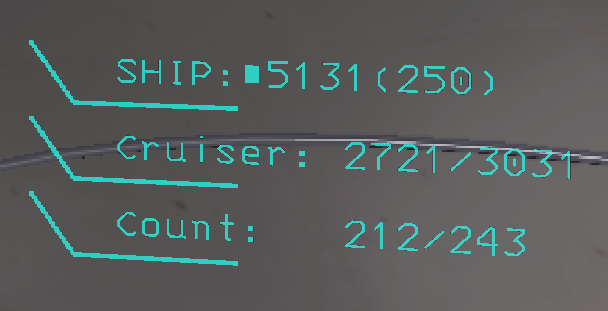
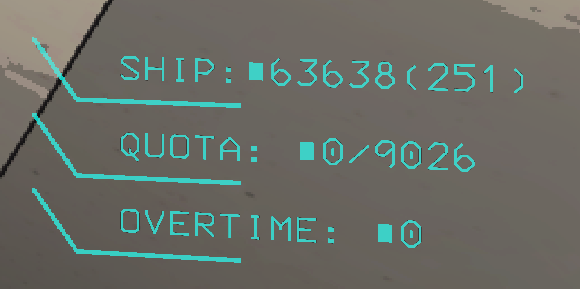
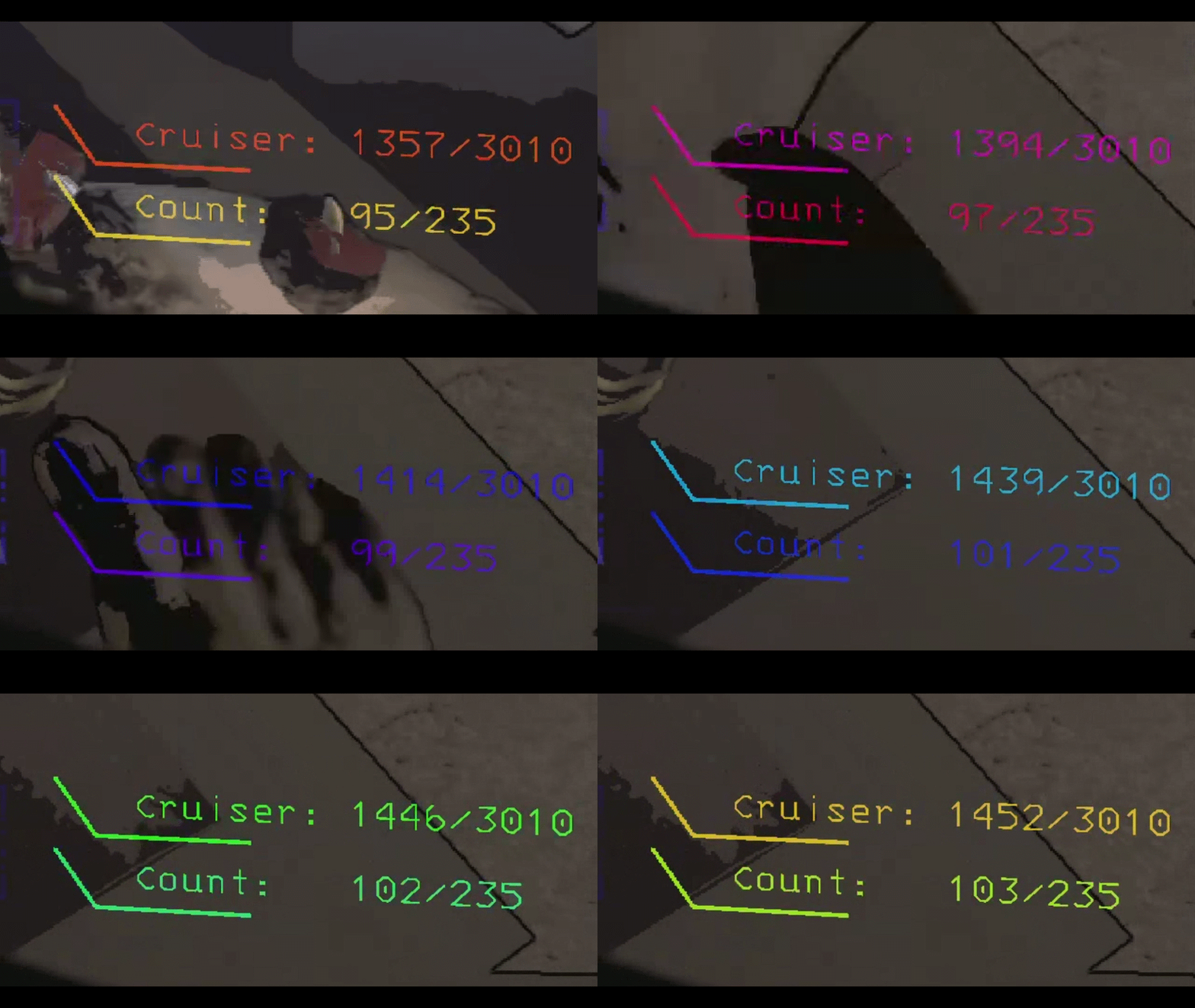
Configs
- Change the name of each mod's text, e.g.
Cruiser: {0}/{1}- "Cruiser" can be changed to something else, same for the QUOTA / OVERTIME names - One
Offset(x, y) per mod; one shared Display Time and AutoDisplay Interval - Change the color of each row's text and line in one setting:
#FF0000, #00FF00 - Color modes: Normal, Rainbow, RGB, Fire, Ocean, Neon, Sunset, Toxic, Ice, Gold, Disco, Negative (the opposite of the screen behind the text), Random (new mode every day) and TrueRandom (new mode on every right-click)
- Ship line format with item count, e.g.
SHIP:${value}({count}) - AutoDisplay: no right-click needed. Inside the ship you see the ship total, at the Company the quota, outside the ship on a moon the Cruiser counter. Updates instantly when loot moves. Works while dead too (
DeadDisplay). Right-click still refreshes instantly - Show Anywhere (ShipLootCruiser): show the ship total from anywhere
- AutoTerminalScan: the scan at the start of every day goes to everyone's chat when you are the host, and to your own chat when you are a client (you may see it twice if the host posts one too). The scheduled scans are host only (or use
/autoscan):Interval Scanfor the scan andCruiser Interval Scanfor the Cruiser report, each a schedule of in-game times (7am, 10pm) or hour intervals (2= every 2 in-game hours). Optional Cruiser report. Message formats and the chat color are configurable. The day-start scan runsDayStartDelayseconds after the ship doors start opening, like abu.AutoScan Scan Bodies(off, in the shared section): player bodies are never counted - not by/scan,/scan -c, the chat scans, the Cruiser counter or the ship total - unless you turn it on/overtimeat the Company posts the overtime bonus to everyone (Overtime Bonus: 123); with no overtime it only tells you privately/autoscanturns the scheduled in/out scan (Interval Scan, default every hour) on or off for this game only./autoscan -cdoes the same for the Cruiser scan (Cruiser Interval Scan, default every hour). The two are separate, they only run together if you use both.on/offcan be added (/autoscan -c off). The settings file is not changed, so the next game starts withChatAutoScan/AutoCruiserScanas set there (default off). The host's scans go to everyone's chat, a client's to its own chat- FinalScan (on by default): when the ship starts leaving (lever pulled or autopilot) the final stats of the moon go to chat as one line that wraps, e.g.
Collected: 10/21Value: 1000/2100. Only loot of this moon counts: what was already in the ship when you landed (from earlier moons) is left out. Collected = put in the ship today, plus the items in a Cruiser that is magneted to the ship. Items in a Cruiser that is not magneted are not collected (they stay on the moon, so they only count in the total). The message is theFinalScan Formatsetting./finalscanswitches it off for the game you are in,/finalscanagain switches it back on (on/offcan be added). The setting itself is not changed: leaving the lobby or restarting the game puts it back to what the settings say (on). The host's message goes to everyone's chat, a client's to its own chat. If you join in the middle of a day, it counts from the moment you arrive - Chat commands for everyone (needs ChatCommandAPI):
/scan(loot inside / outside the facility) and/scan -c(Cruiser report), posted to all players. They also work while the ship is leaving, for the final stats. With no Cruiser on the moon,/scan -cjust answers youCruiser Unavailable - Moons without scrap (the Company building, Galetry) are skipped automatically
- Config changes apply while the game is running (colors on the next scan)
Config file
The settings file is BepInEx/config/Crispy_Depression.Ultimate_Scanner.cfg. Every setting, with its description and default:
Sections

0 Shared Config All Mods

Display Time
How long each HUD stays on screen after it is shown, in seconds (all three mods).
Setting type: Single
Default value: 10
Acceptable value range: From 1 to 30

AutoDisplay
HUDs show by themselves: ship total in the ship, Cruiser counter outside on a moon, quota at the Company. Off = right-click only.
Setting type: Boolean
Default value: true

AutoDisplay Interval
Backup refresh in seconds. HUDs already update the moment loot moves.
Setting type: Single
Default value: 1
Acceptable value range: From 0.5 to 10

Scan Bodies
Count player bodies in every scan and HUD (/scan, /scan -c, chat scans, Cruiser counter, ship total). Off = bodies are never counted.
Setting type: Boolean
Default value: false

DeadDisplay
While dead, keep showing the HUDs: ship total + Cruiser counter on a moon, ship total + quota at the Company.
Setting type: Boolean
Default value: true

1 CruiserScrapCounter

Format
{0} cruiser value, {1} moon value, {2} cruiser items, {3} moon items. \n = new line.
Setting type: String
Default value: Cruiser: {0}/{1}\nCount:   {2}/{3}

Cruiser Color
Text color, line color, e.g. #00F2E6, #00F2E6. Only 1 color = used for both text and line. Empty = game default.
Setting type: String
Default value: #00F2E6, #00F2E6

Count Color
Text color, line color, e.g. #00F2E6, #00F2E6. Only 1 color = used for both text and line. Empty = game default.
Setting type: String
Default value: #00F2E6, #00F2E6

Offset
Move the text: x, y (+x = right, +y = up). Example: 0, 0
Setting type: String
Default value: 0, 0

2 UiSellTracker

Labels
Names before the quota and before the overtime, separated by a comma.
Setting type: String
Default value: QUOTA, OVERTIME

Quota Color
Text color, line color, e.g. #00F2E6, #00F2E6. Only 1 color = used for both text and line. Empty = game default.
Setting type: String
Default value: #00F2E6, #00F2E6

Overtime Color
Text color, line color, e.g. #00F2E6, #00F2E6. Only 1 color = used for both text and line. Empty = game default.
Setting type: String
Default value: #00F2E6, #00F2E6

Offset
Move the text: x, y (+x = right, +y = up). Example: 0, 0
Setting type: String
Default value: 0, 0

3 ShipLootCruiser

Format
{value} ship value, {count} item count. \n = new line.
Setting type: String
Default value: SHIP:${value}({count})

Color
Text color, line color, e.g. #00F2E6, #00F2E6. Only 1 color = used for both text and line. Empty = game default.
Setting type: String
Default value: #00F2E6, #00F2E6

Show Anywhere
Show the ship total from anywhere, not only in the ship.
Setting type: Boolean
Default value: false

Cache Seconds
Reuse the last count for this many seconds (0 = always recount).
Setting type: Single
Default value: 0

Offset
Move the text: x, y (+x = right, +y = up). Example: 0, 0
Setting type: String
Default value: 0, 0

3 ShipLootCruiser General

Color Mode
Normal = your colors. Negative = opposite of the screen. Random = new mode every day. TrueRandom = new mode every right-click. The rest are animated.
Setting type: String
Default value: Rainbow
Acceptable values: Normal, Rainbow, RGB, Negative, Fire, Ocean, Neon, Sunset, Toxic, Ice, Gold, Disco, Random, TrueRandom

Rainbow Speed
Speed of the animated modes (color cycles per second).
Setting type: Single
Default value: 1

Log Scan Time
Log how long each ship scan takes.
Setting type: Boolean
Default value: false

Debug Color Cycle
Debug: each right-click shows the next color mode (chat says which).
Setting type: Boolean
Default value: false

AutoTerminalScan

ChatAutoScan
Send the scan to everyone's chat on the Interval Scan schedule.
Setting type: Boolean
Default value: false

Interval Scan
In-game times (7am, 8pm) and/or hours between scans (2 = every 2 hours). Comma separated.
Setting type: String
Default value: 1

AutoCruiserScan
Send the Cruiser counter to everyone's chat on the Cruiser Interval Scan schedule.
Setting type: Boolean
Default value: false

FinalScan
Send the final stats to chat when the ship starts leaving (lever or autopilot). /finalscan turns it off or on for one game only.
Setting type: Boolean
Default value: true

FinalScan Format
Final stats message, only loot of this moon. Collected = put in the ship today (and in a Cruiser magneted to it). <nobr> keeps a part on one line.
Setting type: String
Default value: <nobr>Collected: {collectedamount}/{totalamount}</nobr> <nobr>Value: {collectedvalue}/{totalvalue}</nobr>

Cruiser Interval Scan
Same as Interval Scan, for the Cruiser scan. 1 = every hour.
Setting type: String
Default value: 1

AutoTerminalScanDayStart
One scan at the start of every day. Host: to everyone's chat. Client: to your own chat.
Setting type: Boolean
Default value: true

DayStartDelay
Seconds after the ship doors open until the day-start scan. It also waits for the ship to land (values are final then).
Setting type: Single
Default value: 2.5

Scan Format
{insideamount} {outsideamount} {insidevalue} {outsidevalue} = scrap inside / outside the facility. Ship and Cruiser loot is not counted.
Setting type: String
Default value: In/Out:{insideamount}/{outsideamount} Value:{insidevalue}/{outsidevalue}

Cruiser Scan Format
{insidecruiseramount} {totalinterior} {Cruiseramount} {TotalinteriorCount} = Cruiser value, moon value, Cruiser items, moon items.
Setting type: String
Default value: Cruiser:{insidecruiseramount}/{totalinterior} Count:{Cruiseramount}/{TotalinteriorCount}

Announce Color
Color of the chat messages, hex e.g. FFFF00. Empty = chat default.
Setting type: String
Default value: #FFFF00
Credits
- ChatCommandAPI by baer1 (required)
- CruiserScrapCounter by Crispy_Depression
- ShipLootCruiser by HQHQTeam, a fork of ShipLoot by tinyhoot
- UISellTracker by SlapItNow: the UiSellTracker rows (quota and overtime at the Company) are based on it. Used and modified with permission: permission. UISellTracker itself credits NutNutty (item value tracking in the original SellTracker) and tinyhoot (UI elements from ShipLoot)
License notice for the bundled MIT-licensed ShipLoot code is in THIRD_PARTY_LICENSES.txt.
