
Please disclose if any significant portion of your mod was created using AI tools by adding the 'AI Generated' category. Failing to do so may result in the mod being removed from Thunderstore.

ClickableTerminal
Interactive terminal with mouse and controller support.
| Date uploaded | 2 weeks ago |
| Version | 0.2.0 |
| Download link | Davesco-ClickableTerminal-0.2.0.zip |
| Downloads | 1595 |
| Dependency string | Davesco-ClickableTerminal-0.2.0 |
This mod requires the following mods to function

BepInEx-BepInExPack
BepInEx pack for Mono Unity games. Preconfigured and ready to use.
Preferred version: 5.4.2100README
Clickable Terminal
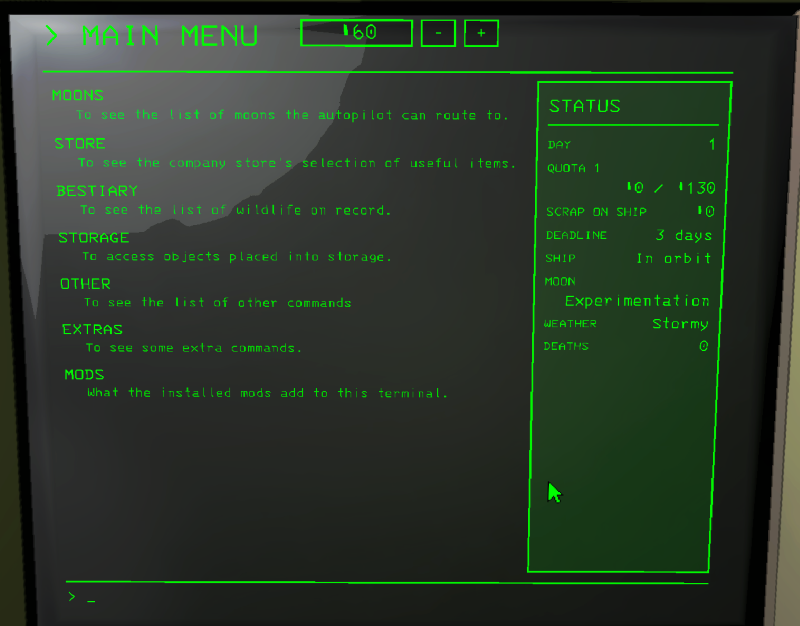
Makes the terminal interactable with a mouse or a controller.
The pages are drawn over the game's own, not replaced.
Pages of other mods are pulled in too, under one MODS page.
You can still type every command as usual.
It changes a lot, so the details are in the Wiki, one page for every part of the terminal.
I tried to cover all the vanilla menus and as many mods as I could, but I can't test everything alone.
If something breaks or looks off with another mod, tell me on GitHub.
Mods with their own pages or fixes
- Lategame Upgrades
- Sell My Scrap
- ScrapBank
- MergeScrap
- Selectable Interiors
- Terminal Seed Picker
- LethalRPG
- LobbyControl
- ExtraDaysToDeadline
- TooMuchScrap
- WeatherReroll
- TooManyEmotes (emote store)
- Contracted (contracts on the moons)
- LethalLevelLoader and DawnLib (moon tags, authors, hidden and locked moons)
- Code Rebirth (refused purchases)
- WeatherRegistry (weather forecast)
- And some other mods I forgot
Every app built on Interactive Terminal API should work with the mouse and the controller, including back and menu. They open in a window over the page you opened them from (AppsInWindow), or full screen if you turn that off. Tested with:
- Lategame Upgrades
- Extend Deadline
- Weather Probe
- Revive
- MergeScrap
- Ship Inventory
CHANGELOG
Changelog
0.2.0
New
- Hide items from the store: SETTINGS on the store page, or the HiddenItems setting.
- Category order setting for the store's tabs.
- Alt or the right stick switches between the menus and the game's own screen. The key is set by SwitchKey.
- Contracted support: contracts on MOONS, CONTRACT LIST and FIELD SUPPORT on MODS.
- Lategame Upgrades contracts (Exorcism, Defusal, Data Retrieval) in windows.
- Scrollbars can be dragged with the mouse.
- FORECAST shows what the weather does and its scrap multipliers. Your own descriptions go in dev.davesco.ClickableTerminal.weathers.txt.
- ModColors: weathers and contracts in WeatherRegistry's and Contracted's colours. Off by default.
Changed
- EXTRAS is gone: the ship controls are on the STATUS panel, MONSTER SCAN is under OTHER, RANDOM is on MOONS.
- New defaults: every decoration and suit on sale (DecorationsOnOffer -1), locked moons hidden (ShowLockedMoons off).
- Panel buttons sit at the bottom of the panel.
- The store's cart panel shows only the count and the total, and ADD and REMOVE sit side by side.
- STATUS counts the scrap on the ship in a new way, I hope it doesnt cause stutter.
- Visited hidden moons are kept in the save file. Visits remembered by 0.1.0 are forgotten. Im still not sure if this is the right way.
- The UI was rebuilt underneath. Nothing should look different, but it should be more stable and less stuttery.
Fixed
- Stutter while moving the mouse with the STATUS panel open.
- The pin or padlock running into the RISK column at a big text size.
0.1.0
- First version: the terminal as clickable menus, with the mouse, the keyboard or a controller.
- Moons with a video and details panel, filters and tags, a COMPANY MOONS section, hidden moons as ??? if you want.
- One page store with a cart, saved carts and buy confirmations.
- Bestiary, storage, scan and logs as lists, files and logs open in a window.
- MONITOR page: the radar live, switch who you watch, ping and flash boosters, teleport, door codes.
- STATUS panel on the main menu, extras (doors, lights, teleporters, lever, random moon, monsters).
- Pages for many mods' commands, and every Interactive Terminal API app with the mouse and the controller, in a window over the page.
- Every page has its own text size (- and +).
