
Please disclose if any significant portion of your mod was created using AI tools by adding the 'AI Generated' category. Failing to do so may result in the mod being removed from Thunderstore.
CruiserLoader
Automatic cruiser loader for Dine.
| Date uploaded | a week ago |
| Version | 0.1.2 |
| Download link | Happyness-CruiserLoader-0.1.2.zip |
| Downloads | 76 |
| Dependency string | Happyness-CruiserLoader-0.1.2 |
This mod requires the following mods to function

BepInEx-BepInExPack
BepInEx pack for Mono Unity games. Preconfigured and ready to use.
Preferred version: 5.4.2305README
CruiserLoader
A Cruiser auto loader mod currently made for pub Dine runs to load cruiser up with utilities.
Currently only "supports" Dine playstyle in which you load the back of the cruiser with stuff. (planning to add more loadouts and just generally more functionality into it)
Number of items loaded and items to load are fully customizable in the config file.
Only items that are currently inside of the ship are getting loaded. Use .cload chat command to load up cruiser. Use .cload <itemname> <count> to load only one type and amount of that item. Also without having a specific item configured in the configs, can use .cload <itemname> <count> <zone> to move items to specified zones. (example .cload jet 2 D3 will move 2 jetpacks to D3 with/without having it configured in the configs)
Auto-restock feature that refills the cruiser after the end of every day. To enable or disable it use .cload restock command.
Clients may execute the commands without the host having it installed. (disabled by default, can be turned on in the configs)
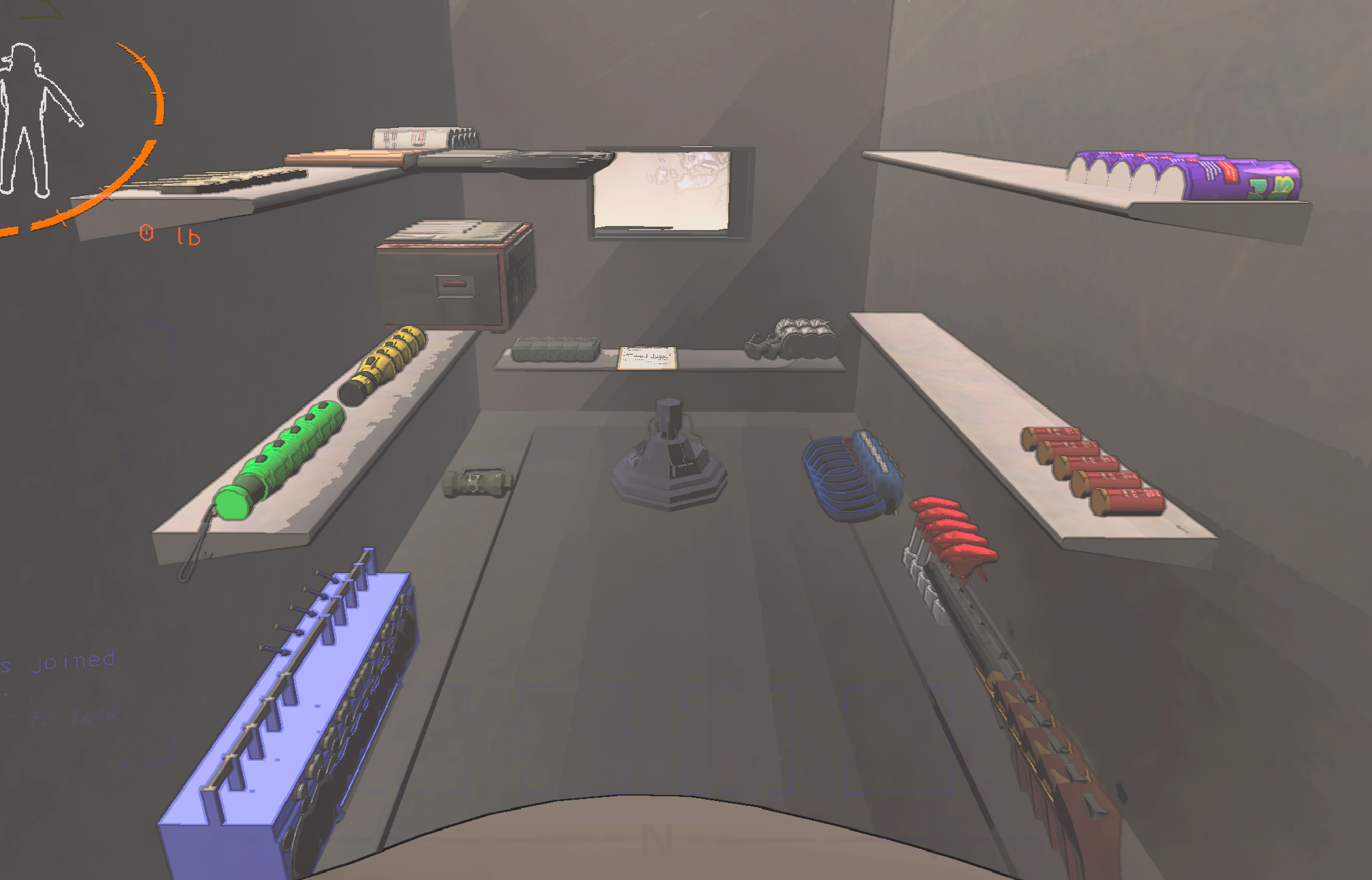
Any number of items can be loaded up to the maximum that are set in the configs for each item. For each zone, items are loaded in in a 5 offset configuration before wrapping back and stacking them.
Clients that has the mod installed can use the commands if the host itself also has it.
Configuration
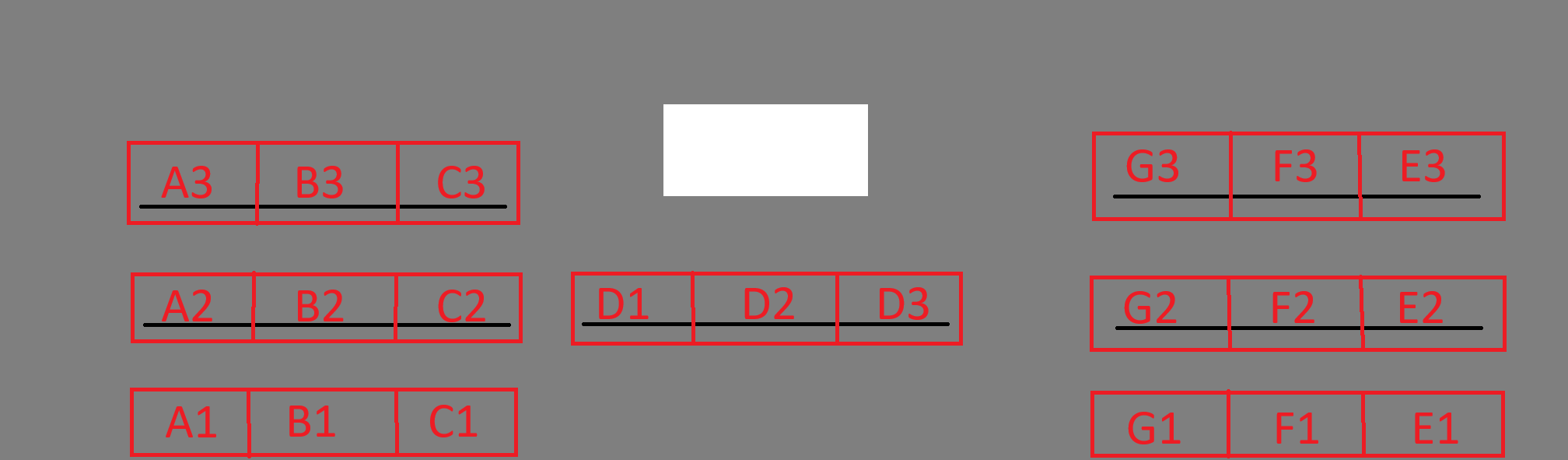
!!!Not all of the items have default zoning. Items that have default zones are shown in the picture below with their count aswell!!!
Config file lives in /config/CruiserLoader/Items.cfg
Item amount to load and their zones are configurable in the configs.
Zone names are specified on the image below.
D2 are specified as the radar booster spot (wouldnt specify that zone for anything else)
Example
Credits
This project uses LethalCompanyTemplate and slices of code of ItemDeclutter licensed under MIT License.
CHANGELOG
v0.1.2
- added a new config entry for client use without host having the mod. It does work just fine but i cannot guarantee that it wont ever break, so i just keep it disabled by default (to enable it, go into the config and set "Experimental ClientUse" to true)
- added an auto-restock feature, can be enabled or disabled using
.cload restockcommand or in the configs.
v0.1.0
- items are now also can be moved from CUPBOARDS to the cruiser (many who using sort mod that sorts into cupboard were unable to move their stuff)
- Host Client verifications, msg sync etc. (many unnecessary networking just for looks 0 functionalities :))
- changed feedback message from chat to displaytip.
- general cleanups (possibly)
- Planning to add "ART" loader soon too.
v0.0.8
- added failsafe to networkhandler to always get initialized after rehosting lobbies or joining lobbies.
v0.0.7
- added for specific items a default count (radar 1, shotgun 2, knife 3, weed 15, tzp 15)
- added zone override for single item load(
.cload <itemname> <count> <zone>) - added chat message to have a feedback for loaded items.
- added some custom networking for clients so they are also able to use the commands, that executes on host to ensure proper networking.
v0.0.5
- changed prefix for load command from /cload to .cload, because ChatCommandAPI compeltely blocks my command from running instead of passing it trought. (so dumb)
- added support to only load individual items
- added some default zones for some items.
v0.0.3
- Items are only getting loaded up to the specified amount when using the command multiple times.
v0.0.2
- changes to readme!
