
Please disclose if any significant portion of your mod was created using AI tools by adding the 'AI Generated' category. Failing to do so may result in the mod being removed from Thunderstore.

QuickSort
Ship and cruiser item sorting with saved profiles for Lethal Company.
| Date uploaded | 2 days ago |
| Version | 0.1.21 |
| Download link | asta-QuickSort-0.1.21.zip |
| Downloads | 43 |
| Dependency string | asta-QuickSort-0.1.21 |
This mod requires the following mods to function

BepInEx-BepInExPack
BepInEx pack for Mono Unity games. Preconfigured and ready to use.
Preferred version: 5.4.2305
baer1-ChatCommandAPI
A Lethal Company modding API for easy creation of Minecraft-style Chat Commands
Preferred version: 1.1.2README
QuickSort (pasta.quicksort)
English(Support) | 한국어
Ship and cruiser item sorting, quick move commands, and named profiles for Lethal Company.
Client/Guest note (IMPORTANT)
If you are a client (guest), installing TooManyItems can help fix a issue where some items fail to sort / snap back in the ship.
Commands
- Tip: If a command shows
[itemName], the name is optional — if you omit it, the command will use the item you are currently holding (if any). /sort: Full sort (sort everything in the ship).- Uses
skippedItemsas the skip list for full sort. - An item you are holding stays in your hand.
- Uses
/sort -a: Full sort, but IGNOREskippedItems(sort absolutely everything that is eligible)./sort -b: Full sort with “saved position priority”.- If an item type has a saved
/sort setposition, it will NOT be skipped even if it matchesskippedItems. - Otherwise (no saved position),
skippedItemsstill applies. - Note:
-aand-bcannot be combined (and/sort -ab//sort -baare rejected).
- If an item type has a saved
/sort <itemName>: Move that item type to your current position (e.g./sort cash_register,/sort weed killeror/sort wee).- This explicit move ignores skip lists, so it works even if the type is in
skippedItems.
- This explicit move ignores skip lists, so it works even if the type is in
/sort <number>: Move the item type bound to that number (e.g./sort 1)./pile [itemName]: Like/sort <itemName>(pull a specific type to you), but if omitted it uses your held item type and also moves the held item.
Skip list (skippedItems)
Edit skippedItems in-game:
/sort skip list: Show currentskippedItemstokens/sort skip add [itemName|alias|id]: Add a token- If omitted, uses your currently held item.
- Also accepts alias or shortcut id.
/sort skip remove [itemName|alias|id]: Remove a token- If omitted, uses your currently held item.
- Also accepts alias or shortcut id.
Bindings (shortcut + alias)
Bind the item you are currently holding:
/sort bind <name|id>/sort bind 1→ bind held item to shortcut id 1/sort bind meds→ bind held item to aliasmeds
/sort bind reset <name|id>/sort bind reset 1→ remove shortcut id 1 binding/sort bind reset meds→ remove aliasmedsbinding
/sb <name|id>: same as/sort bind .../sb reset <name|id>: same as/sort bind reset ...
List bindings:
/sort bindings(also accepts/sort binds,/sort shortcuts,/sort aliases)
Use bindings:
/sort 1(number binding)/sort meds(alias binding)
Saved positions
/sort set [itemName]: Save this type's sort position to your current position (partial match supported)./ss [itemName]: same as/sort set ...(partial match supported)./sort reset [itemName]: Delete saved sort position./sr [itemName]: same as/sort reset .../sort positions: List saved sort positions./sp: same as/sort positions/sbl: same as/sort bindings/sk ...: same as/sort skip ...(e.g./sk list,/sk add ...,/sk remove ...)
Cruiser sorting
/css <zone> [itemName] [max]: While on or near the cruiser, save a shelf zone for an item type and immediately place matching items there, up to the maximum. Omit the item name to use the held item, ormaxto use 10 (allowed range: 1–10000). For example,/css A2 shotgunplaces up to 10 shotguns on shelf zone A2;/css A2 shotgun 2places up to two./css [itemName] [max]: While standing on the cruiser, save your current position instead of a shelf zone and immediately place matching items there. A matching item in your hand is also placed if there is room. The item name defaults to the held item;maxdefaults to 10.- Alternative shelf forms:
/css shelf A2 shotgun 2and CruiserLoader-style/css shotgun 2 A2both save the same shelf rule as/css A2 shotgun 2. /css zones: List the available shelf zones. A, B, C, E, F, and G each have three shelf levels (A1–A3, etc.);D1–D3are the center spots.D2is the radar booster spot, where items do not fan out. See CruiserLoader's zone layout image to choose a zone./css list: Show saved cruiser positions and maximum counts./css reset [itemName]: Remove a saved cruiser position. Omit the name to use the held item./csort: Arrange configured items already in the nearest cruiser, including saved shelf zones, and load matching items from the ship, up to each type's saved maximum. You can run this command without standing on the cruiser. Items beyond a saved maximum stay where they are./cs: Short form of/csort.
Shelf zones and maximum counts are saved with QuickSort's cruiser positions and included in QuickSort profiles. /cs uses the saved rules when sorting. A shelf zone holds at most 20 items total across all types assigned to it (five positions on each of four layers, 0.15 m between layers); D2 holds one. The [max] setting accepts values up to 10000, but sorting stops at the zone's physical capacity and reports when it is reached. Shelf placement moves items directly to their targets without a fall animation, reducing the chance of one item pushing another during sorting.
QuickSort keeps placed shelf items steady relative to the cruiser while they remain on the shelf, then releases them on pickup or removal. In multiplayer, full physics anchoring requires QuickSort on the item's authority (usually the host); direct placement still works when some players do not have QuickSort.
The cruiser shelf placement feature was developed with reference to LC-CruiserLoader by veber01.
Profiles
Profiles save the ship sort settings (including skippedItems), ship positions, cruiser positions, and cruiser maximum counts. Changes made after saving a profile are included only when you save it again. The built-in default profile is your personal baseline.
When a host profile is available in a lobby, it appears as a temporary host profile. Sync Host Profile is enabled by default and automatically applies it. Turn that setting off to keep your personal profile selected; /pu host still applies the host profile manually. Leaving the lobby restores your personal selection and live settings.
/profile save [name]: Save the current settings and positions under a name; omit the name to savedefault. Saving the same name updates it./profile use [name]: Apply a saved profile without starting a sort; omit the name to usedefault. Use/pu hostfor the current lobby host's profile when available./profile sort [name]: Optionally apply a profile, then sort the ship./profile csort [name]: Optionally apply a profile, then sort the cruiser./profile list: List saved profiles and mark the active one./profile delete <name>: Delete a saved profile.- Short forms:
/ps [name]=/profile save [name],/pu [name]=/profile use [name],/pl=/profile list,/pd <name>=/profile delete <name>.
Config / files
All files are created under BepInEx/config.
- Bindings:
pasta.quicksort.sort.bindings.json - Saved positions:
pasta.quicksort.sort.positions.json - Cruiser positions and maximum counts:
pasta.quicksort.cruiser.positions.json - Profiles:
pasta.quicksort.profiles.json - Temporary host profile recovery:
pasta.quicksort.host-recovery.jsonis created while a host profile is applied, then removed after personal settings are restored. It can restore those settings after an interrupted session. - Host profile sync: BepInEx Sync Host Profile setting (enabled by default). Turn it off to prevent automatic use of the temporary host profile.
Notes
- Item name normalization: spaces/hyphens are normalized to underscores for matching (e.g.
kitchen knife→kitchen_knife). - Korean patch compatibility: some Korean item name inputs are recognized as aliases (e.g.
머그잔→coffee_mug,쿠키 틀→cookie_mold_pan,식칼→kitchen_knife,산탄총→shotgun). - Built-in input aliases:
double_barrel→shotgunshotgun_shell→ammo
- Special Y offset (lower placement):
- Full sort (
/sort) will place these types slightly lower:toilet_paper,chemical_jug,cash_register,fancy_lamp,large_axle,v_type_engine
- Full sort (
- Explicit move ignores skip:
/sort <itemName>will still work even if that type is inskippedItems(fixes kitchen knife not moving). - Legacy config fix:
- If
skippedItemscontainsrader_booster(old typo), it is auto-rewritten toradar_booster. - If a token accidentally has leading/trailing
_(e.g._kitchen_knife), it is normalized.
- If
- Config migration (0.1.5):
- If
configVersionis missing / older than0.1.5, andsortOriginYis0.5, it will be auto-changed to0.1.
- If
- Skip list choice: Manually added
shotgunandammotokens are preserved when the config is migrated.
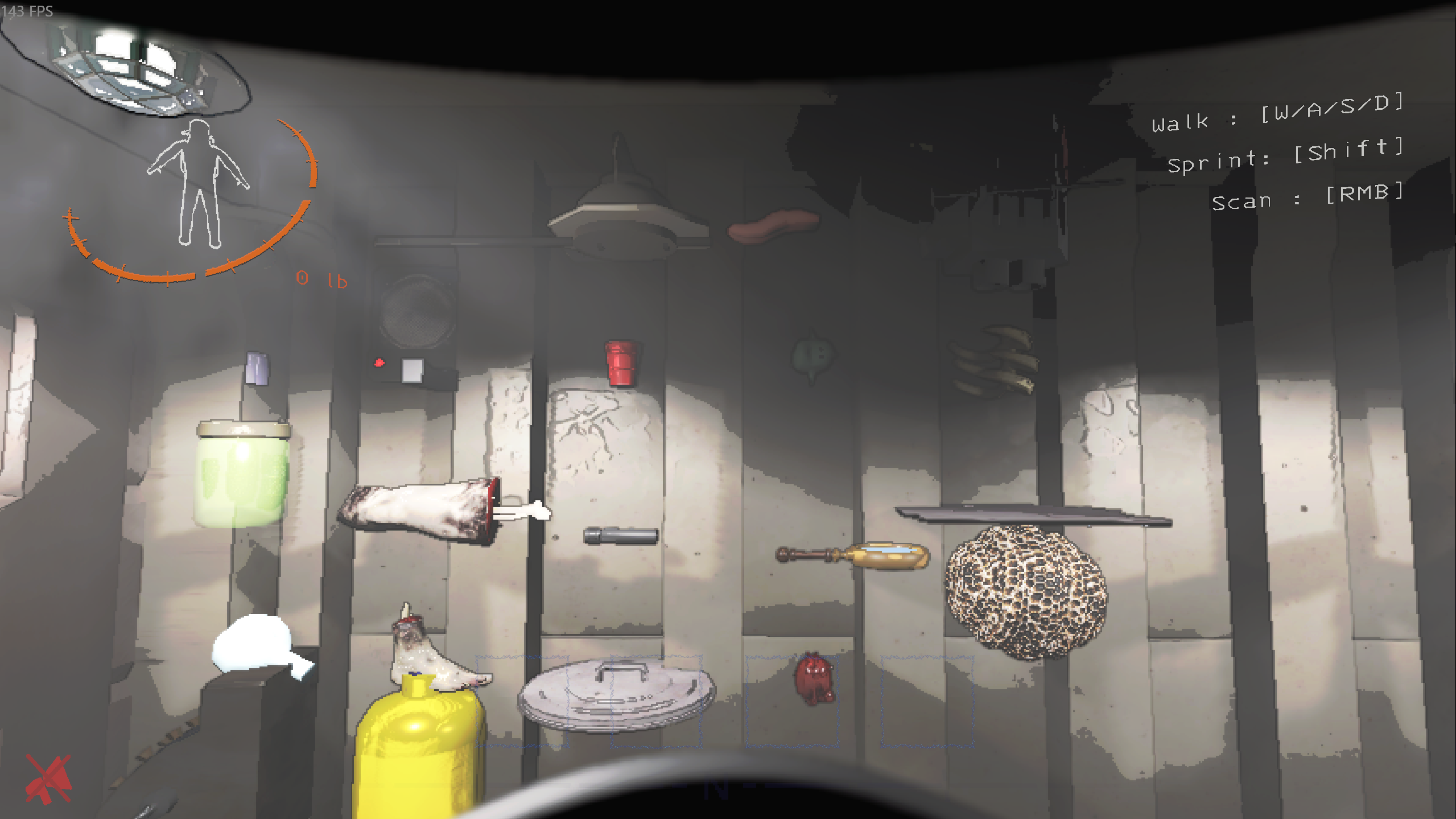
SS
CHANGELOG
Changelog
0.1.24
/csortand/csnow also collect matching items outside the ship in orbit or at the Company (Gordion), just like/sort, while preserving saved maximum counts and shelf capacity limits.
0.1.23
- Save changes to the active personal profile before
/puswitches to another profile or the temporary host profile. This keeps separate/sspositions for the same item type when switching back and forth. /ss,/sort set,/sort <item>, and/pilenow also collect matching items from the cruiser into the ship.
0.1.22
- Fixed cruiser shelf items tilting after sorting by applying their item-specific resting rotation relative to the vehicle.
- Kept
/ssship positions and/csscruiser positions independent for the same item type./sortnow collects eligible cruiser cargo into the ship;/sort -breturns types with a saved/ssposition there even when skipped;/cscontinues to use/csscruiser rules and maximum counts. /cssnow saves the cruiser-local Y position 0.3 higher. Previously saved manual positions keep their Y until re-saved. Cruiser sorting stacks items of the same type at a fixed X/Z, raising Y bysameTypeStackStepYper item (default 0), while retaining the shared shelf-zone capacity.
0.1.21
- Added numbered cruiser shelf zones (
A1–C3,D1–D3,E1–G3) with/css <zone> [itemName] [max]and/css zones./css shelf <zone> ...and CruiserLoader-style/css <itemName> <max> <zone>are supported as aliases. Shelf rules are saved and reused by/csortand/cs. - Added direct shelf placement to prevent fall animations from pushing other cargo during sorting.
- Added cruiser-relative shelf anchoring while items remain on a shelf. Anchoring releases on pickup or removal; full multiplayer physics anchoring requires QuickSort on the item authority/host.
- Shelf zones support up to 20 items per zone (five slots × four layers), except
D2, which supports one. Sorting warns when a configured maximum exceeds the zone's physical capacity. - Added built-in
default, temporary lobbyhost, and named/profilesnapshots for ship and cruiser sorting settings. Optional Sync Host Profile automatically uses the host profile and restores personal settings when leaving the lobby. - Added temporary
pasta.quicksort.host-recovery.jsonrecovery data to restore personal settings after an interrupted host-profile session. - Added
/ps,/pu,/pl,/pd, and/csshortcuts for profile management and cruiser sorting. - Added
/csortto arrange cruiser cargo and load matching items from the ship while keeping cruiser cargo excluded from normal ship sorting. - Fixed localized item skip matching and preserved user-selected shotgun/ammo skips during config upgrades.
- Documented the LC-CruiserLoader reference in the English and Korean READMEs.
0.1.16
- Fix
shotgunandammoare no longer forced back intoskippedItemsafter users remove them.
- Compatibility
- Updated ChatCommandAPI support for
baer1-ChatCommandAPI-1.1.2.
- Updated ChatCommandAPI support for
0.1.15
- Change
- Modified to sort all items on the map in certain situations.
0.1.13
- Fix
- chanload destory bug
0.1.11 / 0.1.12
- Fix
- v80 :D
0.1.10
- Fix:
- add some kr names
- wight 0lb bug
0.1.9
- Fix:
- add some kr names
0.1.8
- Fix:
/sort: now drops your held item first, then runs full sort.
- Behavior:
- Commands now require you to be inside the ship (otherwise an error is shown):
/sort(and/ss,/sr,/sp,/sk,/sb,/sbl) and/pile.
- Commands now require you to be inside the ship (otherwise an error is shown):
0.1.7
- Config:
- Bumped
General.configVersionto0.1.7. - Migration: if
Sorter.skippedItemsis accidentally onlyshotgun, ammo, it is reset back to the full default list. - Fresh install fix: when the config file does not exist yet, migrations no longer create/overwrite
Sorter.skippedItems.
- Bumped
0.1.5
- Client/Guest tip: Installing TooManyItems may help with a vanilla issue where some items fail to sort / snap back.
- New short commands:
/sr→/sort reset/sp→/sort positions/sbl→/sort bindings/sk ...→/sort skip ...(e.g./sk list,/sk add,/sk remove)
- Input aliases (built-in):
double_barrel→shotgunshotgun_shell→ammo
- Full sort ordering: two-handed item types are placed first (fixed behavior; no setting).
- Full sort placement:
sortOriginYis applied again as an offset above detected ground.- Specific types are placed slightly lower:
toilet_paper,chemical_jug,cash_register,fancy_lamp,large_axle,v_type_engine.
- Config:
- Added
General.configVersion(defaults to0.1.5). - Migration: if
configVersionis missing/older andSorter.sortOriginY == 0.5, it is auto-changed to0.1. - Migration: adds
shotgun,ammotoSorter.skippedItemsif missing.
- Added

