
Please disclose if any significant portion of your mod was created using AI tools by adding the 'AI Generated' category. Failing to do so may result in the mod being removed from Thunderstore.

Replay
Automatically record your runs and replay them with a free camera, player following, bookmarks, and timeline controls.
| Date uploaded | a month ago |
| Version | 1.0.2 |
| Download link | asta-Replay-1.0.2.zip |
| Downloads | 124 |
| Dependency string | asta-Replay-1.0.2 |
This mod requires the following mods to function

BepInEx-BepInExPack
BepInEx pack for Mono Unity games. Preconfigured and ready to use.
Preferred version: 5.4.2305README
LC Replay
Record your Lethal Company runs automatically, then watch them again from a new angle.
Version 1.0.2 · BepInEx 5 · Windows
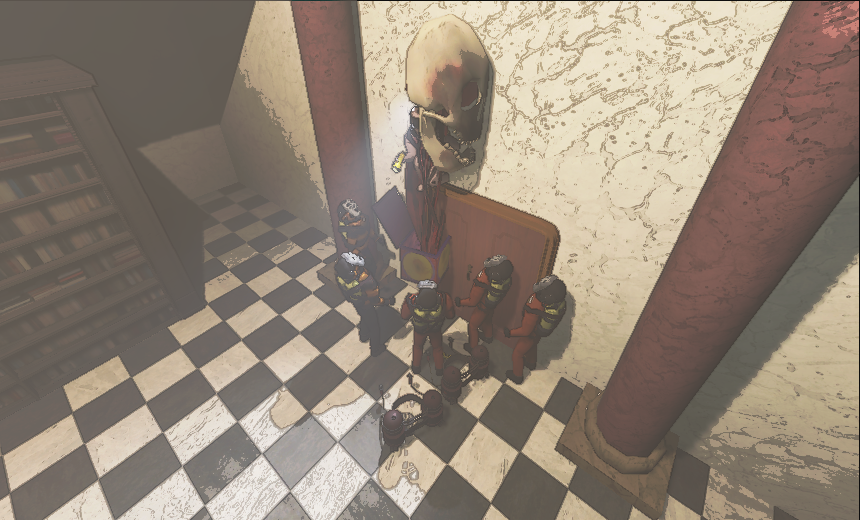
Your runs, ready to replay
- Automatic recording: host or join a game and play as usual.
- Free camera: explore a recorded scene or follow players and enemies.
- Playback controls: pause, jump along the timeline, and watch at 0.25×–4× speed.
- Bookmarks: mark a moment during a run so you can find it later.
- Local library: browse recordings by lobby, quota, and day.
Install
With a mod manager
Install Replay and its dependencies in the Gale, r2modman, or Thunderstore profile you use to launch Lethal Company. Launch the game with mods enabled.
Manually
- Install BepInEx 5. LethalCompany InputUtils is optional; install it to rebind Replay controls in the game settings.
- Extract
LCReplay-1.0.2.zipinto your game folder. The three filesLCReplay.dll,LCReplay.Core.dll, andLCReplay.Skinning.dllbelong inBepInEx/plugins/LCReplay. - Remove duplicate older copies of Replay and restart the game.
Record and watch
- Host or join a game. Recording starts automatically. There is no record or save button to press; recordings are saved as you play and finalized when you return to orbit, disconnect, or quit.
- Mark your favorite moments. Press the backtick key (
`) during gameplay to add a bookmark. You can change the binding through InputUtils or Replay's configuration. - Open your library. Choose Replay from the main menu or pause menu, or press F9.
- Choose a recording and press Play. Use the timeline to seek, click bookmark markers to revisit a moment, and use the Camera selector to switch views.
The live game keeps running while you watch a replay in a session. Close the viewer to return to your character.
During a live session, installed exterior scenery must be available in the currently loaded moon. If Replay asks you to return to the main menu, open the recording there so it can load the recorded moon's complete scenery.
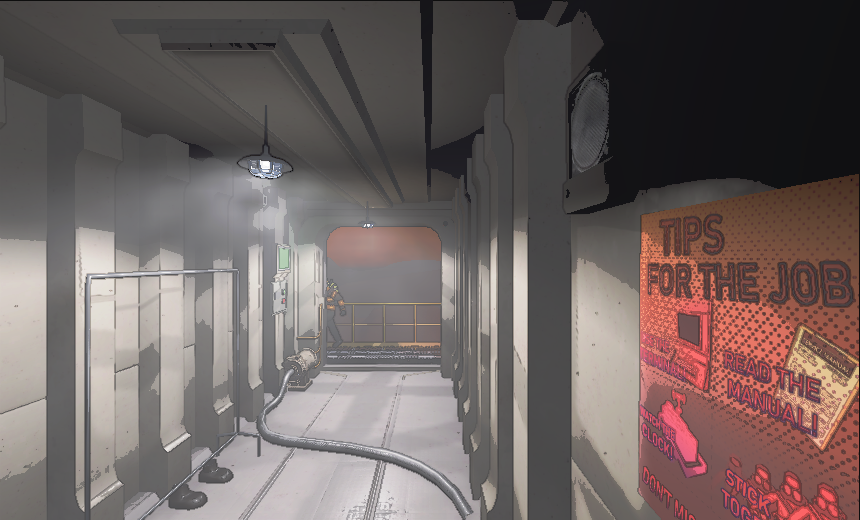
Camera and playback controls
With InputUtils installed, all 24 Replay controls can be changed or unbound in the game's Settings → Controls → LC Replay section, including camera movement, mouse buttons, and wheel directions. On-screen key hints follow your bindings. InputUtils is optional: without it, the defaults below work normally, and Input / BookmarkKey in BepInEx/config/pasta.replay.cfg still changes the bookmark key. With InputUtils, its saved bindings take precedence over that fallback setting.
The table shows default bindings. Mouse movement and ordinary UI pointer clicks keep their usual behavior.
| Control | Action |
|---|---|
| F9 | Open or close the replay library |
| Esc | Leave playback or close the library |
| F11 | Open the library or leave playback |
| F8 | Save a recording checkpoint or retry recording |
| Backtick (`) | Add a recording bookmark |
| WASD + mouse | Move and look around in free camera |
| Q / E | Move down / up |
| Shift | Move faster |
| B | Show or hide the cursor |
| Right mouse button | Look around while the cursor is visible |
| Left mouse button | Follow a player or enemy in free camera |
| Mouse wheel | Change free-camera speed or follow distance |
| Space | Pause or resume |
| Left / right arrow | Jump back / forward 5 seconds |
| F | Follow the selected living player |
| Tab | Follow the next player |
| C | Toggle smooth camera movement |
| L | Show or hide the playback interface |
Zoom close to a followed player to use their recorded first-person camera when available. The playback bar also lets you change speed and select a camera.
Make it look right
Open Settings during playback to adjust resolution, brightness, fog, shadows, and camera movement. For better performance, lower the replay resolution first. Frame rate depends on your PC, the scene, and installed mods.
The Settings controls are ordered as resolution, gamma, camera speed, cinematic movement, shadow, fog / fake fog, scrap esp, enemy esp, and player esp. shadow is enabled by default; turn it off to disable replay shadows.
resolution snaps to 0.5x, 1x, 2x, 3x, or 4x (1x = 860×520). The timeline uses darker orange only for ship takeoff/landing transitions; landed and orbit-waiting sections use the original orange. Unknown phases are gray. Upcoming sections are dim; elapsed sections fill with their phase color and follow backward seeks. The white handle marks the current time. These colors describe the recording, not playback buffering.
Enable the ESP settings to show names and distances through walls. scrap esp excludes scrap stored in the ship or Company Cruiser. player esp shows a nameplate with health above each player's head, four item slots below their feet, and a half-size yellow utility slot above the first item slot. Slots use the installed game HUD frame; selected frames use full opacity and unselected frames use 30% opacity, empty slots have no item icon, and unknown contents show ?. Installed RuntimeIcons output and replacement packs such as HoneeItemIcons are used when available. Missing icons fall back to short item names. New recordings preserve up to 32 slots, including pocketed items; additional slots are counted as unrecorded. Older recordings show known held items or sparse slot entries and Slots: not recorded instead of inventing empty slots. Each ESP setting is off by default and saved between sessions; hiding the playback interface with L keeps enabled ESP markers and inventory slots visible.
Icon images are resolved from the currently installed game/mod assets, not embedded in every recorded frame. To see the same custom icons, use the same icon mods during playback.
The opening camera focuses only on a living player, waiting if none has appeared yet. You can still select enemies manually. Details contains State, Events, and Enemies; ESP controls are in Settings.
Older recordings use the scrap value and available cargo/holder state when explicit scrap or Cruiser occupancy data is missing, so those exclusions can be less complete.
Use the same game version and mod pack that you recorded with for the closest match. Replay recreates the scene from saved game state and installed assets, so lighting, fog, particles, and some modded visuals can differ from the original game. Older recordings cannot restore details that were never captured.
Where are my recordings?
Recordings stay in your active game or mod-manager profile:
- Recordings:
BepInEx/replays - Settings:
BepInEx/config/pasta.replay.cfg
The library's Folder button opens the selected recording's location. The X beside an entry immediately deletes that entry's recordings and index files. Active recordings cannot be deleted. Keep a backup of recordings you want to save.
Nothing is uploaded automatically. Recording files may include player names. Voice chat is not recorded, and Replay does not export video; use your usual screen recorder to share a clip.
Need help?
- Replay is missing from the menu: check that you launched the correct modded profile and installed the dependencies.
- Scenery or characters look different: check that the original game's mods and assets are installed.
- Playback runs slowly: lower resolution and adjust fog and shadow settings in the replay viewer.
Report problems on GitHub Issues. Include your game version, mod list, and what happened.
Licensed under the MIT License.
CHANGELOG
Changelog
1.0.8
- Fix: at 25-30 FPS a recording could miss the facility interior and part of the exterior. The map capture and the draining of hooked game events ran only on game frames that the sampling pipeline left idle, and a 5 Hz sample spread over up to six frames leaves almost none at that frame rate. In the reported Dine recording (about 1,000 tracked objects: 578 items, most of them Cruiser cargo) the exterior took 399 s to record, the interior and the deferred exterior chunk were never captured before the ship left, a dead body's geometry observed at 31 s was written at 445 s, and 4,509 hooked events (doors, hits, teleports) were dropped from the full event queue. Hooked events are now drained every frame, and a pending map or pending spawned-actor geometry gets a bounded slice of every frame (0.5 ms, growing to 3 ms after 25 s pending; the whole recorder tick stays under 6 ms); entity discovery still runs only between samples. Measured in the isolated Dine fixture (600 items, 30 enemies, about 620-1,000 tracked objects) held at 28 FPS: the landing capture settled 22.2 s after landing instead of 138.6 s, and re-exporting the whole map mid-visit without the installed-scene shortcut (how a recording that starts mid-visit captures) took 64.7 s instead of 320.1 s (
artifacts/world-capture-20261108,docs/TESTING.md). - Fix: a recording could stop with "Capture backlog exceeded its bounded memory budget" right after a large map record. While the writer compresses a map of tens of megabytes (2-4 s), sampled frames wait in a bounded tail whose overflow check counted the queued map itself and left less headroom than one sample's size estimate, and a second completed map (the interior right behind the exterior) was rejected outright. The tail now counts maps apart, queues completed maps in order, pauses sampling at half its budget, tolerates the one sample written before the pause is seen, and holds 16 MiB of estimates instead of 8 (
StorageBackToBackMapstest). This would have become frequent with the faster map capture above; the reported recording survived it only because its interior was never captured. - The version the plugin reported to BepInEx and wrote into recording headers (
Recorder:in the CLI'sinspect) was still 1.0.4 in the 1.0.5 to 1.0.7 builds; it is now generated from the shared project version at build time.
1.0.7
- Camera zoom: Alt + mouse wheel and the
-/=(+) keys change the replay camera's field of view (1-160 degrees) in free camera and while following a player or enemy, and0returns it to the default 70 degrees. The view eases smoothly to each new value, and look sensitivity scales with the zoom. The plain wheel still changes free-camera speed or follow distance. The zoom keys and the Alt wheel modifier are new rebindable actions (Camera zoom in,Camera zoom out,Reset camera FOV,Hold to zoom with the mouse wheel).
1.0.5
- Fix: during playback, most players and enemies whose bodies come from the installed game prefabs (Tulip Snake, Spore Lizard, Baboon Hawk, Bracken, Eyeless Dog, Bunker Spider and others, as well as player bodies) were invisible: eyes, teeth and fangs drew, but the skinned body did not. The 1.0.4 mesh reader cached GPU vertex streams in a dictionary shared by every GPU-only mesh, so every installed mesh read after the first received the first mesh's buffer and failed; the reader now keeps one stream cache per mesh. Verified with the new probe audit (
--lcreplay-body-audit) on a 1.0.4 Adamance recording: every actor renders its body after the fix.
1.0.4
- Opening a replay of another moon during a live session (for example while in orbit) no longer fails with "The recorded moon's exterior is not loaded in this live game": playback runs without the outdoor scenery and shows a notice; the main menu path still loads the complete scenery.
- Fix: opening a replay during a live session on game v56 (Input System 1.7) failed with
Method not found: InputSystem.get_actions(); the project-wide actions are now read by reflection and skipped when the API is absent.tools/LCReplay.ApiChecklists every type and member a built plugin references that a given game version's assemblies do not define; the 1.0.4 build has none against v56. - Recording can be paused and resumed: a Pause recording / Resume recording button in the game's pause menu next to the Replay button, and a rebindable key (default F7,
Pause / resume recordingin InputUtils). While paused the recording clock stands still and nothing is sampled; the paused stretch is cut out of the replay (playback does not interpolate across it) and the overlay shows REC PAUSED. The pause is kept across checkpoint segments of the same day and cleared when a new day starts. - New
Interface/NoticeSeconds(default 8): how long the top-right notices (bookmark saved, recording paused or resumed, errors) stay on screen; 0 hides them. - Remove steady-state garbage-collection pressure while recording. The background writer now reuses its UTF-8 text encoder, JSON writer, size-limit streams and sidecar index buffers across records, writes the record envelope and event payloads directly, and compresses small event records with an allocation-free gzip encoder. In the .NET fixture, writer allocation fell from about 22 KB per frame and 3.4 KB per event to about 1 KB per frame and under 100 bytes per event. The file format, gzip framing and sidecar index descriptors are unchanged.
- Recycle frame and entity snapshot objects after the writer releases them, so a 10 Hz observation no longer allocates hundreds of objects per sample.
- Compare mechanism and furniture renderer world matrices before decomposing poses, which removes most native transform calls for stationary members. Recorded poses are unchanged.
- Remove per-frame LINQ, string and list allocations in spawn checks, the recording overlay, LOD classification, round-state keys and mesh readback, and name the remaining world-capture stages (visibility, scene assets, late entities) in the recording diagnostics.
- Remove the largest in-game allocation source found by the new per-stage diagnostics: a lambda inside the nested-field capture loop captured the loop variable, so Mono allocated a closure object for every entity on every sample (about 130 bytes per entity, half of all recording allocation). Also remove the boxed dictionary enumerators in queue accounting,
Type.Namestring reads, animation-change enumerators, per-scan list copies, LOD/debug-renderer name reads, interior-bounds LINQ and spawn-list LINQ; enemy bone and line poses now rotate through buffers that are rewritten only after the writer released every frame that used them. - Recording diagnostics (
.capture.log) now report heap growth per recorder stage (allocKiB=), every twentieth sample per entity kind and capture phase, and the writer's heap growth around frame records, so remaining allocation sources can be located without a profiler. - Spread each observation over consecutive game frames: players, carried items and moving anchors are read together when the sample begins, the remaining actors follow in steps of about 1.5-4 ms (scaled with frame time, at most two extra frames), and the finishing pass and the item-motion/transition setup each get their own frame. The frame keeps the time the sample began; the main-thread recorder work per game frame stays near 1.6 ms instead of the whole 4-5 ms sample landing in one frame.
- Run the maintenance scans (discovery, sounds, post-processing, world, visual, sun) on alternate frames once the map is exported; cache item anchor lookups by parent transform and compare moving scene renderer world matrices before decomposing poses.
- New optional setting
Debug/AllocationProbesenables per-entity and per-phase heap attribution in the recording diagnostics log (a few milliseconds on every twentieth sample); off by default. - Recording diagnostics no longer sample the heap on the game thread unless
Debug/AllocationProbesis on; with it on, each interval also lists the stage sequence of its longest recorder tick. - Skip the item-motion evaluation for resting items whose sampled pose is unchanged, and cache each tracked entry's field plan.
- Run the recording worker at the lowest thread priority (the bounded queue and capture backpressure already cover a slow worker) and shrink the per-frame sample step to about 12% of the frame time (1-3 ms, at most four extra frames).
- The writer uses the producer's conservative frame size estimate instead of walking every entity and bone again on the game thread, and only carried items (not every item with a parent reference) share the player's observation frame.
- Type-keyed reflection caches use a reference/ordinal comparer and the carried-item check caches its compiled readers per entry (the generic tuple comparer cost about 2 µs per lookup in Mono, up to 2.5 ms per sample on item-heavy moons).
- Read enemy bone poses and mechanism/moving-renderer world matrices with parallel transform jobs (
IJobParallelForTransform), scheduled and completed at the start of each sample, so those native reads leave the game thread; direct reads remain as the fallback and the job arrays are rebuilt only when membership changes. - Resting items no longer share the players' observation frame:
itemhad stayed in the immediate-kind set, so every item was still captured in the sample's first frame (the unexplained 3 ms tick); only carried items join that frame and the rest spread over the bounded steps. The longest frame with the mod is now at or below the no-mod run's. - Items reuse per-entry compiled readers for
itemProperties,isScrap,parentObjectandisHeld, the skinned-renderer check no longer allocates an array enumerator per item per sample, and the entity root's lossy scale is read once per entity instead of once per renderer. - The
.capture.logaddsstageSumMs=(time spent in each recorder stage per interval) next tostageMaxMs=; the log rotates into.capture.log.previouswhen large. - Final isolated-fixture figures (
artifacts/fps-gc-20261029, same session,off-r/on-old21.0.3 /on-r52packaged 1.0.4 at 5 samples per second): collections per 30 s window 0 / 16-17 / 1; 1% low 102.7 / 64.5 / 97.7 FPS; average 152.7 / 133.9 / 148.4 FPS (2.8% below no-mod; 1.0.3 was 12.3% below); longest frame 13.56 / 20.06 / 13.39 ms; frames above 20 ms 0 / 1 / 0; recorder main-thread time per game frame - / 0.65 / 0.44 ms. A ceiling test that skipped the writer thread's frame serialization (on-r41) reached 142.1 FPS, so about 2 of the remaining 9 points are the background JSON/gzip work and the rest is the 10 Hz observation of about 630 entities on the game thread. - Managed allocation while recording is down to about 0.3 MiB/s (the game alone allocates 0.02 MiB/s), one collection every 20-30 s instead of two or three per 30 s: the turret check in line capture read
Type.Name(a new string in Mono) for every tracked entry every sample (about 270 KiB/s), destroyed renderers allocated a pose every sample, and the JSON fragment caches rebuilt a StringWriter and JsonTextWriter for every re-encoded entity state or pose (now one reusable encoder per cache). The rest is the platformGZipStream(Mono allocates roughly 8-17 KB per gzip member, growing with the compressed size) plus about 0.06 MiB/s of recorder work. - Default sample rate is now 5 per second, under the renamed setting
Recording/SamplesPerSecond(a customisedRecording/SampleRateother than the old default 10 is carried over once). Playback interpolates between samples; game events (grabs, drops, doors, damage, sounds, item falls, animation changes) are still recorded when they happen. - Recordings are about a third of their previous size at the same scene (typical moon: 164 MB to 55 MB for five minutes; the 600-item stress scene 297 MB to 73 MB), through: sparse frame records (
Recording/SparseFrames, default on): entities and scene renderer poses unchanged since the previous record are left out between complete frames written every 5 s, and playback restores every frame exactly; textures already written for the current capture set are referenced instead of embedded again (late-entity captures used to repeat the same PNGs, a fifth of the file); PNGs use the strongest deflate level and RGB when opaque; recorded coordinates are rounded toRecording/PosePrecisiondecimals (default 4: 0.1 mm, rotations 5); embedded texture copies are limited toRecording/MaxTextureSize(default 512; playback prefers the installed game textures by name and uses the copies only on another install); mesh tangents are no longer stored unlessRecording/MeshTangentsis set (playback recalculates them); mesh coordinates are rounded like poses. - Bone poses are stored in a compact form (
Recording/CompactBonePoses, default on): one base64 block of little-endian float32 values per entity (position, rotation, scale per bone) with the bone names written only in complete frames or when the rig changes. Same values as before; readers expand them back intoBones. Typical scene 54.7 to 52.9 MB, the 30-enemy stress scene 73 to 66.5 MB. - Recordings made by 1.0.4 require 1.0.4 or later to play (shared texture references, sparse frames and compact bone poses); 1.0.4 plays older recordings unchanged.
- New
Recording/StaticEntityObservation(default 2): a resting object (item, door, mechanism or other non-actor whose last two observations were identical) is observed every second sample; players, enemies, carried items, vehicles and projectiles stay at every sample, and a hooked game event on an object (grab, drop, door, damage, scrap value) observes it on the next sample. Skipped samples repeat the last observed values, so every frame remains complete and the file format is unchanged; a change on a resting object can be recorded up to one sample (0.1 s at 10 Hz) late. Set 1 to observe everything every sample. In the stress scene this removes about 40% of the sample-step time (99 to 49-54 ms per 2 s). - The benchmark probe logs
allocMiBPerS=per window and aWRITER-ALLOCin-game test of the frame write path;run.ps1takes-Items/-Enemies. - Typical-moon scene (same fixture with 60 items and 8 enemies; the Dine level itself contributes about 340 doors, mechanisms and other tracked objects, 462 entities per frame): no mod 186.3 FPS / 1% low 120.6 / longest 11.2 ms / 0 GCs; 1.0.4 175.4 / 110.7 / 12.6 ms / 2 GCs per 30 s (
on-t;on-t3174.0 / 107.8 / 1-2 GCs; packaged build with resting-object observationon-t7175.6 / 112.8 / longest frame 11.15 ms / 1-2 GCs; final build at 5 samples per second with sparse frames and compact boneson-t11..on-t13181.3-182.4 / 110-114 / 1 GC per window (2.1-2.7% below no-mod); 5.8-6.6% average loss, no frame above 20 ms). A frame record there is 464 KB of JSON (60 KB gzipped): enemy bone poses 40%, mechanism renderer poses and bases 44%.
1.0.3
- Preserve the existing map when seeking through actor-only updates from unfinished captures, including playback window boundaries.
- Keep the map visible across playback windows by using the same world selection and asset merge rules for reuse checks and scene construction.
- Fix playback errors when seeking forward or backward across recording windows by rebuilding retired actor geometry and discarding destroyed renderer bindings.
- Reduce temporary allocations while recording player hotbars by reusing stable slot keys and slot-count strings without changing recorded inventory data.
- Include peak capture and frame times for each recording diagnostics interval to help investigate intermittent stalls.
- Fix replays opened during a live game on older game versions (Input System 1.7, e.g. v40–v56), which failed every frame with
Method not found: InputSystem.get_actions()and could leave the interior map unbuilt and transparent.
1.0.2
- Keep enabled player, enemy and scrap ESP visible when hiding the playback interface with L (or its rebound key), including player inventory slots.
- Use yellow frames for utility slots and the native HUD color for normal inventory slots. Selected frames use full opacity; unselected frames use 30% opacity.
- Fix utility slot selection detection so its frame becomes fully opaque when selected and dims again when switching back to a normal slot.
1.0.1
- Make all 24 Replay controls rebindable through optional InputUtils, including camera movement, mouse buttons and wheel directions. Preserve standalone defaults and the bookmark configuration; show current bindings in playback hints.
- Show item icons in native game slot frames beside players in Player ESP, with selected/empty slot states and RuntimeIcons/HoneeItemIcons overrides. Names and health remain below the player; new recordings retain slot identities and names, while older recordings distinguish known held items from unrecorded inventory.
- Fix displaced or missing exterior scenery when replaying inside a live game: copy each static-batched renderer's own geometry in world space. If the recorded moon is not currently loaded, explain that the replay must be opened from the main menu.
- Reduce recording overhead on item-heavy moons by filtering tiny coordinate changes in ship and Cruiser cargo, reusing unchanged item state, and removing unnecessary sorting during object discovery.
- Reduce repeated field reflection, transform reads and unchanged-state comparisons during capture. Reuse enemy bone lookup storage while preserving the configured sampling rate and recorded poses.
- Write item and enemy poses with a schema-compatible serializer and smaller buffers for frame/event records, reducing background CPU work and temporary allocations as the round gets busier.
- Reuse recording serialization buffers and unchanged actor state, format pose coordinates without temporary strings, and reduce repeated renderer transform reads and bone-list allocations without lowering the recording rate.
- Cache exact coordinate formatting and unchanged state, sparse item and bone JSON with bounded recording-local storage; retain every sampled value and the existing replay schema.
- Reuse exact position/scale JSON within changing poses, with fixed-size storage and bitwise comparisons so rotating bones do not repeatedly encode unchanged vectors.
- Reuse frame validation scratch sets on the recording worker while retaining all duplicate-ID, pose and state validation checks.
- Combine position/rotation reads, reuse stable Unity object references and skeleton membership, and avoid re-reading the same item pose and repeatedly formatting battery fields.
- Keep file flushing on the writer's existing two-second/completion schedule instead of forcing a flush after every compressed record.
- Reuse input-property and hotkey lookups and retain the live pause-menu manager instead of repeatedly scanning the scene during gameplay.
- Avoid scanning all tracked items and enemies when the game repeatedly stops an idle audio source or tries to play a missing clip; preserve recorded actor and ambient play/stop events.
- Save bounded per-recording capture diagnostics in a background thread to help distinguish capture stalls, writer backlog and process memory pressure.
- Record CadaverGrowth plants as they appear, grow and disappear, with their recorded state restored when seeking.
- Record Stingray ground slime, including placement, size, opacity and removal. Preserve slime and spray paint separately when seeking or reusing decal slots.
- Capture newly spawned items and Old Bird missiles earlier so short-lived objects can appear in replays.
- Avoid mistaking one-shot audio for an active looping sound.
- Preserve installed particle materials and improve weather particle template matching.
The CadaverGrowth and Stingray recording fixes apply to new recordings with world capture enabled. Missing visual data in older recordings cannot be recovered. Recording performance and data preservation were checked in a controlled native Dine scene with 600 items and 30 moving enemy rigs. Full modpack gameplay, the reported recording freeze, and the new plant/slime rendering still need in-game verification.
1.0.0
- First release.
