
Please disclose if any significant portion of your mod was created using AI tools by adding the 'AI Generated' category. Failing to do so may result in the mod being removed from Thunderstore.

| Date uploaded | 3 days ago |
| Version | 0.3.4 |
| Download link | babogebalja-Silence-0.3.4.zip |
| Downloads | 785 |
| Dependency string | babogebalja-Silence-0.3.4 |
This mod requires the following mods to function

BepInEx-BepInExPack
BepInEx pack for Mono Unity games. Preconfigured and ready to use.
Preferred version: 5.4.2305README
Silence 0.3.4
Stay still and silent, or die.
Overview
Silence is a horror event mod for Lethal Company that introduces random blackouts inside the facility.
When the lights suddenly go out, a mysterious "Shh..." sound warns everyone to stay quiet.
After the reaction window, moving or speaking will result in instant death. Players who remain completely still and silent will survive.
There is no physical monster. The event itself is the threat.
Gameplay Preview
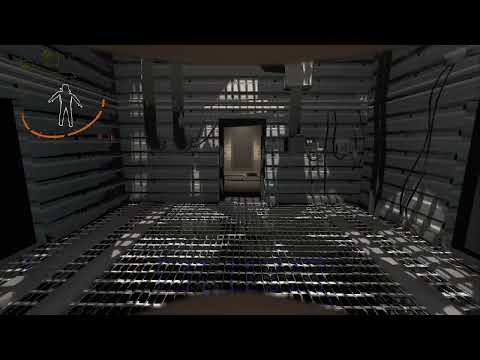
How It Works
- Random Blackouts: Every 25 seconds, there is a 3% chance of triggering an event while living players are inside the facility.
- Event Duration: Blackouts last between 8 and 12 seconds, with a 60-second cooldown after each event.
- Lights Out: Facility lights temporarily shut off, accompanied by the original breaker switch sound and a "Shh..." whisper.
- Reaction Window: You have 1.0–1.5 seconds to stop moving and speaking. This is included in the blackout duration.
- Stay Still: Walking, running, crouch-walking, jumping, and climbing ladders will trigger instant death. Looking around and holding a stationary crouch are allowed. Remaining airborne from a jump when the reaction window ends is lethal.
- Stay Silent: Speaking or making detectable noise through your microphone will also trigger instant death.
- Survive: Once the blackout ends, the lights return to their previous state and players can move and speak freely again.
- Multiplayer: Events are synchronized across all players. Only living players inside the facility are affected.
Installation
Thunderstore Mod Manager / r2modman
- Install Silence through your mod manager.
- Make sure BepInExPack is installed.
- Launch Lethal Company using Start Modded.
All players, including the host, must have the same version of Silence installed and enabled.
Manual Installation
- Install BepInExPack for Lethal Company.
- Extract the mod files into your game's directory.
- Make sure the files are arranged as follows:
BepInEx/
└── plugins/
    └── Silence/
        ├── Silence.dll
        └── silence_shh.wav
Restart the game after installation.
Configuration
Configuration file:
BepInEx/config/local.silence.cfg
The file is generated automatically after the first launch.
| Setting | Default | Description |
|---|---|---|
| EnableMod | true | Enable or disable Silence. |
| EnableNaturalSpawning | true | Enable random blackout events. |
| EventChance | 0.03 | Chance of triggering an event per check (3%). |
| CheckInterval | 25 | Time between event checks in seconds. |
| MinimumDuration | 8 | Minimum blackout duration in seconds. |
| MaximumDuration | 12 | Maximum blackout duration in seconds. |
| CooldownSeconds | 60 | Cooldown between events in seconds. |
| GracePeriodMin | 1.0 | Minimum reaction window in seconds (Event section). |
| GracePeriodMax | 1.5 | Maximum reaction window in seconds (Event section). |
| DetectMovement | true | Enable movement detection. |
| DetectVoice | true | Enable microphone detection. |
| VoiceThreshold | 0.02 | Microphone sensitivity threshold. |
| ShhSoundVolume | 0.8 | Volume of the whisper sound. |
| PowerOffSoundMode | VanillaBreaker | Select the blackout sound effect. |
| PowerOffSoundVolume | 0.8 | Volume of the blackout sound effect. |
Power-Off Sound Options:
VanillaBreaker(Default)VanillaLightOffVanillaApparatusDisconnectVanillaApparatusRemovalCustomDisabled
Existing settings are preserved; missing grace settings use the new defaults.
Event settings are controlled by the host. Audio volume settings are local to each player.
To replace the whisper sound, replace silence_shh.wav in the mod folder with your own compatible audio file.
Restart the game after changing the configuration.
Patch Notes
v0.3.4
- Fixed an issue where blackouts did not occur in certain interior dungeons.
- Added a slight delay before death after a Silence violation is confirmed.
v0.3.2
- Added a randomized 1.0–1.5 second reaction window before movement and voice become lethal.
- Players can now stop moving or speaking during the warning period without dying.
- Improved event timing synchronization for a fairer multiplayer experience.
v0.3.1
- Added a new death animation.
- Increased the default event chance from 2% to 3%.
- Reduced the event check interval from 60 to 25 seconds.
- Reduced the event cooldown from 180 to 60 seconds.
v0.3.0
- Bug Fix
v0.2.0
- Initial release of the Silence blackout event.
- Added movement and microphone detection.
- Added synchronized multiplayer events.
- Added customizable warning sounds and blackout settings.
