

CustomClanUIFixes
UI fixes for playing Monster Train 2 with many clans installed
| Date uploaded | 2 weeks ago |
| Version | 0.2.0 |
| Download link | frutos-CustomClanUIFixes-0.2.0.zip |
| Downloads | 11 |
| Dependency string | frutos-CustomClanUIFixes-0.2.0 |
This mod requires the following mods to function

BepInEx-BepInExPack
BepInEx pack for Mono Unity games. Preconfigured and ready to use.
Preferred version: 5.4.2100
Conductor-ExpandedWinTracker
Mod that adds tracking for soul savior class combinations among other things.
Preferred version: 0.0.1README
Custom Clan UI Fixes (Monster Train 2)
UI fixes for playing with many clans installed. It adds no content: no cards, no units, no clans. It patches base-game screens with Harmony.
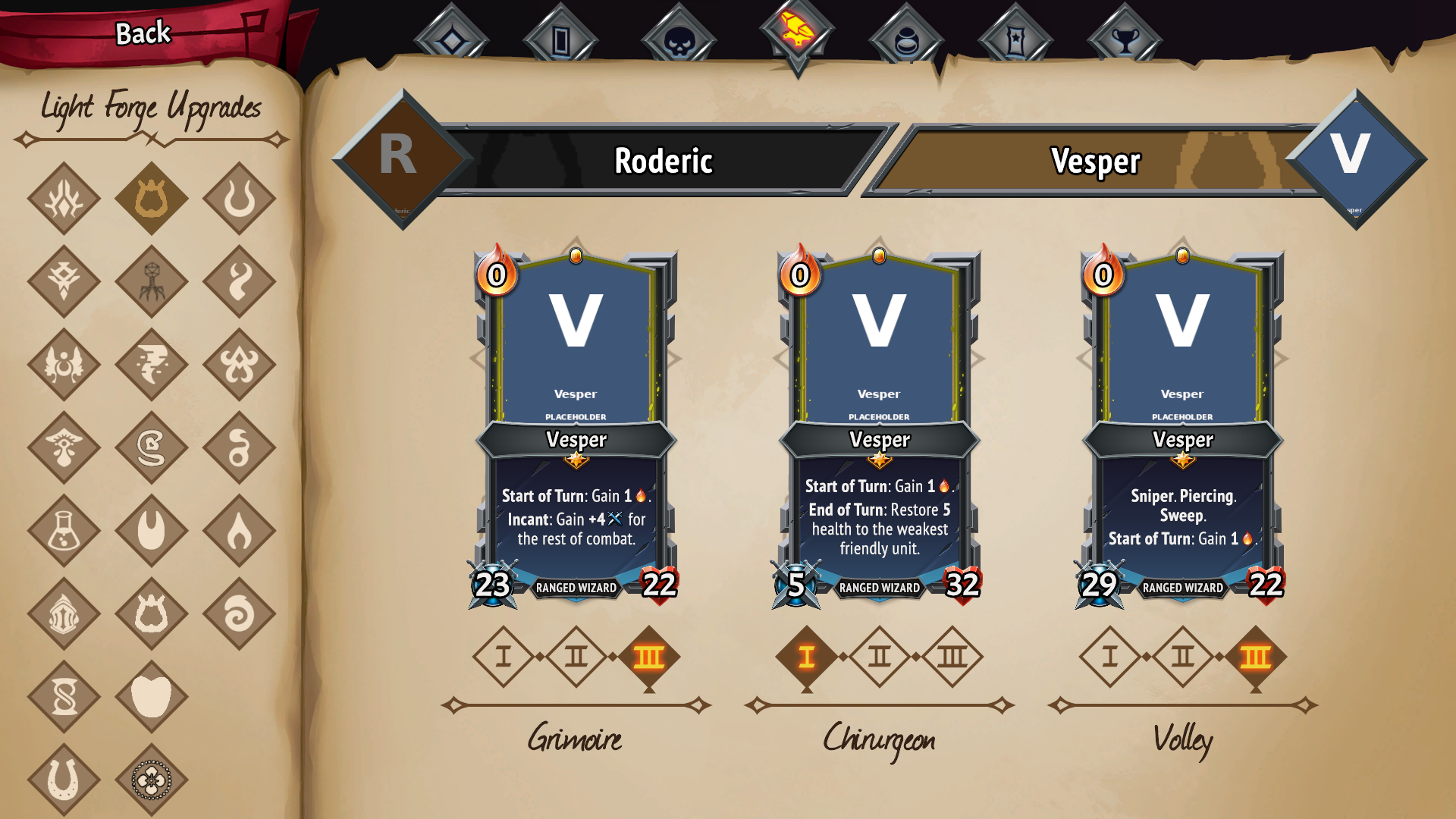
18 clans in three columns, all visible and clickable. Without the mod the list runs off the bottom of the page and the last ones cannot be selected at all.
What it fixes
The logbook's champion upgrade page
The Light Forge Upgrades page lays the clans out in two fixed columns (regular clans and crew clans) and does not paginate: with a dozen mods installed the column runs off the bottom of the page and the last clans cannot be seen or selected.
This mod measures the page, works out how many columns fit and lays the clan diamonds out in a grid that uses the full width, shrinking them only as much as needed. With 18 clans that is 3 columns of 6 at 91% of the original size; the design holds up to about 45 clans before pagination would be needed.
What it does not do: move buttons around in the hierarchy. The game rebuilds those buttons every time the screen opens, so reparenting them leaves duplicated, dead diamonds behind. Here every button stays where the game put it and only its drawn position changes.
The logbook's artifacts page
The Artifacts page gives every clan a column of its own and, like the page above, does not paginate: past a dozen clans the last columns run off the right edge of the sheet and there is no way to reach them.
This mod splits the columns into pages that fit the width of the sheet and reuses the game's own page-turn arrows — the ones the compendium already draws for the card and checklist pages. No new UI, no reparenting: paging is whole columns being switched on and off, and the game's layout closes the gaps. When every column already fits, nothing is hidden and no arrow appears.
Settings
BepInEx\config\mt2_custom_clan_ui_fixes.Plugin.cfg, section [LogbookFit]:
| key | default | what it does |
|---|---|---|
Enabled |
true |
set to false and the screen is left exactly as the game draws it |
MinScale |
0.45 |
how far a diamond may be shrunk |
HeaderReserve |
130 |
px kept free at the top for the page heading. The measured area includes it, so without this the first row of diamonds climbs over the title once there are enough clans |
ScaleMultiplier |
1 |
multiplies the computed factor, to leave the diamonds a little smaller than strictly needed (0.9 = 10% smaller) |
MaxAutoColumns |
3 |
column cap. 2 = leave the game's own layout and only scale it |
ColumnSpacing |
16 |
gap between columns once past two (the game's own is 96) |
HeightBudget |
0 |
usable page height in px; 0 = detect it (measured: 1000) |
WidthBudget |
0 |
usable width in px; 0 = detect it (measured: 400). At 440 the diamonds keep their original size, spilling slightly outside the nominal area |
RetryFrames |
5 |
frames the layout pass is retried after the screen opens |
Verbose |
true |
log what it measures and applies to LogOutput.log |
The retry is not a blind workaround: the game fills the crew column one or more frames after the screen opens, so the first pass only sees half the clans. The log line is only written when the result changes, not once per retry.
Section [ArtifactsPaging]:
| key | default | what it does |
|---|---|---|
Enabled |
true |
set to false and the artifacts page is left exactly as the game draws it |
ColumnsPerPage |
0 |
columns per page; 0 = as many as the measured width fits |
WidthBudget |
0 |
usable sheet width in px; 0 = detect it. If the split comes out short or long, take the width from the zona: line in the log and set it here |
RetryFrames |
5 |
frames the split is retried after the screen opens |
Verbose |
true |
log what it measures and how it splits |
Relation to CustomClanHelper
Custom-Clan-Helper fixes the logbook's checklist page and lists both of these in its TODO ("Champion Upgrade Page in logbook is wonky", "Artifact page needs pagination support"). Both mods are compatible and deal with different screens.
Building
See COMO-COMPILAR.md. GitHub Actions builds the DLL on every push that touches src/.
License
MIT.
Custom Clan UI Fixes — en castellano
Arreglos de interfaz para jugar con muchos clanes instalados. No añade contenido: ni cartas, ni unidades, ni clanes. Parchea pantallas del juego base con Harmony.
Que arregla
La pagina de mejoras de campeon del logbook
La pantalla Light Forge Upgrades del logbook reparte los clanes en dos columnas fijas (clanes normales y tripulacion) y no pagina: con una decena de mods instalados la columna se sale de la hoja por abajo y los ultimos clanes no hay forma de verlos ni de seleccionarlos.
Este mod mide la hoja, decide cuantas columnas caben y recoloca los rombos en una rejilla que aprovecha el ancho, encogiendolos solo lo justo. Con 18 clanes salen 3 columnas de 6 a un 91% del tamano original; el diseno aguanta hasta unos 45 clanes antes de tener que paginar.
Lo que no hace: mover botones de sitio en la jerarquia. El juego reconstruye esos botones cada vez que se abre la pantalla, asi que cambiarlos de padre deja rombos duplicados y sin funcionar. Aqui cada boton se queda donde el juego lo puso y solo se cambia donde se dibuja.
La pagina de artefactos del logbook
La pagina de artefactos le da una columna a cada clan y, como la anterior, no pagina: pasada la docena de clanes las ultimas columnas se salen de la hoja por la derecha y no hay forma de llegar a ellas.
Este mod reparte las columnas en paginas que caben a lo ancho de la hoja y reutiliza las flechas de paso de pagina del propio juego, las mismas que el compendio ya pinta en las paginas de cartas y de coleccion. Ni UI nueva ni cambios de jerarquia: pasar de pagina es encender y apagar columnas enteras, y el layout del juego cierra los huecos. Si todas las columnas caben, no se esconde ninguna y no aparece ninguna flecha.
Ajustes
BepInEx\config\mt2_custom_clan_ui_fixes.Plugin.cfg, seccion [LogbookFit]:
| clave | por defecto | que hace |
|---|---|---|
Enabled |
true |
a false y la pantalla queda como la deja el juego |
MinScale |
0.45 |
hasta donde se deja encoger un rombo |
HeaderReserve |
130 |
pixeles que se reservan arriba para el titulo de la hoja. La zona medida lo incluye, asi que sin esto los rombos se le suben encima en cuanto hay bastantes clanes |
ScaleMultiplier |
1 |
multiplica el factor calculado, para dejar los rombos algo mas pequenos de lo justo (0,9 = un 10% mas pequenos) |
MaxAutoColumns |
3 |
columnas como mucho. 2 = no se toca la rejilla del juego, solo se escala |
ColumnSpacing |
16 |
separacion entre columnas al pasar de dos (la del juego son 96) |
HeightBudget |
0 |
alto util de la hoja en px; 0 = detectarlo (medido: 1000) |
WidthBudget |
0 |
ancho util en px; 0 = detectarlo (medido: 400). A 440 los rombos quedan a tamano original, saliendose un poco del area nominal |
RetryFrames |
5 |
frames que se reintenta la colocacion tras abrir la pantalla |
Verbose |
true |
traza en LogOutput.log, con las medidas y el factor aplicado |
El reintento no es un parche a ciegas: el juego crea los botones de la columna de tripulacion uno o mas frames despues de abrir la pantalla, asi que la primera colocacion solo ve la otra mitad. La traza solo se escribe cuando el resultado cambia, no en cada reintento.
Seccion [ArtifactsPaging]:
| clave | por defecto | que hace |
|---|---|---|
Enabled |
true |
a false y la pagina de artefactos queda como la deja el juego |
ColumnsPerPage |
0 |
columnas por pagina; 0 = las que quepan segun el ancho medido |
WidthBudget |
0 |
ancho util de la hoja en px; 0 = detectarlo. Si el reparto se queda corto o largo, coge el ancho de la linea zona: del log y fijalo aqui |
RetryFrames |
5 |
frames que se reintenta el reparto tras abrir la pantalla |
Verbose |
true |
traza en LogOutput.log de lo que mide y de como reparte |
Relacion con CustomClanHelper
Custom-Clan-Helper arregla la pagina del checklist del logbook, y tiene estas dos en su TODO ("Champion Upgrade Page in logbook is wonky", "Artifact page needs pagination support"). Los dos mods son compatibles y se ocupan de pantallas distintas.
Compilar
Ver COMO-COMPILAR.md. El DLL lo compila GitHub Actions con cada push que toque src/.
Licencia
MIT.
CHANGELOG
Historial de cambios
Español
0.4.5
- Nuevo resumen de Soul Savior en el panel izquierdo: combinaciones ganadas, clanes con victorias y máxima dificultad alcanzada.
- Los textos de Soul Savior siguen el idioma seleccionado en el juego.
- Icono de Soul Savior ajustado para encajar mejor en las pestañas del logbook.
- ExpandedWinTracker by Conductor se instala automáticamente como dependencia. Gracias a Brandon por el seguimiento de victorias.
0.4.4
- Nueva pestaña de Soul Savior con acceso directo y cinco clanes por página.
- Seguimiento de victorias por combinación de clan principal y aliado, con máxima dificultad ganada y detalles por campeón al pasar el cursor sobre las banderas.
- Usa los registros de ExpandedWinTracker by Conductor, sin modificar sus guardados. Gracias a Brandon por ExpandedWinTracker.
- Las banderas de aliados se reparten de forma equilibrada y dejan libre el retrato del clan.
- Los clanes normales y del DLC comparten páginas para aprovechar mejor el espacio.
- Ajustes de alineación de pestañas, cintas y medidores, y mejoras de navegación con mando.
0.3.0
- Registro de progreso con un clan por fila y cinco clanes por página, usando las flechas del juego.
- Banderas de aliados a tamaño completo y medidores de maestría alineados, también para los clanes del DLC.
- El adorno inferior del filtro de cartas deja de tapar la caja de búsqueda cuando hay muchos clanes.
- Nuevos ajustes para el registro de progreso y los filtros de cartas. Registro detallado desactivado por defecto.
0.2.1
- Nuevas capturas y documentación en la página del mod. Sin cambios en su funcionamiento.
0.2.0
- Artefactos repartidos en páginas equilibradas, con las flechas del juego. Si todas las columnas caben, se mantiene una sola página.
- Las mejoras de campeón respetan el espacio del título y permiten ajustar el tamaño de los iconos.
0.1.0
- Primera versión.
- Rejilla de mejoras de campeón que permite ver y seleccionar todos los clanes instalados.
- Opciones de configuración para ajustar o desactivar los cambios de interfaz.
English
0.4.5
- New Soul Savior overview in the left panel: winning clan combinations, clans with wins and highest winning difficulty.
- Soul Savior text follows the language selected in the game.
- Refined Soul Savior icon to fit the logbook tabs.
- ExpandedWinTracker by Conductor is now installed automatically as a dependency. Thanks to Brandon for the win tracking.
0.4.4
- New Soul Savior tab with direct access and five clans per page.
- Track wins by main/ally clan combination, including highest winning difficulty and champion details when hovering over banners.
- Uses records from ExpandedWinTracker by Conductor without modifying its save files. Thanks to Brandon for ExpandedWinTracker.
- Ally banners are evenly distributed and no longer cover clan portraits.
- Normal and DLC clans share pages to make better use of the available space.
- Tab, ribbon and meter alignment adjustments, plus improved controller navigation.
0.3.0
- Progress record with one clan per row and five clans per page, using the game's arrows.
- Full-size ally banners and aligned mastery meters, including DLC clans.
- The card filter's bottom ornament no longer covers the search box when many clans are installed.
- New progress-record and card-filter settings. Detailed logging is off by default.
0.2.1
- Updated screenshots and documentation on the mod page. No changes to mod behaviour.
0.2.0
- Artifacts split into balanced pages using the game's arrows. Keep a single page when all columns fit.
- Champion upgrades leave room for the heading and allow icon-size adjustments.
0.1.0
- First release.
- Champion-upgrade grid that makes all installed clans visible and selectable.
- Configuration options to adjust or disable the interface changes.
