

CustomClanUIFixes
UI fixes for playing Monster Train 2 with many clans installed
| Date uploaded | a week ago |
| Version | 0.4.8 |
| Download link | frutos-CustomClanUIFixes-0.4.8.zip |
| Downloads | 40 |
| Dependency string | frutos-CustomClanUIFixes-0.4.8 |
This mod requires the following mods to function

BepInEx-BepInExPack
BepInEx pack for Mono Unity games. Preconfigured and ready to use.
Preferred version: 5.4.2100README
Custom Clan UI Fixes (Monster Train 2)
UI fixes for playing with many clans installed. It adds no content: no cards, no units, no clans. It patches base-game screens with Harmony.
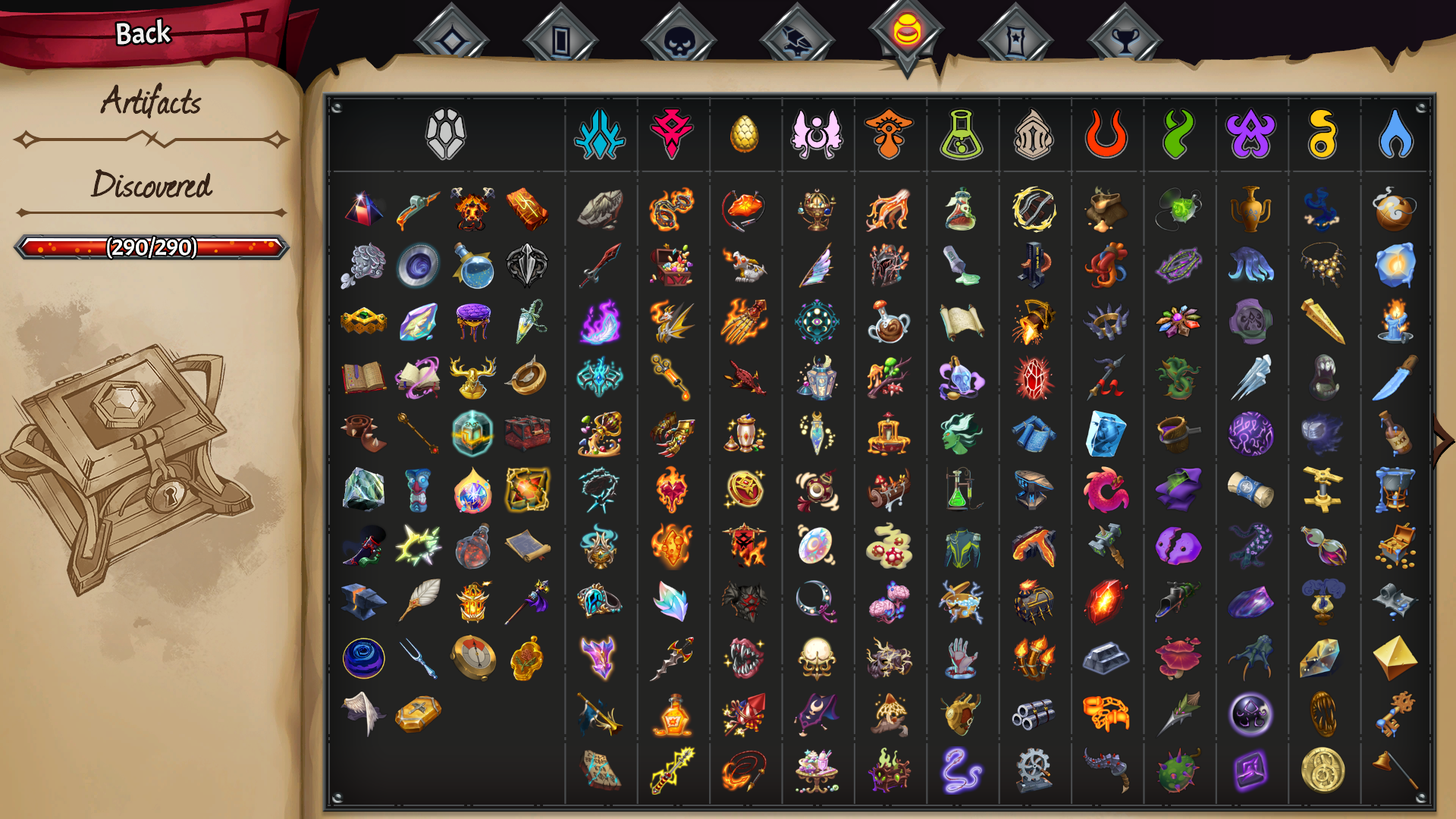
The artifacts page with 19 clans installed: the clan columns split into two pages, turned with the game's own arrows. Without the mod the last ones are drawn past the right edge of the sheet.
What it fixes
The logbook's champion upgrade page
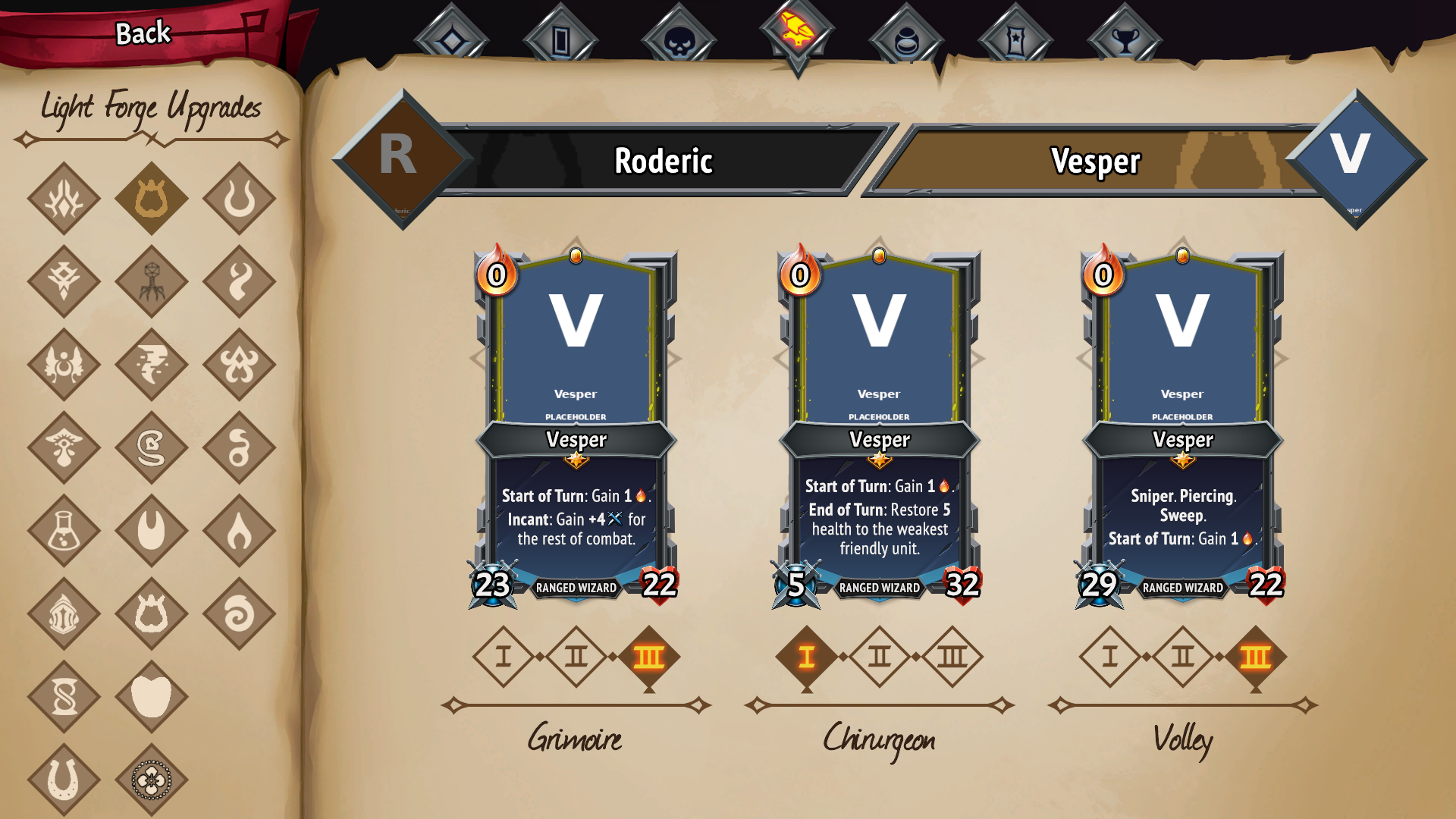
19 clans in three columns, all visible and clickable, with the page heading left alone.
The Light Forge Upgrades page lays the clans out in two fixed columns (regular clans and crew clans) and does not paginate: with a dozen mods installed the column runs off the bottom of the page and the last clans cannot be seen or selected.
This mod measures the page, works out how many columns fit and lays the clan diamonds out in a grid that uses the full width, shrinking them only as much as needed and keeping the page heading clear. With 21 clans that is 3 columns of 7 at 87% of the original size, and the diamonds keep shrinking on their own as clans are added — around 30 they are at 61%.
What it does not do: move buttons around in the hierarchy. The game rebuilds those buttons every time the screen opens, so reparenting them leaves duplicated, dead diamonds behind. Here every button stays where the game put it and only its drawn position changes.
The logbook's artifacts page
The Artifacts page gives every clan a column of its own and, like the page above, does not paginate: past a dozen clans the last columns run off the right edge of the sheet and there is no way to reach them.
This mod splits the columns into pages that fit the width of the sheet and reuses the game's own page-turn arrows — the ones the compendium already draws for the card and checklist pages. No new UI, no reparenting: paging is whole columns being switched on and off, and the game's layout closes the gaps. When every column already fits, nothing is hidden and no arrow appears.
The pages come out evenly filled rather than cramming the first one: with 24 columns that is 12 and 12, not 17 and 7. It balances by width, not by column count — the generic artifacts take four times the width of a clan column.
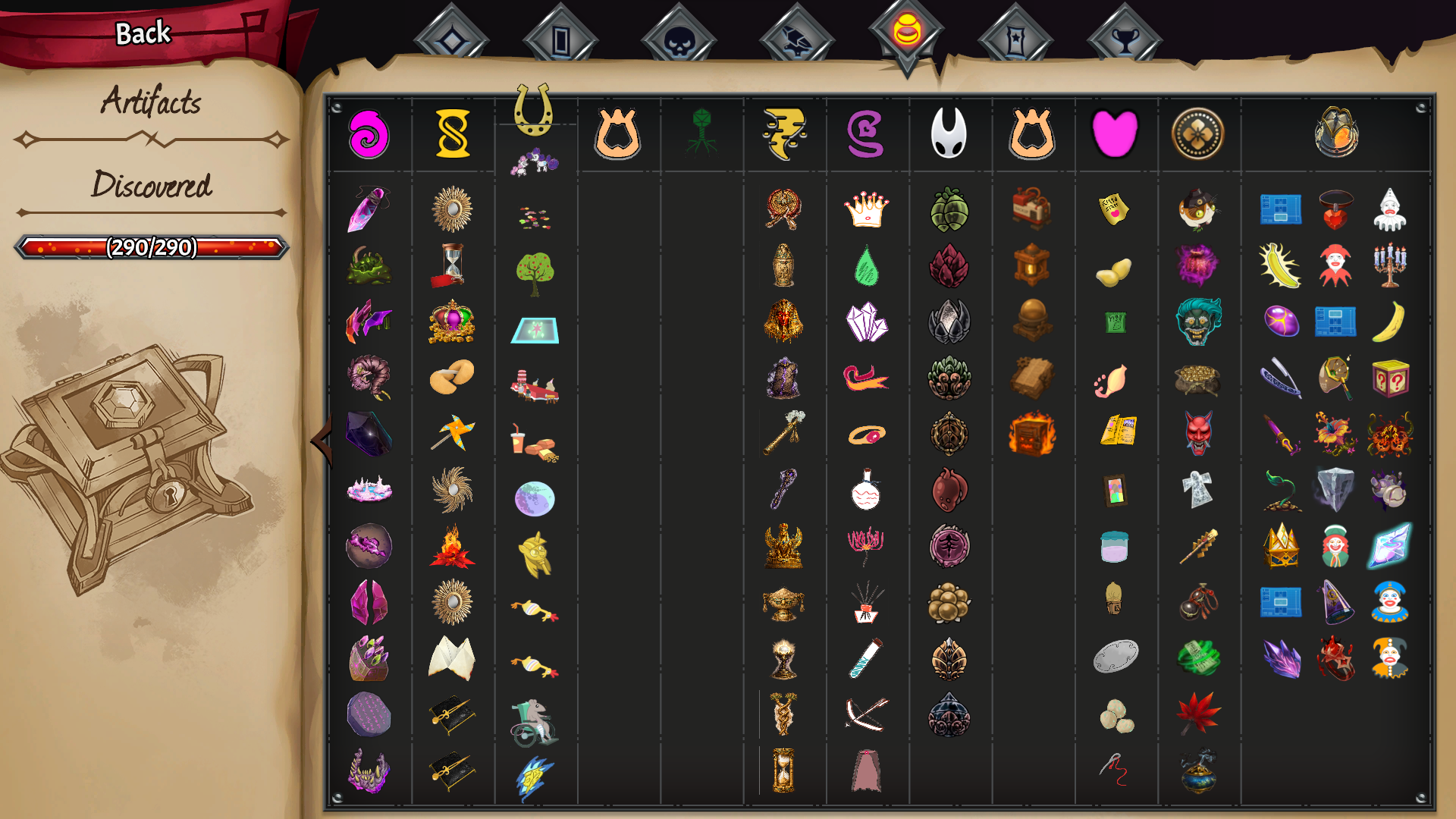
Page two, reached with the arrow on the right. Without the mod these columns are drawn past the edge of the sheet and cannot be reached at all.
The logbook's progress record
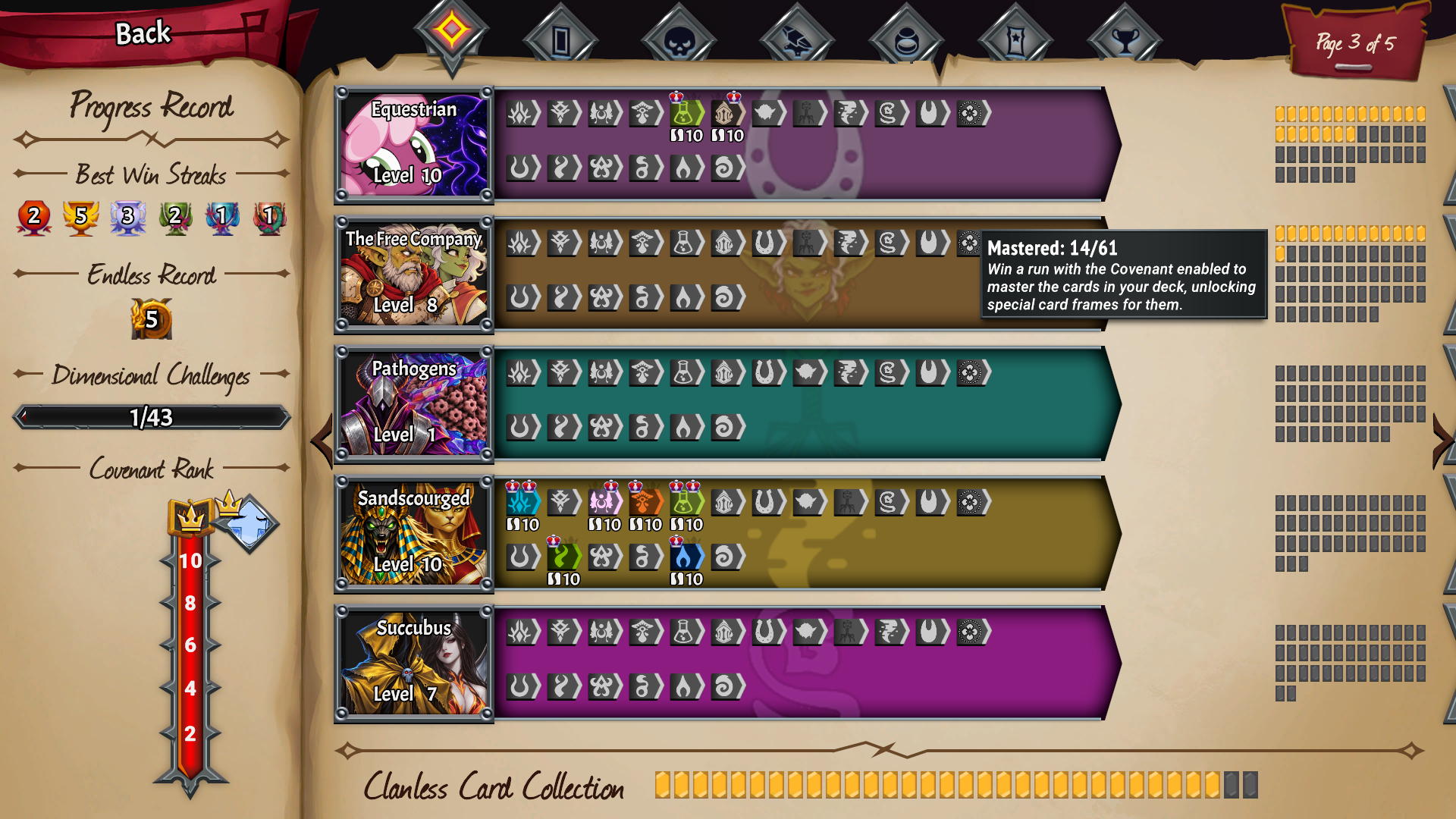
Page 3 of 5 with 19 clans: one clan per row, the ally banners at full size, and the same card mastery grid for every clan.
The Progress Record page lays the clans out in a fixed grid of 2 x 5 and does not paginate either: from the eleventh clan on, the sections are drawn below the bottom edge of the sheet and cannot be seen at all. On top of that, each row of ally banners is only 354 px wide, so with a dozen allied clans the game squeezes the banners to half their width and they overlap.
This mod puts one clan per row and pages the sheet with the game's own arrows, five clans per page; the "Page N of M" label counts those pages. With the full width of the sheet:
- the ally banners keep their full size;
- the clan's colour ribbon runs all the way to the card mastery meter;
- the card mastery meter grows in columns instead of rows — a clan with more than 42 cards used to spill out of its section — and every clan gets the same 12 x 5 grid, so the meters line up.
The DLC page (Railforged, Wurmkin) gets the same layout.
The card filter's search box
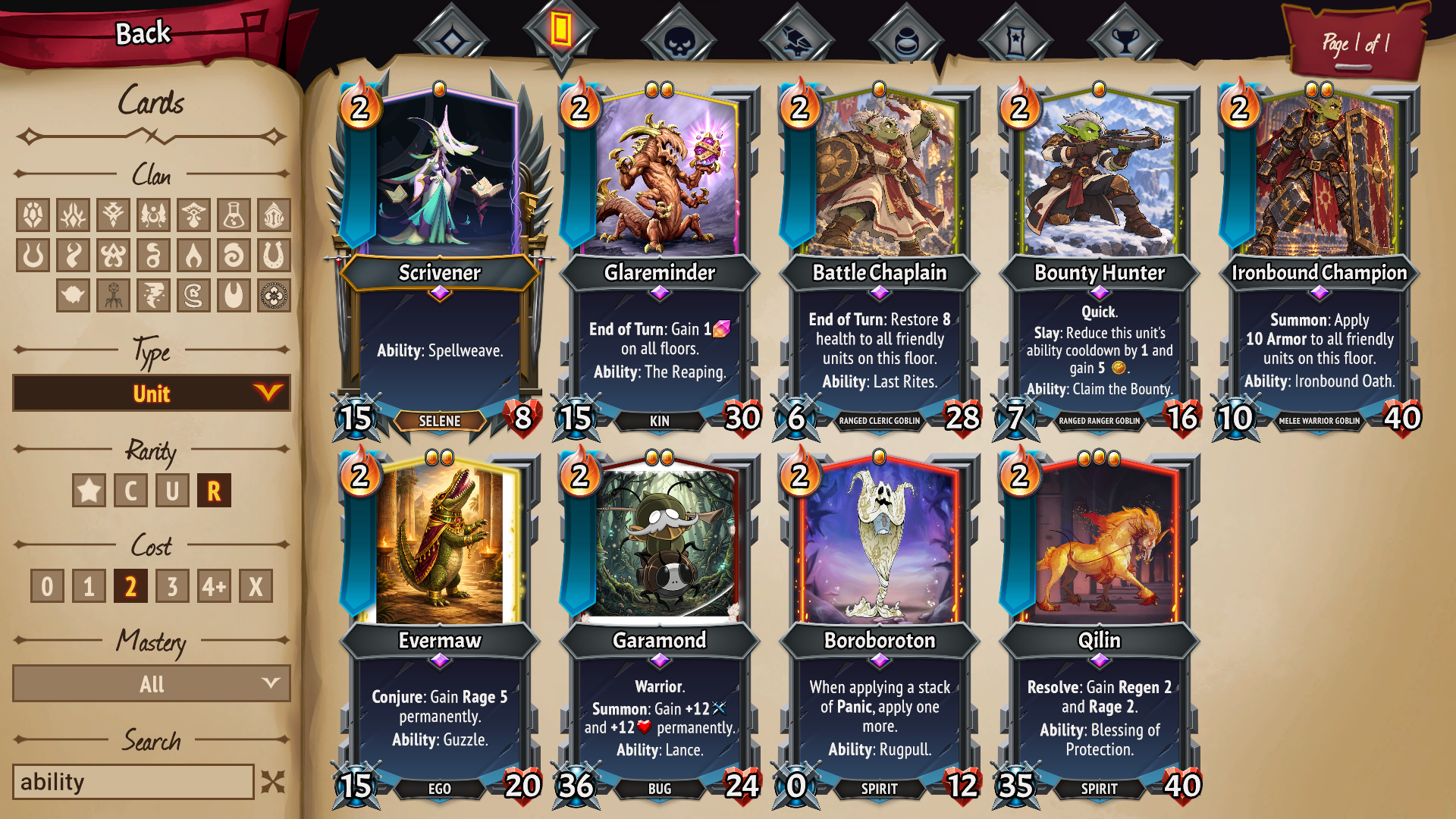
The logbook's card filters with 19 clans: three rows of clan buttons, and a search box you can read.
Once there are enough clans for a third row of clan buttons, the ornament that closes the bottom of the filter panel — a line with a diamond in the middle — is drawn right across the search box, over the text you type. This mod switches that ornament off, and only when it actually overlaps the box: with fewer clans the panel is left as the game draws it.
Settings
BepInEx\config\mt2_custom_clan_ui_fixes.Plugin.cfg, section [LogbookFit]:
| key | default | what it does |
|---|---|---|
Enabled |
true |
set to false and the screen is left exactly as the game draws it |
MinScale |
0.45 |
how far a diamond may be shrunk |
HeaderReserve |
130 |
px kept free at the top for the page heading. The measured area includes it, so without this the first row of diamonds climbs over the title once there are enough clans |
ScaleMultiplier |
1 |
multiplies the computed factor, to leave the diamonds a little smaller than strictly needed (0.9 = 10% smaller) |
MaxAutoColumns |
3 |
column cap. 2 = leave the game's own layout and only scale it |
ColumnSpacing |
16 |
gap between columns once past two (the game's own is 96) |
HeightBudget |
0 |
usable page height in px; 0 = detect it (measured: 1000) |
WidthBudget |
0 |
usable width in px; 0 = detect it (measured: 400). At 440 the diamonds keep their original size, spilling slightly outside the nominal area |
RetryFrames |
5 |
frames the layout pass is retried after the screen opens |
Verbose |
false |
log what it measures and applies to LogOutput.log |
The retry is not a blind workaround: the game fills the crew column one or more frames after the screen opens, so the first pass only sees half the clans. The log line is only written when the result changes, not once per retry.
Section [ArtifactsPaging]:
| key | default | what it does |
|---|---|---|
Enabled |
true |
set to false and the artifacts page is left exactly as the game draws it |
ColumnsPerPage |
0 |
columns per page; 0 = as many as the measured width fits |
WidthBudget |
0 |
usable sheet width in px; 0 = detect it. If the split comes out short or long, take the width from the zona: line in the log and set it here |
Balance |
true |
evenly filled pages (24 columns: 12 + 12) instead of filling the first one (17 + 7) |
RetryFrames |
10 |
frames the split is retried after the screen opens |
Verbose |
false |
log what it measures and how it splits |
Section [ProgressGrid]:
| key | default | what it does |
|---|---|---|
Enabled |
true |
set to false and the progress record is left exactly as the game draws it |
Columns |
1 |
clan columns. 1 = one clan per row, which is what makes room for the banners; 2 = the game's own grid |
RowsPerPage |
0 |
clans per page; 0 = as many as fit (5) |
PlaqueWidth |
280 |
width of the portrait plaque in px; 0 = whatever is left |
FlagOffsetX |
-280 |
px the ally banners are moved inside the section; negative = to the left |
BalanceFlagRows |
true |
splits the ally banners evenly between their two rows. It moves objects between parents, as the game itself does: if duplicated or unresponsive banners show up, set it to false |
FixMasteryMeter |
true |
the card mastery meter grows in columns instead of rows |
MeterColumns |
12 |
meter columns, the same for every clan |
MeterRows |
5 |
rows that fit; with 12 columns, room for 60 cards. If a clan does not fit, columns are added for every clan |
Verbose |
false |
log the grid, the paging and what it adjusts |
The remaining keys (Layout, WidenSections, FreeFlagWidth, FlagAlignLeft,
FlagSpacing, StretchPlaqueFill, RibbonExtra, DetailSections, DumpTree) are there
for troubleshooting; their defaults are the values tuned in game.
Section [CardFilter]:
| key | default | what it does |
|---|---|---|
Enabled |
true |
set to false and the filter panel is left exactly as the game draws it |
MinOverlap |
0.25 |
how much of the search box's height something has to cover to count as the ornament. Raise it if anything else gets switched off |
AlsoInside |
false |
also look inside the search box itself. Off because the box's own frame and background live there |
Levels |
1 |
how far up to look for the ornament; 1 = the Search section and its neighbours |
Verbose |
false |
log what it switched off |
DumpTree |
false |
dump the panel's hierarchy once, for troubleshooting |
Relation to CustomClanHelper
Custom-Clan-Helper also works on the logbook: it lists the champion upgrade and artifacts pages in its TODO ("Champion Upgrade Page in logbook is wonky", "Artifact page needs pagination support"), and it gives modded clans a progress record page of their own. Both mods work together: this one has been tested with Custom-Clan-Helper installed, progress record included.
Soul Savior tracking
Development note: The Progress · Cards page inside Soul Savior is still under development. I'm releasing this update now because it already brings substantial improvements to Soul Savior tracking.
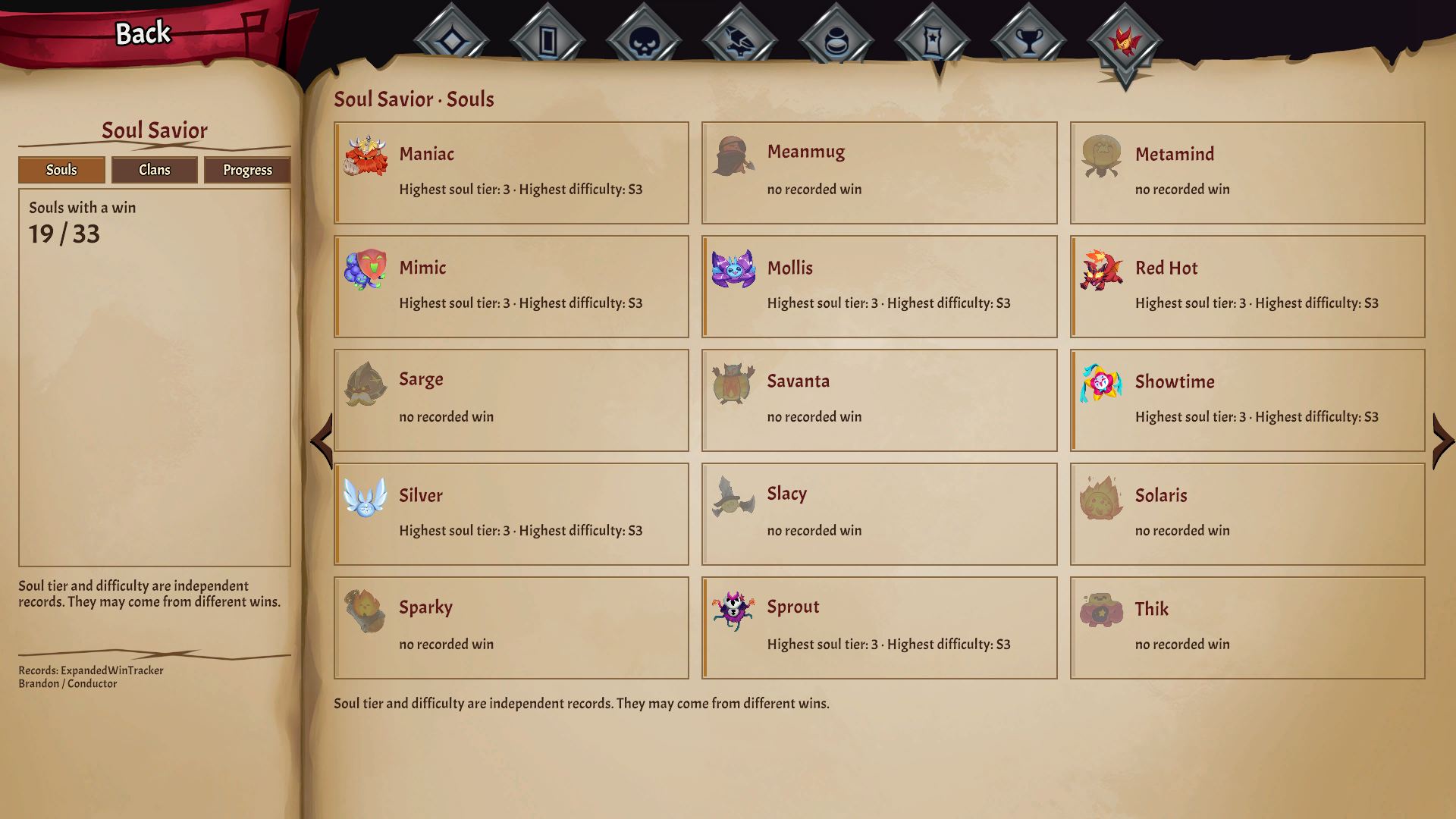
The Soul Savior tab starts with a soul catalog: fifteen soul families per page, localized names, highest soul tier won and highest difficulty won. Those are independent records from ExpandedWinTracker by Conductor, and can come from different victories. Clan combination pages follow the soul catalog. The left panel summarizes the current view.
Clan details and missing victories
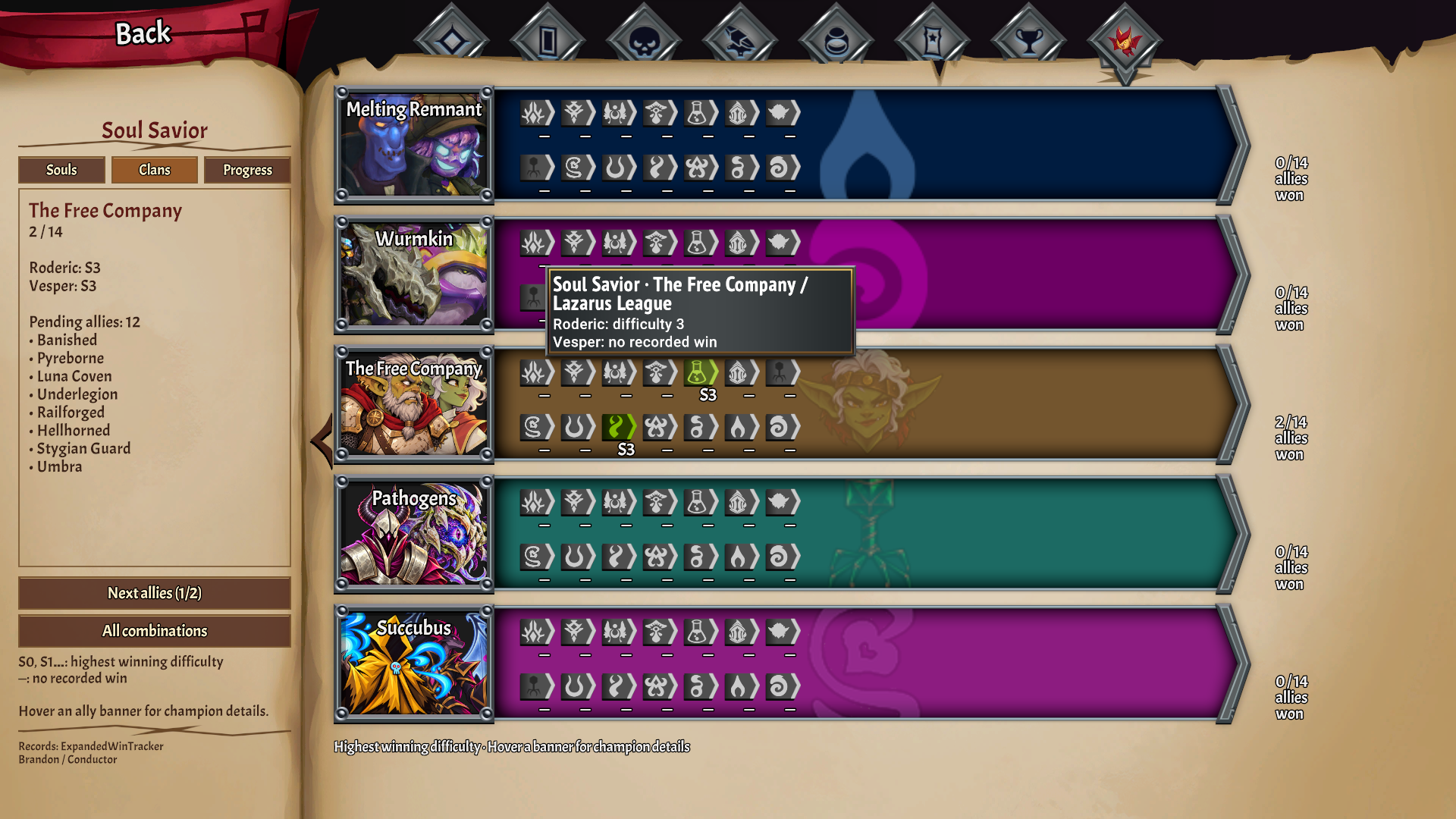
On clan pages, mouse focus or controller selection updates the left panel with missing allies and the highest Soul Savior difficulty won by each champion. Browse missing allies in batches with the panel button. The Without a win button hides completed combinations; progress totals still include all allies. Soul entries use the game’s native navigation and tooltips. Compact panels keep full text available in a tooltip.
Historical card plays
Card tooltips show actual plays since this feature was installed: direct, automatic, and a Soul Savior subtotal. Copies and upgrades share the base card ID. Summoning a unit counts as a card play; its subsequent attacks and unit/room abilities do not. Previews and replay playback are excluded. Real plays before an undo or battle restart remain counted, so this measures usage across attempts. Previous usage cannot be reconstructed.
Set [CardUsage] Enabled = false in the mod’s configuration to disable tracking and its
tooltip. These counts are stored by CustomClanUIFixes in
BepInEx/config/CustomClanUIFixes/card-usage.json, with a previous-state .bak copy.
They are separate from ExpandedWinTracker’s Soul Savior victory records. Game saves and
ExpandedWinTracker records are left untouched.
Progress explorer
Open Logbook → Soul Savior → Progress, then choose Cards, Clans or Souls.
- Cards: most-played ranking, search, clan filter (including clanless), and All / Normal / Soul Savior / Other modes. Counts distinguish direct and automatic plays and show the tracking start date.
- Clans: search by localized name; order by name, most progress or most pending. Choose Any champion, Champion 1 or Champion 2. Select a clan to see its pending allies; All clans returns to the list without losing the chosen champion.
- Souls: show all, without a win or below the chosen difficulty goal, with a name search.
- Goals: select Goal to cycle the required difficulty. Combination and soul totals stay complete while searching; the percentage and bar describe the current view. S0 is a recorded win, while — means no recorded win. Soul tier and difficulty remain independent records.
The tables use the native page arrows as well as their Previous / Next controls. On narrow layouts the outer arrows browse Souls, Clans and Progress; Progress keeps its own table controls. Tracking starts when this feature is installed and cannot reconstruct earlier card plays. Soul Savior records come from ExpandedWinTracker by Conductor (Brandon).
Building
See COMO-COMPILAR.md. GitHub Actions builds the DLL on every push that touches src/.
License
MIT.
Custom Clan UI Fixes — en castellano
Arreglos de interfaz para jugar con muchos clanes instalados. No añade contenido: ni cartas, ni unidades, ni clanes. Parchea pantallas del juego base con Harmony.
Que arregla
La pagina de mejoras de campeon del logbook
La pantalla Light Forge Upgrades del logbook reparte los clanes en dos columnas fijas (clanes normales y tripulacion) y no pagina: con una decena de mods instalados la columna se sale de la hoja por abajo y los ultimos clanes no hay forma de verlos ni de seleccionarlos.
Este mod mide la hoja, decide cuantas columnas caben y recoloca los rombos en una rejilla que aprovecha el ancho, encogiendolos solo lo justo y dejando libre el titulo de la hoja. Con 21 clanes salen 3 columnas de 7 a un 87% del tamano original, y los rombos siguen encogiendo solos segun se anaden clanes: sobre los 30 van al 61%.
Lo que no hace: mover botones de sitio en la jerarquia. El juego reconstruye esos botones cada vez que se abre la pantalla, asi que cambiarlos de padre deja rombos duplicados y sin funcionar. Aqui cada boton se queda donde el juego lo puso y solo se cambia donde se dibuja.
La pagina de artefactos del logbook
La pagina de artefactos le da una columna a cada clan y, como la anterior, no pagina: pasada la docena de clanes las ultimas columnas se salen de la hoja por la derecha y no hay forma de llegar a ellas.
Este mod reparte las columnas en paginas que caben a lo ancho de la hoja y reutiliza las flechas de paso de pagina del propio juego, las mismas que el compendio ya pinta en las paginas de cartas y de coleccion. Ni UI nueva ni cambios de jerarquia: pasar de pagina es encender y apagar columnas enteras, y el layout del juego cierra los huecos. Si todas las columnas caben, no se esconde ninguna y no aparece ninguna flecha.
Las paginas salen igual de llenas en vez de llenar la primera: con 24 columnas, 12 y 12, no 17 y 7. El equilibrio es por ancho y no por numero de columnas, porque la de artefactos genericos ocupa cuatro veces lo que una de clan.
La hoja de progreso del logbook
La hoja Progress Record reparte los clanes en una rejilla fija de 2 x 5 y tampoco pagina: a partir del undecimo clan, las secciones se dibujan por debajo del borde de la hoja y no hay forma de verlas. Ademas, cada fila de banderas de aliados mide solo 354 px, asi que con una docena de clanes aliados el juego aplasta las banderas a la mitad y se solapan.
Este mod pone un clan por fila y pagina la hoja con las flechas del propio juego, cinco clanes por pagina; el rotulo "Page N of M" cuenta esas paginas. Con todo el ancho de la hoja:
- las banderas de aliados conservan su tamano;
- la cinta de color del clan llega hasta el medidor de cartas;
- el medidor de cartas dominadas crece en columnas y no en filas -un clan con mas de 42 cartas se salia de su seccion- y todos los clanes llevan la misma rejilla de 12 x 5, asi que los medidores quedan alineados.
La hoja de DLC (Railforged, Wurmkin) recibe el mismo formato.
La caja de busqueda del filtro de cartas
En cuanto hay clanes para una tercera fila de botones de clan, el adorno que cierra el panel de filtros por abajo -una raya con un rombo en medio- se dibuja justo encima de la caja de busqueda, sobre el texto que escribes. Este mod apaga ese adorno, y solo cuando de verdad tapa la caja: con menos clanes el panel queda como lo pinta el juego.
Ajustes
BepInEx\config\mt2_custom_clan_ui_fixes.Plugin.cfg, seccion [LogbookFit]:
| clave | por defecto | que hace |
|---|---|---|
Enabled |
true |
a false y la pantalla queda como la deja el juego |
MinScale |
0.45 |
hasta donde se deja encoger un rombo |
HeaderReserve |
130 |
pixeles que se reservan arriba para el titulo de la hoja. La zona medida lo incluye, asi que sin esto los rombos se le suben encima en cuanto hay bastantes clanes |
ScaleMultiplier |
1 |
multiplica el factor calculado, para dejar los rombos algo mas pequenos de lo justo (0,9 = un 10% mas pequenos) |
MaxAutoColumns |
3 |
columnas como mucho. 2 = no se toca la rejilla del juego, solo se escala |
ColumnSpacing |
16 |
separacion entre columnas al pasar de dos (la del juego son 96) |
HeightBudget |
0 |
alto util de la hoja en px; 0 = detectarlo (medido: 1000) |
WidthBudget |
0 |
ancho util en px; 0 = detectarlo (medido: 400). A 440 los rombos quedan a tamano original, saliendose un poco del area nominal |
RetryFrames |
5 |
frames que se reintenta la colocacion tras abrir la pantalla |
Verbose |
false |
traza en LogOutput.log, con las medidas y el factor aplicado |
El reintento no es un parche a ciegas: el juego crea los botones de la columna de tripulacion uno o mas frames despues de abrir la pantalla, asi que la primera colocacion solo ve la otra mitad. La traza solo se escribe cuando el resultado cambia, no en cada reintento.
Seccion [ArtifactsPaging]:
| clave | por defecto | que hace |
|---|---|---|
Enabled |
true |
a false y la pagina de artefactos queda como la deja el juego |
ColumnsPerPage |
0 |
columnas por pagina; 0 = las que quepan segun el ancho medido |
WidthBudget |
0 |
ancho util de la hoja en px; 0 = detectarlo. Si el reparto se queda corto o largo, coge el ancho de la linea zona: del log y fijalo aqui |
Balance |
true |
paginas igual de llenas (24 columnas: 12 + 12) en vez de llenar la primera (17 + 7) |
RetryFrames |
10 |
frames que se reintenta el reparto tras abrir la pantalla |
Verbose |
false |
traza en LogOutput.log de lo que mide y de como reparte |
Seccion [ProgressGrid]:
| clave | por defecto | que hace |
|---|---|---|
Enabled |
true |
a false y la hoja de progreso queda como la deja el juego |
Columns |
1 |
columnas de clanes. 1 = un clan por fila, que es lo que deja sitio a las banderas; 2 = la rejilla del juego |
RowsPerPage |
0 |
clanes por pagina; 0 = los que quepan (5) |
PlaqueWidth |
280 |
ancho de la placa del retrato en px; 0 = lo que sobre |
FlagOffsetX |
-280 |
px que se mueven las banderas de aliados dentro de la seccion; negativo = a la izquierda |
BalanceFlagRows |
true |
reparte las banderas de aliados a partes iguales entre sus dos filas. Mueve objetos de padre, como hace el propio juego: si aparecen banderas duplicadas o que no responden, ponlo a false |
FixMasteryMeter |
true |
el medidor de cartas dominadas crece en columnas y no en filas |
MeterColumns |
12 |
columnas del medidor, las mismas para todos los clanes |
MeterRows |
5 |
filas que caben; con 12 columnas, sitio para 60 cartas. Si un clan no cabe, se anaden columnas para todos |
Verbose |
false |
traza de la rejilla, el paginado y lo que ajusta |
El resto de claves (Layout, WidenSections, FreeFlagWidth, FlagAlignLeft,
FlagSpacing, StretchPlaqueFill, RibbonExtra, DetailSections, DumpTree) son para
diagnosticar; sus valores por defecto son los ajustados en partida.
Seccion [CardFilter]:
| clave | por defecto | que hace |
|---|---|---|
Enabled |
true |
a false y el panel de filtros queda como lo deja el juego |
MinOverlap |
0.25 |
cuanto del alto de la caja de busqueda tiene que tapar algo para darlo por adorno. Subelo si se apaga algo mas |
AlsoInside |
false |
buscar tambien dentro de la propia caja. Apagado porque ahi viven su marco y su fondo |
Levels |
1 |
hasta donde se sube a buscar el adorno; 1 = la seccion Search y sus vecinas |
Verbose |
false |
traza de lo que ha apagado |
DumpTree |
false |
vuelca una vez el arbol del panel, para diagnosticar |
Relacion con CustomClanHelper
Custom-Clan-Helper tambien trabaja sobre el logbook: tiene las paginas de mejoras y de artefactos en su TODO ("Champion Upgrade Page in logbook is wonky", "Artifact page needs pagination support") y da a los clanes modeados una hoja de progreso propia. Los dos mods funcionan juntos: este se ha probado con Custom-Clan-Helper instalado, hoja de progreso incluida.
Explorador de Progreso
Nota de desarrollo: La página Progress · Cards de Soul Savior sigue en desarrollo. He decidido publicar esta actualización porque ya incluye numerosas mejoras en el seguimiento de Soul Savior.
Abre Logbook → Soul Savior → Progreso y elige Cartas, Clanes o Almas.
- Cartas: ranking de las más jugadas, búsqueda y filtros por clan (incluido Sin clan) y modo. Se separan usos directos y automáticos y se indica desde cuándo se cuentan.
- Clanes: busca por el nombre del idioma del juego y ordena por nombre, progreso o pendientes. Elige Cualquier campeón, Campeón 1 o Campeón 2. Selecciona un clan para ver sus aliados pendientes; Todos los clanes vuelve a la lista conservando el campeón elegido.
- Almas: todas, sin victoria o por debajo del objetivo, con búsqueda por nombre.
- Objetivos: pulsa Objetivo para cambiar la dificultad requerida. Los totales de combinaciones y almas no se reducen al buscar. El porcentaje y la barra corresponden a la vista actual. S0 cuenta como victoria; — indica ausencia. Nivel del alma y dificultad siguen siendo récords independientes.
Las tablas admiten las flechas nativas y sus botones Anterior / Siguiente. En ventanas estrechas las flechas exteriores recorren Almas, Clanes y Progreso; la tabla conserva sus controles propios. El recuento de cartas empieza al instalar el seguimiento, sin reconstruir usos anteriores. Los datos Soul Savior proceden de ExpandedWinTracker by Conductor (Brandon).
Compilar
Ver COMO-COMPILAR.md. El DLL lo compila GitHub Actions con cada push que toque src/.
Licencia
MIT.
Soul Savior: combinaciones de clanes
Si existe el guardado de ExpandedWinTracker, el logbook añade una octava pestaña superior para Soul Savior, con cinco clanes por página y contador independiente. El registro normal agrupa también los clanes del DLC para aprovechar la última hoja. Conserva los retratos y banderas de aliados, muestra la máxima dificultad ganada como S0, S1, etc., y ofrece detalle por campeón en el tooltip de cada bandera. Un guion indica que no hay victoria registrada. El contador de la derecha indica aliados con alguna victoria / aliados disponibles.
Lee BepInEx/config/ExpandedWinTracker.Plugin/extraMetagameSave.json al abrir cada página. ExpandedWinTracker sigue encargándose de registrar las victorias; esta integración no escribe en su guardado ni en el metajuego normal. Las victorias normales y las coronas no se sustituyen.
Se puede desactivar con [SoulSavior] Enabled = false. ExpandedWinTracker se instala como dependencia; ejecuta el juego una vez para generar sus registros. Si todavía no existe el guardado, se muestra un aviso de datos no disponibles. Si el fichero no puede leerse, se muestra un aviso y se ocultan los resultados para evitar mostrarlos como derrotas.
Las vistas Almas y Clanes tienen accesos propios en el panel izquierdo; Progreso reúne las tablas y el ranking de cartas, cuya página sigue en desarrollo.
Compatible con los registros de ExpandedWinTracker, de Monster Train 2 Modding Group: https://github.com/Monster-Train-2-Modding-Group/Expanded-Win-Tracker
El panel izquierdo resume las combinaciones ganadas, los clanes con victorias y la máxima dificultad. Los textos siguen el idioma elegido en el juego; hay traducciones para inglés, español, francés, alemán, italiano, portugués, polaco, ruso, japonés, coreano y chino simplificado y tradicional. Los idiomas sin traducción usan inglés.
Soul Savior tracking dependency / Dependencia del seguimiento Soul Savior
Soul Savior tracking uses ExpandedWinTracker by Conductor. It records the wins; CustomClanUIFixes reads and displays them without modifying its save file. Thanks to Brandon / Conductor for ExpandedWinTracker. The mod manager installs it and its dependencies automatically. Run the game once to generate the records.
El seguimiento Soul Savior utiliza ExpandedWinTracker by Conductor: registra las victorias y CustomClanUIFixes las muestra sin modificar su guardado. Gracias a Brandon / Conductor. El gestor instala automáticamente el tracker y sus dependencias. Ejecuta el juego una vez para generar los registros.
CHANGELOG
Historial de cambios
Español
0.5.0
- Las vistas Almas y Clanes de Soul Savior pasan al mod independiente SoulSaviorLogbook; ambos mods pueden utilizarse juntos.
- CustomClanUIFixes conserva los arreglos de interfaz y el seguimiento de usos de cartas en sus tooltips.
- Se retiran la pestaña Soul Savior integrada y la dependencia directa de ExpandedWinTracker.
- El explorador experimental Progress · Cards sigue en desarrollo y no se incluye en esta versión. Sus recuentos guardados se conservan.
- Nuevo icono y capturas actualizadas del registro de progreso y los filtros de cartas.
0.4.8
Nota de desarrollo: La página Progress · Cards de Soul Savior sigue en desarrollo. He decidido publicar esta actualización porque ya incluye numerosas mejoras en el seguimiento de Soul Savior.
- Menú de clanes con fondo opaco y navegación independiente: la tabla y el buscador dejan de recibir selección mientras el desplegable está abierto.
- Corregida la sustitución del trofeo en los estados normal y seleccionado de la pestaña Soul Savior, también tras las animaciones.
- Selector de clan desplegable con lista alfabética y desplazamiento, para elegir directamente en lugar de recorrer todos los clanes. Icono de alma propio para la pestaña Soul Savior, evitando repetir el trofeo.
- Texto de información más ligero y espaciado: peso regular, sin contorno ni sombra, con mayor separación de letras, palabras y líneas.
- Cartas, Clanes y Almas conservan por separado búsqueda y página mientras el libro está abierto, incluido el detalle de aliados. Limpiar afecta solo a la vista actual; pulsar la pestaña activa conserva su posición.
- Corregido un fallo al crear los tooltips de los encabezados que podía impedir mostrar la nueva pestaña del logbook.
- Menos huecos en el panel lateral, más espacio para nombres en las tablas y tooltips para títulos y ayudas completos. La navegación compacta también se activa cuando falta altura.
- Filtros activos destacados, ayudas localizadas para recorrer opciones, contador de resultados y mensajes centrados para tablas vacías. Volver del detalle de clan conserva la página y la búsqueda de la lista.
- Tarjetas de almas con el mismo estilo del libro, tablas con filas alternas y valores alineados, marcas de objetivo y buscador enmarcado. Los tooltips de almas se limpian si falla la lectura del tracker.
- Interfaz de Soul Savior y Progreso más integrada con el libro: botones enmarcados, selección dorada, texto en tinta y bloques separados.
- Accesos Almas, Clanes y Progreso dentro de Soul Savior, con memoria de página durante la sesión.
- Ranking de cartas más jugadas, con búsqueda y filtros por clan y modo; usos directos y automáticos separados.
- Objetivo de dificultad para combinaciones y almas, con contadores completos, porcentaje y barra de progreso.
- Filtros de almas: todas, sin victoria y por debajo del objetivo.
- Pendientes por campeón: seleccionar un clan muestra los aliados que le faltan al campeón elegido.
- Búsqueda de clanes y orden por nombre, progreso o cantidad de pendientes. Las tablas usan las flechas del juego.
0.4.7
- Panel del clan seleccionado: aliados pendientes y mejor dificultad de cada campeón. Sigue el cursor y la selección con mando.
- Navegación nativa en el catálogo de almas, tooltips y texto adaptable; los aliados pendientes se recorren por bloques.
- Filtro «Sin victoria» para las combinaciones de Soul Savior, conservando los contadores completos.
- Contador histórico de cartas en sus tooltips, con jugadas directas y automáticas separadas y subtotal Soul Savior. Agrupa copias y mejoras de la misma carta.
- El recuento empieza al instalar esta función. Excluye habilidades, simulaciones y replays; conserva las jugadas reales previas a deshacer o reiniciar un combate.
0.4.6
- Seguimiento por alma en la pestaña Soul Savior, con iconos y nombres en el idioma del juego.
- Quince almas por página y resumen de almas con victoria; las combinaciones de clanes siguen después del catálogo.
- Nivel máximo del alma y dificultad máxima mostrados como récords independientes de ExpandedWinTracker.
0.4.5
- Nuevo resumen de Soul Savior en el panel izquierdo: combinaciones ganadas, clanes con victorias y máxima dificultad alcanzada.
- Los textos de Soul Savior siguen el idioma seleccionado en el juego.
- Icono de Soul Savior ajustado para encajar mejor en las pestañas del logbook.
- ExpandedWinTracker by Conductor se instala automáticamente como dependencia. Gracias a Brandon por el seguimiento de victorias.
0.4.4
- Nueva pestaña de Soul Savior con acceso directo y cinco clanes por página.
- Seguimiento de victorias por combinación de clan principal y aliado, con máxima dificultad ganada y detalles por campeón al pasar el cursor sobre las banderas.
- Usa los registros de ExpandedWinTracker by Conductor, sin modificar sus guardados. Gracias a Brandon por ExpandedWinTracker.
- Las banderas de aliados se reparten de forma equilibrada y dejan libre el retrato del clan.
- Los clanes normales y del DLC comparten páginas para aprovechar mejor el espacio.
- Ajustes de alineación de pestañas, cintas y medidores, y mejoras de navegación con mando.
0.3.0
- Registro de progreso con un clan por fila y cinco clanes por página, usando las flechas del juego.
- Banderas de aliados a tamaño completo y medidores de maestría alineados, también para los clanes del DLC.
- El adorno inferior del filtro de cartas deja de tapar la caja de búsqueda cuando hay muchos clanes.
- Nuevos ajustes para el registro de progreso y los filtros de cartas. Registro detallado desactivado por defecto.
0.2.1
- Nuevas capturas y documentación en la página del mod. Sin cambios en su funcionamiento.
0.2.0
- Artefactos repartidos en páginas equilibradas, con las flechas del juego. Si todas las columnas caben, se mantiene una sola página.
- Las mejoras de campeón respetan el espacio del título y permiten ajustar el tamaño de los iconos.
0.1.0
- Primera versión.
- Rejilla de mejoras de campeón que permite ver y seleccionar todos los clanes instalados.
- Opciones de configuración para ajustar o desactivar los cambios de interfaz.
English
0.5.0
- Soul Savior Souls and Clans move to the independent SoulSaviorLogbook mod; both mods can be used together.
- CustomClanUIFixes keeps the UI fixes and card-usage tracking in card tooltips.
- Removed the embedded Soul Savior tab and direct ExpandedWinTracker dependency.
- The experimental Progress · Cards explorer is still under development and is not included in this version. Existing stored counts are preserved.
- New icon and updated screenshots of the Progress Record and card filters.
0.4.8
Development note: The Progress · Cards page inside Soul Savior is still under development. I'm releasing this update now because it already brings substantial improvements to Soul Savior tracking.
- Clan dropdown now has an opaque background and isolated navigation; the table and search field cannot receive selection while the menu is open.
- Fixed Soul Savior tab artwork in both normal and selected states, including after button animations.
- Scrollable alphabetical clan dropdown for direct selection instead of cycling through every clan. Soul Savior now uses a soul icon instead of repeating the trophy.
- Lighter, more spacious information text: regular weight, no outline or shadow, and increased letter, word and line spacing.
- Cards, Clans and Souls keep separate searches and pages while the logbook is open, including ally details. Clear affects only the current view; selecting the active tab preserves its position.
- Fixed heading tooltip initialization that could prevent the new logbook tab from displaying.
- Tighter sidebar spacing, more room for table names and full-text tooltips for headings and help. Compact navigation also handles insufficient height.
- Highlighted active filters, localized option hints, result counts and centered empty states. Returning from clan details restores the list page and search.
- Matching soul cards, alternating table rows, aligned values, goal markers and a framed search field. Soul tooltips clear stale results when tracker records cannot be read.
- Refined Soul Savior and Progress styling with framed buttons, gold selection, ink text and clearer sections matching the logbook.
- Souls, Clans and Progress shortcuts within Soul Savior, with page memory during the session.
- Most-played card ranking with search, clan and mode filters, and separate direct and automatic counts.
- Difficulty goals for clan combinations and souls, with complete totals, percentage and a progress bar.
- Soul filters: all, without a win, or below the selected goal.
- Champion-specific missing wins: select a clan to inspect the allies still needed by the chosen champion.
- Clan search and sorting by name, progress or missing wins. Tables support the game's page arrows.
0.4.7
- Selected-clan panel with missing allies and each champion’s highest difficulty. Follows mouse focus and controller selection.
- Native navigation for soul entries, tooltips and adaptive text; missing allies can be browsed in batches.
- “Without a win” filter for Soul Savior combinations, while keeping full progress totals.
- Historical card-play counts in card tooltips, separating direct and automatic plays and showing a Soul Savior subtotal. Copies and upgrades share the same base-card count.
- Counts start when this feature is installed. Abilities, previews and replays are excluded; real plays before an undo or battle restart remain counted.
0.4.6
- Soul tracking in the Soul Savior tab, with icons and names in the selected game language.
- Fifteen souls per page and a summary of souls with a win; clan combinations follow the soul catalog.
- Highest soul tier and highest difficulty shown as independent records from ExpandedWinTracker.
0.4.5
- New Soul Savior overview in the left panel: winning clan combinations, clans with wins and highest winning difficulty.
- Soul Savior text follows the language selected in the game.
- Refined Soul Savior icon to fit the logbook tabs.
- ExpandedWinTracker by Conductor is now installed automatically as a dependency. Thanks to Brandon for the win tracking.
0.4.4
- New Soul Savior tab with direct access and five clans per page.
- Track wins by main/ally clan combination, including highest winning difficulty and champion details when hovering over banners.
- Uses records from ExpandedWinTracker by Conductor without modifying its save files. Thanks to Brandon for ExpandedWinTracker.
- Ally banners are evenly distributed and no longer cover clan portraits.
- Normal and DLC clans share pages to make better use of the available space.
- Tab, ribbon and meter alignment adjustments, plus improved controller navigation.
0.3.0
- Progress record with one clan per row and five clans per page, using the game's arrows.
- Full-size ally banners and aligned mastery meters, including DLC clans.
- The card filter's bottom ornament no longer covers the search box when many clans are installed.
- New progress-record and card-filter settings. Detailed logging is off by default.
0.2.1
- Updated screenshots and documentation on the mod page. No changes to mod behaviour.
0.2.0
- Artifacts split into balanced pages using the game's arrows. Keep a single page when all columns fit.
- Champion upgrades leave room for the heading and allow icon-size adjustments.
0.1.0
- First release.
- Champion-upgrade grid that makes all installed clans visible and selectable.
- Configuration options to adjust or disable the interface changes.
