

Server Utilities
A chat command and poll framework for servers. Implements extra features such as map voting and more.
By Fifty
| Date uploaded | 4 years ago |
| Version | 1.0.0 |
| Download link | Fifty-Server_Utilities-1.0.0.zip |
| Downloads | 277 |
| Dependency string | Fifty-Server_Utilities-1.0.0 |
This mod requires the following mods to function
README
Fifty.ServerUtils
A framework for chat command based server mods. Doesn't spam the chat, doesn't cover your HUD with unnecessarily large messages.
The mod is separated into modules all of which have extensive settings and apart from the core can be entirely disabled.
Settings
Messages: f_serverutils_localization.nut
Settings: f_serverutils_settings.nut
It is highly recommended to change some of the settings such as fsu_owner so your players know who to contact when wanting to report something to the server owner.
Core
The core module implements a chat and a poll handler. For more information on the API check the API section.
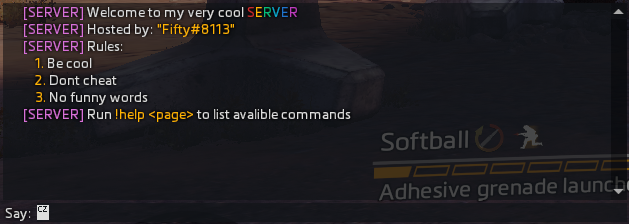
Welcome message example:
Poll example:

Other
- Map voting
- Adds map voting functionality at the end of the match or with the command
!rtv
- Adds map voting functionality at the end of the match or with the command
- Spam filter
- Filters repeating messages
- Filters messages sent too fast
Commands
!help <page> - Lists commands the player is allowed to see ( check the API section ). Is paged to not spam the chat.
!name - Returns the name of the server ( ns_server_name ).
!owner - Returns the owner ( FSU_OWNER ).
!mods - Lists installed mods ( FSU_MODS ).
!rules - Lists rules ( FSU_RULES ).
!vote - Allows you to vote if a poll is active.
!usage <command> - Returns the command usage ( check the API section ).
!discord - Returns the discord message ( FSU_DISCORD ).
!rtv - Rock the vote, if enough players vote ( fsu_mapchange_fraction ) a map vote will start.
!skip - If enough players vote ( fsu_mapchange_fraction ) the map will be skipped based on playlist.
API
Chat callbacks support ANSI escape codes, these allow you to change the colour of your text. An example of such a code is \x1b[113m which changes the colour to orange.
Global functions
void function FSU_RegisterCommand ( string command, string usage, string group, void functionref( entity, array < string > ) callbackFunc, array < string > abbreviations = [], bool functionref( entity ) visibilityFunc = null )
Registers your custom command
command- Your command, needs to have a
"!"at the start - Example:
"!help"
- Your command, needs to have a
usage- Explanation of what the command does
- Example:
"\x1b[113m!vote\x1b[0m <number> Allows you to vote on polls"
group- Currently unused, but in the future it'll be used to categorize the commands
- Something like
!help <page/group>is planned
callbackFunc- This function gets called when the player calls your command
entityis playerarray < string >is an array of arguments, args[0] would be the first argument, the command isn't passed in
abbreviations- Abbreviations of the command
- Example:
[ "!dc", "!dikord", "!dicsord" ]
visibilityFunc- Decides if the player can see the command ( For example if the
!helpcommand only shows allowed commands, same goes for!usage)
- Decides if the player can see the command ( For example if the
bool function FSU_CanCreatePoll ()
Returns true if you can create a poll, there can only be one poll at a time so to not conflict make sure you check this!
void function FSU_CreatePoll ( array < string > options, string before, float duration, bool show_result )
Creates the poll. It is not recommended to pass an array larger than 7.
options- A list of options
before- A string put on the first line. An example use of this would be
"Vote for a map!"
- A string put on the first line. An example use of this would be
duration- Duration of the poll in seconds
show_result- Decides if a message announcing the poll winner should be broadcast
int function FSU_GetPollResultIndex ()
Returns the index of the option which won the poll.
If the 1st option won it will return 0.
If there were no votes cast it returns -1.
