

VanillaPlus
THIS MOD HAS SPECIAL INSTALL INSTRUCTIONS IN THE DESCRIPTION, PLEASE READ THEM. Modified Northstar.Client to load Client-Side mods on Vanilla servers
| Date uploaded | a year ago |
| Version | 2.5.0 |
| Download link | NachosChipeados-VanillaPlus-2.5.0.zip |
| Downloads | 2770 |
| Dependency string | NachosChipeados-VanillaPlus-2.5.0 |
README
VanillaPlus
Patch for Northstar.Client to enable client-side mods on official servers.
THIS MOD HAS A NON-STANDARD INSTALL PROCESS!
Installation
If you installed an older version of the mod, delete it before installing the new one! If you still have a version with Northstar.Client installed in the mods directory, or a version thats called NanohmProtogen-VanillaPlus delete those too!
1.) Install Northstar if you don't already have it
2.) Create a folder in your Titanfall2 Directory called R2Titanfall
3.) Inside of that folder, create a folder called packages
4.) Place the unzipped Thunderstore download of Vanilla+ in the packages folder, and extract it
5.) It should look like this:
Titanfall2
  R2Titanfall
    packages
      NachosChipeados-VanillaPlus-2.4.3
        mods
          NP.VanillaPlus
Note that the folder in packages is NOT a .zip file
6.) There are multiple ways you can launch this profile. You only need to do one of these, and it's recommend you do 6a.
6a.) Add -northstar -vanilla -profile=R2Titanfall as launch options to Titanfall 2 on Steam or EA, then launch Titanfall 2 from either launcher (recommended, as this will count hours and achievements, where as a .bat won't)
6b.)
-
On steam, on the bottom left of your library click
Add a Game->Add a Non-Steam Game->Browse, and locate your Titanfall2 Directory. -
After you do this, select
Titanfall2.exeand clickAdd selected Programs. This will create an extraTitanfall2entry in your library. -
Right click on this new entry, and rename it to
Titanfall 2: Vanilla+. Then, add-northstar -vanilla -profile=R2Titanfallas launch options for it. This will allow you to launch Vanilla Titanfall 2, and Vanilla+ separately, as well as count hours and achievements.
6c.)
- Create a file called
R2Titanfall.txtin yourTitanfall2folder, then put the following text in:
NorthstarLauncher.exe -northstar -vanilla -profile=R2Titanfall
-
Now save it and rename it to
R2Titanfall.bat -
Double click
R2Titanfall.batto launch the Vanilla+ profile we just made. Open the EA App first if you use this method, otherwise it most likely won't work
Installing additional mods
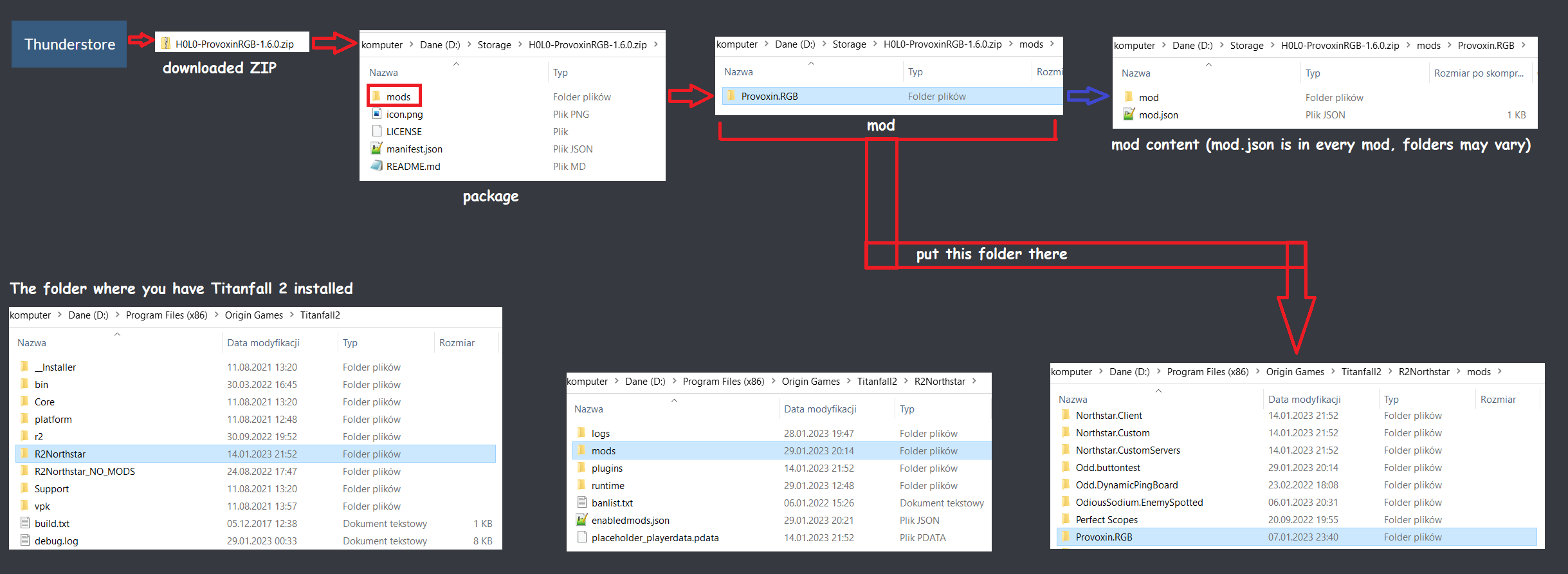
An easy way to install mods can be done by simply downloading a mod off of Thunderstore, unzipping the downloaded file, then placing that folder inside the R2Titanfall/packages directory. Create it if it doesn't exist.
Alternatively, you can follow the guide for installing mods in the mods directory.
For both ways, remember to also download dependencies listed in the mod page (ignore Mod Settings if it's listed)
CHANGELOG
2.5.0
- Use tabs for indentation
- Add Spectre rodeo, in-game server browser and better server browser warning
- Hide a few Vanilla+ convars that are only used internally
- Update Discord RPC stuff
2.4.4
- Removed "Easier Alternative Install Method" from README.md
- (Hopefully) better clarified Thunderstore install instructions
2.4.3
- Added
chatroom.nutfrom Northstar - Moved
fontfiletable.txtto keyvalues - Added
NSGetModDownloadLinkByNameerror to FAQ.md - Added extra launch option to README.md
- Updated links in README.md to point to the new wiki
- Updated github links to point to this repo
2.4.2
- Updated to handle Northstar`s mod info refactor
2.4.1
- Add warning to migrate to
-vanillaif the user is still on-norestrictservercommands
2.4
- Update VanillaPlus to use
-vanillaas-norestrictservercommandsis deprecated - Remove DT fov mod warning
- Clean up some unused code
- Fix core mod warning not going away
2.3
- Re-add files to make mods such as Khalmee's Speech Bubbles work
- Fix error introduced by plugins v3 in Northstar
2.2
- Fix Mod Settings not showing up in the in game menu
- Re-add slightly modified
_items.nutfrom Northstar.CustomServers for some mods that use its functions (the one brought to my attention being Blue Fire) - Make Vanilla+ convars save to profile.cfg (so they don't need to be set every time... I should've done this originally...)
2.1
- Fix infinite connecting bug introduced in 2.0
- Allow user to disable main menu promos (in mod settings)
- Allow user to change Vanilla+ logo transparency (in mod settings)
2.0
- Rework/rewrite of VanillaPlus
- Restore FD functionality
- Add safeio support
- Fix most auth errors
- Check for incompatible mods and warn the user if they have one
- Independent of Northstar.Client (~35 unused files for Vanilla no longer load)
1.1
- Include rich presence in the VanillaPlus GitHub release
1.0
- First version of the mod, using Northstar.Client alongside the mod to load
