
You are viewing a potentially older version of this package.
View all versions.
Basic Chat Commands
Provides basic chat commands to outward. Ex.: /follow
| Date uploaded | 7 months ago |
| Version | 0.0.1 |
| Download link | GymMed-Basic_Chat_Commands-0.0.1.zip |
| Downloads | 121 |
| Dependency string | GymMed-Basic_Chat_Commands-0.0.1 |
This mod requires the following mods to function

GymMed-Chat_Commands_Manager
CLI library for Outward chat. Eliminates the need to build a separate UI to execute mod functions by providing an in-chat console.
Preferred version: 0.1.0
GymMed-Mods_Communicator
Outward Mods Communicator enables seamless communication between mods through shared events and configuration syncing. It also lets users override any changes made by other mods, giving them full control over their settings.
Preferred version: 1.2.0

README
Outward Basic Chat Commands
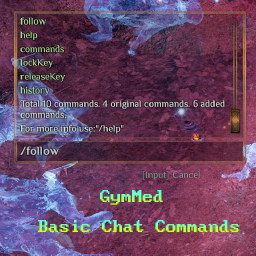



Provides basic user chat commands
How to use it
Firstly, install Chat Commands Manager. After that, you can use the commands provided by this mod directly in chat.
Built-in Commands
Follow
Uses Unity’sNavMeshPath to calculate a path and simulates character
movement input to begin following another character. Following is automatically
canceled when the follower starts moving manually.Usage:
- Type
/followto follow a random nearby character (starting from the local player). - Type
/follow characterNameto follow a specific character.
How to set up
To manually set up, do the following
- Create the directory:
Outward\BepInEx\plugins\OutwardBasicChatCommands\. - Extract the archive into any directory(recommend empty).
- Move the contents of the plugins\ directory from the archive into the
BepInEx\plugins\OutwardBasicChatCommands\directory you created. - It should look like
Outward\BepInEx\plugins\OutwardBasicChatCommands\OutwardBasicChatCommands.dllLaunch the game.
If you liked the mod leave a star on GitHub it's free
CHANGELOG
Changelog
Release 0.1.1 Version
Fixed
- Made
maxChatMessagescommand compatible with chat commands manager v.0.1.0.
Release 0.1.0 Version
Added
- Added
cfgToXmlcommand,
Release 0.0.2 Version
Added
- Added
setVisualscommand, - Added multiple
enchantmentscommands, - Added multiple
timecommands, - Added
skillscommand, - Added
maxChatMessagescommand.
Fixed
- Changed code structure.
Release 0.0.1 Version
- Initial release.
