
You are viewing a potentially older version of this package.
View all versions.
ActionBar
Expand QuickSlots with highly configurable Action Slots. Customize hotbar layout and reposition HUD elements.
| Date uploaded | 5 months ago |
| Version | 1.2.0 |
| Download link | fierrof-ActionBar-1.2.0.zip |
| Downloads | 66 |
| Dependency string | fierrof-ActionBar-1.2.0 |
This mod requires the following mods to function


Mefino-Outward_Config_Manager
BepInEx's in-game configuration manager, customized for Outward.
Preferred version: 17.2.0README
Action Bar (Modified by fierrof)
This is a modified version of the original Action UI mod by ModifAmorphic, focused strictly on the Action Bar and UI reordering features.
Credits
- Original Author: ModifAmorphic
- Modified by: fierrof
- Source Code: GitHub Repository
License
This project is licensed under the GNU General Public License v3.0 (GPL-3.0), consistent with the original project's license. Source code must remain open.
Changes in 1.2.0
This version fixes several critical UI refresh and settings bugs:
UI Bug Fixes:
- Fixed Persistent UI Element: Removed lingering "Skill Chain" UI window by implementing recursive GameObject destruction in PlayerActionMenus.
- Fixed Disabled Slot Visual Bug: Disabled slots now correctly remain hidden when keybinds are changed by prioritizing IsDisabled check in AssignEmptyAction.
- Fixed UI Refresh Loop: Prevented infinite refresh loop that was blocking inputs by adding recursion guard in GlobalHotbarService.
- Fixed Disabled Slots Blinking: Disabled slots no longer flicker when pausing the game by adding alpha change guards in AssignEmptyAction.
Settings Fixes:
- Fixed "Hide Left Nav" Setting: Now properly updates by implementing complete settings synchronization in SaveNew.
- Fixed "Empty Slot Display" Setting: Fixed both the initial sync issue and dropdown update issue by implementing complete settings sync and per-slot propagation.
Code Cleanup:
- Removed obsolete ChainedSkill.cs file that was causing build errors.
Changes in 1.0.0
This version specifically streamlines the mod and fixes key issues:
- Added Global Saved Configuration: Settings now persist globally across characters and sessions.
- Config Manager Migration: Migrated to Mefino's Config Manager and disabled the old custom settings menu.
- Hide Slot Functionality: Added the ability to hide/disable specific action slots (Right-Click in Hotkey Mode).
- Bug Fix: Disabled right-click functionality for adding skills to specific slots to fix a bug where "Summon Will-o-Wisp" was incorrectly appearing.
- Streamlined Features:
- Disabled Equipment Sets.
- Disabled Durability functions (only the Action Bar overlay remains).
- Disabled all features not related to the Action Bar and UI reordering.
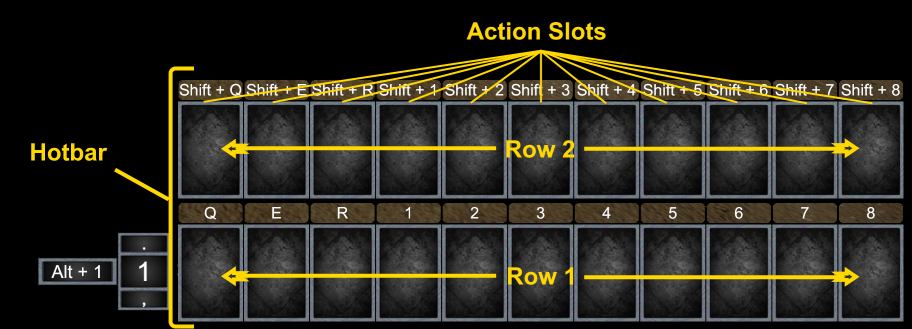
Highly Configurable Hotbars and Action Slots
Key Features
- Multiple Hotbars: Add additional rows and slots.
- UI Positioning: Reposition user interface elements.
- Global Saving: Configurations are now saved globally.
CHANGELOG
Changelog
2.2.1
- Fixed an issue with custom skills not being dropped on the hotbar
2.2.0
- Added keybind modifiers
- Added mouse wheel resizing
- Added middle/right click reset for size and postion
- Added draggable items from the action bar
- Fix sleep and thirst icon not showing
- Fix hotkeys not being blocked when dialogs are open
2.1.2
- Add mana/stamina checking for skills that require them
- Added Mana move hanlder and resize config
- Lock hotkeys when inventories are open!
- Resize configs go from 0 to 500
- Removed unused configs
2.1.1
- Improved mouse labels
- Fixed slot saving, was saving to global
- Fixed font size for cd and hotkey labels
2.1.0
- Added resizing for every hud element
- Fixed Interaction element not being able to be moved
- Fixed slot saving and dynmic slots not behaving as they should
2.0.1
- Fixed droppable skils, If you dropped a skill and it disappeared, you can relearn it using Debug Mode (There are mods that activate it).
2.0.0
- Remade the whole thing from scratch
1.2.4
- Fixed: Profiles not saving completely
1.2.3
- Fixed: Configs not refreshing when changed
- Fixed: Some UI elements reseting on reload
1.2.2
- Fixed: Dynamic slots now work correctly with modded equipment that adds non-standard hand slots (e.g. Classfixes).
- Fixed: Main-hand non-weapon equipment (shields, off-hand items held in the main hand) no longer shares context IDs with offhand equipment, preventing preset mixups.
- Fixed: Equipment context resolution now falls back to slot-based slot scanning when standard property names are unavailable, improving compatibility with mods that expose equipment differently.
- Fixed: Non-weapon equipment context IDs are now derived from a stable UID or name hash, preventing context collisions across sessions.
1.2.1
- Fixed: Dynamic slot context now resolves both main-hand and off-hand equipment correctly (including non-weapon off-hand items like torches).
- Fixed: Combo context fallback behavior now restores expected slot assignments when the off-hand item is unequipped.
- Fixed: Slot edits made while both hands are equipped now save to the combo preset context instead of incorrectly saving only to the main-hand context.
1.2.0
- Added: Per-slot empty style cycling in slot configuration mode (
Hidden → Image → Transparent). - Added: Dynamic slots with weapon-based presets:
- Toggle dynamic state with middle-click in slot configuration mode.
- Equipping weapons applies saved dynamic slot presets when available.
- Drag/drop updates the active weapon preset for dynamic slots.
- Clearing a dynamic slot removes that slot from the active weapon preset.
1.1.2
- Fixed: Interaction tooltip appearing at the top of the screen. Implemented auto-detection to identify the container holding the interaction prompt and exclude it from positioning, ensuring it remains in its correct place.
1.1.1
- Fixed: Bug where the interaction tooltip was on the top.
1.1.0
- Added: Precise UI Positioning:
- X/Y Sliders in Config Manager.
- Two-way binding between Config Manager and Visual Drag Editor.
- "Center X" and "Center Y" buttons to alignment.
- Fixed: UI Dragging no longer snaps the bar back to incorrect positions.
- Fixed: "Reset Positions" button now correctly resets both UI and configuration values.
- Fixed: Configuration changes (Rows, Slots) apply immediately and reliably.
- Removed: "Equipment Sets" completely removed this time.
1.0.2
- Documentation: Fixed README formatting and deduplication.
- Documentation: Fixed Changelog display on Thunderstore.
1.0.1
- Documentation: Added critical warning about incompatibility with legacy ActionUI mod.
- Documentation: Added instructions to uninstall the old mod.
1.0.0
- Initial release of the revamped Action Bar mod.
- Added:
- Hide/Disable Slots: Right-click in Hotkey Mode to toggle slot visibility.
- Global Layout Config: Rows, slots, scale, disabled slots shared across all characters.
- Config Manager Integration: Uses Mefino's Config Manager.
- Fixed:
- Addressed significant stability issues regarding bar resets and item assignment.
- Fixed vanilla keyboard quickslots overlapping.
