

CubeX
A modern in-game menu for PEAK with player tools, visuals, host controls, and quality-of-life features.
| Date uploaded | 2 weeks ago |
| Version | 3.3.2 |
| Download link | LIGHTNING_X-CubeX-3.3.2.zip |
| Downloads | 363 |
| Dependency string | LIGHTNING_X-CubeX-3.3.2 |
This mod requires the following mods to function

BepInEx-BepInExPack_PEAK
BepInEx pack for PEAK. Preconfigured and ready to use.
Preferred version: 5.4.75301README

Cube-X
A modern in-game menu for PEAK, built as a BepInEx plugin with two polished interfaces — a classic drill-down list menu and a click-style window GUI — plus a full protection suite, Steam-aware player tools, host controls, visual tools, quality-of-life features, and performance-focused rendering options.
Overview
Cube-X is designed as a full-featured PEAK menu with a clean interface, organized submenus, cached UI data where practical, and game-aware actions that prefer existing in-game behavior over fragile shortcuts.
The menu currently includes feature classes and actions across the main pages, covering player controls, protections, lobby tools, friends, achievements, visuals, world interaction, spawning, inventory management, search utilities, Discord access, notifications, keybinds, and menu settings.
Since 2.0.0, every feature can be driven from either of two interchangeable front-ends, switchable at any time from Settings > Appearance > Click GUI.
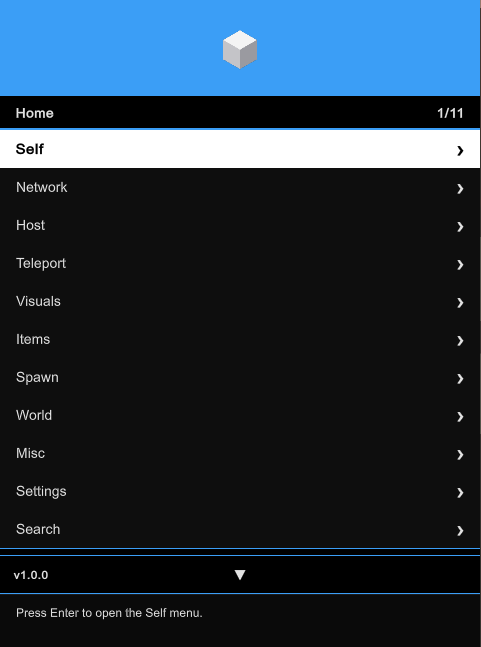
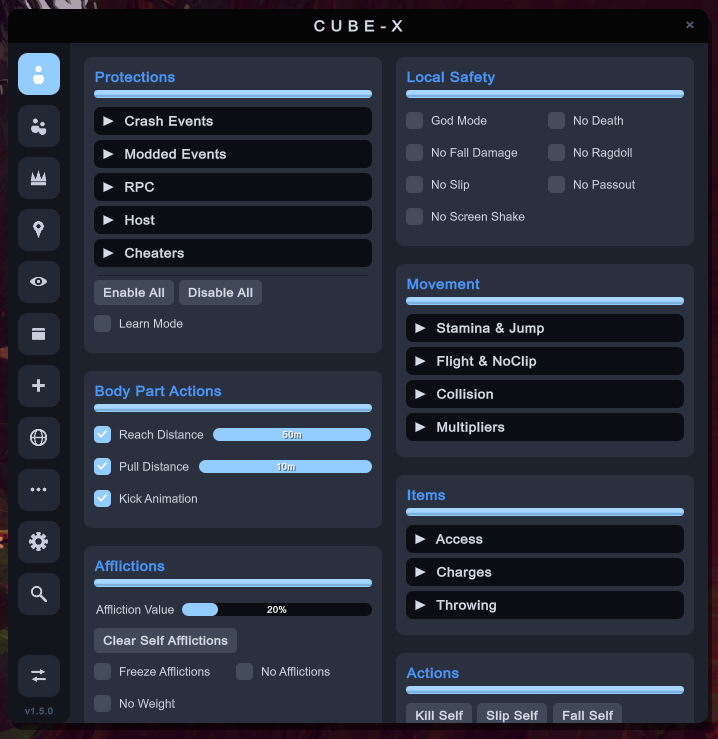
Classic drill-down list menu (left) and the new Click GUI window interface (right) — both drive the exact same features.
Interface
Classic List Menu
A compact GTA-style drill-down menu built for quick keyboard/controller navigation during gameplay.
| UI Area | What It Does |
|---|---|
| Header | Menu identity. Can drag menu position. |
| Breadcrumbs | Shows where you are inside nested submenus. |
| Feature Rows | Toggle actions, buttons, numbers, colors, text values, and nested pages. |
| Right Panel | Shows selected-player context, Steam avatars, tags, status, and profile details where available. |
| Footer | Shows navigation hints, current selection state, and keybind information. |
| Notifications | Uses a clean rectangular notification style with title, description, accent strip, and dismiss timer bar. |
| Color Picker | Applies selected colors only after the picker is accepted or closed. |
| Keybinds | Lets features be bound, listed, and removed individually from the settings menu. |
Click GUI
A click-style window interface introduced in 2.0.0.
| UI Area | What It Does |
|---|---|
| Sidebar Tabs | One icon tab per menu page for instant switching. |
| Group Boxes | Two-column category panels with checkboxes, sliders, and buttons. |
| Expandable Submenus | Nested feature groups expand in place inside their panel. |
| Draggable Window | Drag the header to reposition the whole window. |
| Input Capture | Gameplay controls are blocked while the window is open or while typing. |
| Shared State | Uses the same features, config, keybinds, and saved state as the classic menu. |
Default navigation is keyboard-first in the classic menu and mouse-first in the Click GUI; both can be customized from the settings pages.
Protections
Cube-X ships a full protection suite under Self > Protections, organized into five categories. Each protection watches a specific class of hostile or abusive network traffic.
| Category | Protection | Scope | Detects / Blocks |
|---|---|---|---|
| Crash Events | Kill My Scout | Local Block | Death, kill, and zombify RPCs targeting your scout from a non-owner sender. |
| Crash Events | Destroy My Objects | Local Block | Destroy and ownership-transfer events targeting your player objects. |
| Crash Events | Destroy Others | Local Block + Host Kick | Destroy or player-wipe events targeting another scout. As host, the attacker is kicked when Kick is on. |
| Crash Events | Attack Others | Host/Master Block + Host Kick | Kill, zombify, or pass-out RPCs sent to another scout by a non-owner. Detected and blocked only when you are host. |
| Crash Events | Event Spam | Local Block | High-rate Photon events that can destabilize, lag, or crash the session. |
| Crash Events | Spam Timeout | Opt-in Local Block (30s, per player) | Disabled by default. When enabled, players who trigger 30 or more full spam detections in a short window are blocked locally for 30 seconds per sender. |
| Modded Events | Item Injection | Local Block | Unauthorized item spawns or inventory syncs targeting your hand or slots. |
| Modded Events | Item Spawning | Detect + Optional Local Block | Remote players spawning items from thin air through mods. Legitimate gameplay flows — biome pickups, throws, drops, and host/scene spawns — are recognized and never flagged. |
| Modded Events | Explosive Spam | Local Block | Repeated Dynamite, Beehive/Bee Swarm, Blowdart Hits, from network spawns, explosion RPC spam, bee-swarm RPC spam, blowdart-hit RPC spam. |
| Modded Events | Suspicious Prefab | Local Block | Non-vanilla network prefab instantiation from remote clients. |
| RPC | Forced Actions | Local Block | Forced falls, pass-outs, teleports, slips, and other control RPCs targeting your scout. |
| RPC | Inventory Manipulation | Local Block | Remote inventory, slot, held-item, and pickup RPCs targeting your scout. |
| RPC | RPC Spam | Local Block | Excessive repeated RPCs from the same sender in a short window. |
| Host | Fake Host Authority | Host/Master Block + Host Kick | Non-master clients sending expedition, world-state, fog, or end-game control RPCs. |
| Host | Ascent Change | Local Block + Host Re-sync + Host Kick | Ascent difficulty changes from a player who is not the current host. As host, the correct ascent is re-synced to everyone after a blocked attempt. |
| Cheaters | Known Cheaters | Detect + Blacklist + Host Kick | Known mod-client-tagged players. Add to Blacklist auto-blacklists them; Kick auto-kicks as host. |
| Cheaters | Identity Spoof | Detect + Blacklist + Host Kick | Players sharing another scout's Photon user ID (confirmed) or display name (possible). |
Per-Protection Controls
Every protection entry has six independent switches:
| Control | Behavior |
|---|---|
| Notify | Shows an in-game notification when the protection triggers. |
| Block | Blocks the hostile event within the labeled scope. |
| Log | Writes the event to the Cube-X protection log. |
| Announce in Chat | Announces the detection in the in-game text chat. |
| Add to Blacklist | Adds the offender to your local blacklist. |
| Host Kick | Kicks the offender when you are the host/master client. |
Suite Controls
| Control | Behavior |
|---|---|
| Enable All / Disable All | Toggles the entire protection suite in one click. |
| Learn Mode | Observes and logs without blocking, useful for tuning. |
| Protection Log | Written to %APPDATA%\CubeX\Peak\Log.txt. |
| Kick Notice | Host-side protection kicks replace the native leave notice with "{Name} has been kicked! Reason: {reason}". |
Scope labels are honest by design: Local Block protects your client, while host/master entries state the confirmed authority path instead of claiming global blocking the network flow can't prove. Extensive false-positive guards cover room joins, late-join inventory sync, revive relays, legitimate item replication, end-game flow, and physics/rescue RPCs.
Feature Map
| Page | Highlights |
|---|---|
| Self | Local safety (god mode, no death, no fall damage, no ragdoll, no slip, no passout, no screen shake), the full protection suite, movement (stamina & jump, flight & noclip, collision, multipliers), body part actions (reach/pull distance, kick animation), item access/charges/throwing helpers, afflictions with per-affliction controls, entity control (Scoutmaster, zombie), aura farm, and self-focused actions. |
| Network | Live player list, selected-player tools, spectate with Picture-in-Picture, recent players, blacklist, Steam friends with lobby details, player notes, invite options, profile links, player tags, lobby info side panel, join/leave/rejoin and copy-join-link tools, voice tools, text chat, and achievement management. |
| Friends | Loads Steam friends into a dedicated submenu with online/offline tags, joinable-lobby details (player count, region, biome, level), and invite-focused actions. |
| Host | Live Ascent difficulty control applied mid-expedition through PEAK's own ascent RPC, PEAK Map Picker (daily/random/full cached catalog with biome summaries), Terrain Customizer with per-segment biome filters, More Scouts room limits, Steam lobby locking, master/client authority tools, room version utilities, kiosk tools, campfire actions, and join handling. |
| Visuals | Player ESP with per-type colors, profile cards, pings, camera options, FOV and zoom tools, third-person options, HUD tools, watermark, world tags, movement effects, dead-scout collider optimization, remote ragdoll velocity clamping, and visual quality controls. |
| World | World interaction tools, time-related options, object utilities, luggage helpers, and environment actions. |
| Teleport | Teleport to spawn, players, pings, look position, custom coordinates, quick targets, or any active campfire detected in the current scene. |
| Performance | Frame pacing, rendering quality, world-entity, remote-character, wind-simulation, and ESP cost controls in one top-level page. |
| Spawn | Spawn-focused tools for items and game objects, backed by the JSON spawn item cache. |
| Inventory | Inventory helpers, item access, slot tools including backpack assignment and contents, cook-level controls, and item-focused quality-of-life actions. |
| Search | Quick lookup tools for finding features, players, objects, or menu entries faster. |
| Misc | Discord community access, notifications, utility actions, and general helpers. |
| Settings | Click GUI interface toggle, menu styling, controls, keybind management, notification preferences, persistent configuration with save/load confirmation, and a Replay Tutorial option for the first-time onboarding. |
Player Tags
Cube-X adds readable tags to player entries so status and context are easier to scan.
| Tag | Meaning |
|---|---|
| Developer | Player presented a current backend-authorized Cube-X developer assertion. |
| Friend | Player is recognized from the Steam friends list. |
| Blacklisted | Player exists in the local blacklist list. |
| Recent | Player was recently seen. |
| Online / Offline | Steam or game-aware presence state where available. |
| Name Spoof | Player joined the current room with a Steam name that does not match the in-game nickname. |
| {modname} | Player is using a known third-party mod/mod menu. |
| Modder | Player triggered a protected illegal network action and is not labeled as a known mod client. |
Name spoof detection is intended to apply only to players observed inside the current game or room, avoiding false positives from stale recent-player or blacklist data.
Achievements
The achievements page includes individual achievement controls and bulk actions.
| Action | Description |
|---|---|
| Unlock All | Unlocks achievements through the game-aware achievement flow. |
| Lock All | Resets achievement state where supported. |
| Individual Entries | Lets achievements be managed one by one from the achievements submenu. |
| Accent Achievements | Includes the accent achievement range where supported by the game. |
Keybinds
Cube-X supports feature-level keybinds.
| Control | Behavior |
|---|---|
| Open Menu | Opens or closes the menu (either interface). |
| Set Feature Keybind | Assigns a keybind to the hovered feature. |
| Keybind List | Shows every assigned keybind as its own option. |
| Remove Selected Keybind | Removes one selected keybind without clearing the entire list. |
| Notify Keybind Toggles | Optional notification when a keybind toggles a feature. |
Default controls:
| Input | Action |
|---|---|
Insert |
Open or close the menu. |
Arrow Up / Arrow Down |
Move selection. |
Enter |
Activate selected option. |
Backspace / Escape |
Go back. |
Arrow Left / Arrow Right |
Adjust values. |
Shift + Enter |
Edit compatible numeric/text values. |
F8 |
Assign a keybind to the hovered feature. |
D-pad Right + RB |
Open or close the menu with a controller. |
D-pad |
Move selection; left/right adjusts compatible values. |
A |
Activate selected option. |
B |
Go back, or close the menu from Home. |
Mouse |
Full navigation inside the Click GUI. |
Notifications
Notifications use a modern scale-aware layout, redesigned in 2.0.0:
| Element | Purpose |
|---|---|
| Main Rect | Holds the notification content with adaptive width and border. |
| Accent Strip | One colored strip on the left side. |
| Timer Bar | Thin bar showing time until auto-dismiss. |
| Title | Short event name. |
| Description | Clear action result or status message. |
| Animations | Smooth fade in/out with a brief flash on arrival; up to 15 stored notifications. |
Notification behavior can be adjusted from the notification submenu, including keybind toggle notifications.
Performance Focus
Cube-X includes menu and game-facing performance work intended to reduce unnecessary frame cost.
| Area | Approach |
|---|---|
| Menu Rows | Organized and cached where practical to avoid rebuilding expensive UI state unnecessarily. |
| Player Data | Steam avatars, tags, and player metadata are reused instead of being repeatedly fetched every frame. |
| ESP | Rendering is scoped to useful targets and avoids unnecessary object rendering where possible. |
| Visual Effects | Heavy visual options can be disabled or tuned from Home > Performance. |
| Notifications | Lightweight drawing style with minimal layout complexity. |
| Feature Pages | Large menus are split into focused submenus to reduce clutter and scanning cost. |
| Ragdoll Physics | Optional remote ragdoll velocity clamp prevents extreme physics spikes (70+ m/s) from destabilizing frame rate. |
| Runtime Safety | Configurable state guards skip incomplete update frames, while exact no-op filters avoid redundant body-part physics writes. |
| Character Queries | Nearby-character checks use equivalent squared distances, and optional two-bone skinning lowers crowded-scene rendering cost. |
| Spawn Cache | JSON-backed spawn item cache avoids rebuilding the item list every menu visit. |
Some actions still depend on live game state and must refresh while playing, especially player lists, lobby state, online state, ESP targets, and world objects.
Discord Community
Cube-X includes a first-time prompt asking whether the user wants to join the Discord community server for Cube-X.
The link is also available in:
Misc > Discord Community > Join Discord
Community link:
https://discord.gg/cHmp58MqPf
Notes
Cube-X is built for PEAK modding and testing workflows. Game updates may change internal behavior, player data, achievements, networking, or object layouts, so some features may need updates after PEAK patches.
Use responsibly and preferably in private, modded, or trusted lobbies.
Cube-X is not affiliated with PEAK, Landfall, Aggro Crab, Steam, Photon, BepInEx, or any related official project/Mods.
Developed only by: Mister9982
CHANGELOG
Version 3.3.7
Compatibility: Updated for PEAK v2.4.c.
New
- Quicksave Error Log Patch — prevents PEAK from attempting to read a non-existent quicksave file on startup.
- Infinite Glider —
Self > Glider— Prevents stamina drain while gliding. (Includes RGB Looping Trail Color) - Glider Drag Multiplier —
Self > Glider > Drag Multiplier— (Max 1.2x to avoid physics issues) | Sweet spot: 1.15x
Improved
- Display Full Body — now includes skeleton body.
- General Codebase Cleanup — removed unused code, improved performance, and reduced memory allocations.
Fixed
- Clear Self Afflictions — properly removes all afflictions including curse and petrify.
Version 3.3.6
New
- Crossplay Network Fix — reduces crossplay-related issues; enabled by default under
Misc > Network. - Infinite Emote —
Self > Body Part Actions > Infinite Emote— Plays the selected emote indefinitely until you start moving.
Fixed
- Pause Menu Player List — now properly aligns with the pause menu.
Version 3.3.5
Improved
- Disable Player Collision — nearby-player checks, cached colliders, and automatic safety restoration reduce lag.
- Noclip — cached body colliders and safer restoration during death, carry, and character changes.
Fixed
- Pause Menu Player List — bounded layout, visible scrollbar, and controller scrolling keep players on-screen.
- Redundant Physics Filter — preserves small, valid movement and damping changes.
- Collision Feature Conflicts — noclip, Big Ghost, and dead-scout physics no longer undo each other's collider settings.
- Entity Control Conflicts — prevents overlapping Big Ghost, Scoutmaster, and Zombie control modes.
Removed
- Item Spawning Protection — causes false positives for legitimate item pickups and equips. will be reworked in a future update.
Version 3.3.4
Added
- Player List Controls —
Network > Playersnow includes selectable info-panel modes and alphabetical or actor-ID sorting. The default panel mode is Info + Visual. - Player Color Indicators — Live player rows now show a colored circle matching each scout's in-game color.
- Pause Menu Player List Toggle —
Home > Misc > Interfacecan enable or restore Cube-X's compact, scrollable pause-menu player list. It is enabled by default.
Improved
- Protection Log — repeated entries are rate-limited and buffered on a background thread to prevent file writes from interrupting gameplay.
Fixed
- Fog Sync Protection — continuous
RPCA_SyncFogupdates are accepted only from the actual room host/master. - Lobby Property Events — valid Photon property changes are no longer blocked as event spam while joining.
- Player Property Updates — Cube-X refreshes player state only when relevant identity or mod fields change.
- Display Full Body — equipped backpacks are no longer toggled every frame, and stored-item renderers are cached.
- Late Join Stability — mismatched reconnect and achievement records are repaired before player registration.
- Cube-X Join Hitches — graceful handling of join-related hitches.
- Remote Ragdolls — removed obsolete material work while preserving condor carry animation and velocity behavior.
Version 3.3.3
Compatibility: Updated for PEAK v2.4.b.
Added
- "Set Menu Key" option on the first time launch.
- Backpack Type Assignment in Items > Slot 4 now lets you select and assign a Backpack, Fannypack, Jetpack, or Rocketpack.
Improved
- Display Full Body now shows the equipped Backpack, Fannypack, Jetpack, or Rocketpack in first person, including the pack's visible stored items.
Fixed
- Updated world player-name labels for PEAK's (Update 2.4.b) asynchronous
UIPlayerNames.Initcallback.
Version 3.3.2
Compatibility: Updated for PEAK v2.2.a and v2.3.a.
Added
- Full Body — see your body in first person, with a small FPS boost.
- World Atmosphere Controls — customize the sky, weather, fog, sun, and moon.
- Become Big Ghost — fly around as a giant ghost.
- Profile Name Colors — use presets or custom colors for each letter.
- Teleport Return Point — jump back to where you were before teleporting.
- Performance Page — includes crowd optimization, grass rendering, ragdoll, physics, and frame-rate controls.
Improved
- Held-item details are more accurate, including Mandrake, Book of Bones, and Energy Drink effects.
- Teleport and ESP menus are cleaner, and campfire targets refresh automatically.
- Event notifications show who died, revived, knocked out, or attacked whom.
- (WIP) Item-spawn protection now names the player and catches inaccessible/debug items.
- Better crowd and remote-ragdoll performance.
- Deaggro Bees now instantly clears only swarms targeting you through the host instead of dispersing them.
- Bee swarm RPC protection avoiding hive-break false positives.
- Disable Player Collision now tracks collider pairs efficiently and restores only the collisions it changed after players join, leave, or respawn.
Fixed
- Coordinate and spawn teleports now handle invalid or overlapping destinations safely.
- Name rendering, Unicode names, and the one-letter username bug.
- Unwanted Carry now protects only your living character and never changes anyone else's carry state.
- Disable Voice Chat Filter no longer causes the ringing sound in Alpine.
Version 3.3.1
Compatibility: Updated for PEAK v2.1.a.
Added
- Late Join Anti Fling —
Host > More Scouts > Late Join— Caps a joining scout's ragdoll speed with an adjustable safety limit. - Item Uses —
Items > Held Item Stats— Displays the held item's remaining and total uses.
Improved
- Ghost Ping — pings made while dead or downed are tagged GHOST / DOWNED.
- Cursed Skull — shows its heal and the Petrify it costs.
- Timed Effects — Sunscreen, No Hunger, Low Gravity, Climb and more now show a duration.
Fixed
- Backpack Wheel — backpacks and jetpacks no longer inherit the rocketpack's slices.
- Item Stats — status rows no longer vanish while you are a skeleton.
- Item Stats — the shield no longer draws as a long yellow bar.
- Item Stats — weight is no longer rounded.
- Tick Attach — rebuilt for PEAK 2.0's new attach path.
Version 3.3.0
Compatibility: Updated for PEAK v2.0.a.
Added
- Infinite Jetpack Fuel —
Self > Items > Charges— Keeps equipped and carried jetpacks fully fueled. - Rocketpack Controls —
Self > Rocketpack— Adds fire and stop actions, infinite flight, impact protection, unlimited pack use, wheel controls, and a dedicated HUD. - Throw Preview —
ESP > Projectiles > Throw Preview— Previews landing and activation areas for beans, dynamite, and beehives. - Campfire Food Scaling —
Host > More Scouts > Campfire Food— Configures food-per-scout and spare food bundles for larger parties. - Affliction Charge Rates —
Self > Afflictions > Charge— Adjusts global or per-affliction charge and drain speeds. - Recent Players: Copy —
Network > Recent Players > [Player] > Copy— Copies player IDs, lobby details, join links, or the complete saved record. - Player Tags —
Network > Players / Recent Players / Blacklist / Friends— Adds FRIEND, BLACKLIST, MODDER, and detected-client labels to player entries and related notifications. - Host Change Notifications —
Misc > Notifications— Displays an alert whenever lobby host authority migrates. - Scout Count Toggle —
Settings > HUD & UI— Shows or hides the HUD scout counter. - Late Join Submenu —
Host > More Scouts > Late Join— Groups late-join revival and anti-fling controls in one location.
Improved
- Notifications — frame-rate-independent stacking and animations.
- Item Cache — uses PEAK's
ItemDatabaseand works from the main menu. - RPC Protections — signatures and validation updated for PEAK 2.0.
- Revive / Kill / Climbing / Ragdoll — updated for PEAK 2.0 RPCs.
- Inventory & Backpack — new item slots, backpack types, and wheel handling.
- Afflictions — added Arrow, Petrify, and FlyTrap.
- Achievements — PEAK 2.0 achievement system and ascent badges.
- Ascent — maximum raised from 7 to 9.
- Icicles — Shake and Drop work again.
- HUD / Scout Count — restored after PEAK removed
VersionString.Update. - Item Fuel — jetpacks are recognized and refilled.
- Steam Lobby Join — clearer failure reasons, faster connection detection.
- Networking — lobby state clears properly after kicks, timeouts, and disconnects.
- Memory — Steam caches are now bounded.
- Search — finds dynamic entries, protections, and player directories.
- More Scouts — better mid-run hosting and mini-run behavior.
- Host Only Kiosk — unauthorized starts are silently ignored.
- Player Info / Footer / Cache Alert — UI and readability.
Fixed
- Jetpack RPC — normal jetpack use no longer trips RPC spam protection.
- Infinite Rocket Flight — the pack stays on until the flight ends, so the wheel and Stop stay usable.
- Petrify — Add and Remove now stack instead of setting or wiping the value.
- Cooked Items — held item stats now reflect cooking.
- Cure-Alls — Cure-All and Faerie Lantern list every status they treat.
- Negative Weight — balloons show their negative weight.
- Sleepy & Heat — these stat rows now appear.
- Grow Bean — restored after PEAK RPC changes.
- Magic Bean — non-host planting errors.
- More Scouts — campfire food persistence, placement, and player count.
- Item Spawning — duplicated items from non-host players.
- Text Chat —
/opens,Entersends,Esccancels. - Cache Alert — long messages wrap correctly.
Version 2.2.3
Compatibility: Updated for PEAK v1.65a.
Added
- Cache Alert —
Settings > HUD & UI— Warns when the spawn item cache must be rebuilt after a PEAK update.
Improved
- Lobby Joining — proper checks before attempting a join.
- Voice Status — moved to the side panel.
Fixed
- Unity 6 — resolved
Scene.get_handle()error. - RPC Attribution — better sender detection across game updates.
- Unwanted Carry — no longer let other mods carry you while alive.
Version 2.2.2
Added
- Free Cam —
Self > Free Cam— Provides unrestricted camera flight with configurable speed, sprint multiplier, smoothing, and sensitivity. - Voice Status —
Network > Voice Chat— Shows each player's live Speaking, Connected, Mic Idle, or No Voice state. - Accurate Carry Weight —
Network > Players > [Player] > Movement— Makes carried players contribute their actual inventory weight. - Dismount Carry —
Network > Players > [Player] > Movement— Ends a piggyback manually or through jump, crouch, and drop inputs; it can also be assigned to a keybind. - Unwanted Carry Protection —
Self > Protections > RPC— Blocks another player from forcing you into a carry while you are alive. - Crab Affliction Protection —
Self > Protections > RPC— Removes the unused Crab status from incoming affliction synchronization. - RPC Sender Attribution — Automatic / background — Tracks the true sender of sensitive RPCs so authorization and protection decisions target the correct player.
Improved
- Network > Players — shows every Photon player, including loading and un-spawned ones.
- Player Names — sanitized, with actor numbers shown.
- Piggyback Carry — rebuilt with strict validation and recovery after death, disconnects, and host migration.
Version 2.1.0
Added
- Four-Slot Inventory Strip —
Network > Players > Player Information— Displays the selected player's four inventory slots directly on the information panel.
Improved
- Live Player Information character preview.
- Protections > Modded Events > Explosive Spam.
Changed
- Spam Timeout is now opt-in and off by default; old settings are migrated.
- Spam Timeout now needs 30+ confirmed detections before applying the 30-second block.
Version 2.0.2
Fixed
- Item Spawning protection flagging legitimate pickups and equips.
- Backpack duplication and dropped carried players when equipping a backpack mid-carry.
- Blocked rescue-claw pulls leaving drag, fall, rope, and target state behind.
- Stale temporary hand-slot items and locally disappearing pickups.
- Cursor flashing while Cube-X owns the mouse.
- Stale Alpine wind/snow when a client misses the host's wind-off RPC.
- Frozen and orphaned mushroom zombies after the owner disconnects.
Improved
- README documents the current protection suite.
Version 2.0.0
Release focus: Introduced the Click GUI.
Added
- Click GUI —
Settings > Appearance— Adds a second click-style window interface that shares the classic menu's features, settings, and saved state. - Ascent Control —
Host > Ascent— Applies an ascent difficulty to every scout during an active expedition. - PEAK Map Picker —
Host > Biome > PEAK Map Picker— Selects the daily map, a random map, or a specific entry from the cached catalog. - Terrain Customizer —
Host > Biome > Terrain Customizer— Filters and builds map selections using per-segment biome choices. - First-Time Tutorial —
Settings > Replay Tutorial— Guides first-time users through interface selection and can be replayed at any time. - Item Spawning Protection —
Self > Protections > Modded Events— Routes remote item spawns through configurable notification, logging, and blocking controls. - Ascent Change Protection —
Self > Protections > Host— Blocks unauthorized ascent changes and re-synchronizes the host's correct setting. - Spam Timeout Protection —
Self > Protections > Crash Events— Temporarily blocks persistent event spammers on a per-player basis.
Improved
- Redesigned notifications with scale-aware layout and smoother animations.
- Host/master detection resolved live against the room, with migration fallbacks.
- Menu input capture and cursor handling across prompts, editors, and the Click GUI.
Fixed
- Fog desync for joining, reconnecting, and mini-run scouts.
- Revive Late Join Players spawning on dead players or invalid positions.
- Destroy protection treating a player's own cleanup as an attack.
- Spectate > Picture in Picture previews for dead players.
Version 1.5.0
Release focus: Expanded protections and quality-of-life tools.
Added
- Versioned Spawn Item Cache —
Spawn > Itemsand automatic / background — Stores spawnable items in JSON by game version and rebuilds the cache after PEAK updates. - Aura Farm —
Self > Miscellaneous— Automates nearby aura-item use with a searchable item selector. - Directory Search —
Network > Friends / Blacklist / Recent Players— Adds focused search fields to saved and live player directories. - Backpack Slot Management —
Items > Slot 4 / Backpack— Assigns a backpack and exposes its contents with per-item cook levels. - Temporary Extra Slot —
Items > Extra Slot— Exposes PEAK's temporary inventory slot250for item management. - Entity Control —
Self > Entity Control— Adds transformations for becoming a Scoutmaster or mushroom zombie. - Text Chat —
Network > Text Chat— Adds PeakTextChat-compatible in-game messaging. - Hear Passed Out Players —
Network > Voice Chat— Keeps passed-out players audible through voice chat. - Protection Suite Controls —
Self > Protections— Organizes protections into Crash Events, Modded Events, RPC, Host, and Cheaters, with per-entry controls, suite toggles, Learn Mode, and logging. - Expanded Protection Entries —
Self > Protections > Crash Events / Cheaters— Adds Known Cheaters, Identity Spoof, Destroy Others, and Attack Others detection. - Host Kick Notice — Automatic / background — Replaces the native leave message with a clear host-side kick reason.
- Picture-in-Picture Spectate —
Network > Players > Spectate— Opens a draggable live camera preview for the selected player. - Lobby Information and Join Link —
Network > Connection— Displays current lobby details and copies a reusable Steam join link. - Steam Lobby Details and Player Notes —
Network > Friends / Recent Players / Blacklist— Adds lobby metadata and persistent notes to saved-player directories. - Clamp Remote Ragdoll Velocity —
Performance > Remote Characters— Limits extreme remote ragdoll speeds to reduce physics instability. - Fire Smoke PTFX Player — Historical:
Network > Players > [Player]— Applied the fire-smoke visual effect to a selected player; no longer exposed in the public menu.
Improved
- Cook level range is now
0-4, with one shared cooking flow. - Wider Incoming RPC Guard coverage for forced afflictions, death, inventory, spawn spam, and host abuse.
- Honest protection scope labels — local blocks are labeled as such.
- Ownership-theft protection covers remote character views.
- Host blacklist kicks and blocks rejoin; non-host stays passive.
- Large false-positive reduction pass across join, revive, inventory, and physics RPCs.
- Better protection notifications and logs, with post-block state resync.
- Config Save/Load notifications, and a taller Text Chat panel.
Fixed
- Force Win only affecting the local client.
- False positives for Force Unstick / UnHang and Force End Screen Done.
- Top-right HUD ascent alignment, and the disappearing scouts counter.
- Carry and backpack equip conflicts.
- Fog not syncing for joining players.
- Ownership request false positives on join/spawn.
- Dynamite, beehive, and blowdart use treated as spawn spam.
- Protection log and chat spam while joining lobbies.
- Blacklist adds are now opt-in per protection.
- Harmful non-host blacklist behavior.
- PUN events, and submenu highlight smoothing.
Removed
- All harmful and abusive features from the Players and All Players submenus.
Version 1.4.3
Improved
- Join-time status sync validation accepts legitimate owner updates.
- Revive Late Join Players waits for PEAK to fully register a joining scout.
Fixed
- Lobby joins getting stuck when status sync arrived before ownership settled.
- Late-join revive acting on a half-created scout.
Version 1.4.2
Added
- Auto Revive All —
Network > All Players > Recovery— Revives dead players every five seconds, with lava rescue and selectable target behavior. - Delete Gun —
Spawn > Guns— Deletes targeted items and world objects by raycast while excluding protected player objects. - Pull Distance Targeting Visuals —
Self > Body Part Actions > Pull Distance— Draws a target ring, guide line, and distance label while using extended pull range. - Altitude HUD —
Settings > HUD & UI— Adds the local player's altitude to the numerical HUD. - Disable Bugle SFX —
World > Environment— Locally mutes regular and magic bugle sound effects. - Rejoin Lobby —
Network > Connection— Leaves and reconnects to the current Steam lobby. - Expanded Steam Lobby Details —
Network > Friends / Recent Players / Connection— Displays lobby links, host details, tags, biome, level, and ascent metadata. - Player and Lobby Utilities —
Network > Friends / Recent Players / Players— Adds Copy Lobby ID, Open Steam Profile, and ownership-return actions where relevant. - Player Identified Notifications — Automatic / background — Shows a one-time alert when Cube-X recognizes a known mod client.
Improved
- Reorganized Self page categories and renamed several submenus.
- Teleport and revive actions place players beside you and clear velocity.
- Scan throttling across player, character, and visual features.
- Infinite Rescue Hook Range patched continuously across all hook paths.
Fixed
- Steam lobby link text overlapping menu rows.
- Mod Reason showing the generic prefix instead of the reason.
- Steam join links with query strings, fragments, or whitespace.
- Blacklist not blocking blacklisted players from joining.
- Legitimate owner and recent-join revive RPCs being blocked.
- Carry Player and Carry Me failing for non-host carriers.
- Forced carry being visible only locally, and carry backpack swaps.
- Slot-4 input and carried-player jump/drop input not releasing a forced carry.
Version 1.4.1
Added
- Alt-Tab FPS Recovery —
Performance > Frame Rate— Reapplies fullscreen and frame-pacing settings when the game regains focus. - Player ESP Target Colors —
ESP > Players > ESP > Colors— Provides independent colors for players, food, items, luggage, ghosts, and hazards. - Reset Name Color —
Network > Profile > Name Color— Restores the default synchronized profile-name color. - Open Menu On Launch —
Settings > Keybinds— Opens Cube-X automatically when the plugin starts.
Improved
- Feature ticking and menu refreshes synced to the game frame.
- Duplicate-hotkey confirmation prompt.
- Prompts, keybind capture, color picker, and editors keep the cursor visible and block gameplay input.
- Spectate follows a dead player's ghost when available.
- Remove Item Restrictions only inspects your held item.
- Optimized Freeze/Spin All Items, Reach Distance, and Deaggro Bees.
- Unified Steam lobby join tracking across links, friends, and saved lobbies.
Fixed
- Blocked high-impact RPCs leaving ownership or inventory state stale.
- Reset Color and Reset Name staging white instead of the default nickname color.
- Hotkeys on generated affliction Add/Remove rows not firing.
- Input leaking through while a prompt or editor is active.
- Modal cursor restore using stale focus state.
- Non-host Clear Player Object causing local-only desync.
- Set Username and Reset Name respawning a dead or ghost character.
Version 1.4.0
Added
- Mod Reason —
Network > Players > Player Information— Explains why Cube-X marked a selected player as modded or suspicious. - Selected-Player Actions —
Network > Players > [Player]— Adds revive, down, teleport-to-me, and Scoutmaster actions for the selected player. - Revive on Player —
Network > Players > [Player] > Recovery— Revives you at the selected player's position. - Aimbot —
Spawn > Guns— Adds an adjustable FOV circle and target-lock marker for supported thrown items. - Additional Player and Rendering Controls —
Performance > Rendering,Self > Movement > Collision, andNetwork > Profile— Adds Disable Airport Mirror, Disable Player Collision, and Reset Name controls. - Projectile Visuals —
ESP > Projectiles— Adds a projectile path overlay and item trails. - Revive Late Join Players —
Host > More Scouts > Late Join— Automatically revives joining scouts at a selectable safe target. - Cube-X Identification — Automatic / background — Adds opt-in User and Developer identity tags for compatible Cube-X clients.
- Self Affliction Controls —
Self > Afflictions— Exposes the complete affliction list with per-affliction add and remove actions.
Improved
- Reset to Defaults now covers toggles, values, text, colors, and UI customization.
- Remove Item Restrictions is now a toggle that restores original flags.
- Light Nearby Campfire teleports players to you first.
- More Scouts refreshes campfire food as the scout count grows.
- Aimbot supports charged throws and thrown-item RPCs.
- Teleport to Spawn resolves the scene's real spawn point.
- Pull Distance extended from 4m to 10m using the game's own spring force — no teleporting.
- Fly follows the camera look direction; controller descend moved to right-stick press.
- Consolidated duplicate all-player and selected-player actions.
- Reduced per-frame allocations in the stamina bar, affliction HUD, and player info panel.
Fixed
- Feeding items to other players while Instant Item Use was enabled.
- Modded hosts forcing fall, kill, pass out, teleport, or end-game on you.
- Duplicate action implementations across player menus.
- Anti-cheat false positives and Fly null reference edge cases.
Version 1.3.2
Added
- Player Status HUD —
ESP > Players > Awareness— Shows nearby player stamina and affliction bars with configurable range and player-count limits. - Selected-Player Preview —
Network > Players > Player Information— Renders a live material preview of the selected scout beside their information. - Controller Navigation — Interface-wide — Adds D-pad navigation,
Ato select,Bto go back, andD-pad Right + RBto open or close the menu.
Improved
- Profile-card stamina bars use game-style stamina, extra stamina, and affliction segments.
- Affliction badges use PEAK's colors, full names, and percentages.
- Menu search refreshes live while typing.
- Fly controller support, and one shared player roster across HUDs and visuals.
- Blacklist enforcement split between host kicks and non-host cleanup.
Fixed
- Ascent achievement unlocks.
- Config text fields rebuilding while typing.
- Pull Distance ignoring the configured distance.
- Duplicate HUD stamina rows after joins and leaves.
- Player trails drawn on ghosts and dead players.
Version 1.3.1
Added
- FPS Performance Controls —
Performance > World Entities / Remote Characters / Wind Simulation— Controls center-of-mass updates, remote ragdoll throttling, and wind-force processing. - Ragdoll Update Tuning —
Performance > Remote Characters— Configures near, medium, and far update rates and distance thresholds. - Profile Card Stamina Bars —
ESP > Players > Profile Cards— Displays game-style stamina and affliction bars on player profile cards. - Custom Saves —
Settings > Config > Custom Saves— Manages named configurations with notes, timestamps, load, overwrite, rename, and delete actions.
Improved
- Config saves persist text options, toggles, numbers, colors, and layout state.
- Reorganized Visuals > Performance into Preset, Rendering, World Entities, Characters, and Wind.
- Replaced selected-only filters with Exclude Self toggles.
- Held Item Stats, and Numerical HUD reduction timers.
- Day/night indicator moved to top center; version and scout text moved to top-right.
Fixed
- Magic Bean vine growth for non-host players.
- Invalid RPC payloads for revive, stop-climbing, and end-screen actions.
- Statue revive handling and local ownership re-sync.
- Anti-modder false positives for self revive, effigy revive, bee swarms, campfire burnout, scout cannon, fog, and end-game flow.
- Legitimate item drops and stale drop relays.
- Player Inventory clear-slot and all-slot actions targeting the wrong slot.
- Play Dead sending the flex emote.
- Host Only Kiosk enforcement outside of hosting.
- Description word wrapping and submenu back navigation.
- Infinite Item Charge with the Friendship Bugle and rope spools.
- Infinite Rope consuming the item and ignoring the 10m cap.
Version 1.3.0
Added
- Modder Player Tags —
Network > Playersand automatic / background — Labels suspicious clients in player lists after protected illegal network activity is detected. - More Scouts —
Host > More Scouts— Raises the host-controlled room limit to as many as 30 scouts and scales campfire food. - Host Lobby Controls —
Host > Lobby Control— Adds Steam lobby locking, airport loading, and end-screen skipping for the host. - Dead-Scout Physics Optimization —
Performance > World Entities— Disables unnecessary dead-scout ragdoll colliders to improve large-lobby performance. - Extended Pull and Reach Distance —
Self > Body Part Actions— Raises Pull Distance and Reach Distance limits to 50 metres.
Improved
- Expanded anti-modder detections across scout, swarm, campfire, flare, fog, bridge, rope, and network events.
- Client UI handling for large lobbies — sliders, nametags, cutscene seats, and end-screen entries.
- Reduced Photon instability during large revive waves.
- Airport kiosk locked to the host by default.
- Campfire tools affect only the nearest campfire within 10m.
- Item recharge refills to natural full values instead of oversized ones.
- Sticky Fingers folded into Infinite Item Charge.
- Reworked Infinite Rescue Hook Range to avoid scene-wide scans.
- Hardened remote destroy protection with post-block room resync.
- Steam joins leave the current room first.
- Renamed Peak Kick Drop Mode to Kick Animation.
- Modded hosts are no longer trusted for protected master-client RPCs.
Removed
- Biome warp and broad scene-changing controls.
- The broken custom rope length option.
Version 1.2.0
Added
- Cheap World Item Rendering —
Performance > World Entities— Uses a lower-cost rendering path for world items to improve frame rate. - Remote Destroy Protection —
Self > Protections > Crash Events— Detects remote Photon destroy events that target your player objects.
Improved
- Tags anchored to the right of the submenu.
- Fewer anti-modder false positives.
- Steam friends card shows the game name instead of the app ID.
- Cached player, character, and luggage lookups.
- Bulk luggage actions batched over time instead of one frame.
Fixed
- Tags not displaying.
- Player actions targeting stale or missing players.
- Luggage menu and teleport errors from invalid renderer bounds.
- All-player actions failing to collect characters.
- The player invite button not sending Steam invites.
Version 1.1.1
Fixed
- Thunderstore Packaging — corrected the package upload so the release installs properly.
Version 1.1.0
Improved
- App data moved to
%APPDATA%\CubeX\Peak. - Disable Client Timeout keeps send/receive processing active.
- Skip Intro on Startup patches the startup wait instead of the update loop.
- Cached achievement metadata and unlock lookups.
- Combined distant mob culling into one toggleable option.
- Username color changes staged until Set Username is pressed.
- On-screen notifications capped at 10; performance target FPS range 30-600.
Fixed
- Idle notification spam from Use Everyone's Ping Pointer.
Version 1.0.0
Release
- Initial Release — launched Cube-X for PEAK.
