

ClimbInfoTracker
Track your every climbing record.
| Date uploaded | 2 days ago |
| Version | 0.1.3 |
| Download link | LengSword-ClimbInfoTracker-0.1.3.zip |
| Downloads | 178 |
| Dependency string | LengSword-ClimbInfoTracker-0.1.3 |
This mod requires the following mods to function

BepInEx-BepInExPack_PEAK
BepInEx pack for PEAK. Preconfigured and ready to use.
Preferred version: 5.4.75301

README
ClimbInfoTracker
Track the local player's PEAK climb history.
Features
- Records climbs as in progress, summited, failed, or abandoned.
- Persists in-progress climbs periodically, so an interrupted session is kept as an abandoned record instead of being lost.
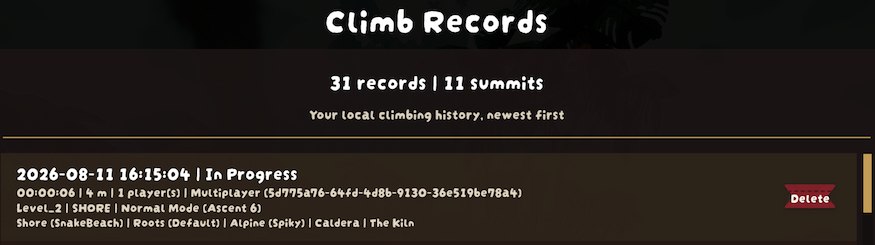
- Stores the start date and time, duration, current height, ascent, player count, level, current biome, run mode, network mode, and Photon room name.
- Supports normal runs, custom runs, and custom mini runs. Custom runs do not show a difficulty.
- Stores the generated map's biome sequence, including biome variants and the Mesa tomb state when available.
- Adds a
Climb Recordspage to the pause menu. Records use a compact four-line layout, have a visible scrollbar, and can be deleted individually. - Provides English and Simplified Chinese text. Other game languages fall back to English while game-provided biome names continue to use the game's localization.
TerrainRandomiser Integration
TerrainRandomiser is optional. When it is installed and random terrain is enabled for a run, ClimbInfoTracker records the terrain seed and a compressed snapshot of the map settings with that climb.
- The record displays the terrain seed when one was captured.
Exportwrites that record's original map settings toApplication.persistentDataPath/TerrainRandomiser/as a formatted JSON file. The file name uses the record's start time and is overwritten if it already exists.Loadis available only at the Airport. It loads the selected record's map settings into TerrainRandomiser for the next run.- The
ExportandLoadbuttons appear only when TerrainRandomiser is loaded and the selected record contains a saved map-settings snapshot.
Configuration
ClimbInfoTracker uses the following BepInEx configuration entries:
| Section | Key | Default | Description |
|---|---|---|---|
General |
Enable Tracker |
true |
Enables recording new climb history. |
General |
AutoSaveInterval |
60 |
Seconds between in-progress snapshots. Set to 0 to save only when a climb starts and ends. |
TerrainRandomiser |
UseActualMapSettings |
true |
When loading a saved TerrainRandomiser record, disables random biome and variant selection for overridden biomes so the settings reproduce the generated map. This does not change exported files or the stored record snapshot. |
Data
History is stored in:
Application.persistentDataPath/ClimbInfoTracker/ClimbInfoTracker.json
On Windows with PEAK's default Unity company and product path, this is usually:
C:/Users/<YourUsername>/AppData/LocalLow/LandCrab/PEAK/ClimbInfoTracker/ClimbInfoTracker.json
TerrainRandomiser exports, when used, are stored in:
Application.persistentDataPath/TerrainRandomiser/MapSettings_yyyy-MM-dd_HH-mm-ss.json
References
CHANGELOG
Changelog
[0.1.3] - 2026-08-12
Fixed
- Fixed compatibility issues for 2.0.a
[0.1.2] - 2026-08-11
Added
- Added new icon, readme and git repository link.
[0.1.1] - 2026-07-21
Added
- Added generated map biome details to climb records, including biome variants and Mesa tomb state.
- Added simplified Chinese translations for generated map biome variant names.
- Added visible scrollbar support for the climb history row list.
Changed
- Improved climb history row layout, viewport spacing, summary visibility, and button spacing.
- Limited built-in mod localization to English and Simplified Chinese.
- Reused the game's hero day text font for climb history UI text.
[0.1.0] - 2026-07-11
Added
- Initial Release
