

PeakItemInsight
Preview item effects with native HUD icons. Optional detailed descriptions with timings, side effects and cooking info, plus adjustable background transparency.
| Date uploaded | 2 weeks ago |
| Version | 0.2.13 |
| Download link | Rachel560lu-PeakItemInsight-0.2.13.zip |
| Downloads | 873 |
| Dependency string | Rachel560lu-PeakItemInsight-0.2.13 |
This mod requires the following mods to function

BepInEx-BepInExPack_PEAK
BepInEx pack for PEAK. Preconfigured and ready to use.
Preferred version: 5.4.2403README
PEAK Item Insight
See what changes before you use it. 使用前,看见变化。
Preview recovery and poison on your stamina bar, and see what each item does.
在精力条上预览恢复与毒性,随时查看物品用途。
Download / 下载 · English · 简体中文 · Report an issue / 问题反馈
Gameplay demo
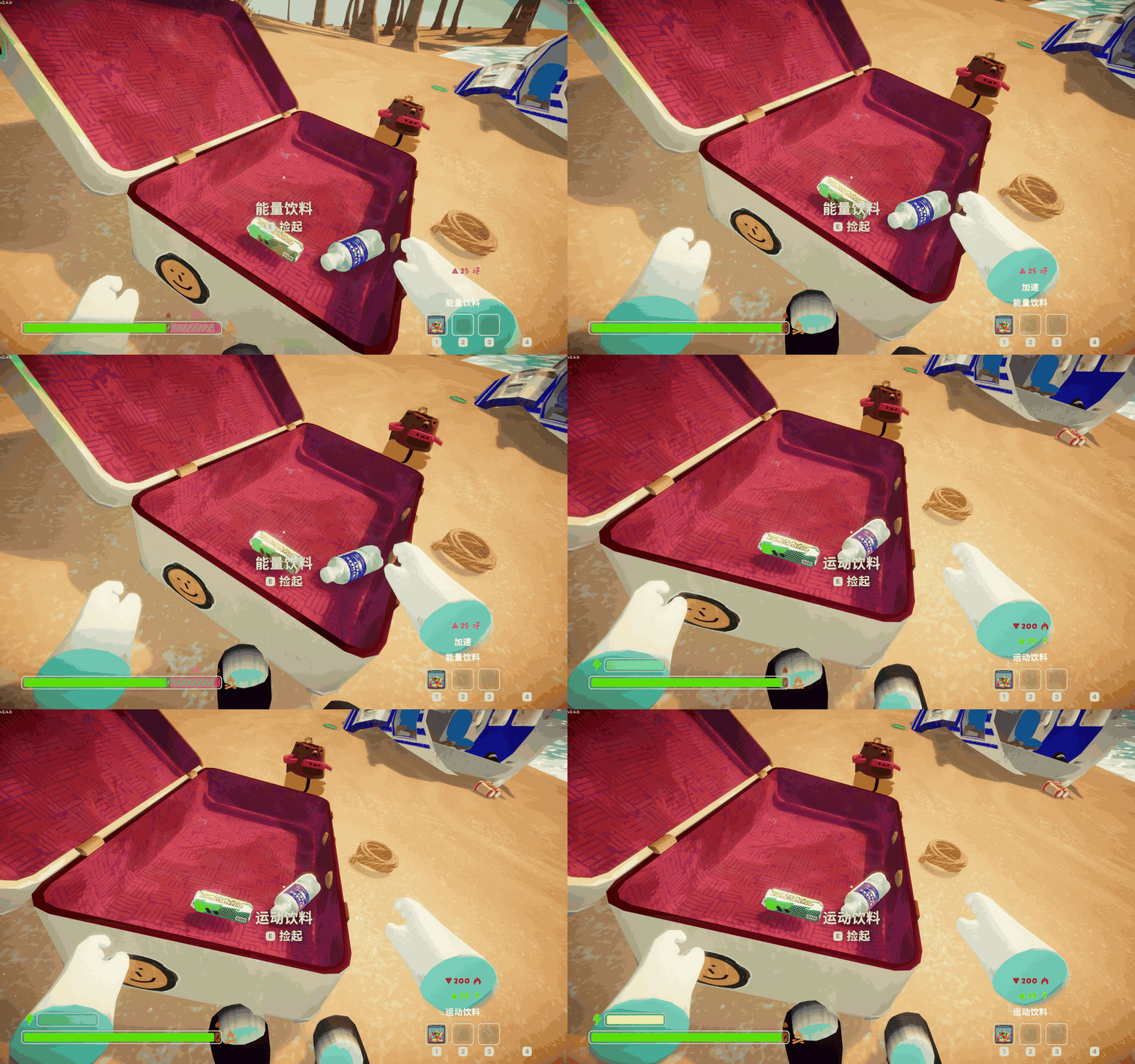
English demo
Energy and sports drinks: compact effect summaries and stamina previews before use.
中文演示
能量饮料与运动饮料:查看简洁的效果提示和精力条变化。
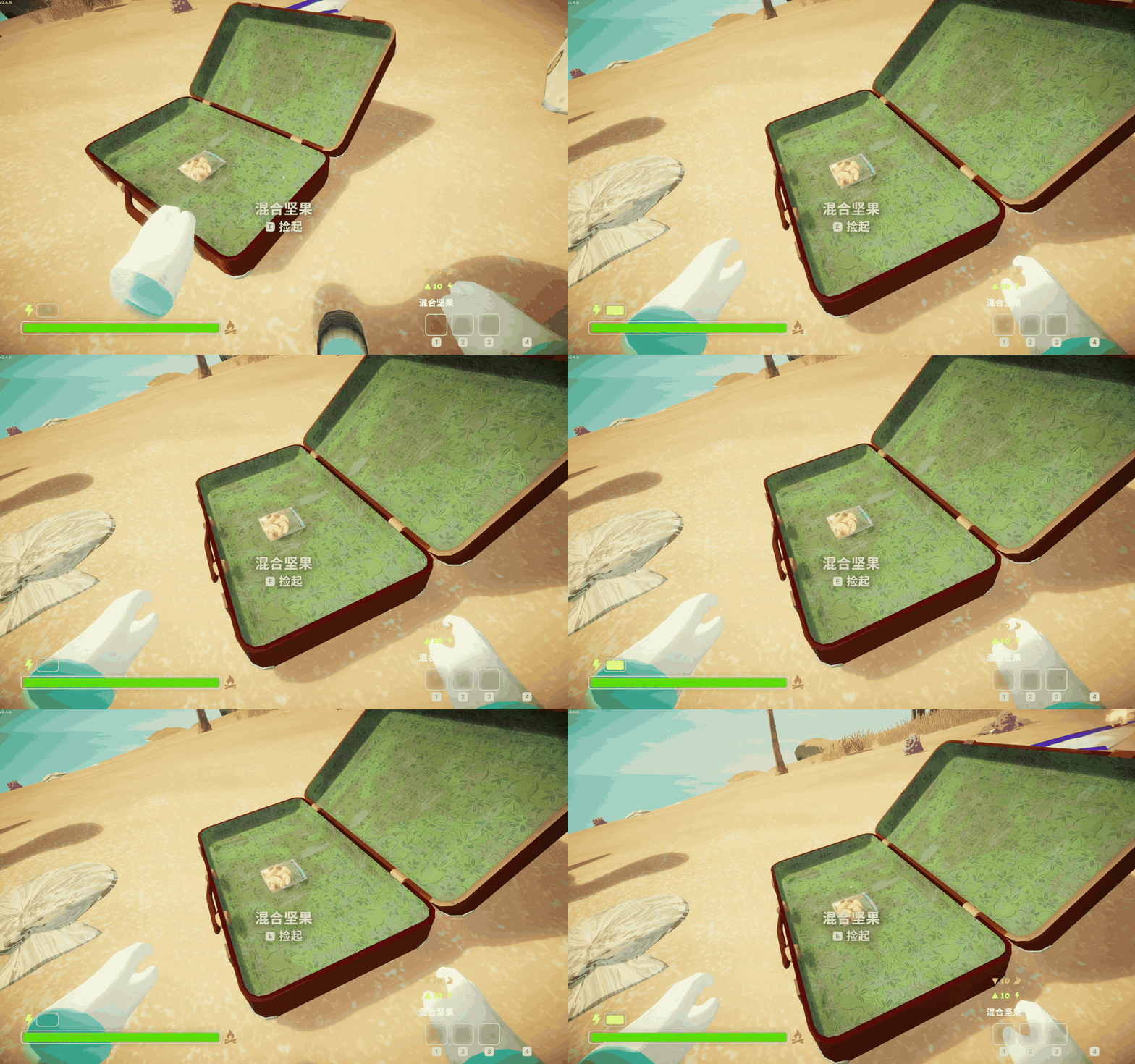
混合坚果:原装风格的额外精力条闪烁预览。
English
Download and install
- Open the Thunderstore page and choose Install with App, or select PEAK in Thunderstore Mod Manager or r2modman and search for PeakItemInsight.
- Install the mod and its BepInExPack_PEAK dependency when prompted.
- Click Start modded to launch the game.
Close the game before installing or updating. For your first modded run, back up your saves and use a separate manager profile.
How to use
- Aim at an item: effects appear above the first empty inventory slot, or above the backpack slot when all three slots are full.
- Hold an item: when you are not aiming at another item, see the held item's preview.
- Recovery: the recoverable hunger or injury segment pulses green, showing only the amount you can recover.
- Bonus stamina: native lightning and outline appear above the main bar when you have none, or extend the lower bonus bar when you do. Only the gain pulses.
- Harmful effects: poison, spores and other effects pulse in their corresponding colors. Timed effects show an arrow, the estimated final change and a status icon.
- Look away: the preview disappears with empty hands or switches back to your held item.
Previews do not use items for you. There is no recovery pulse when you have no corresponding hunger or injury. Treat “Unknown” as unknown, not safe; timed effects are estimates.
Customize the display
The settings panel appears on your first Airport visit. To reopen it, press Esc and click Item Insight settings in the top-right corner of the pause menu.
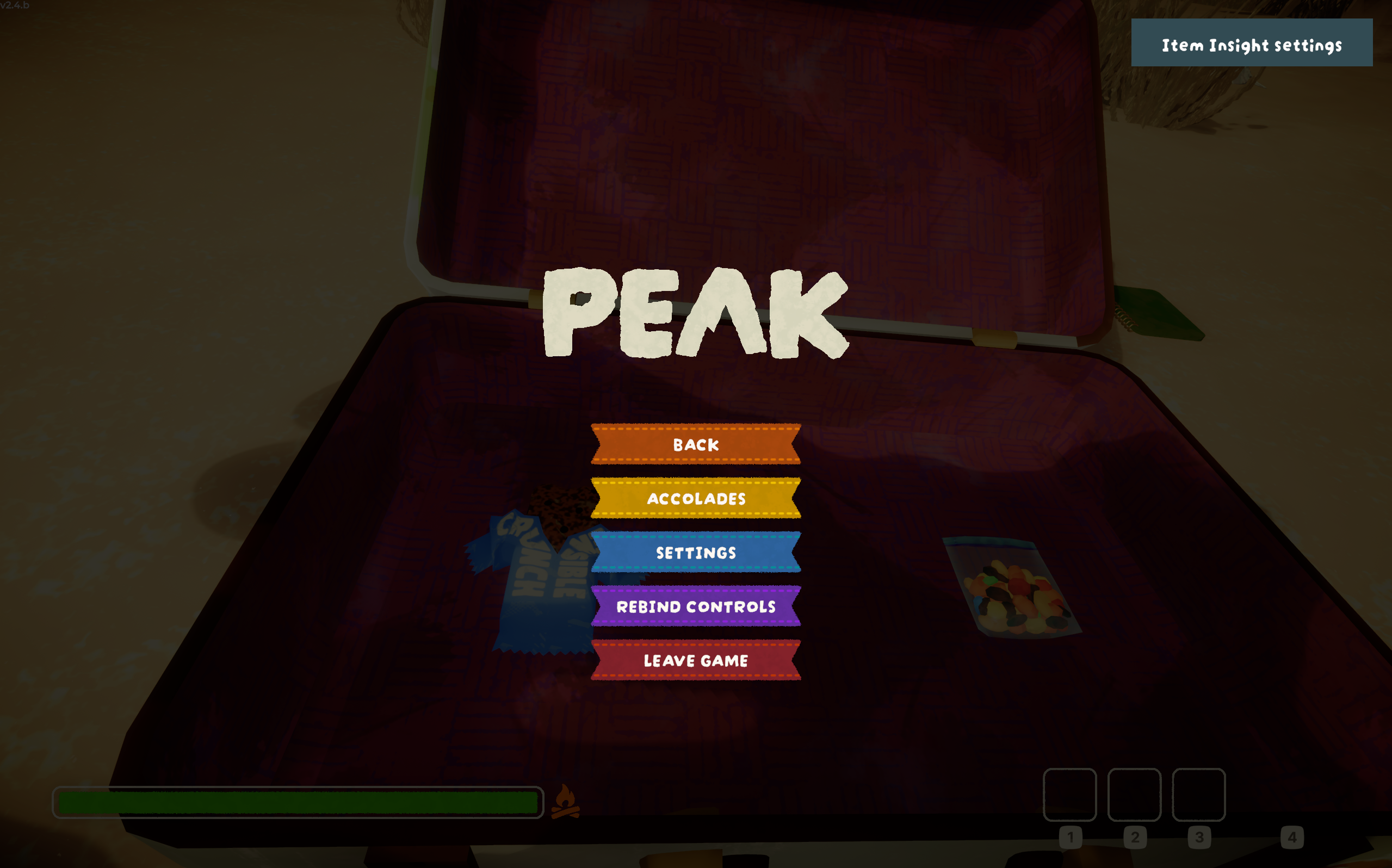
Change each row independently. Choices save immediately; click Done to close.
| Setting | Controls |
|---|---|
| Description style | Minimal (default) or Detailed card with a rounded background |
| Detailed background transparency | 0–100%; changes only the detailed card fill, keeping text and icons opaque |
| Text above inventory | Effect numbers, icons and instructions above your inventory |
| Stamina bar preview | Predicted recovery and harmful changes on the stamina bar |
Choose Hover / Held / Both / Off. Both is the default. Hover shows only the aimed-at item; Held shows only the item actually in your hands. Both prioritizes the aimed-at item and falls back to the held item—it does not display two previews at once. Off disables only that row.
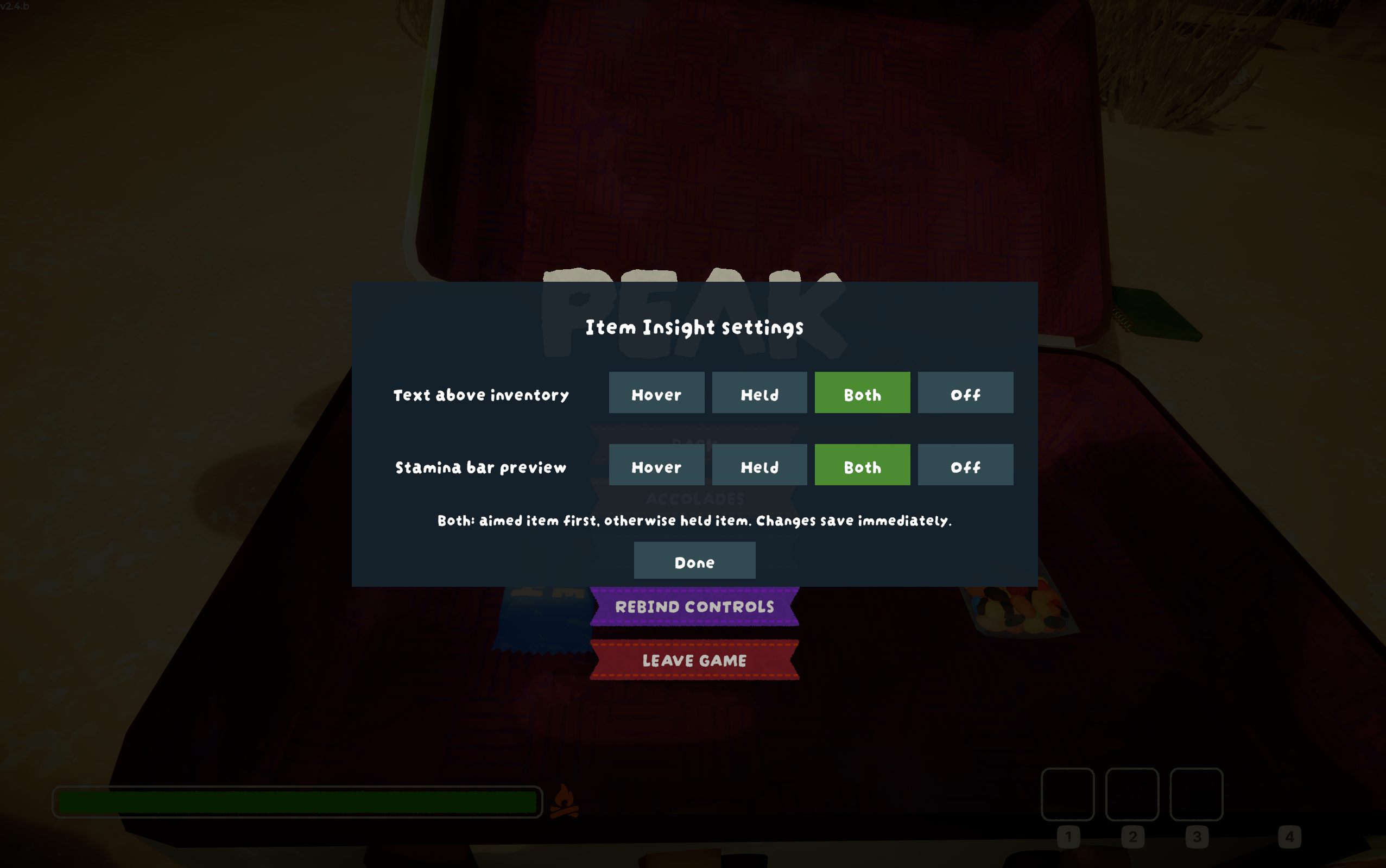
For example, choose Hover for text and Both for stamina to use another mod for held-item text while keeping this mod's held-item stamina preview.
Alternatively, close the game and edit InventoryTextSource (text) and StaminaPreviewSource (bar) under Preview in Config editor. Accepted values: Hover, Held, Both, Off. Restart the game after manual edits.
After the first launch, close the game and find dev.rachel.peakiteminsight in your manager's Config editor:
- Language: use
Autoto follow the game, or chooseChinese/English/Turkish/Spanish. Auto supports both Spanish regions; manual Spanish uses Spain’s native item text. Missing mod translations fall back to English. - MinimalScale / MinimalOffsetX / MinimalOffsetY: resize and reposition the inventory description in either style.
- AnimateRecovery: turn pulsing on or off; off uses a steady preview color.
Press Esc → Item Insight settings → Description style to choose Minimal / Detailed. Detailed cards show the item icon beside its name, known cooking count, plain-language effects with status icons, per-second changes, durations, delayed side effects and necessary use conditions. Missing information is omitted. The stamina preview remains independent; choose Off to keep only the description card. You can also edit UI.DescriptionStyle (Minimal / Detailed) in Config editor.
Instant-only items show effects per use. Timed-effect items show the final change from your current state, matching the stamina preview; speed boosts and temporary infinite stamina keep short labels. A question mark means the risk is not confirmed.
Need help?
- No preview at all: launch with Start modded and check that the mod is enabled.
- Effects visible but no recovery pulse: check that you have hunger or injury the item can restore.
- Effect text too small or in the way: adjust its size and position.
- Something else: report an issue with the item name, a screenshot and the steps that caused it.
To uninstall, close the game and disable or remove PeakItemInsight in your mod manager.
中文
下载与安装
- 打开 Thunderstore 下载页,点击 Install with App;也可以在 Thunderstore Mod Manager 或 r2modman 中选择 PEAK,搜索 PeakItemInsight。
- 安装 Mod 及管理器提示的 BepInExPack_PEAK 依赖。
- 点击 Start modded 启动游戏。
安装或更新前请退出游戏。首次使用 Mod,建议备份存档并新建一个管理器配置。
怎么使用
- **准星对准物品:**效果提示显示在第一个空物品栏上方;物品栏全满时显示在右侧背包栏上方。
- **拿在手里:**没有瞄准其他物品时,显示手持物品的预览。
- **恢复效果:**预计恢复的饥饿、伤势区域闪绿光,只标出实际可恢复的部分。
- **额外精力:**使用原生闪电和白框;当前没有额外精力时预览在上方,已有时在下方衔接,仅新增部分闪烁。
- **有害效果:**毒素、孢子等效果以相应颜色闪烁提示;持续效果以箭头、最终预计变化量和状态图标简洁展示。
- **移开准星:**空手时隐藏预览,手持物品时切回手持预览。
预览不会自动使用物品。没有饥饿或伤势时,对应的恢复区域不会闪烁。提示若显示“未知”,请不要当作“无毒”;持续效果数值是预估值。
调整显示
首次进入机场时会显示设置面板。之后按 Esc,点击暂停菜单右上角的 Item Insight 设置 / Item Insight settings 即可重新打开。
简介样式和两项预览可独立设置,点击即保存,点击「完成 / Done」关闭:
| 设置 | 控制内容 |
|---|---|
| 物品简介样式 / Description style | 极简(默认)或带圆角背景框的详细卡片 |
| 详细背景透明度 / Detailed background transparency | 0–100%;只调整详细卡片底色,文字和图标保持不透明 |
| 物品栏上方文字 / Text above inventory | 物品栏上方的效果数值、图标和用途说明 |
| 精力条闪烁预览 / Stamina bar preview | 精力条上预计恢复或增加的状态区域 |
每项支持 准星(Hover)/ 手持(Held)/ 两者(Both)/ 关闭(Off),默认两者。准星仅显示瞄准目标;手持仅显示真正拿在手中的物品;两者优先准星目标,没有目标时显示手持物品,并非同时显示两份提示。关闭只影响对应的一项。
例如:文字选 Hover、精力条选 Both,即可用其他 Mod 显示手持文字,同时保留本 Mod 的手持精力条预览。
也可退出游戏后,在 Config editor 的 Preview 分组调整 InventoryTextSource(文字)和 StaminaPreviewSource(精力条),填入 Hover、Held、Both 或 Off。手动修改后重新启动游戏。
首次启动后,退出游戏,在管理器的 Config editor 中找到 dev.rachel.peakiteminsight:
- **Language:**默认
Auto跟随游戏,或选择中文(Chinese)/英文(English)/土耳其语(Turkish)/西班牙语(Spanish)。自动模式支持两种西班牙语地区;手动 Spanish 使用游戏的西班牙地区物品译文。缺失的 mod 翻译回退到英文。 - **MinimalScale / MinimalOffsetX / MinimalOffsetY:**调整两种物品简介样式的大小与位置。
- **AnimateRecovery:**开启或关闭闪烁;关闭后使用固定颜色预览。
按 Esc → Item Insight 设置 → 物品简介样式 选择 极简 / 详细。详细卡片显示名称旁的物品图标、已有的烹饪次数、效果数值、已知的持续时间或延迟、效果结束后的副作用,以及必要的使用/触发条件;没有的信息直接省略。精力条预览仍可独立关闭,选择 Off 即可只保留描述卡片。也可在 Config editor 中调整 UI.DescriptionStyle(Minimal / Detailed)。
纯即时物品显示本次使用效果;持续效果物品显示从当前状态到效果结算后的预计变化,与精力条预览一致。加速、临时无限精力保留短标签。问号代表风险尚未确认。
遇到问题?
- **完全没有提示:**确认从 Start modded 启动,并且管理器中已启用本 Mod。
- **有效果提示但没有恢复闪烁:**确认角色有对应的饥饿或伤势,且物品能恢复它。
- **效果提示太小或挡住视线:**调整效果提示大小与位置。
- 其他问题:提交反馈,附上物品名称、问题截图和出现问题的操作步骤。
卸载时,退出游戏后在管理器中禁用或卸载 PeakItemInsight 即可。
MIT License · Rachel560lu · Unofficial PEAK mod / 非官方 PEAK Mod
CHANGELOG
Changelog
0.2.13 — 2026-09-14 / Optional readable detailed descriptions
- Add Minimal / Detailed description selection in the pause-menu settings; stamina preview controls remain independent.
- Detailed cards show the item icon beside its name, known cooking count and adjustable background transparency.
- Describe immediate effects, per-second changes, duration and delayed side effects in plain language with status icons. Combine redundant drowsiness clearing; omit unavailable information.
- Add Turkish and Spanish translations alongside Chinese and English.
- Stop refreshing hidden settings, limit prediction refreshes, reuse unchanged text layouts and release settings UI focus on close.
- 新增可选详细模式、名称旁物品图标、烹饪次数与背景透明度设置;精力条预览仍可独立调整。
- 详细版使用文字配图标,明确即时/每秒效果、持续时间及延迟副作用;合并重复困倦恢复,省略不存在的信息。
- 保留中英文并新增土耳其语、西班牙语;减少隐藏设置和重复布局的刷新,关闭设置时清理其 UI 焦点。
0.2.12 — 2026-09-13 / English instructions first
- Move English instructions above Chinese instructions; retain all screenshots and demos.
- 英文使用说明移至中文上方,保留全部截图与演示。仅更新文档,沿用 0.2.11 DLL。
0.2.11 — 2026-09-13 / In-game preview settings
- Add independent Hover / Held / Both / Off controls for inventory text and stamina previews, with automatic saving.
- Show setup on the first Airport visit; reopen through the top-right pause-menu entry. Fix pause entry click layering.
- 新增物品栏文字与精力条预览独立设置,首次进入机场显示,暂停菜单右上角可重新打开,选择自动保存。
- Add bilingual setup instructions and screenshots. Existing preview typography and stamina rendering remain unchanged.
0.2.10 — 2026-09-13 / README update
- Separate English and Chinese demos, English first. Add the new English GIF and retain both Chinese demos.
- 演示分为英文和中文,英文在前;新增英文 GIF,保留两张中文演示。
- Documentation only; the tested 0.2.9 Mod DLL is unchanged. 仅更新文档,Mod 功能不变。
0.2.9 — 2026-09-12 / Simpler timed effects
- Timed items show one final change per status, using the same snapshot as the stamina preview. Remove raw rates, durations and delay text.
- Keep short labels for speed boosts, temporary infinite stamina and mushroom abilities; preserve poison warnings at the status cap.
- Replace the previous gameplay demo with new energy/sports drink and trail mix recordings.
- 持续类物品按状态合并显示最终预计变化量,去掉速率、持续时长和延迟;保留临时能力短标签与毒性风险提示。
- 更新饮料和混合坚果实机 GIF。精力条闪烁、字体及物品栏定位沿用原有实现。
0.2.8 — 2026-09-12 / Native text and inventory positioning
-
Fix missing Chinese glyphs and restore the game's rounded font, native status icons and clear up/down effect arrows.
-
Anchor aimed-at item information above the first empty inventory slot; use the backpack position when all three slots are full. Holstered slot highlights no longer misplace the preview.
-
Keep held-item information above its own slot and preserve stamina-bar preview behavior.
-
Replace the old README demos with one new energy-drink gameplay GIF.
-
修复中文方框乱码,恢复原生圆润字体、状态图标与增减三角。
-
准星物品提示显示在第一个空槽上方,满栏时显示在背包栏上方,不再受收起物品后的高亮影响。
-
手持提示仍跟随自身槽位;精力条预览保持不变。
-
README 旧演示统一替换为新版能量饮料实机 GIF。
0.2.7 — 2026-09-12 / Minimal interface
-
Replace the detailed card with a compact, background-free interface using game fonts and status icons. No mode selection is needed.
-
Keep stamina-bar previews, signed effects, poison/spore risks, duration, remaining uses and useful item instructions.
-
Position information near the inventory; support Chinese/English, adjustable size and offsets.
-
Remove legacy card settings. Existing minimal-interface settings remain compatible.
-
仅保留极简界面:原生字体与状态图标、无背景,无需切换模式。
-
保留精力条闪烁、效果数值、毒性/孢子提示、持续时间、剩余次数和必要用途说明。
-
信息定位在物品栏附近,支持中英文、大小和位置调整;旧详情卡配置不再生效。
0.2.6 — native stamina previews
- Bonus stamina now uses PEAK's original lightning icon, white outline and textured fill.
- New bonus previews appear above the main bar; existing bonus previews extend the lower bar. Only the gain pulses, with a clear gap between the bars.
- Hunger recovery and poison increases are previewed together, including full and partial hunger recovery.
- Add sports-drink, special-item and Remedy Fungus GIFs. Replace the bandage demo with a first aid kit.
额外精力预览使用原生闪电、白框和填充;没有额外精力时显示在上方,已有时在下方衔接,仅新增部分闪烁。饥饿恢复与毒性增加同步预览。新增运动饮料、特殊道具和灵药菇演示,以急救箱替换绷带演示。
0.2.5 — preview fixes and clearer item cards
- Fix the floating flashing block near the stamina bar when previewing bonus stamina.
- Improve Chinese/English descriptions for the Scout Cannon, Passport, Piton and Remedy Fungus.
- Explain piton reuse and Remedy Fungus group healing; remove generic internal diagnostic messages from item cards.
- Refresh gameplay demos: energy drink, poisonous mushroom, poisonous berry, bandage, safe mushroom and item information.
修复精力条外的闪烁方块,完善童军大炮、护照、岩钉和灵药菇的中英文说明,移除无用诊断文案,并更新六组演示。
0.2.4 — player-page and cover update
- Replace the package cover with the new Item Insight artwork.
- Streamline the bilingual README around download, gameplay demos, usage and common settings.
- Keep the same gameplay DLL and dependencies as 0.2.3.
0.2.3 — demonstration and source-link update
- Add poisonous-food, safe-food and item-card GIF demonstrations to the public page.
- Link the public MIT-licensed GitHub repository and issue tracker.
- Documentation-only package: the DLL is byte-identical to the tested 0.2.2 plugin, whose in-game log version remains 0.2.2. No gameplay changes or additional dependencies.
0.2.2 — first public release
- Preview hovered items with held-item fallback.
- Pulse hunger and injury recovery inside the affected native status segment.
- Preview recognized poison/spore/status increases, including poison when the native poison slot starts hidden or empty.
- Include item-only cumulative timed effects with delay and duration in the card; totals remain estimates.
- Add extra/infinite stamina cues and game-style bilingual cards with icons, risk warnings and useful charges.
- Read real runtime poison components rather than hardcoding food names or overwriting cooking-dependent effects.
- Validate six audited poison-food variants and pass 81 offline regression checks.
- Include the MIT License. Player testing supplied poisonous-food, safe-food and card demonstrations; full item/multiplayer compatibility is not claimed.
Earlier version numbers were local development builds, not previous public Thunderstore releases.
