

Hiking GPS
A live minimap for PEAK on a handheld GPS. Real terrain, markers for chests, campfires, statues and animals. Client side.
| Date uploaded | a month ago |
| Version | 1.0.2 |
| Download link | abra9987-Hiking_GPS-1.0.2.zip |
| Downloads | 19 |
| Dependency string | abra9987-Hiking_GPS-1.0.2 |
This mod requires the following mods to function

BepInEx-BepInExPack_PEAK
BepInEx pack for PEAK. Preconfigured and ready to use.
Preferred version: 5.4.75301

README
Hiking GPS
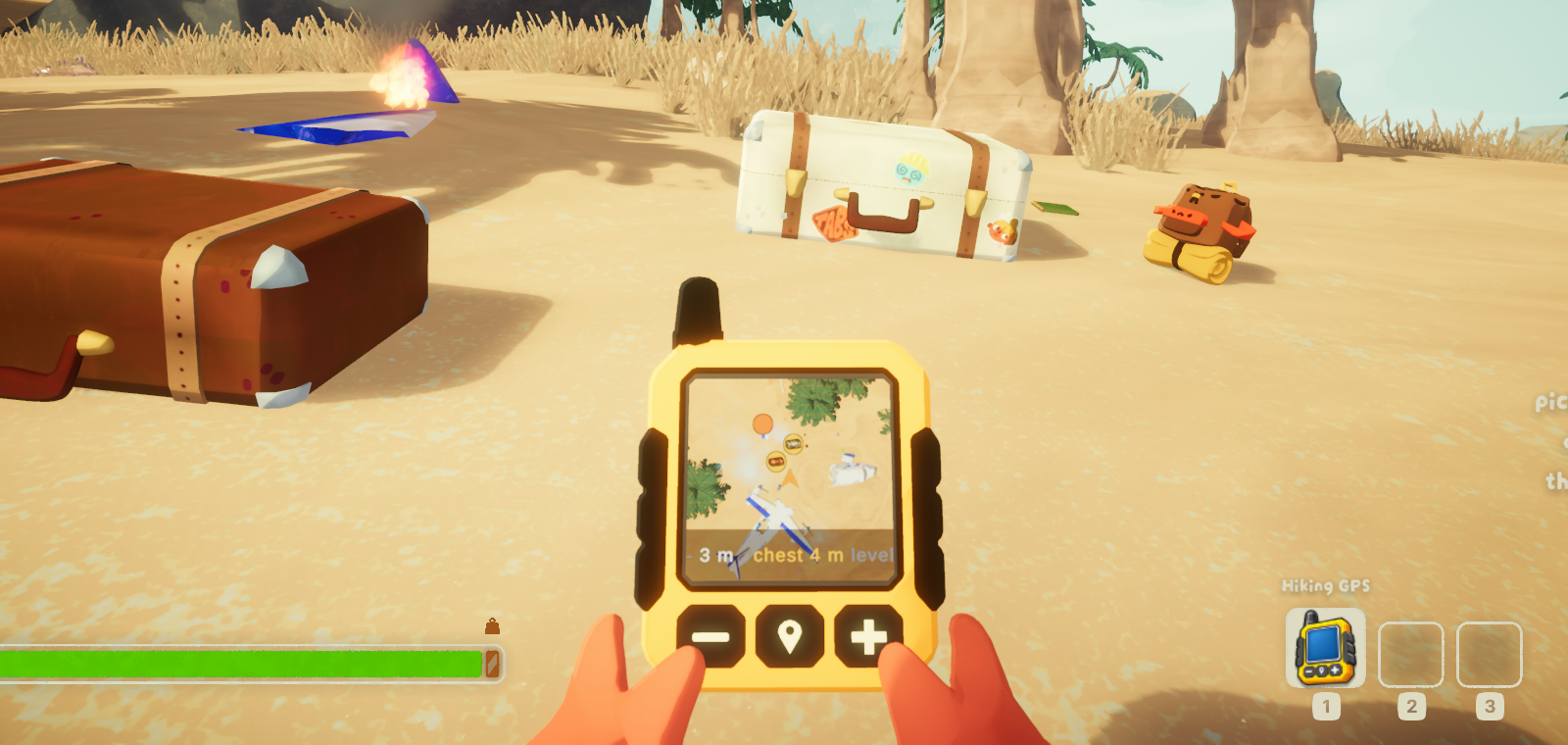
A live minimap for PEAK, on a handheld GPS you carry. Press M and the mountain
is there — real terrain, drawn by the game itself, seen from above.
Client side. Only you install it. Nobody else in the lobby needs it, the host does not need it, and it changes nothing anyone else sees.
What it shows
- The real mountain. Not a redrawn diagram: a camera looking down at the world you are standing in, so what is on the screen is what is under you.
- Chests, campfires, statues, belltowers, capybaras and the scoutmaster, each drawn as a picture of itself rather than a coloured dot. Opened chests disappear, so the map only points at loot that is still there.
- Height, which is what PEAK is about. A marker grows and lightens above you and shrinks and darkens below — thirty metres sideways and thirty metres up are nothing alike on this mountain.
- Everyone else on the climb, at any distance.
- Your altitude and the distance to the nearest unopened chest.
No game assets ship with this mod
The GPS itself is drawn for the mod. Every marker icon is photographed from your own copy of the game, once, the first time you see that kind of thing — so the pictures always match the version you have, and nothing of PEAK's artwork travels.
Controls
| Key | |
|---|---|
M |
Show or hide the GPS |
= / - |
Zoom, in fixed steps from 20 m to 2000 m across |
N |
Tilt: straight down, 75°, 45° |
Install
Install it with a mod manager, or drop HikingGPS.dll into BepInEx/plugins/
by hand. Needs BepInEx 5 (BepInExPack PEAK), which the manager installs
for you.
The map appears about ten seconds after a run starts, once your character is on their feet.
Settings
Everything is in BepInEx/config/com.abra9987.hikinggps.cfg, written on first
launch.
| Setting | |
|---|---|
SizePixels |
How large the GPS is drawn |
Corner |
Which corner it hangs in |
MarginXPixels, MarginYPixels |
How far in from the edges |
PlayerMarkerColour |
The colour of the arrow that is you, as #RRGGBB |
StartZoomStep |
Which zoom step it opens on |
MarkerSizePixels |
How large the markers are |
Icons |
Turn the photographed icons off, back to plain markers |
StartDelaySeconds |
How long after the mountain loads before the map opens |
Both top corners are clear of PEAK's own HUD. The bottom two are not: at the
default margin the GPS covers the stamina bar on the left and the item slots on
the right. To use them, raise MarginYPixels to about 95 bottom-left and 115
bottom-right.
Leave everything under Automation alone — it exists to develop the mod, takes
the game over and can quit for you. It is off by default.
Notes
- Steam achievements keep working. PEAK only blocks them during its own
custom runs — the check is
RunSettings.blockingAchievements, and it returns whether you started a custom run, nothing else. The game looks for no mod loader anywhere. This mod never touches achievements, run settings or Steam, and with the default settings it installs no patches at all. - If PEAK crashes on startup with BepInEx installed, launching with
-dx12is the usual fix. - Please do not report bugs to Aggro Crab or Landfall while running mods. Uninstall first, check the problem is still there, and only then report it.
Source and issues: github.com/abra9987/Peak-Hiking-GPS
CHANGELOG
Changelog
1.1.0
The GPS is a thing you find and carry.
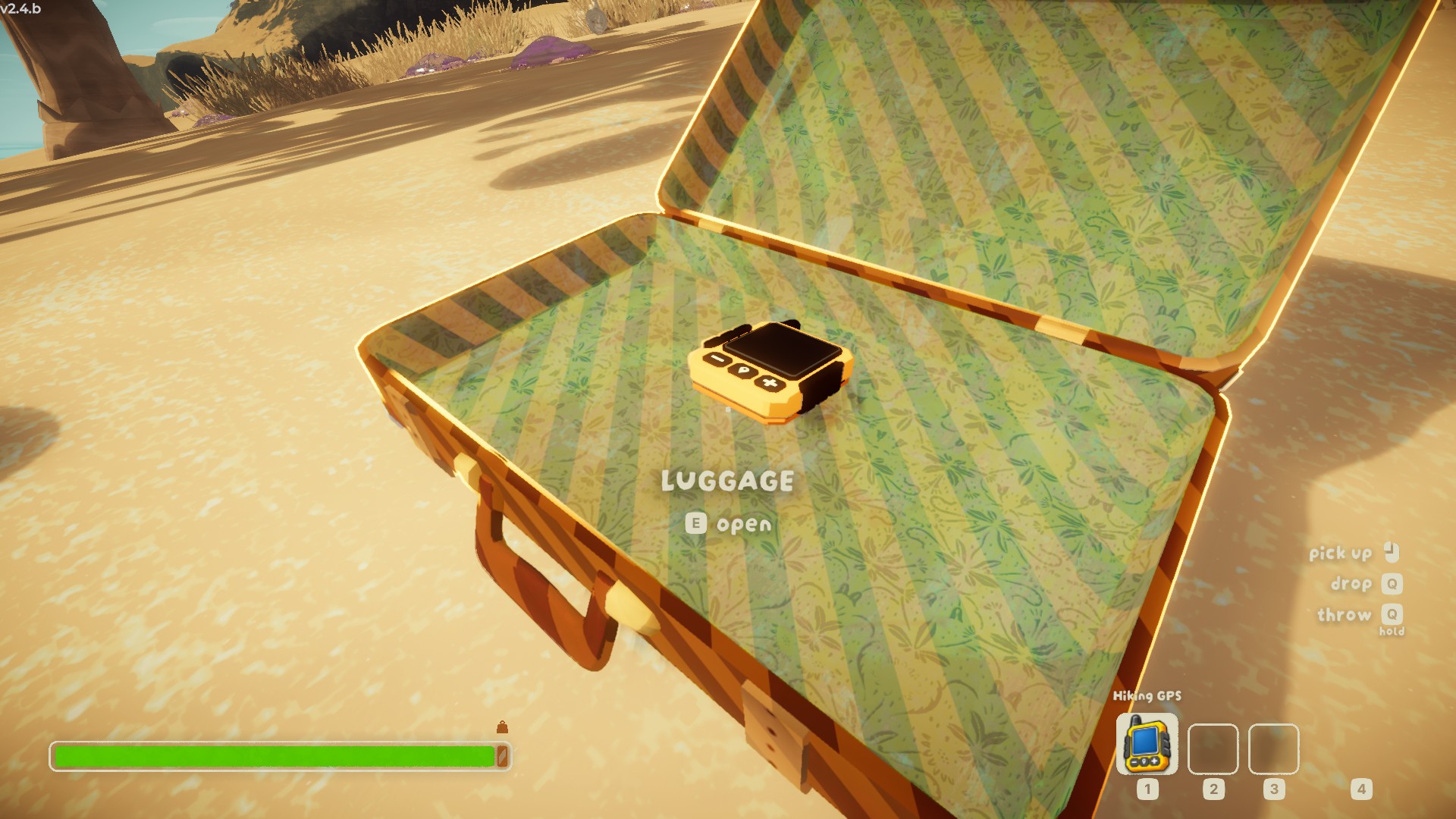
- A real item. The device turns up in beach luggage (
Rareby default), and is picked up, carried in both hands, dropped, thrown, pocketed and hung on a backpack like any other item. The map is on its screen, and only while it is in your hands: put it away and it goes dark, take it out and it wakes at the zoom you chose. This needs PEAKLib (PEAKLib_Items), which a mod manager installs with the mod. Without it the map is pinned to a corner of the screen as before. - Held the way the game holds its own things. Arms out, palms on the case, the screen leaned back towards you — settled by eye in front of the airport mirror rather than by numbers.
- It lands on its back. Dropped or thrown, it ends up screen-up rather than standing on an edge; in a suitcase it lies flat, in the middle, antenna towards the lid.
- On a backpack it hangs screen-out, in any of the four slots.
- Bigger and bolder. The device is four times its real size in the hands, which is what PEAK's hands need; markers on its screen are doubled and the readout is bold.
- The zoom is kept between glances. It used to reset every time the map opened.
- The buttons press when you press them, and it clicks — six sounds, chirps on waking and sleeping, a knock at the end of the zoom ladder.
- An inventory icon painted from the model.
Settings under Tracker cover all of it: rarity and luggage, size, where it
is held, how it lies in a suitcase, and the marker size on the screen.
1.0.3
- New icon: the GPS itself, large, on a plain grey field. The old one carried lines of small text that were unreadable at the size an icon is actually shown at.
Text and artwork only. The mod is unchanged from 1.0.1.
1.0.2
- The readme said mods disable Steam achievements. They keep working; the note is corrected.
Text only. The mod itself is unchanged from 1.0.1.
1.0.1
- Unbound the two development hotkeys.
F11saved a screenshot andF10photographed every kind of thing on the mountain at once. Both exist to work on the mod, neither belongs on a player's keyboard: Steam, the graphics driver and Windows all take screenshots already, and F10 set off a lot of work if you leaned on it mid-climb. Both keys are still in the config for anyone who wants them, just not bound to anything by default.
Nothing else changed. The map, the markers and the settings are as they were.
1.0.0
First release. Tested against PEAK 2.4.b.
- A live minimap, drawn by the game itself, on a handheld GPS in the corner of the screen.
- Markers for unopened chests, campfires, statues, belltowers, capybaras, mobs and the scoutmaster, each shown as a picture of itself. The pictures are photographed from your own copy of the game the first time you see one, so none of PEAK's artwork ships with the mod.
- Markers grow and lighten above you, shrink and darken below.
- Other climbers marked at any distance.
- Altitude and the distance to the nearest unopened chest.
- Zoom in fixed steps from 20 m to 2000 m across; three viewing angles.
- Client side: nobody else in the lobby needs it.
