
You are viewing a potentially older version of this package.
View all versions.

PeakOverheadStats
PeakStatsEx stats HUD (timer, height, day/night, map route) with teammate stamina bars moved overhead above player heads.
| Date uploaded | 2 weeks ago |
| Version | 1.0.4 |
| Download link | linlin-PeakOverheadStats-1.0.4.zip |
| Downloads | 1135 |
| Dependency string | linlin-PeakOverheadStats-1.0.4 |
This mod requires the following mods to function

BepInEx-BepInExPack_PEAK
BepInEx pack for PEAK. Preconfigured and ready to use.
Preferred version: 5.4.75301README
Peak Overhead Stats
Teammate stamina bars, status numbers, and inventory — all shown above players' heads instead of the bottom-left corner.
Combine the full HUD of PeakStatsEx with the overhead positioning of OverheadStamina.
✨ Features
🧑🤝🧑 Teammate overhead display
Everything PeakStatsEx showed in the bottom-left party list is now floating directly above the teammate it belongs to:
- 🏷️ Player name — colored by player color, left-aligned with the stamina bar
- ⚡ Main stamina bar — bright green fill with numeric value
- 🔵 Extra stamina bar — thin blue bar below the main one
- 🎭 Affliction bars — weight / hunger / cold / poison / etc. with correct colors
- 🎒 Inventory slots — items shown next to the status bar
- ✈️ Airport weight support — weight bar renders correctly in airport scene
📊 Climb session stats (PeakStatsEx HUD)
- ⏱️ Climb time — total elapsed time
- 📏 Climb height — current altitude
- 🌍 Map & biome route — current map and biome progression with built-in Chinese localization
- 📍 All HUD elements match PeakStatsEx layout exactly
📸 Screenshots
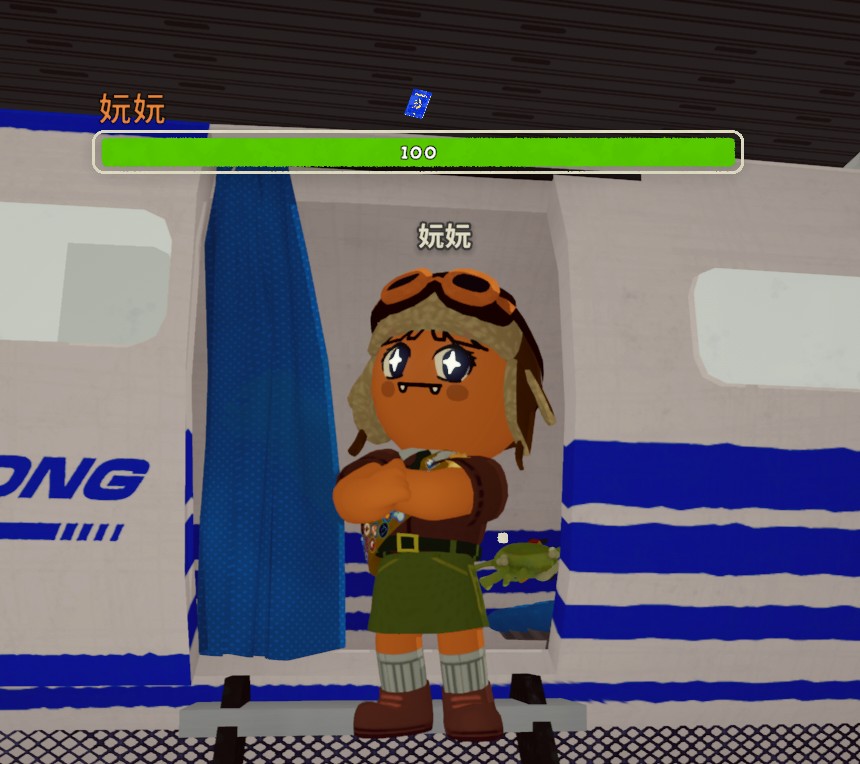
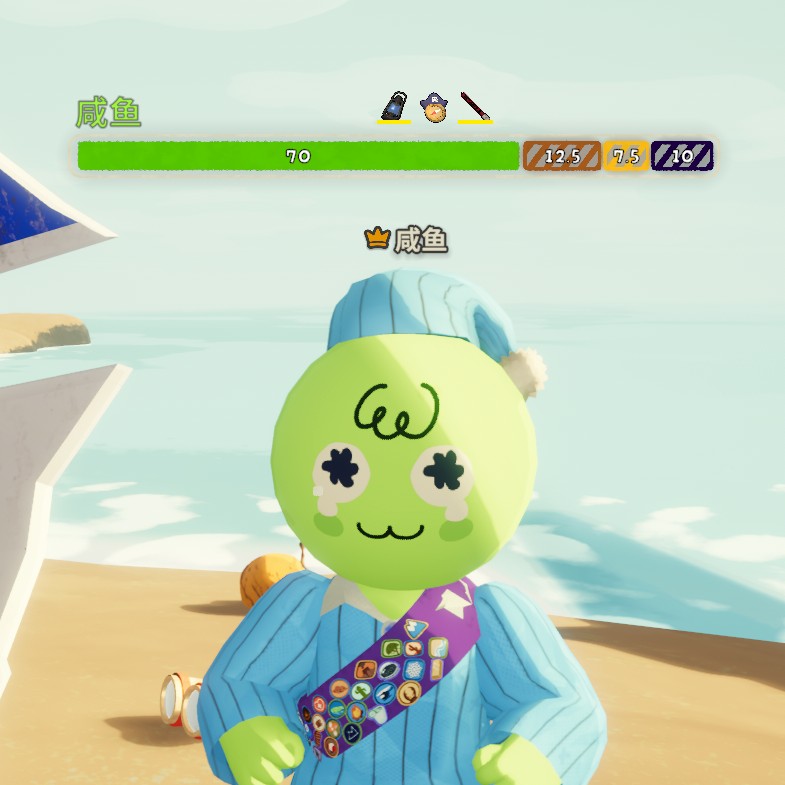
⚙️ Configuration
Launch the game once, then edit BepInEx/config/com.yls.peakoverheadstats.cfg:
| Setting | Default | Description |
|---|---|---|
| ShowInventorySlots | true | Show teammate inventory items |
| ShowExtraStaminaBar | true | Show extra stamina bar |
| MaxShowDistance | 30 | World units before overhead info hides |
📥 Installation
- Install BepInExPack PEAK (required dependency)
- Install this mod via r2modman / Thunderstore Mod Manager, or manually:
- Extract the ZIP into
PEAK/BepInEx/plugins/
- Extract the ZIP into
- Launch the game
🔧 Building from source
dotnet build src\PeakOverheadStats\PeakOverheadStats.csproj -c Release
🙏 Acknowledgements
- LengSword / yls-peak-mods — original PeakStatsEx concept and full HUD feature set
- PatchNote — OverheadStamina overhead rendering approach
- 妧妧 — playtesting and feedback
- 咸鱼 — playtesting and feedback
- PEAK modding community
📄 License
MIT
CHANGELOG
Changelog
1.0.4
- 基于 1.0.3 稳定版重构,移除开发中引入的与原生 HUD(邀请好友 / 登机终端 / 物品使用进度条 / 登机倒计时)冲突的改动
- 新增头顶状态条整体缩放:可选 25% / 50% / 75% / 100%,默认 75%(在配置文件 [Overhead] 段修改)
- 修复游戏大更新后,队友头顶名牌反复出现 NullReferenceException、状态条创建失败不显示的崩溃问题
- 头顶引用缓存全面加空值保护(节点查找 / 字体模板 / 角色名 / 颜色 / 体力条各子节点),缺失时安全跳过
- 补丁入口加异常兜底,单帧配置期异常不再向游戏抛出,避免拖累帧率或干扰原生 UI
- 保留 1.0.3 全部功能:队友体力条 / 负重条 / 状态条 / 物品栏移至头顶显示
1.0.3
- 修复了古老雕像的负重显示问题
- 修复了机场负重空白的问题(机场中使用总条-体力条计算负重条)
- 添加了机场显示小彩蛋
- 玩家名称左对齐与绿色体力条对齐
- 更新了图标和截图
1.0.2
- 基于 PeakStatsEx,队友体力条移至头顶显示
- 通过 UIPlayerNames 补丁实现头顶名牌渲染
0.1.0
- 初始版本
- 移植 PeakStatsEx 功能(队友状态数值、体力条、攀登时间/距离、物品栏物品名称)
- 将所有队友信息从左下角重新定位到玩家头顶
