
FreeFly
FreeFly adds local no-clip flight to PEAK, with temporary speed control and a stage-aware teleport menu for finding teammates or reaching stage destinations.
| Date uploaded | 2 weeks ago |
| Version | 1.1.0 |
| Download link | lllei-FreeFly-1.1.0.zip |
| Downloads | 853 |
| Dependency string | lllei-FreeFly-1.1.0 |
This mod requires the following mods to function

BepInEx-BepInExPack_PEAK
BepInEx pack for PEAK. Preconfigured and ready to use.
Preferred version: 5.4.75301README
FreeFly


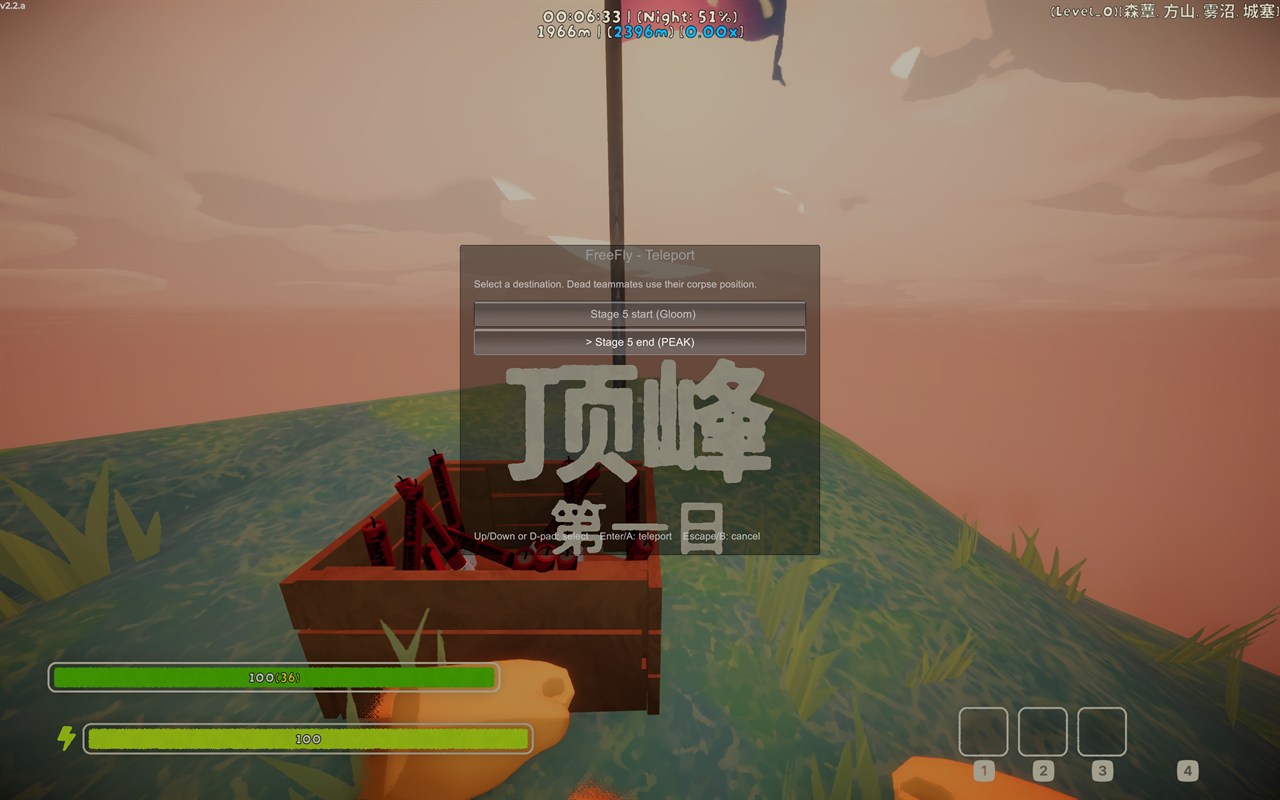
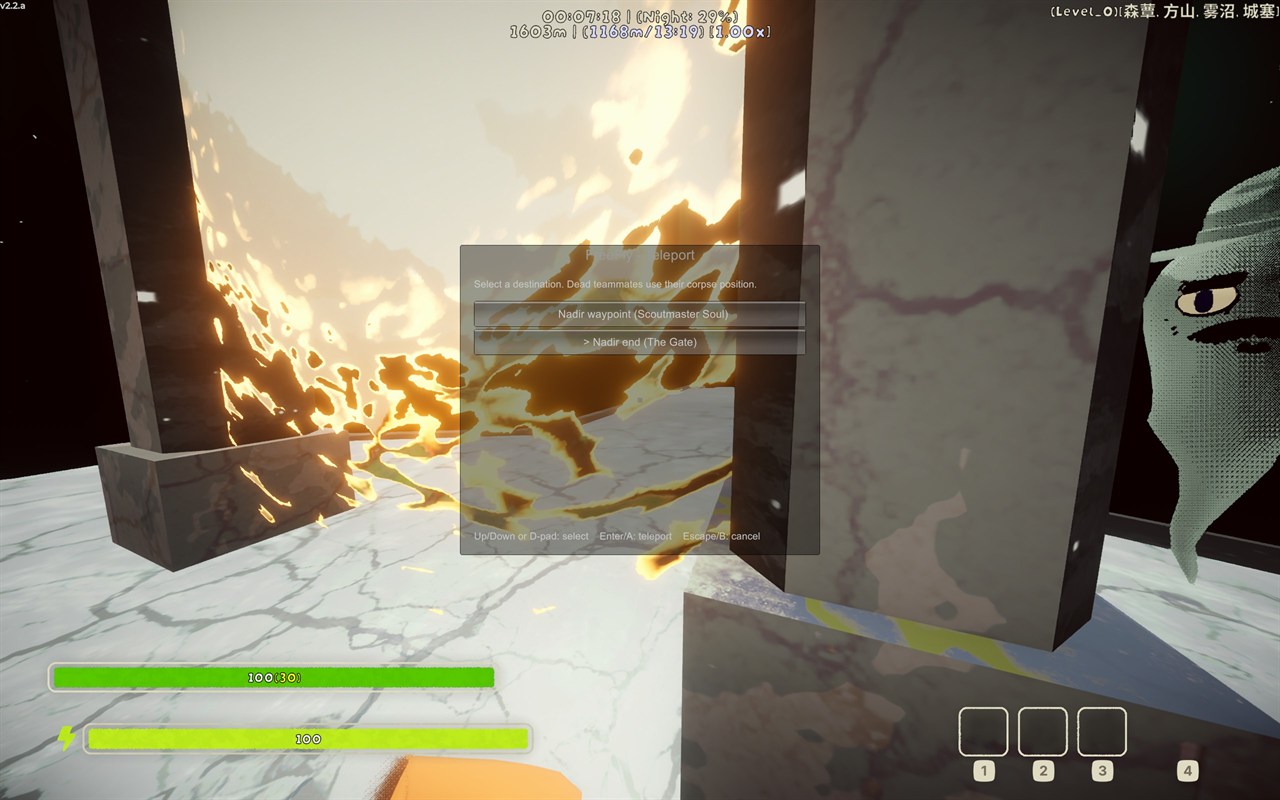
Preview / 效果展示
| PEAK teleport / PEAK 传送 | Nadir teleport / Nadir 传送 |
|---|---|
 |
 |
English
FreeFly adds local no-clip flight to PEAK, with temporary speed control and a stage-aware teleport menu for finding teammates or reaching stage destinations.
Features
- Fly anywhere: Toggle no-clip flight and move freely through the current stage without gravity or collision getting in the way.
- Adjust speed on the fly: Hold the configured speed-up or slow-down input for temporary multipliers, without changing your base speed.
- Keyboard and controller support: Use keyboard shortcuts or configurable Unity Input System controller paths. Flight and teleport can use a modifier chord or standalone buttons.
- Stage-aware teleport destinations: The menu tracks the current stage's start and end points, campfires, the Nadir route, and the final PEAK destination. Destinations are refreshed as the run advances.
- Teleport to teammates: Select living, passed-out, or dead teammates.
Why FreeFly?
FreeFly is my own take on a flight mod, implemented around how I prefer to play. FlyMode already exists, but I wanted a few things to work differently:
- Speed should adapt to the situation: The original mod does not provide temporary speed-up or slow-down controls. Moving faster is useful when crossing a large area, while a slower speed makes small adjustments much less frustrating.
- Teleport belongs next to flight: In practice, people usually enable a flight mod to find a teammate more quickly or get to the end of the current stage. Those destinations are useful enough that I wanted them in the same mod and menu.
- Flight is also the recovery tool: Teleporting is not always reliable and can occasionally leave the player stuck in an awkward position. Having flight available makes it possible to move back to a normal position instead of being left there.
There are also a couple of implementation details that are easy to miss during normal play:
- Consistent no-clip: The original mod approximates no-clip by moving the player very quickly while leaving the colliders active. At lower speeds, walls can still block you, and cacti or traps can still catch you or deal damage. FreeFly disables the character's flight colliders, so the result does not depend on speed and these hazards cannot affect you while flying.
- Clean recovery: FreeFly restores normal physics when flight ends, a warp starts, the character changes, or the plugin is unloaded.
Installation
Install with Thunderstore Mod Manager or r2modman, or place FreeFly.dll directly in PEAK's BepInEx/plugins directory. FreeFly requires BepInEx 5.
Controls
| Action | Keyboard | Controller |
|---|---|---|
| Toggle flight | F6 |
View / Select + Left Shoulder (default) |
| Open teleport menu | F7 |
View / Select + Right Shoulder (default) |
| Move | PEAK movement bindings | Left stick |
| Look | PEAK look bindings | Right stick |
| Ascend | PEAK jump binding | PEAK jump binding |
| Descend | PEAK crouch binding | PEAK crouch binding |
| Temporary speed up | Hold Left Shift (default) |
Hold Right Shoulder (default) |
| Temporary slow down | Hold Left Alt (default) |
Hold Left Shoulder (default) |
In the teleport menu, use Up/Down or the D-pad to select a destination, Enter/A to teleport, and Escape/B to cancel.
For normal stages, the menu shows the current stage start (the initial spawn or previous campfire) and its end campfire. Newly advanced destinations stay disabled while PEAK generates the segment. The Nadir exposes its spawn, Scoutmaster Soul waypoint, and The Gate as they become relevant; the final stage targets PEAK's summit flare location. Selecting any destination places the local player slightly above and behind it using configurable offsets.
Configuration
The config file is generated at BepInEx/config/com.github.lllei.FreeFly.cfg.
| Key | Default | Allowed range |
|---|---|---|
General.Enabled |
true |
boolean |
Controls.ToggleFlightShortcut |
F6 |
keyboard key |
Controls.TeleportMenuShortcut |
F7 |
keyboard key |
Controls.ControllerChordModifierPath |
<Gamepad>/selectButton |
Unity Input System path, or empty |
Controls.ControllerFlightTogglePath |
<Gamepad>/leftShoulder |
Unity Input System path, or empty |
Controls.ControllerTeleportMenuTogglePath |
<Gamepad>/rightShoulder |
Unity Input System path, or empty |
Controls.SpeedUpShortcut |
LeftShift |
keyboard key, or None |
Controls.SlowDownShortcut |
LeftAlt |
keyboard key, or None |
Controls.SpeedUpControllerPath |
<Gamepad>/rightShoulder |
Unity Input System path, or empty/None |
Controls.SlowDownControllerPath |
<Gamepad>/leftShoulder |
Unity Input System path, or empty/None |
Movement.BaseSpeed |
100 m/s |
1 to 1000 |
Movement.SpeedUpMultiplier |
2.0 |
1 to 10 |
Movement.SlowDownMultiplier |
0.2 |
0.05 to 1 |
Teleport.VerticalOffset |
2 m |
0 to 10 |
Teleport.BackwardOffset |
1.5 m |
0 to 10 |
Controller paths are Unity Input System paths. Leave the modifier path empty to make the flight and teleport actions standalone buttons; leave an action path empty to disable that shortcut. Invalid numeric values are clamped or replaced with safe defaults at runtime.
Compatibility notes
FreeFly is compiled against PEAK 2.2.a (Steam build 24801711) and BepInEx 5.4.75301. Only the player using FreeFly needs to install it.
Building
The included PeakGameDir.props points at the standard Steam installation path. For another machine, copy PeakGameDir.props.example to PeakGameDir.props and set the PEAK directory, or set PEAK_GAME_DIR.
dotnet test tests\FreeFly.Core.Tests\FreeFly.Core.Tests.csproj -c Release
dotnet build FreeFly.sln -c Release
dotnet msbuild src\FreeFly\FreeFly.csproj -t:Deploy -p:Configuration=Release
dotnet msbuild src\FreeFly\FreeFly.csproj -t:PackageThunderstore -p:Configuration=Release
Normal builds only write src/FreeFly/bin and obj. Deploy copies FreeFly.dll to PEAK/BepInEx/plugins/FreeFly; PackageThunderstore creates artifacts/lllei-FreeFly-<version>.zip after checking the manifest version.
中文
FreeFly 为 PEAK 增加本地无碰撞飞行、临时速度控制和按关卡管理的传送菜单,可用于寻找队友或前往关卡目的地。
功能
- 自由飞行: 开启无碰撞飞行后,可以在当前关卡中自由移动,不受重力和碰撞影响。
- 随时调整速度: 按住配置的加速或减速输入即可临时应用速度倍率,不会改变基础速度。
- 支持键盘和手柄: 支持键盘快捷键和可配置的 Unity Input System 手柄路径;飞行和传送可以使用组合键,也可以使用独立按键。
- 按关卡管理传送目的地: 菜单会跟踪当前关卡的起点和终点、篝火、Nadir 路线以及最终 PEAK 目的地,并随着流程推进刷新目的地。
- 传送到队友: 可选择存活、昏迷或死亡的队友。
为什么做 FreeFly
FreeFly 是我按照自己的游玩习惯实现的飞行模组。FlyMode 已经存在,但我希望下面几件事能以不同方式工作:
- 速度应该适应不同场景: 原 Mod 没有临时加速或减速控制。跨越大范围区域时,更快的速度很有用;而在小范围内调整位置时,更慢的速度会轻松得多。
- 传送适合和飞行放在一起: 实际上,人们通常启用飞行模组,是为了更快找到队友或前往当前关卡终点。这些目的地足够常用,因此我希望把它们放进同一个 Mod 和菜单中。
- 飞行也可以用来恢复: 传送并不总是可靠,偶尔会把玩家留在尴尬的位置。有了飞行,就可以回到正常位置,而不是被困在那里。
还有一些在正常游玩中容易忽略的实现细节:
- 稳定的无碰撞效果: 原 Mod 保留碰撞体,主要通过高速移动来近似实现无碰撞。速度较低时,墙壁仍可能挡住玩家;仙人掌或陷阱也仍可能卡住玩家或造成伤害。FreeFly 会关闭角色的飞行碰撞体,因此效果不依赖速度,飞行时也不会受到这些危险影响。
- 完整恢复状态: 结束飞行、开始传送、角色发生变化或插件卸载时,FreeFly 都会恢复正常物理状态。
安装
可以通过 Thunderstore Mod Manager 或 r2modman 安装,也可以将 FreeFly.dll 直接放入 PEAK 的 BepInEx/plugins 目录。FreeFly 需要 BepInEx 5。
操作方法
| 操作 | 键盘 | 手柄 |
|---|---|---|
| 切换飞行 | F6 |
View / Select + 左肩键(默认) |
| 打开传送菜单 | F7 |
View / Select + 右肩键(默认) |
| 移动 | PEAK 移动绑定 | 左摇杆 |
| 视角 | PEAK 视角绑定 | 右摇杆 |
| 上升 | PEAK 跳跃绑定 | PEAK 跳跃绑定 |
| 下降 | PEAK 蹲下绑定 | PEAK 蹲下绑定 |
| 临时加速 | 按住 Left Shift(默认) |
按住 Right Shoulder(默认) |
| 临时减速 | 按住 Left Alt(默认) |
按住 Left Shoulder(默认) |
在传送菜单中,使用上/下方向键或十字键选择目的地,回车键/A 确认传送,Escape/B 取消。
普通关卡会显示当前关卡起点(初始出生点或上一处篝火)和终点篝火。新推进的目的地会在 PEAK 生成对应路段时保持禁用。Nadir 会在相关节点出现时显示出生点、Scoutmaster Soul 路标和 The Gate;最终关卡则指向 PEAK 山顶的信号弹位置。选择目的地后,本地玩家会根据可配置偏移出现在目的地的上方和后方。
配置
配置文件生成于 BepInEx/config/com.github.lllei.FreeFly.cfg。
| 配置项 | 默认值 | 允许范围 |
|---|---|---|
General.Enabled |
true |
布尔值 |
Controls.ToggleFlightShortcut |
F6 |
键盘按键 |
Controls.TeleportMenuShortcut |
F7 |
键盘按键 |
Controls.ControllerChordModifierPath |
<Gamepad>/selectButton |
Unity Input System 路径,或留空 |
Controls.ControllerFlightTogglePath |
<Gamepad>/leftShoulder |
Unity Input System 路径,或留空 |
Controls.ControllerTeleportMenuTogglePath |
<Gamepad>/rightShoulder |
Unity Input System 路径,或留空 |
Controls.SpeedUpShortcut |
LeftShift |
键盘按键,或 None |
Controls.SlowDownShortcut |
LeftAlt |
键盘按键,或 None |
Controls.SpeedUpControllerPath |
<Gamepad>/rightShoulder |
Unity Input System 路径,或留空/None |
Controls.SlowDownControllerPath |
<Gamepad>/leftShoulder |
Unity Input System 路径,或留空/None |
Movement.BaseSpeed |
100 m/s |
1 到 1000 |
Movement.SpeedUpMultiplier |
2.0 |
1 到 10 |
Movement.SlowDownMultiplier |
0.2 |
0.05 到 1 |
Teleport.VerticalOffset |
2 m |
0 到 10 |
Teleport.BackwardOffset |
1.5 m |
0 到 10 |
手柄路径使用 Unity Input System 格式。将组合键修饰键路径留空可将飞行和传送改为独立按键;将动作路径留空可禁用对应快捷键。非法数值会在运行时钳制或回退到安全默认值。
兼容性说明
FreeFly 编译于 PEAK 2.2.a(Steam build 24801711)和 BepInEx 5.4.75301。只有使用 FreeFly 的玩家需要安装。
构建
项目内的 PeakGameDir.props 默认指向标准 Steam 安装目录。其他机器请将 PeakGameDir.props.example 复制为 PeakGameDir.props 并填写 PEAK 路径,或设置 PEAK_GAME_DIR。
dotnet test tests\FreeFly.Core.Tests\FreeFly.Core.Tests.csproj -c Release
dotnet build FreeFly.sln -c Release
dotnet msbuild src\FreeFly\FreeFly.csproj -t:Deploy -p:Configuration=Release
dotnet msbuild src\FreeFly\FreeFly.csproj -t:PackageThunderstore -p:Configuration=Release
普通构建只会写入 src/FreeFly/bin 和 obj。Deploy 会将 FreeFly.dll 复制到 PEAK/BepInEx/plugins/FreeFly;PackageThunderstore 会在检查 manifest 版本后创建 artifacts/lllei-FreeFly-<version>.zip。
CHANGELOG
Changelog
All notable changes to FreeFly are documented here.
1.3.0 - 2026-09-01
- Removed the preset controller-path dropdowns so all keyboard and controller bindings accept unrestricted Unity Input System paths.
- Standardized empty paths as the only documented way to disable an input binding.
1.2.0 - 2026-09-01
- Replaced legacy
KeyCodekeyboard bindings and menu input polling with Unity Input System actions and configurable keyboard control paths. - Changed all multi-word configuration entry names to use spaces for improved readability.
1.1.2 - 2026-08-25
- Improved controller shortcut compatibility across common Xbox and PlayStation layouts.
- Corrected the default controller View/Share binding.
- Added common Gamepad controller paths to the in-game configuration dropdown.
1.1.1 - 2026-08-23
- Fixed descending with the controller crouch button during free flight.
1.1.0 - 2026-08-22
- Added on-screen notifications when free flight is enabled or disabled.
- Refactored input, flight runtime, teleport destinations, and the teleport menu into separate modules.
- Improved flight cleanup by restoring the original gravity and collider states.
- Reduced teleport menu refresh and GUI allocation overhead while keeping destinations updated during generation.
- Added validation and complete archive contents to the Thunderstore packaging script.
1.0.0
- Added local no-clip flight with PEAK's native movement, look, jump, and crouch inputs.
- Added temporary speed-up and slow-down modifiers without changing the base flight speed.
- Added configurable keyboard shortcuts and Unity Input System controller paths.
- Added a stage-aware teleport menu with campfires, Nadir destinations, the PEAK summit, and teammate positions.
- Added teleport targets for alive, passed-out, and dead teammates.
- Added cleanup when flight becomes unavailable, the character changes, PEAK starts a warp, or the plugin unloads.
