
FrogSkill
Pull Scouts and Zombies with switchable Custom and vanilla-client-compatible tongue modes.
| Date uploaded | 2 days ago |
| Version | 1.4.0 |
| Download link | lllei-FrogSkill-1.4.0.zip |
| Downloads | 194 |
| Dependency string | lllei-FrogSkill-1.4.0 |
This mod requires the following mods to function

BepInEx-BepInExPack_PEAK
BepInEx pack for PEAK. Preconfigured and ready to use.
Preferred version: 5.4.75301README
FrogSkill


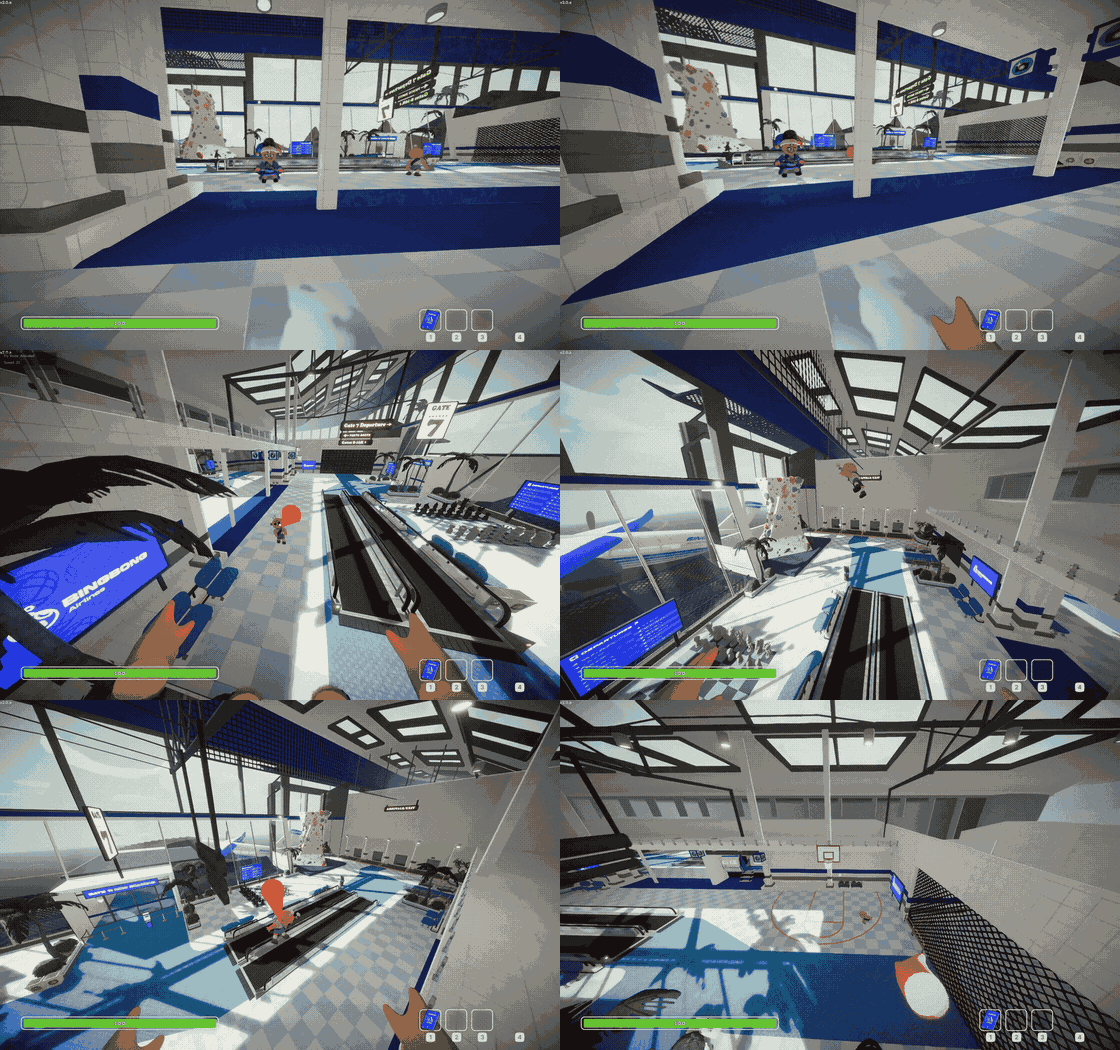
Custom mode / Custom 模式
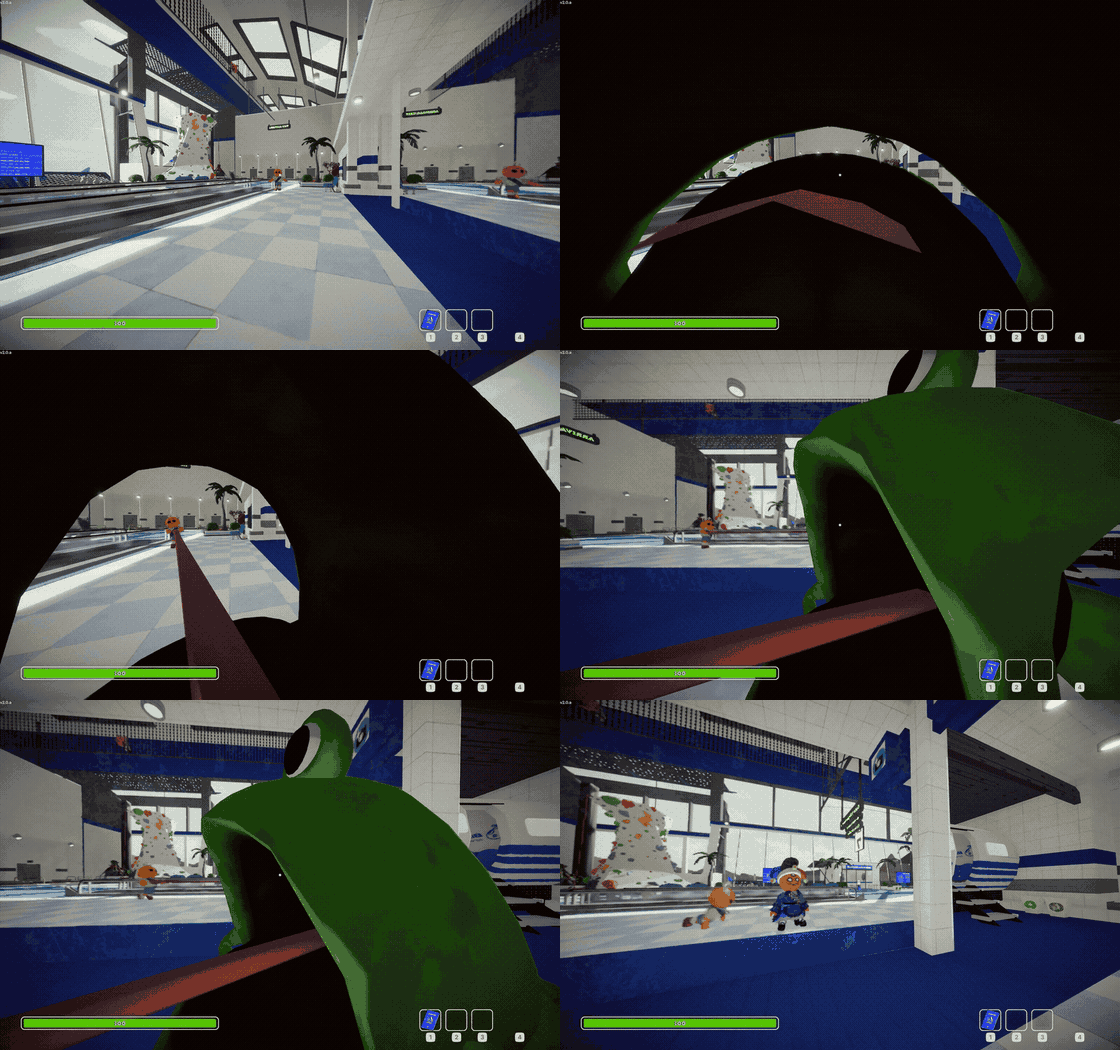
Vanilla mode / Vanilla 模式
English
FrogSkill gives every living Scout a frog tongue that can hook and pull other Scouts and Zombies. Press C to switch between the Custom tongue and a vanilla-client-compatible tongue that borrows PEAK's Frog model.
Features
- Frog-style pulling: Uses PEAK's current Frog pull curve, maximum lift distance, force formula, drag, and release ordering.
- Two tongue modes: Switch between Custom visuals and PEAK's original Frog tongue without changing the fire key.
- Vanilla-client-compatible option: Successful Vanilla-mode hits are visible to players who have not installed the mod.
- Scout and Zombie targets: Pull living Scouts, transformed Zombie Scouts, and NPC Mushroom Zombies.
- Aim forgiveness: Slight near-misses can select a visible target near the crosshair without pulling through physical obstructions.
- Miss animation: A missed shot briefly extends and retracts along the aimed direction without applying force.
- Multiplayer visuals: Firing, pulling, releasing, and tongue visuals are synchronized between modded clients.
Installation
Install with Thunderstore Mod Manager or r2modman. Manual installation requires BepInEx 5 and ModConfig; place FrogSkill.dll in PEAK/BepInEx/plugins/FrogSkill/.
Only players who want to fire a tongue need to install FrogSkill. Installation requirements for visuals depend on the selected mode:
| Mode | Multiplayer visuals |
|---|---|
| Custom | Clients without FrogSkill cannot see the custom tongue |
| Vanilla | Unmodded clients can see successful tongue hits; the temporary Frog model may occasionally clip through the Scout |
Controls
Custom mode is selected by default. Press C to switch modes; an on-screen notification shows the newly selected mode. Switching does not interrupt an active pull and applies to the next shot.
Aim at a living Scout or supported Zombie and press G to fire. A direct crosshair hit always takes priority; after a direct miss, an unobstructed target within the configured forgiveness cone can be selected. The assist radius grows with distance, and multiple candidates are resolved in favor of the one closest to the crosshair. Once the cooldown has elapsed, press G again while pulling to release the current target and fire toward the new aim direction. Pressing it during cooldown leaves the current pull untouched. Both bindings use Unity Input System control paths and can be changed in the config. The modes share one cooldown and cannot pull simultaneously.
If no valid target is selected, the tongue performs a short miss animation without triggering the skill cooldown. Custom-mode misses are synchronized to modded clients; Vanilla-mode misses are visible only to the firing player. The maximum visual length is 35% of the configured target range and stops early on physical obstructions.
Configuration
The config file is generated at BepInEx/config/com.github.lllei.FrogSkill.cfg.
| Key | Default | Allowed range |
|---|---|---|
General.Enabled |
true |
boolean |
Controls.Activation Path |
<Keyboard>/g |
Unity Input System button path |
Controls.Mode Switch Path |
<Keyboard>/c |
Unity Input System button path |
Tongue.Max Distance |
40 |
5 to 60 |
Tongue.Aim Forgiveness Degrees |
3 |
0 to 10 degrees; 0 disables assistance |
Tongue.Pull Force |
450 |
0 to 2000 |
Tongue.Lift Force |
30 |
0 to 500 |
Tongue.Max Hook Duration |
1 |
0.5 to 10 seconds |
Tongue.Stop Distance |
5 |
1 to 10 |
Tongue.Extra Drag Other |
0.95 |
0 to 1 |
Tongue.Extra Drag Let Go |
0.1 |
0 to 1 |
Tongue.Cooldown |
0.5 |
0 to 60 seconds |
Each control setting accepts one Unity Input System path, for example <Keyboard>/g or <Gamepad>/rightShoulder. Leave a path empty to disable that action. Both modes share the distance, force, duration, stop-distance, and cooldown settings. ExtraDragOther and ExtraDragLetGo apply only to Custom mode because Vanilla mode uses the original Frog's client-side drag behavior.
Frogs and other non-Character mobs are not currently supported targets. Dead or fully passed-out Scouts cannot fire or be targeted.
Building
Copy PeakGameDir.props.example to the gitignored PeakGameDir.props and set the PEAK directory, or set PEAK_GAME_DIR.
dotnet build FrogSkill.sln -c Release
dotnet msbuild src\FrogSkill\FrogSkill.csproj -t:Deploy -p:Configuration=Release
dotnet msbuild src\FrogSkill\FrogSkill.csproj -t:PackageThunderstore -p:Configuration=Release
Normal builds do not deploy to PEAK. Deploy explicitly copies the DLL into the configured game installation. Packaging writes artifacts/lllei-FrogSkill-<version>.zip and validates its metadata, DLL version, icon, and contents.
For a release, update Version in FrogSkill.csproj, version_number in manifest.json, and the dated section in CHANGELOG.md.
中文
FrogSkill 为每个存活的 Scout 添加青蛙舌头,可以抓住并拖拽其他 Scout 和 Zombie。按 C 可以在 Custom 舌头与兼容原版客户端的 Vanilla 舌头之间切换;Vanilla 模式会借用 PEAK 的青蛙模型。
功能
- 青蛙式拉取: 使用当前 PEAK 青蛙的距离曲线、最大升力距离、受力公式、阻力与释放顺序。
- 两种舌头模式: 无需更换发射键,即可切换 Custom 视觉与 PEAK 原版青蛙舌头。
- 兼容原版客户端: Vanilla 模式成功命中时,未安装 Mod 的玩家也能看到舌头。
- 支持 Scout 和 Zombie: 可以拉取存活 Scout、变身后的 Zombie Scout 和 NPC Mushroom Zombie。
- 瞄准容错: 准心稍微偏离时可以选择附近可见目标,但不会穿过物理障碍抓取。
- 空吐动画: 未命中有效目标时,舌头会沿瞄准方向短暂伸出并收回,但不会施加拉力。
- 多人同步: 安装 Mod 的客户端之间会同步发射、拉取、释放和舌头视觉。
安装与多人要求
推荐使用 Thunderstore Mod Manager 或 r2modman 安装。手动安装需要 BepInEx 5 和 ModConfig,并将 FrogSkill.dll 放入 PEAK/BepInEx/plugins/FrogSkill/。
只有需要主动发射舌头的玩家必须安装 FrogSkill。两种模式的视觉安装要求不同:
| 模式 | 多人视觉 |
|---|---|
| Custom | 未安装 FrogSkill 的客户端看不到自定义舌头 |
| Vanilla | 未安装 Mod 的客户端也能看到成功命中的舌头;临时青蛙模型偶尔可能从 Scout 身体中穿出 |
操作
默认选择 Custom 模式。按 C 切换模式,屏幕提示会显示新模式。切换不会中断正在进行的拉取,而是从下一次发射开始生效。
瞄准存活 Scout 或受支持的 Zombie,按 G 发射。准心直接命中始终优先;直接射线未命中后,才会在配置的容错锥内选择无遮挡目标。辅助范围随距离增加;存在多个候选目标时,优先选择离准心最近的目标。冷却结束后,在拉取期间再次按 G 会释放当前目标,并朝新的瞄准方向重新抓取;冷却期间按下 G 不会中断当前拉取,也不会重新抓取。两个绑定均使用 Unity Input System control path,可在配置中修改。两种模式共用冷却,并且不能同时拉取。
没有选中有效目标时会播放短促的空吐动画,但不会触发技能冷却。Custom 模式的空吐会同步给已安装 Mod 的客户端;Vanilla 模式的空吐仅施法者本地可见。空吐的最大视觉长度为配置射程的 35%,遇到物理障碍时会提前停止。
配置文件位于 BepInEx/config/com.github.lllei.FrogSkill.cfg,所有配置键、默认值和范围见上方英文表格。每项控制配置只接受一个 Unity Input System 路径,例如 <Keyboard>/g 或 <Gamepad>/rightShoulder;留空可禁用对应动作。AimForgivenessDegrees 默认为 3 度,可在 0 至 10 度间调整;设为 0 可以恢复严格准心判定。两种模式共用瞄准容错、距离、力度、持续时间、停止距离和冷却;ExtraDragOther 与 ExtraDragLetGo 仅作用于 Custom 模式。
目前不能抓取青蛙或其他非 Character 生物。死亡或完全昏迷的 Scout 无法发射,也不能成为目标。
构建与发布
将 PeakGameDir.props.example 复制为已被忽略的 PeakGameDir.props 并填写 PEAK 路径,或者设置 PEAK_GAME_DIR。普通构建不会写入游戏目录;只有显式 Deploy 才会部署。发布 ZIP 的生成命令及版本要求见上方英文构建章节。
CHANGELOG
Changelog
All notable changes to FrogSkill are documented here.
Unreleased
1.4.0 - 2026-09-01
- Replaced legacy
KeyCodepolling with one configurable Unity Input System path per action. - Added spaces to multi-word configuration keys for consistent display in ModConfig.
1.3.0 - 2026-08-15
- Added configurable crosshair forgiveness for near-miss tongue shots, shared by Custom and Vanilla modes, with a 3-degree default and a range up to 10 degrees.
- Kept direct crosshair hits as the highest priority and required assisted targets to have an unobstructed line of sight.
1.2.0 - 2026-08-14
- Changed the action key to re-grab toward the current aim direction after releasing an active target.
- Kept the current pull intact when re-grab is pressed during cooldown.
- Changed missed shots to play their tongue animation without triggering cooldown.
1.1.1 - 2026-08-14
- Updated the required BepInExPack_PEAK dependency to 5.4.75301.
1.1.0 - 2026-08-14
- Added a Vanilla tongue mode that uses PEAK's original Frog network object so unmodded clients can see successful hits.
- Added a
Cmode switch while keepingGas the shared fire and release key. - Added shared cooldown and active-tongue coordination between both modes.
- Kept Custom mode as the default and preserved the original FrogSkill configuration.
- Marked the standalone FrogSkillVanilla plugin as incompatible to prevent duplicate controls.
1.0.0 - 2026-08-13
- Added a configurable frog-tongue skill for living Scouts.
- Added support for pulling living Scouts, transformed Zombie Scouts, and NPC Mushroom Zombies.
- Matched the current Frog prefab's distance curve, maximum lift distance, force formula, and release ordering.
- Added a reduced default lift force to account for the Scout mouth anchor and a 0.5-second cooldown.
- Added strict Rescue Claw-style crosshair raycast targeting with physical obstruction handling.
- Added a short synchronized tongue animation when no valid target is hit.
- Added multiplayer synchronization for firing, pulling, releasing, and tongue visuals.
- Added ModConfig-compatible in-game key rebinding and configurable pull behavior.
