
Please disclose if any significant portion of your mod was created using AI tools by adding the 'AI Generated' category. Failing to do so may result in the mod being removed from Thunderstore.

RepoCommandConsole
R.E.P.O. command console: spawn enemies, items, weapons, upgrades and valuables; revive, heal, summon or return players to the truck. F2 fuzzy autocomplete, ordered command chains and host-controlled multiplayer access.
| Date uploaded | a month ago |
| Version | 2.1.0 |
| Download link | Coollectors-RepoCommandConsole-2.1.0.zip |
| Downloads | 104 |
| Dependency string | Coollectors-RepoCommandConsole-2.1.0 |
This mod requires the following mods to function

BepInEx-BepInExPack
BepInEx pack for Mono Unity games. Preconfigured and ready to use.
Preferred version: 5.4.2305
README
REPO Command Console
Spawn enemies and items, revive your team, and control the next run from one searchable F2 console.
RepoCommandConsole is a free in-game command console mod for R.E.P.O. Spawn enemies, weapons, upgrades, items, and valuables from your live game catalog. Version 2.1.0 adds player commands for healing, reviving, summoning, returning to the truck, and more. Press F2, find a command or target with fuzzy autocomplete, and run it. The host controls multiplayer access and can grant friends permission to use the commands.
Install RepoCommandConsole on Thunderstore · Step-by-step tutorial · Video walkthrough (MP4) · All commands
Current compatibility: R.E.P.O.
v0.4.4.3or compatible
Required dependencies: BepInExPack5.4.2305and REPOLib4.2.0
See the console in game
Click a screenshot to open the full-resolution image and read the command text.
Find a spawn with fuzzy autocomplete
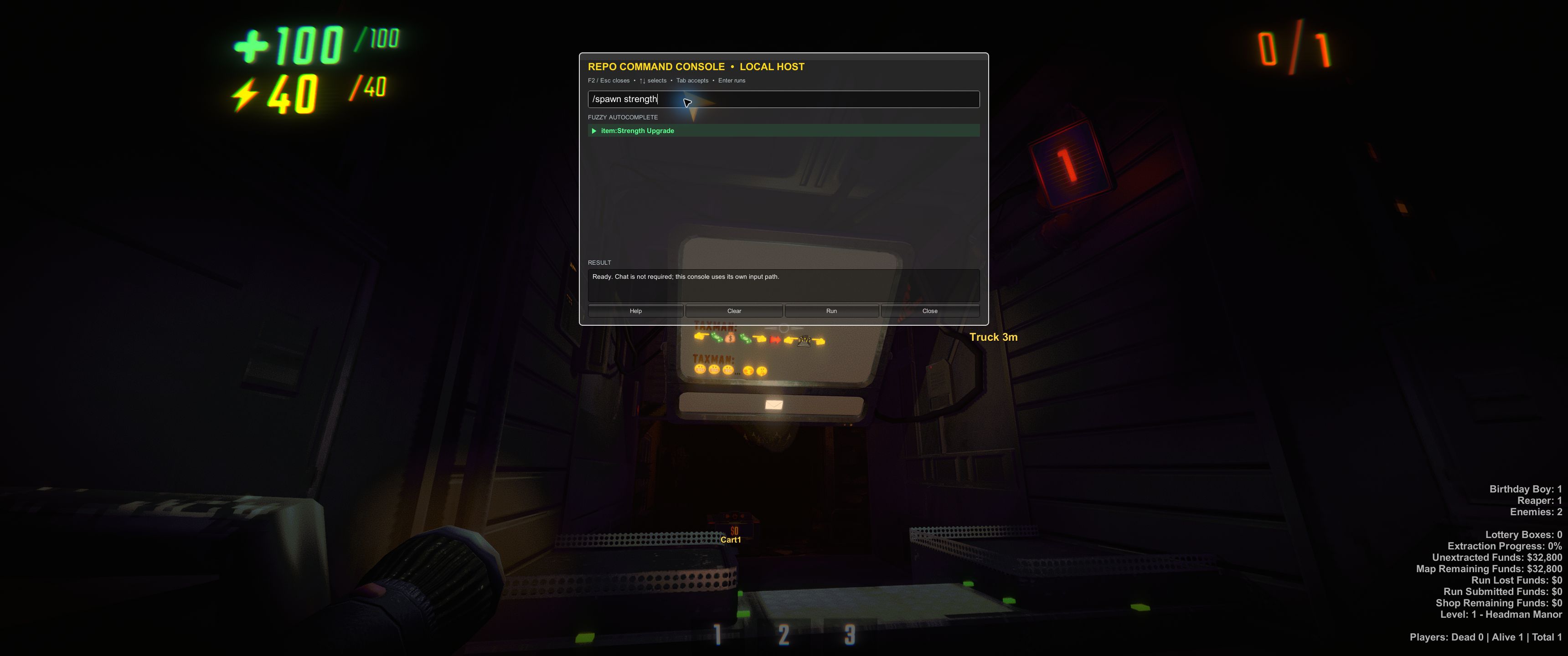
Start typing a target name to see matching entries from the live game catalog. Use the arrow keys and Tab to select a suggestion.
Run a spawn command
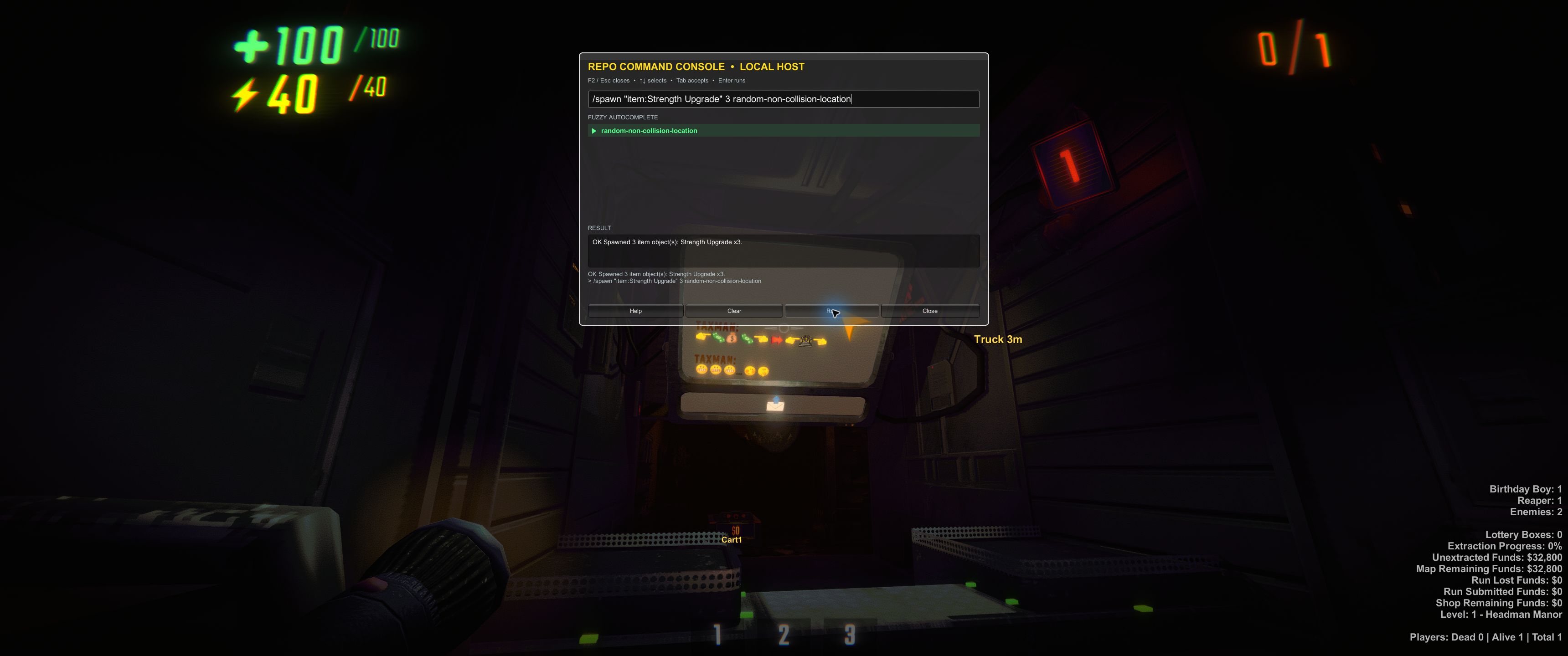
The console confirms that three Strength Upgrades were spawned. They were placed elsewhere in the level in this demonstration.
Clean up your spawned objects
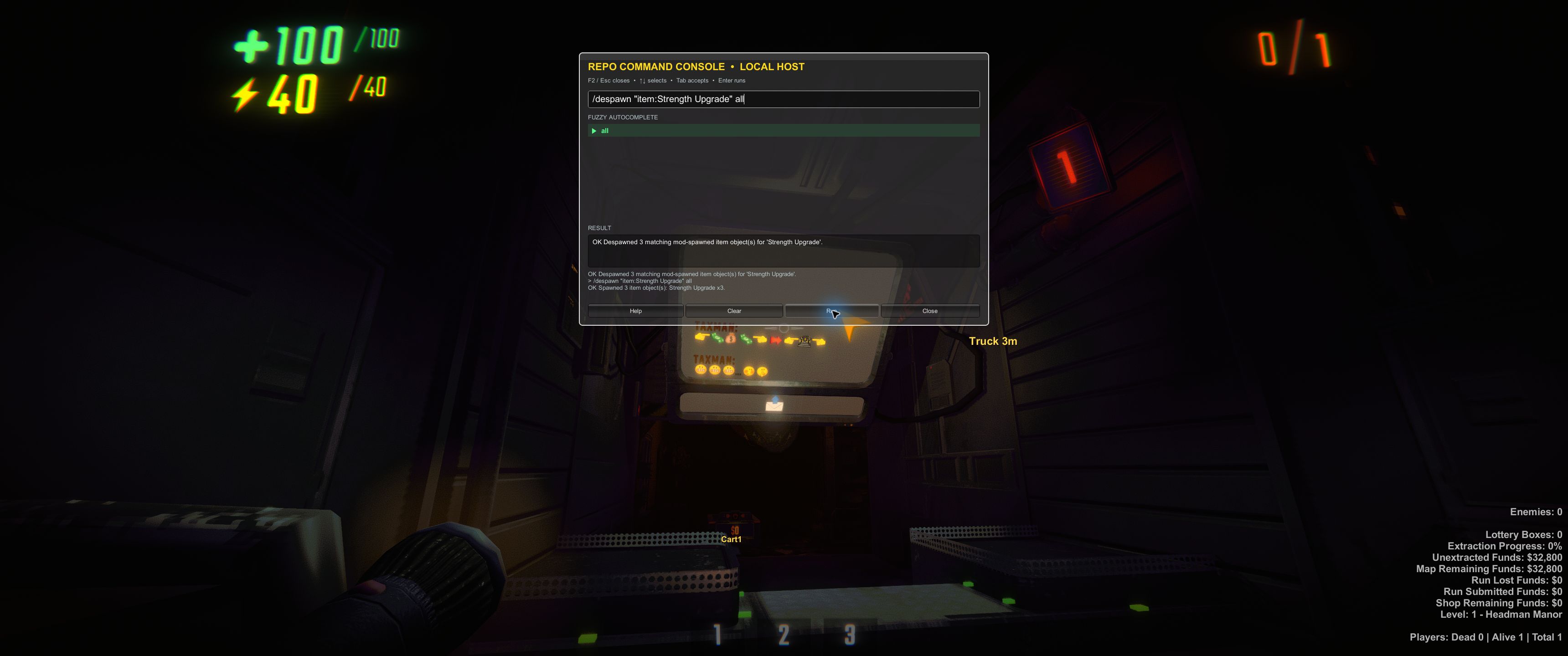
The /despawn command removes the three Strength Upgrades created for the demonstration, and the console confirms the cleanup.
These are genuine gameplay screenshots of RepoCommandConsole 2.0.0, first published with the 2.0.1 page update. Other installed mods contribute some of the surrounding HUD. The player commands added in 2.1.0 are documented below.
Install with Thunderstore or r2modman
- Open Thunderstore Mod Manager or r2modman and select R.E.P.O.
- Create or choose the profile you want to use.
- Find RepoCommandConsole in the online mod list and select Download. If you are already on the Thunderstore package page, choose Install with Mod Manager.
- Confirm that the profile includes these exact dependencies:
BepInEx-BepInExPack-5.4.2305Zehs-REPOLib-4.2.0
- Launch the profile with Start Modded.
- Enter a lobby or run, then press
F2.
Every friend who wants to open the console or submit commands must install the mod in their own profile. Players without RepoCommandConsole can still join the lobby normally, but they cannot use its console.
How to spawn items and enemies in R.E.P.O.
- Press
F2to open the console. - Begin typing
/spawn. - Use
UpandDownto highlight the command, then pressTabto accept it. - Type part of a target name, such as
headorstrength. - Highlight the target you want and press
Tabagain. Autocomplete adds quotes when a name contains spaces. - Optionally choose a count and location with the same autocomplete flow.
- Press
Enterto run the command.
Accepting the autocomplete suggestion matters: fuzzy matching helps you find a target, but execution requires a canonical target from the live catalog rather than guessing what you meant.
What's new in 2.1.0: player commands
- Help the team recover. Use
/revive,/heal,/summon, and/truckfor one selected character orall. - Run actions in order.
/chain all revive heal truckrevives eligible dead characters, heals the group, and returns them to the truck. A failed step stops the chain. - Choose players by name. Fuzzy autocomplete includes the host and dead characters; actor numbers distinguish duplicate names.
- Stage a scene or experiment. Additional commands cover health, damage, knockback, speech, expressions, wings, tumble, flashlights, animation speed, pupils, and falling.
/revive all
/heal all
/summon all
/truck all
/chain all revive heal truck
Every player command requires a target. Revive needs an available death head, and heal applies to living characters. /maxhealth changes the current session's maximum health; it is not a permanent upgrade purchase. Characters receiving expression, animation-speed, pupil, or falling effects also need 2.1.0 or newer. See multiplayer requirements and the full player command reference.
Built for custom runs
- Find targets without memorizing internal names. Search the live item, valuable, and enemy catalogs with fuzzy autocomplete.
- Keep the host in control. Grant or revoke a friend's command access for the current room.
- Clean up your own spawns. Despawn removes only matching objects previously created by this mod.
- Use a dedicated console.
F2works independently of the chat interface and does not replace the game's chat commands.
Console controls: press F2 to open
| Key | Action |
|---|---|
F2 |
Open or close the console |
Escape |
Close the console |
Up / Down |
Change the highlighted suggestion |
Tab |
Accept the highlighted suggestion for the active argument |
Enter |
Run the command |
F2 is the default toggle key and can be changed in the mod's BepInEx configuration.
Commands at a glance
/spawn <target> [count=1] [location=player-location]
/spawn <target> <location>
/despawn <target> [count=all]
/revive <player|all>
/heal <player|all> [full|amount]
/summon <player|all>
/truck <player|all>
/chain <player|all> revive heal truck
/grant <player>
/revoke <player>
/permissions
/help
Targets use one of three catalog prefixes: item:, valuable:, or enemy:. Weapons, upgrades, and other usable equipment are found through the item: catalog.
Player commands use all or a character selected with fuzzy autocomplete, such as "Bob Builder#2". Every character is available, including the host and dead players. /revive requires an explicit target; /revive all revives the party, while /revive "Bob Builder#2" revives only Bob. Use Up/Down to reach suggestions beyond the eight visible rows.
The player command set also includes /kill, /damage, /knockback, /maxhealth, /expression, /speak, /wings, /tumble, /flicker, /animationspeed, /pupils, /falling, and /resetpush. /summon gathers the selected characters at the command sender's position, including when a granted friend submits it. /chain all revive heal truck performs those three actions in order. See the player command reference for parameters and defaults.
Spawn and numeric despawn counts must be whole numbers from 1 through 500. Invalid or out-of-range counts return an error instead of being silently changed.
Ready-to-try examples
/spawn "item:Strength Upgrade"
/spawn "item:Strength Upgrade" 2 player-location
/spawn "valuable:Diamond Display" 5 random-non-collision-location
/spawn "enemy:Headman" 1 random-non-collision-location
/despawn "enemy:Headman" all
player-locationspawns at the player who submitted the command, not automatically at the host.random-non-collision-locationsearches for a collision-free level location.- If the location directly follows the target, the count defaults to
1. - Omitting both optional spawn arguments creates one object at
player-location. - Omitting a despawn count, or using
all, removes all matching mod-spawned objects.
For the full grammar and edge cases, see the complete command reference.
Multiplayer: host control with friend access
All spawn, despawn, and player commands are host-authoritative. A friend's console sends a request to the lobby host; the host validates the request and performs the world change. Player effects that the game restricts to a character's owner use an authenticated host-to-owner request after the host approves them.
| Player | Needs the mod? | Can use the console? |
|---|---|---|
| Lobby host | Yes | Yes, always authorized |
| Friend granted by the host | Yes | Yes, for the current room |
| Friend not granted by the host | Yes | Can open and autocomplete, but mutation requests are rejected |
| Unmodded friend | No | Can join the lobby, but cannot open or use this console |
Grant a friend access
- The host opens their local console with
F2. - The host enters
/grantand uses autocomplete to select the friend. Player selectors include the Photon actor number, such as"Player Name#2", so duplicate nicknames remain unambiguous. - The friend can now run spawn, despawn, and all player commands from their own console.
- The host can enter
/revokeand select that player to remove access. - Anyone with the mod can use
/permissionsto check the current permission state.
Only the host's local console can run /grant and /revoke; those commands are rejected when sent over the network. Grants belong to the current room, are removed when a player leaves, and are cleared when the room or lobby host changes.
Everyone submitting the new commands should install version 2.1.0. Characters targeted by /expression, /animationspeed, /pupils, or /falling also need this version for the owner relay; they do not need a grant just to receive an effect. Other player actions use the game's host-compatible RPCs and can affect unmodded characters. Unavailable targets and unsupported clients produce explicit errors, including partial results for all. The AllPlayerCommands mod is not a dependency.
Despawning is intentionally scoped
RepoCommandConsole tracks what it creates. /despawn removes the newest matching tracked objects and never scans the level to delete normal map content.
/despawn "item:Strength Upgrade" 1
/despawn "valuable:Diamond Display" all
/despawn enemy:all all
item:all, valuable:all, and enemy:all target every mod-spawned object of that kind. A numeric count is a maximum, so the command can report fewer removals when fewer matching tracked objects exist.
FAQ and troubleshooting
Why does F2 not open the console?
Make sure you launched the correct profile with Start Modded, RepoCommandConsole is enabled on this computer, and the profile contains BepInExPack 5.4.2305 plus REPOLib 4.2.0. Also check whether the console toggle key was changed from its default in the BepInEx configuration.
Why was my friend's command rejected?
The lobby host must run /grant <player> from the host's own console after that friend joins the room. The friend also needs RepoCommandConsole installed. Grants do not carry into another room and are cleared if the lobby host changes.
Why does a target that looks correct still return “No canonical target matches”?
Open the console, type part of the name, highlight the desired live autocomplete result, and press Tab before running the command. Names in screenshots, external guides, or older game versions may not match the current REPOLib catalog exactly.
Why did despawn remove fewer objects than requested?
Only matching objects created and tracked by this mod are eligible. Normal level content and objects created by other systems are left alone. A numeric count is the maximum to remove, not a guarantee that many matching tracked objects exist.
Can friends play without installing the mod?
Yes. Unmodded players can join the lobby, but they cannot open RepoCommandConsole or submit its commands. Any friend who wants console access must install the mod and receive host permission.
Does this replace or interfere with R.E.P.O. chat commands?
No. RepoCommandConsole uses its own F2 interface and private parser. It does not depend on the chat UI and does not register or patch the vanilla /spawn command.
Why did random placement fail?
The mod searches for a collision-free level position and returns an explicit error if it cannot complete the requested spawn safely. Try a smaller count, use player-location, or move to another part of the level and try again.
More information
Find your next spawn
The visual item-and-valuables guide on Steam offers ideas for shop goods, weapons, upgrades, drones, carts, and valuables. Its availability and names may change. Use the console's live autocomplete for the canonical target strings available in your current game; the guide is not an enemy catalog or a guarantee that a target exists.
Developer architecture, networking protocol, testing, packaging, and local-install guidance remain in the repository's docs directory so this page can stay focused on players.
CHANGELOG
Changelog
All notable changes to RepoCommandConsole are documented here.
2.2.0 - 2026-09-07
- Added a full scrollable spawn catalog: enter
/spawnwithout a search query, browse with the mouse wheel, scrollbar, or arrow keys, and keep fuzzy search for finding a particular target. - Removed the total autocomplete-result cap while retaining eight compact visible rows. Keyboard selection stays in view, and catalog refreshes preserve mouse scrolling.
- Added small previews of actual game items, valuables, and enemies beside target names. Previews reuse native icons or render asset meshes without instantiating gameplay objects, use a bounded cache, and fall back to text when unavailable.
- Expanded the supported catalog with ten verified network resources: four cosmetic cases, three enemy souls, and three surplus money bags. Disabled and removed prototype items remain excluded.
- Added familiar guide names such as Pistol, Defib, and Light Bridge, plus shorter valuable names. Alias searches insert canonical targets without duplicating browser rows.
- Protected the console's BepInEx manager through game transitions. Verified that the console survives menu-to-singleplayer level loading, opens with F2, and executes a spawn through Run.
- Fixed keyboard handling inside the focused console window; F2 and Escape closing were verified while the text field had focus.
- Fixed enemy
player-locationplacement choosing distant roaming points. It now samples navigation near the player within 3 metres, extends to 5 metres if needed, and returns a clear error before spawning if no nearby walkable point is available. - Recorded the corrected nearby placement with two Apex Predator spawns, normal enemy movement, and successful targeted cleanup in singleplayer.
- Verified upright actual-asset previews for 254 of 255 audited targets; Hidden has no visible model mesh and retains its category placeholder.
- Added complete-catalog, fuzzy-alias, scrolling, keyboard, and catalog regression tests, plus local enemy placement, compiled command-routing, thumbnail isolation, and installed-game API checks in the standard test command.
2.1.0 - 2026-09-07
- Added team recovery commands: revive, heal, summon, and truck return for one player or everyone, plus ordered command chains.
- Added full-word player commands for kill, revive, healing, maximum health, summon, truck return, knockback, damage, expression, speech, wings, tumble, flicker, animation speed, pupils, falling, and push reset.
- Added player-or-all fuzzy completion, including the host and inactive dead characters; duplicate names use explicit actor selectors. All suggestions are accessible with Up/Down, including larger lobbies.
- Added
/chain <player|all> kill revive heal summon truckwith up to eight ordered actions. - Routed granted clients through the existing host executor, with authorization rechecks during batched work and sustained effects.
- Added a restricted host-to-owner relay for expression, animation, pupils, and falling, with owner acknowledgement, character-view binding, expiry, and sender validation. Those target clients need version 2.1.0 or newer.
- Used the current four-argument health RPC and retained vanilla RPC security checks.
- Added parser, completion, permission, owner-relay security, and installed-game API contract tests. AllPlayerCommands is not required.
- Introduced the selected Console Companion mascot icon and refreshed the package description and README with the new player features, genuine gameplay screenshots, and a getting-started tutorial.
2.0.1 - 2026-09-07
- Added real in-game screenshots of fuzzy autocomplete, a successful spawn command, and despawn cleanup to the package page.
- Documentation-only package update; the plugin DLL, dependencies, and icon are unchanged from 2.0.0.
2.0.0 - 2026-08-26
- Added a dedicated in-game command console that remains available when normal game chat is disabled.
- Added context-aware fuzzy autocomplete for commands, spawn targets, counts, locations, and player names.
- Added host-authoritative spawning and despawning for items, valuables, and enemies.
- Added host-managed grant and revoke permissions so approved non-host players can submit the same commands.
- Allowed spawn location to follow the target directly while count defaults to one.
- Made all accepted slash-command counts from 1 through 500 execute unchanged or return an explicit error instead of silently clamping per entity kind.
- Bound remote authorization and active jobs to their original room, host, session, and live grant; added one-pending-request client behavior and explicit timeout/session failures.
- Deferred Photon callback registration and network polling until an actual lobby/gameplay session, so menu and private-game region-selection scenes do not touch Photon through this mod.
- Made autocomplete role-aware so non-host clients are not offered host-only grant/revoke or player-management entries.
- Collision-checked the exact final enemy roam point used for random placement.
- Expanded pure command and network coverage for grammar, counts, translation, completion, protocol policy, request lifecycle, and session grants.
- Added safe local build, Thunderstore package, profile-install, legacy-plugin quarantine, and command-test scripts.
- Made the build, test, package, and local-install scripts compatible with Windows PowerShell 5.1, added disposable compatibility coverage for the quarantine path, and made the installer reject a running game with a clear restart instruction.
