
Please disclose if any significant portion of your mod was created using AI tools by adding the 'AI Generated' category. Failing to do so may result in the mod being removed from Thunderstore.
You are viewing a potentially older version of this package.
View all versions.
| Date uploaded | a day ago |
| Version | 2.0.0 |
| Download link | ScarScar-UI_ultra_plus-2.0.0.zip |
| Downloads | 194 |
| Dependency string | ScarScar-UI_ultra_plus-2.0.0 |
This mod requires the following mods to function

BepInEx-BepInExPack
BepInEx pack for Mono Unity games. Preconfigured and ready to use.
Preferred version: 5.4.2100

README
UI ultra+
An advanced, highly-customizable overlay and HUD enhancement mod for R.E.P.O. that gives you detailed information about your run, teammates, enemies, and vehicles.
Features
- Independent Mode Customization: Mix and match any combination of Display Mode, Upgrade UI Mode, and Timer Style Mode to fit your exact preference.
- Display Modes (Bottom-Right Overlay):
- Ultra: Native TMP compact HUD (value & remaining) when map is closed, detailed multi-column breakdown panel when map is open.
- Classic: Retro CRT text with rich-text colors and game-native font.
- Basic: Clean, flat-white text on a dedicated CRT-free overlay canvas.
- Upgrades UI Modes:
- Ultra: Modern panel rendered directly through the in-game CRT monitor pipeline with chromatic aberration, scanlines, and glow.
- Classic: Retro green CRT glow with refined regular font weight and clean letter spacing.
- Native: Restores the original game upgrade window.
- Displays live persistent save data in the shop and when the map is open in levels.
- Level Speedrun Timer:
- Automatically starts the moment loading ends and character control is gained.
- Automatically stops when the level ends (extraction/completion) and holds the final level time.
- Automatically resets when the next level begins.
- Automatically hides in menus, death cutscenes, and while map panel is open.
- 3 customizable styles (Ultra CRT, Classic green CRT glow, and Basic CRT-free white) with full position and font size controls.
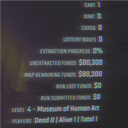
- Valuables & Stats Tracking: Displays map total value, remaining value, lost value, exploration progress, token box counts, submitted funds, and shop remaining funds.
- Teammate HUD Overlay: View teammate positions, alive/dead status, distance, and off-screen edge direction indicators.
- Enemy Radar & Counter: Displays the types and total counts of enemies currently present on the map, with optional Chinese nicknames.
- Vehicles & Carts HUD: Real-time tracking of large/small carts, karts, cargo, and truck parking spot locations.
- Customizable Interface: Easily adjust font size, offsets (X/Y), opacity, layout spacing, and specific sections through the in-game REPOConfig menu.
- Language Support: Full English and Chinese localization.
Configuration
This mod integrates with REPOConfig to let you modify all settings in-game. Customize the visibility of every section, adjust text sizes, set update intervals, toggle sections, and position each element exactly where you want it.
Credits
- Based on Tansinator's original Map Value Tracker and Zichen's More UI.
CHANGELOG
Changelog
[2.0.0] - 2026-08-05
Added
- Level Speedrun Timer:
- Automatically starts the moment the loading screen ends and you gain control of your character.
- Automatically stops when the level ends (extraction / level completion) and holds the final level time.
- Automatically resets when the next level begins.
- Automatically hides in the Main Menu, Lobby Menu, during death cutscenes, and while the map panel HUD is open.
- Includes 3 distinct style modes:
- Ultra: Native TMP text with CRT shader effect and bloom.
- Classic: Retro green text with REPO money HUD CRT glow.
- Basic: Clean, flat-white text rendered on a dedicated CRT-free overlay canvas.
- Fully customizable font size and X/Y offset controls, positioned at the top of Global settings (
B.Global) for easy access.
- Ultra & Classic Upgrades UI Modes:
- Ultra: Modern panel rendered directly inside the in-game CRT monitor pipeline with chromatic aberration, scanlines, and bloom matching the game HUD.
- Classic: Retro green CRT glow with refined regular font weight and clean horizontal character spacing.
- Custom upgrade overlay integrated into shop screens and map panels displaying live persistent save data.
- Fully Independent Modes: Mix and match any combination of Display Mode (Ultra, Classic, Basic), Upgrade UI Mode (Ultra, Classic, Native), and Timer Style (Ultra, Classic, Basic).
Fixed & Improved
- Extraction Progress Reset & Accuracy: Fixed level state leakage across client runs, ensuring exploration progress and 100% completion percentages reliably reset on every level generation for all clients, and improved floor precision.
- Truck & Cart Label Tracking: Resolved truck position caching issues so world labels continuously track the truck's accurate position in real-time.
- Shop Upgrade Display: Fixed Ultra upgrade UI visibility in non-level shop states, parenting the container to the HUD canvas root so it renders reliably when buying upgrades in the shop.
[1.0.0] - 2026-07-16
Added
- Initial release of UI ultra+!
- Advanced customizable HUD for valuables, remaining values, exploration progress, and token box counts.
- Dynamic Enemy Tracking HUD displaying active enemy types and total counts.
- Enhanced Teammate HUD overlays showing alive/dead status, distance, and direction indicators.
- Vehicle and Cart tracking HUD overlays to keep track of large carts, small carts, karts, and cargo.
- Native in-game options menu integration via REPOConfig.
- Full localization support for both English and Chinese languages.
