
Please disclose if any significant portion of your mod was created using AI tools by adding the 'AI Generated' category. Failing to do so may result in the mod being removed from Thunderstore.
PlayerTweaks
Customize most of the HUD's colors! (and more)
| Date uploaded | a month ago |
| Version | 0.4.2 |
| Download link | Swaggies-PlayerTweaks-0.4.2.zip |
| Downloads | 7174 |
| Dependency string | Swaggies-PlayerTweaks-0.4.2 |
This mod requires the following mods to function

BepInEx-BepInExPack
BepInEx pack for Mono Unity games. Preconfigured and ready to use.
Preferred version: 5.4.2304README
PlayerTweaks
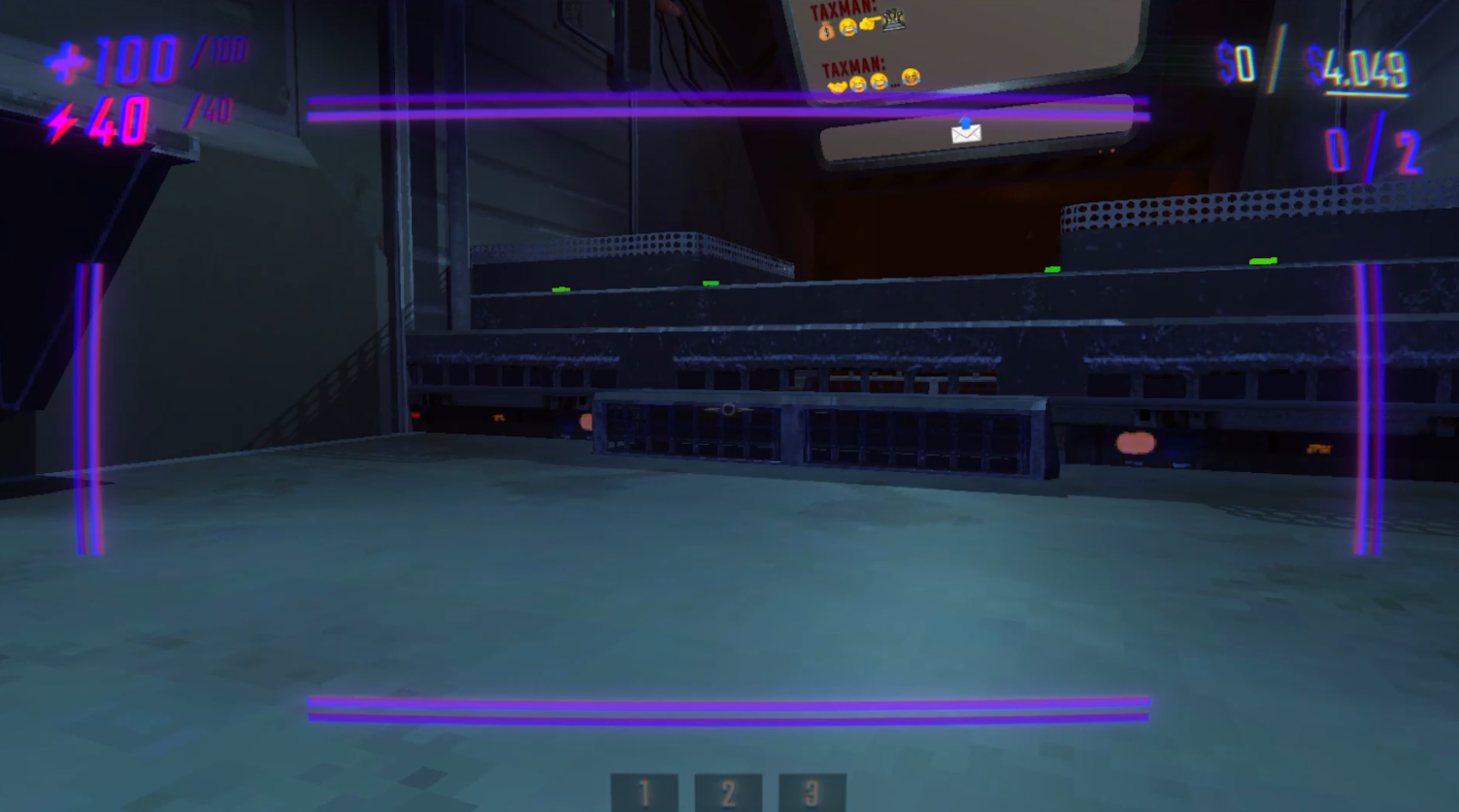
Small mod to swap (almost) ALL the colors on the UI! Completely client-sided, completely compatible with vanilla and modded clients. I will add more customization for other UI elements in the future, this is an early release! Here's an example of my very purple UI :3
Feel free to join my discord server or add me @swaggies for anything relating to my mods.
Details
As of right now, you can customize the colors of:
- The health icon, number, and max number
- The stamina icon, number, and max number
- The haul goal's dollar sign color, number color, and slash's color
- The extraction counter's color and slash's color
- The tumble UI's colors, both when stunned and when you're able to get up
- Every crosshair color (such as idle, hovering over an object, holding an object, etc)
- The hurt vignette's color
- The color of valuable values (& shop item costs)
- The color of valuable damage popups
- The color of the Overcharge ring
- The gradient of the Item Info UI (the thing that shows the names of shop items at the bottom)
- Most of the colors of geometry & objects on the Map
- The colors of the UI when driving a vehicle
You can also:
- Make the health & stamina icons visually deplete relative to your current health & stamina (enabled by default)
- Make the hurt vignette appear at all times, and scale with how damaged you are (& adjust its scaling, and even make it appear while you're dead!)
- Adjust the text size and display time for valuable damage popups (at predefined breakpoints), and display these popups when a valuable is instantly destroyed (eg by an extraction point or a pit)
- Make valuables show their names at the bottom of your screen when you hold them
- Enable the old Overcharge UI at the top left of your screen (shows overcharge as a number like health & stamina)
- Enable these certain tweaks to player controls (all of which are disabled by default):
- Ability for WASD to instantly exit a tumble instead of waiting for your Semibot to stop moving
- Ability for jumping to instantly uncrouch you (if you're using toggle crouch)
- Ability for sprinting to instantly uncrouch you (if you're using toggle crouch)
- (tbh i just added these in cuz i feel like theyre super necessary and i personally use them :3)
playertweaks version 0.4.2
repo version 0.4.3+
CHANGELOG
0.4.2
- Added a toggle for using your own config across any modpack so you don't need to reconfigure PlayerTweaks for every modpack with it installed (disabled by default)
- Please use the new
Swaggies.PlayerTweaks.Globalconfig file to switch between global config and modpack config, and to copy the current modpack's PlayerTweaks config to your global config. Global config is saved to%localappdata%low/semiwork/repoasSwaggies.PlayerTweaks.GlobalFile.cfg. You can edit it directly if you'd like, without needing to use a modpack's config to overwrite it.
- Please use the new
- Added a config option for upscaling stamina by 2.5 (so it starts at 100 with each upgrade adding 25) - obviously just a visual change, actual stamina mechanics are unchanged. Disabled by default.
- Added config options for adding a label to health, stamina, and legacy overcharge (so you can make it say like "100 HP" or something, up to you), all empty by default
- Fixed Aim Color Disabled config option doing absolutely nothing at all
0.4.1
- Updated for v0.4.0
- Added configuration options for the vehicles' UI and the "Disabled" aim state
0.4.0
- Added configuration options for the Map. You can change the colors for the following:
- Walls and floors
- Walls and floors for active, inactive, and completed extraction points
- Walls and floors for the truck
- Outline and area shading for unexplored rooms, along with the "?" symbol
- Stairs and doors
- Valuable objects and shop items
- Player death heads and the main player arrow
- The "backtrack" path that displays dots to the current extraction point (or truck), & the ability to make it crossfade colors as it gets further away from the player arrow
0.3.1
- Fixed Item Info UI showing the names of valuables being held by other players
0.3.0
- Added configuration options for the Tumble Wings UI
- You can change the colors of the wings, the bar holder, and the bar itself.
- You can have two different colors for when the bar is empty and full. The bar's color will smoothly transition between the two as the timer runs out.
- These will not affect the wings that appear on the Semibots themselves, only the UI on-screen.
- Added configuration options for the Overcharge UI
- You can change the color of the circle bar
- You can toggle displaying the Legacy Overcharge UI seen in old semiwork devlogs (where the overcharge was a number at the top left, like health and stamina)
- You can configure the Legacy Overcharge UI in the same ways as health and stamina
- Added configuration options for the Item Info UI
- You can change the gradient colors for the standard gradient (grabbing a shop item) and the enemy gradient (grabbing an enemy)
- You can enable showing the names of valuables when grabbing them as well (works the same as shop items) - will only show when grabbing, not hovering
- Added a toggle for displaying the hurt vignette at max health
- Fixed an issue where a valuable broken for $0 will use the max value lost setting instead of the minimum
- Fixed an issue where the stamina icon meter was a little offset visually
- Fixed an issue where disabling the "use icon as a health/stamina bar" option would pause it at whatever state it was in, instead of being set back to max for vanilla behaviour
0.2.0
- Added configuration options for the Value UI that displays when you pick up a valuable or pick up/hover over a shop item
- this uses the same logic that LevelScaling's custom value UI had
- you can customize its colors and count-up/down animation, and the color of the cost for shop items
- Added configuration options for the Value Lost UI that appears when a valuable takes damage
- you can customize its colors, text sizes, and display times at certain breakpoints (0/1000/5000/10000/50000), and if the colors/text sizes/display times should interpolate between the breakpoints or not
- you can also toggle if these value lost UIs should always appear if a valuable is instantly destroyed (eg by extraction point or pit) - by default (and in vanilla) it doesn't
0.1.1
- Adjusted the logic for initializing the UI tweaks to maximize compatibility (hopefully...)
- ..also fixed an issue with WalkieTalkies where the energy icon would be copied over due to the mod only removing one image on initialization instead of all of them
