
Please disclose if any significant portion of your mod was created using AI tools by adding the 'AI Generated' category. Failing to do so may result in the mod being removed from Thunderstore.

BetterQueue
Autosaved survivor Command builds with a native-styled lobby and Tab scoreboard editor. Scrollable category sidebar, queue-row loop icon, drag reorder and optional LookingGlass tooltips.
| Date uploaded | a day ago |
| Version | 1.3.3 |
| Download link | SkyFall-BetterQueue-1.3.3.zip |
| Downloads | 20 |
| Dependency string | SkyFall-BetterQueue-1.3.3 |
This mod requires the following mods to function

bbepis-BepInExPack
Unified BepInEx all-in-one modding pack - plugin framework, detour library
Preferred version: 5.4.2121
README
Better Queue
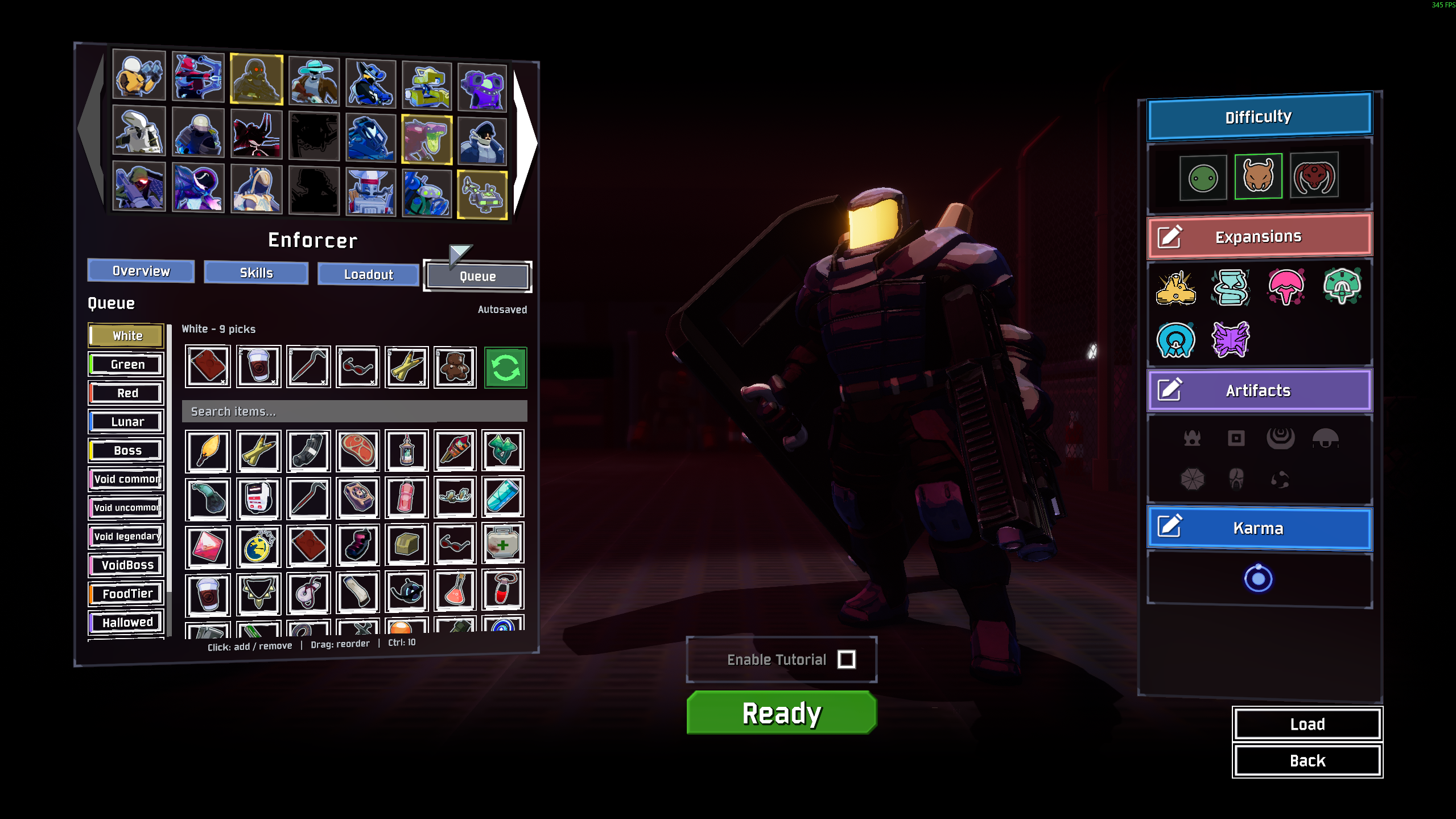
Plan your Artifact of Command build before a run, then let Command cubes pick the items for you. Each survivor gets a separate saved build.
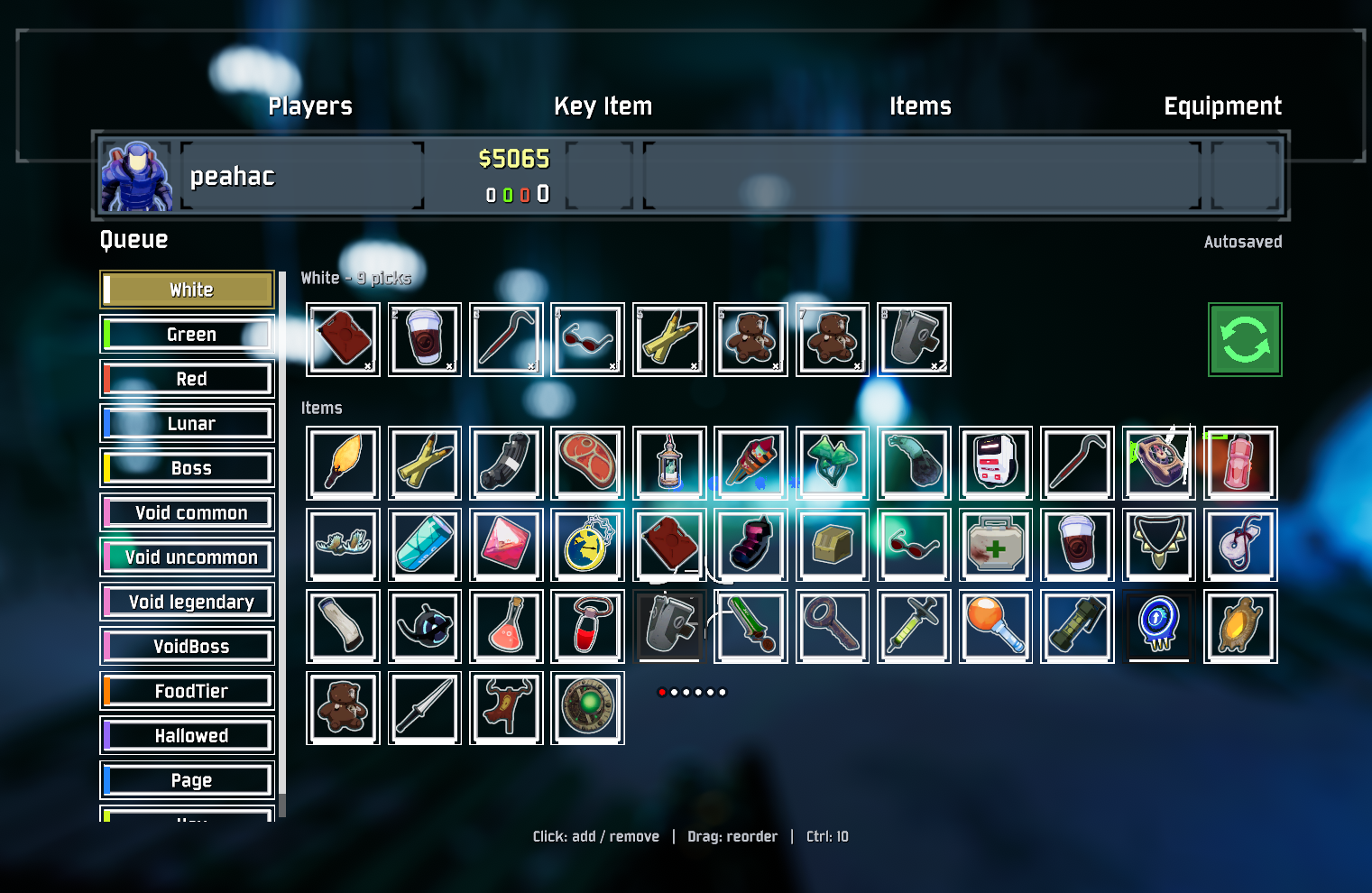
Get started
- Install with Gale, r2modman or Thunderstore Mod Manager. It needs BepInExPack and HookGenPatcher. Disable other Command queue mods to avoid conflicting picks.
- Select a survivor and open Queue, just after Loadout. Choose an item category and add the items you want. Changes save automatically.
- Start a run with Artifact of Command enabled. Compatible Command cubes follow your queue. Open the scoreboard with Tab to edit it during a run, or use F7 to toggle it.
Without the artifact, you can still plan builds, but this mod does not turn ordinary drops into Command cubes.
Controls
| Where | Action |
|---|---|
| Item list | Left-click adds one; right-click removes one from the last planned stack. |
| Queued items | Left-click removes one; right-click adds one. Drag to reorder; nearby items slide to preview the new position. |
| Either item row | Hold Ctrl to change ten at a time. |
| Loop button | Toggle repeat for that category. Green means on. |
| Lobby editor | Search items by name. The in-run editor has no search field. |
Dragging shows an item under your cursor. Drop outside the queue or close the panel while still dragging to cancel.
Each category advances separately. Items you collect during a run update its progress without using up your saved build for the next run. Equipment and temporary/rental items keep their normal pickup behavior.
Compatibility and settings
LookingGlass is optional. When installed, its detailed item tooltips appear here too. Other mods' items appear through the game's item catalog.
Each player controls their own queue through the game's normal Command selection messages. Better Queue does not require a custom server protocol. Split-screen is not supported.
Settings: BepInEx/config/modwright.betterqueue.cfg
Saved builds: %LOCALAPPDATA%/Modwright/BetterQueue/<profile-id>/BetterQueue.plans.json (Windows). The profile ID belongs to your local RoR2 player profile, so importing a shared Gale profile does not replace your build. The exact path appears in the game log.
On first use, existing builds migrate from BepInEx/config/BetterQueue.plans.json. That file remains an export/backup copy; subsequent imports cannot overwrite the local save. Both copies keep a .bak.
You can turn automatic picking or the scoreboard editor off and change the F7 shortcut. Existing survivor builds in CommandQueue.saves.json import on first launch; the original file stays intact.
For developers
Build with .NET 9 and PowerShell 7:
dotnet build src/BetterQueue/BetterQueue.csproj -c Release
dotnet run --project tests/BetterQueue.Tests -c Release
pwsh ./scripts/package.ps1
The ZIP goes in dist/. See technical notes, publishing and the changelog for details.
New code uses Apache-2.0. Adapted CommandQueue integrations retain their MIT notices. See credits and licenses.
CHANGELOG
Changelog
1.3.7
- Search the selected lobby category by item name, internal ID or tooltip description, including optional LookingGlass descriptions. Ignore rich-text formatting and letter case; return to the top of the results when the query changes.
- Release build, targeted checks against the compiled search helper, and native API visibility audits pass. Live lobby verification remains manual.
1.3.6
- Remove the item library's bottom tier stripe, which overlapped its frame. Categories retain their tier colors in the sidebar.
- Use a single two-unit frame with soft edges and shared corners, replacing the fractional double strokes. Tile dimensions now use whole canvas units; item artwork and quantity labels stay inside the frame. Apply the same frame to drag previews.
- Release build, 71,492 existing assertions and native API/HookGen visibility audits pass. Live lobby and scoreboard visual verification remains manual.
1.3.5
- Replace stretched cancel-button textures with uniform nested UI mesh strokes for item tiles, category buttons, loop controls and drag ghosts. Keep native fonts, colors, masking and hover feedback; remove the uneven bottom stroke and texture seams.
- Keep the 1.3.4 scoreboard drag lifetime fix. Save data and scheduler behavior are unchanged.
- Release build and native UI/API visibility audits pass. Lobby/scoreboard rendering still needs live visual verification.
1.3.4
- Keep the drag preview inside the queue editor instead of adding a direct child to the native HUD canvas. Dragging no longer makes the HUD hide the scoreboard, cancel the drag and recenter the cursor.
- Preserve the native Tab hold/toggle behavior, item ghost, animated neighbour shifts and landing animation. Saved builds are unchanged.
- Release build, existing 71,492 assertions and native API/HookGen visibility audits pass; live cursor/drag verification remains manual.
1.3.3
- Keep authoritative builds outside shared mod-manager configs, in local app data keyed by the local RoR2 player profile. Importing the host's Gale profile into an existing or new manager folder can no longer overwrite an established local build.
- Migrate every survivor from the old JSON on first use; retain the config JSON as an export/backup copy. Keep atomic writes, readable replacement backups, corrupt-file preservation and forward-version protection. Log the exact save path.
- Wait for the local owned body at run startup instead of locking a stale lobby preference. Keep Tank and Enforcer plans separate.
- Release build and 71,492 assertions pass, including production file-store migration and recovery tests. Live two-machine/profile-import verification remains necessary.
1.3.2
- Add a cursor-following item ghost, a subtle lift, animated neighbour shifts and a short landing/return animation to queue drag-and-drop. Reuse native item frames/fonts on the existing canvas; no screen backdrop or copied UI prefab is added.
- Preview the destination without mutating the saved build. Commit once after a valid drop, preserving stable IDs, quantities, fulfilled run progress and other categories. Drops outside the queue cancel. Long queues scroll at the viewport edges.
- Clean up drag UI, tooltips and scroll state when the panel closes, focus is lost, the layout/plan changes or Escape is pressed. A released drop can finish even if Tab is released during landing. Do not treat a drag as an item click.
- Release build, 71,479 scheduler/layout/reorder assertions and native RoR2/UI/HookGen API audits pass. In-game drag animation, pointer scaling and native Tab lifetime still need visual verification.
1.3.1
- Remove the Queue header Close button. Keep the native Tab hold/toggle controls and F7 shortcut; reclaim header width for autosave status.
- Release build, 9,670 existing scheduler/layout assertions and installed-game/HookGen API visibility audits pass. Live UI verification remains manual.
1.3.0
- Replace the category dropdown with a persistent, scrollable left sidebar, tier color markers and an active-category highlight. Keep the native player-list width, UI assets and scoreboard blur.
- Replace Loop text with original vector two-arrow artwork. Place it beside the queued item row; icon and frame turn green when looping is enabled for that category.
- Remove search from the in-run scoreboard and remove its temporary pin, pause and chat hooks. Lobby search remains available.
- Pass scoreboard ownership directly when building an inactive HUD, so it cannot be mistaken for the lobby editor.
- Stop selected mouse items from reopening their tooltip after pointer exit. Explicitly remove the item's tooltip on exit; preserve LookingGlass descriptions and gamepad navigation details.
- Release build, 9,670 scheduler/layout assertions, native RoR2 member audit and installed HookGen visibility audit pass. Live UI, tooltip exit and host/client checks remain manual.
1.2.2
- Use full localized item descriptions in library and planned-queue tooltips. Optionally call LookingGlass's existing item formatter with the local master, current item count and next-copy preview; refresh on hover/select. Keep LookingGlass optional and fall back safely when its formatter is unavailable.
- Clicking the scoreboard search field temporarily pins the native scoreboard so Tab can be released while typing. Add a native-style Close button and editing hint. Tab, Esc, F7 or Close exits; restore the prior toggle setting on hide, detach and disable.
- Keep Enter in the selected search field from opening game chat. Intercept pause only for this pinned editing session; ordinary scoreboard and pause behavior remain native.
- Release build, 9,202 assertions, native RoR2 API audit and installed HookGen visibility audit pass. Live LookingGlass values and keyboard/UI behavior still need in-game verification.
1.2.1
- Fix overlapping scoreboard headers by preserving native horizontal sizing and padding. Place Queue below the player strips in the existing vertical layout instead of over the objective/stats column.
- Reuse the native pickup UI button sprite, material, colors and language-aware RoR2 font. Remove teal styling, duplicated headings and the unsupported dropdown glyph.
- Use a compact toolbar, fixed-size queue row, searchable scrolling item library and legible quantity badges. The editor stays transparent over the existing scoreboard blur.
- Add geometry regression coverage for compact lobby and co-op scoreboard sizes. Release build, 9,194 assertions, native RoR2 API and installed HookGen visibility audits pass. Live visual and multiplayer checks still require an in-game session.
1.2.0
- Move the in-run queue editor into the native Tab scoreboard beside the existing player list. Reuse its canvas, cursor and post-process blur; remove the separate editor black backdrop and always-on bottom preview strip.
- Use transparent queue/list surfaces, native scoreboard visibility/rebinding/toggle behavior, and an optional F7 toggle of the same scoreboard. Preserve lobby editing, per-survivor autosave, reservations and live run progress.
- Restore original scoreboard/player-container rectangles when detached or disabled. Attach on scoreboard-open and when the local HUD changes across stages.
- Replace the inaccessible private nested PickupMessage Deserialize hook with the public HookGen HandlePickupMessage hook. Decode a copy through MessageBase, preserve the live reader position, count permanent added quantities and ignore temporary/rental pickups.
- Release build, 8,998 scheduler assertions, native RoR2 API audit and installed HookGen visibility audit pass. In-game native layout/blur and live receipt/host-client verification remain manual.
1.1.1
- Respect the viewing camera's HUD visibility so the queue strip stays hidden during casino machine/table views, even when no screen button owns UI focus.
1.1.0
- Replace verbose build rows and per-row controls with compact clickable icons, quantity badges and drag reordering.
- Use one category selector, a Loop toggle and a larger searchable item grid.
- Move the HUD preview to a short bottom-centre icon strip; hide it while another interface owns focus.
- Narrow the in-run editor while preserving all survivor plans and live-run scheduling.
1.0.0
- New Better Queue plugin identity and standalone build/run scheduler.
- Autosaved survivor builds with stable entry IDs and non-destructive legacy survivor import.
- Compact Queue tab after Loadout: category selector, search, numbered steps, quantities and reorder controls.
- In-run F7 editor and next-item preview.
- Permanent ground-pickup reservations, order-preserving repeat cycles and fulfilled-unit reconciliation.
- Raw picker transport compatibility and destroyed inventory-display subscription cleanup.
