
Please disclose if any significant portion of your mod was created using AI tools by adding the 'AI Generated' category. Failing to do so may result in the mod being removed from Thunderstore.

HighCommand
An RTS mode: command an AI army of real survivors from a strategy camera. Recruit heroes, buy upgrades, loot the map with one shared purse. Feedback welcome on Discord or GitHub.
| Date uploaded | a day ago |
| Version | 0.15.0 |
| Download link | kantemiir-HighCommand-0.15.0.zip |
| Downloads | 261 |
| Dependency string | kantemiir-HighCommand-0.15.0 |
This mod requires the following mods to function

RiskofThunder-RoR2BepInExPack
Simplify the modding ecosystem of Risk of Rain 2, making it easier for modders to create and maintain their mods while preventing harmful bugs.
Preferred version: 1.43.0README
High Command — an RTS mode for Risk of Rain 2
Stop running. Start commanding.
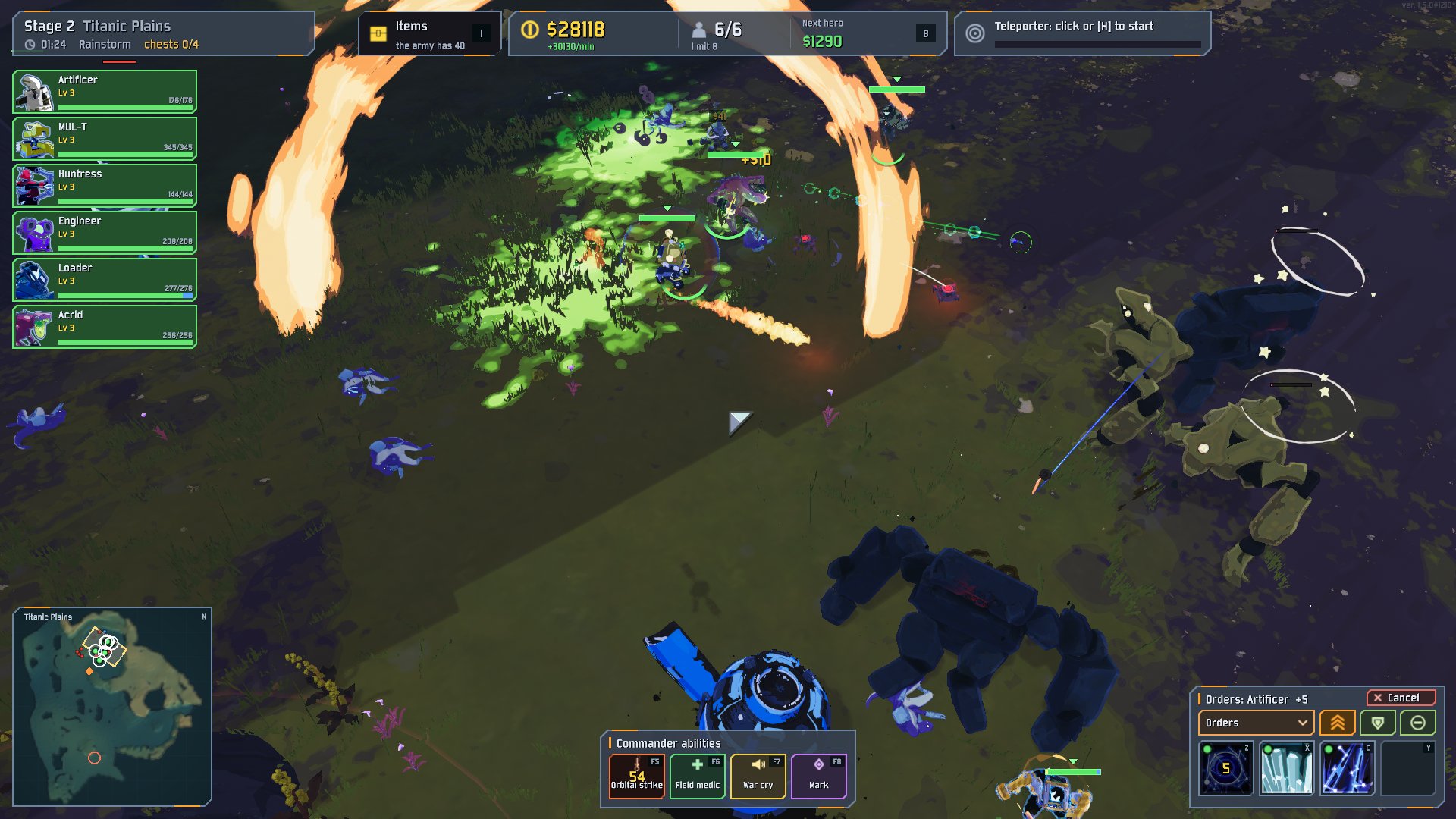
High Command turns Risk of Rain 2 into a real-time strategy game. You have no body: you are the commander, looking down at the stage from an RTS camera. Your army is made of real survivors (Huntress, MUL-T, Acrid, Engineer, anyone you have unlocked), each driven by its own AI with that survivor's actual skills. You select them, give them orders, spend the army's gold on new recruits and upgrades, and decide when to start the teleporter.
Everything else is the game you know: the same stages, enemies, director, elites, bosses, items, difficulties and artifacts. It just plays very differently when you are the one holding the map.
Status: early but playable. Single player only. I am actively working on it, and I would love your feedback (see Feedback and help).
What you get
Command an army of survivors
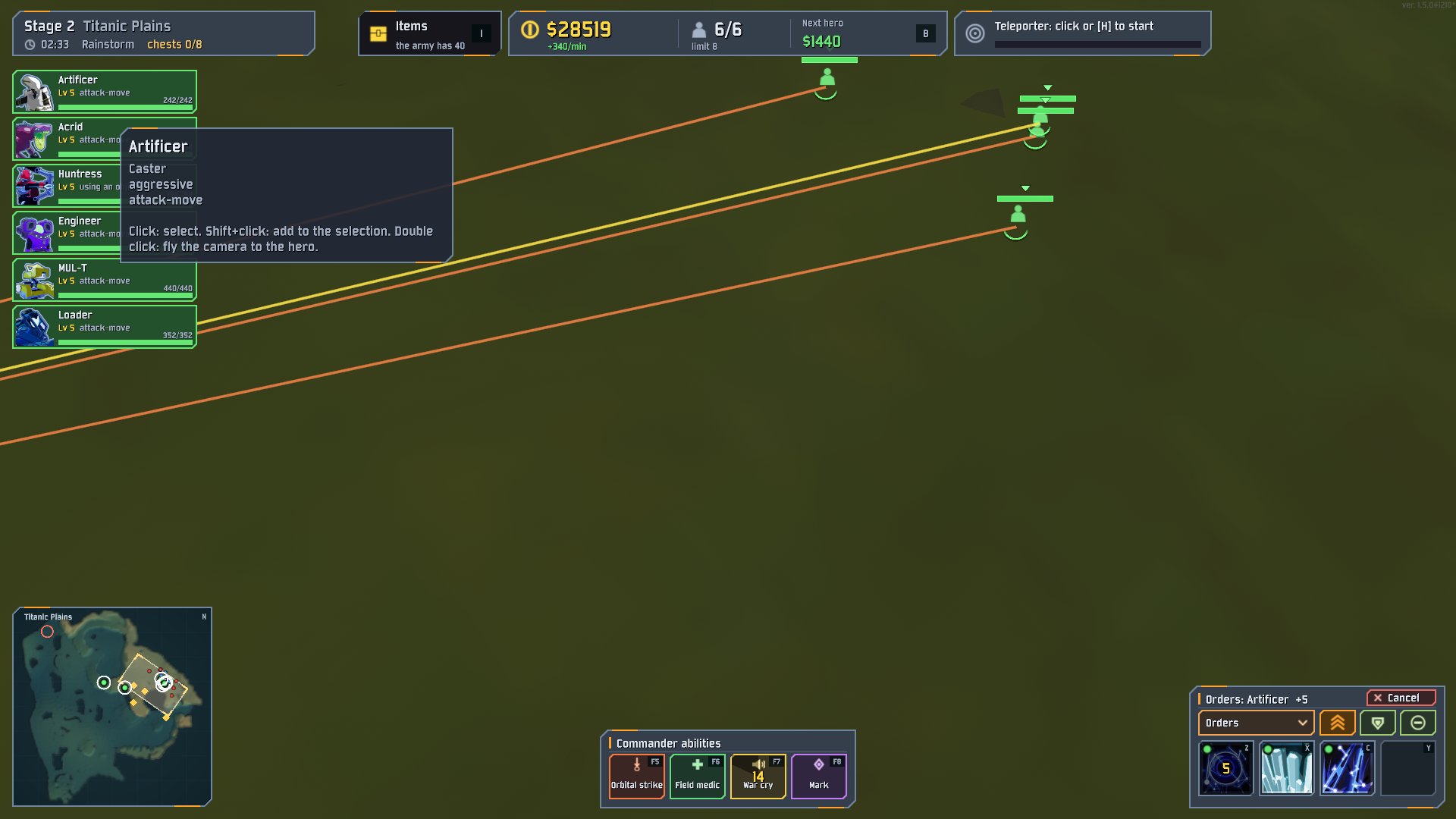
Select heroes with a click or a box drag. A right click does the obvious thing: move, attack the enemy under the cursor, follow a friend, open a chest. Attack-move, focus fire, hold, patrol, retreat to a rally point, formations, control groups, Shift-queues: it is all there, with the hotkeys you would expect from an RTS.
Heroes that fight like their survivor
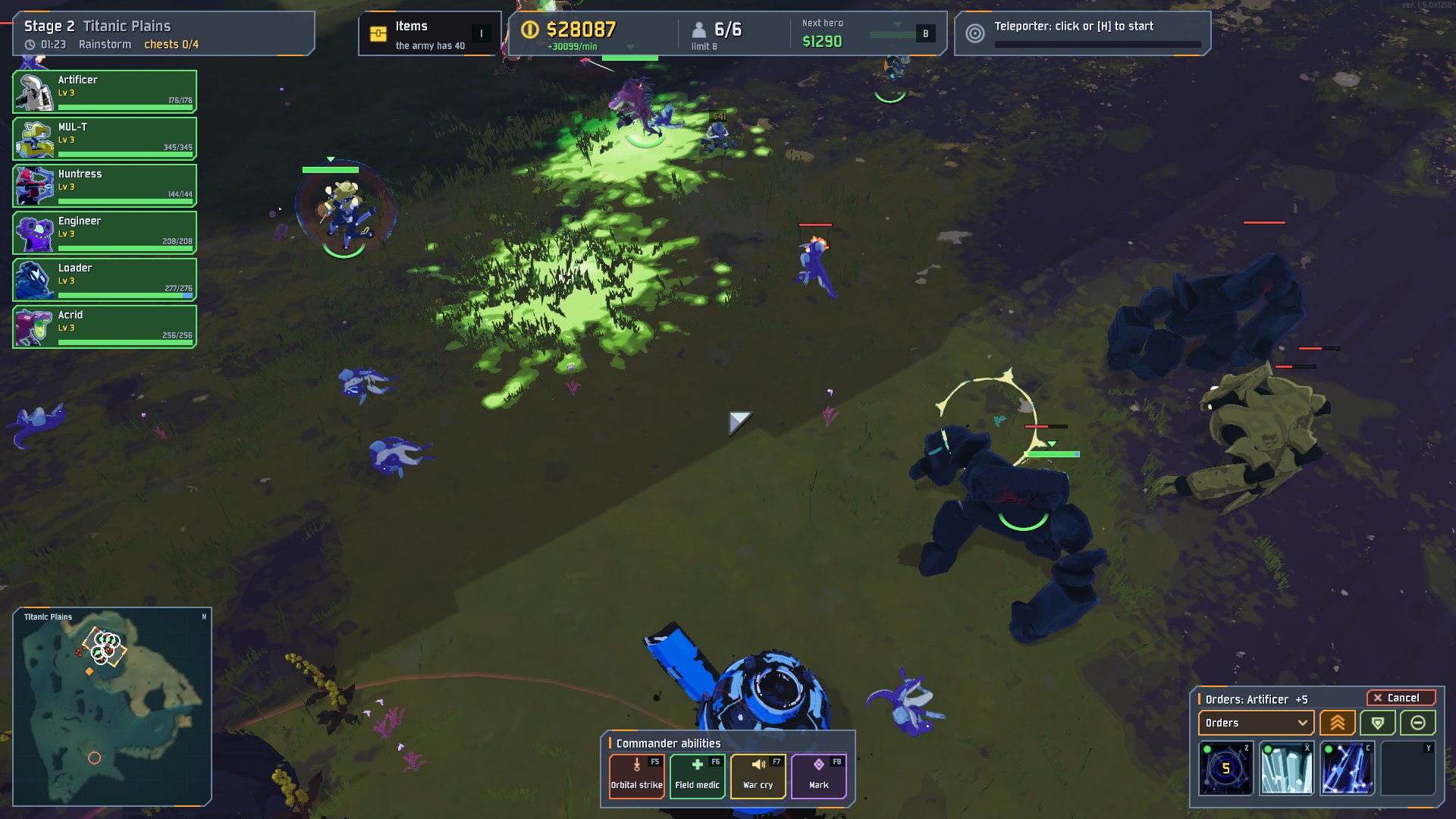
Every hero uses its own kit. Ranged survivors keep their distance and kite, melee survivors dive in, and Engineer
drops turrets. Skills fire on their own, or you cast them yourself (Z X C, Y for equipment) and switch any skill's
automatic use on or off. Stances (aggressive / defensive / passive) decide how far they chase.
Get down into the fight
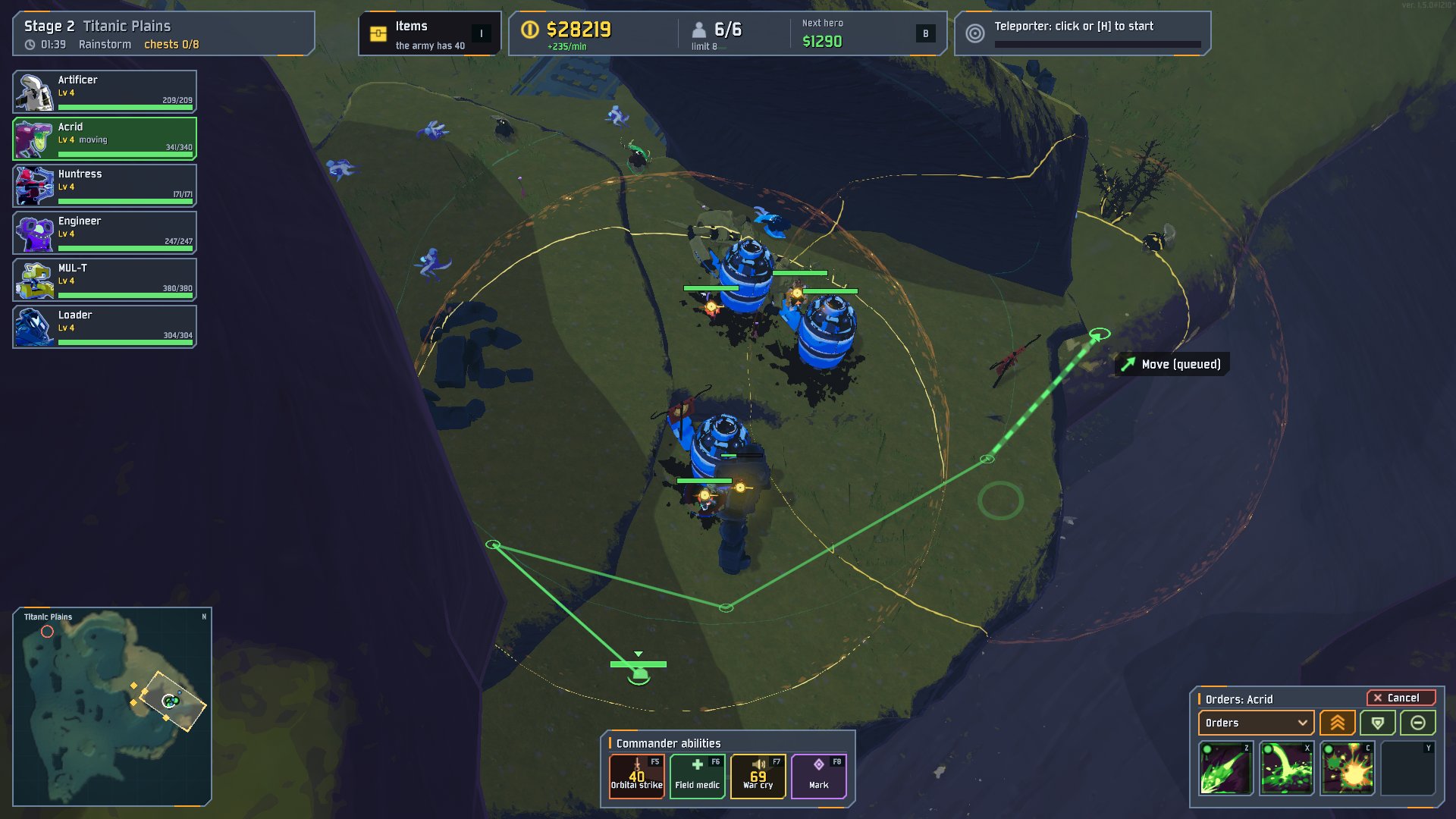
The camera is built like a modern RTS camera: zoom to the cursor, rotate, tilt, and zoom all the way in for a low, cinematic view right next to your heroes. A rock or a roof that hides a hero fades out of the way. A hero behind a hill is drawn as a silhouette, so you never lose anyone.
One purse for the whole army
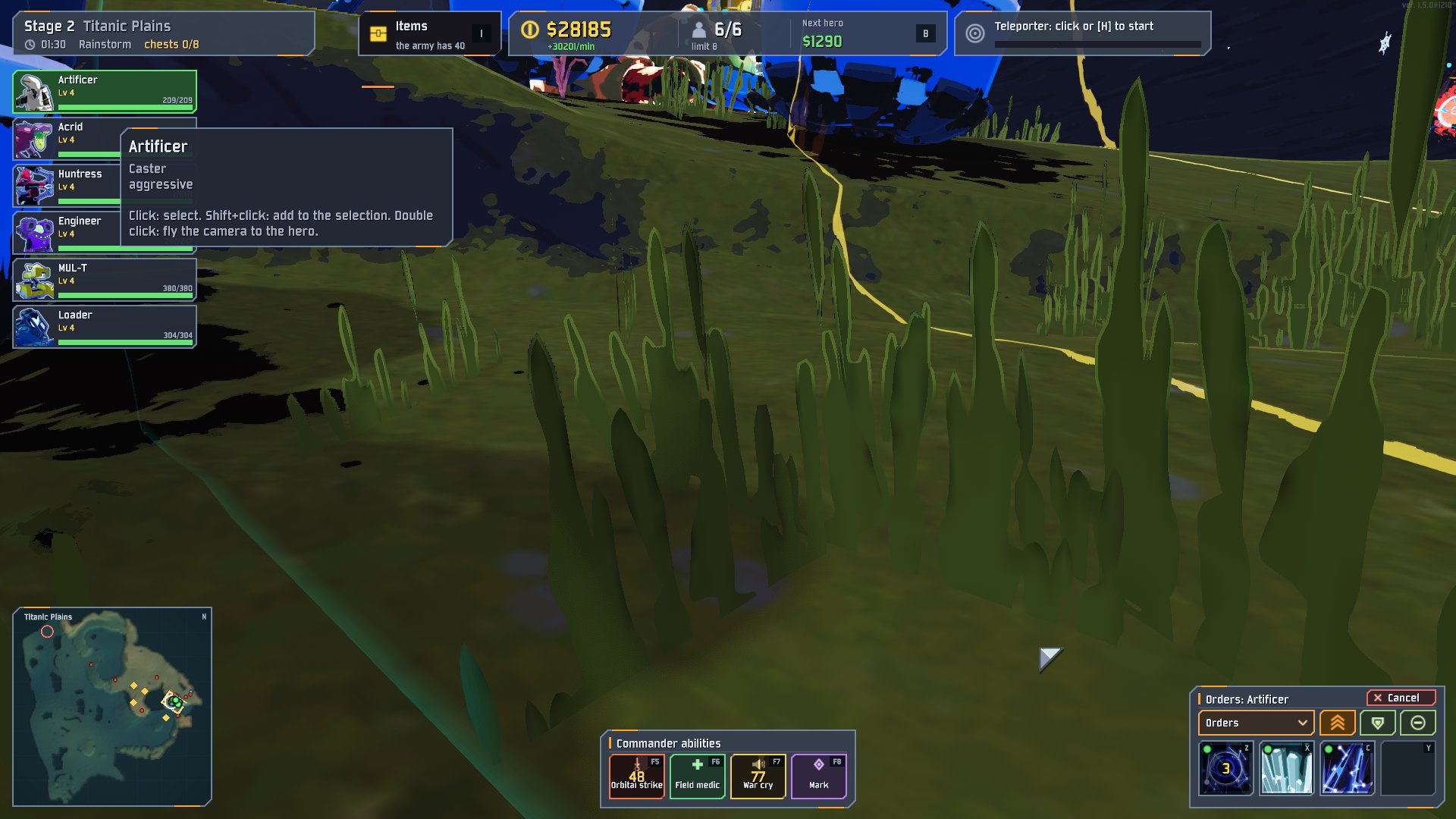
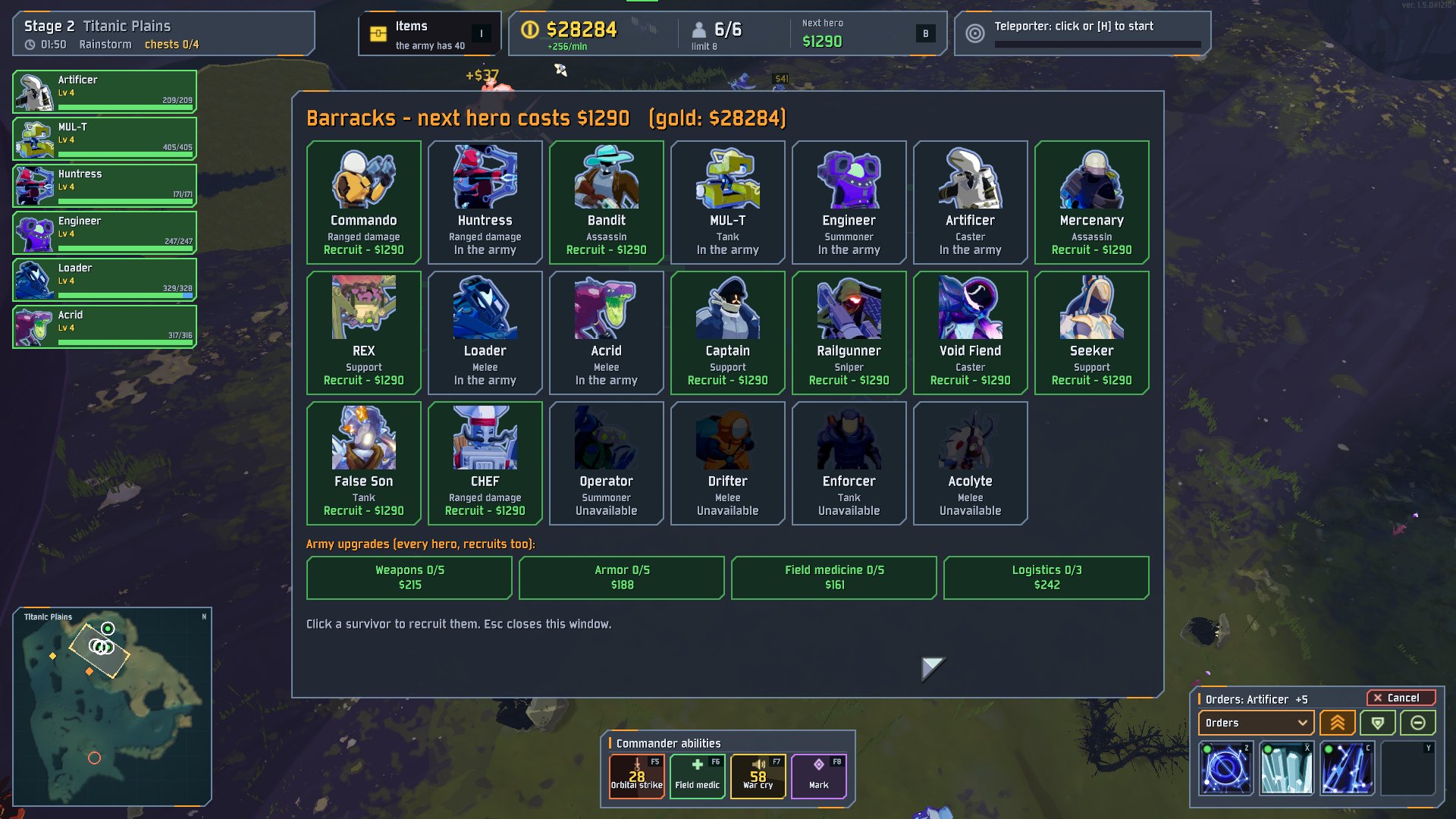
Kills, barrels and income fill one shared purse. Spend it on:
- Recruits: every unlocked survivor can join, and the price grows as the run goes on.
- Army upgrades: weapons, armor, field medicine and logistics, for every hero including future recruits.
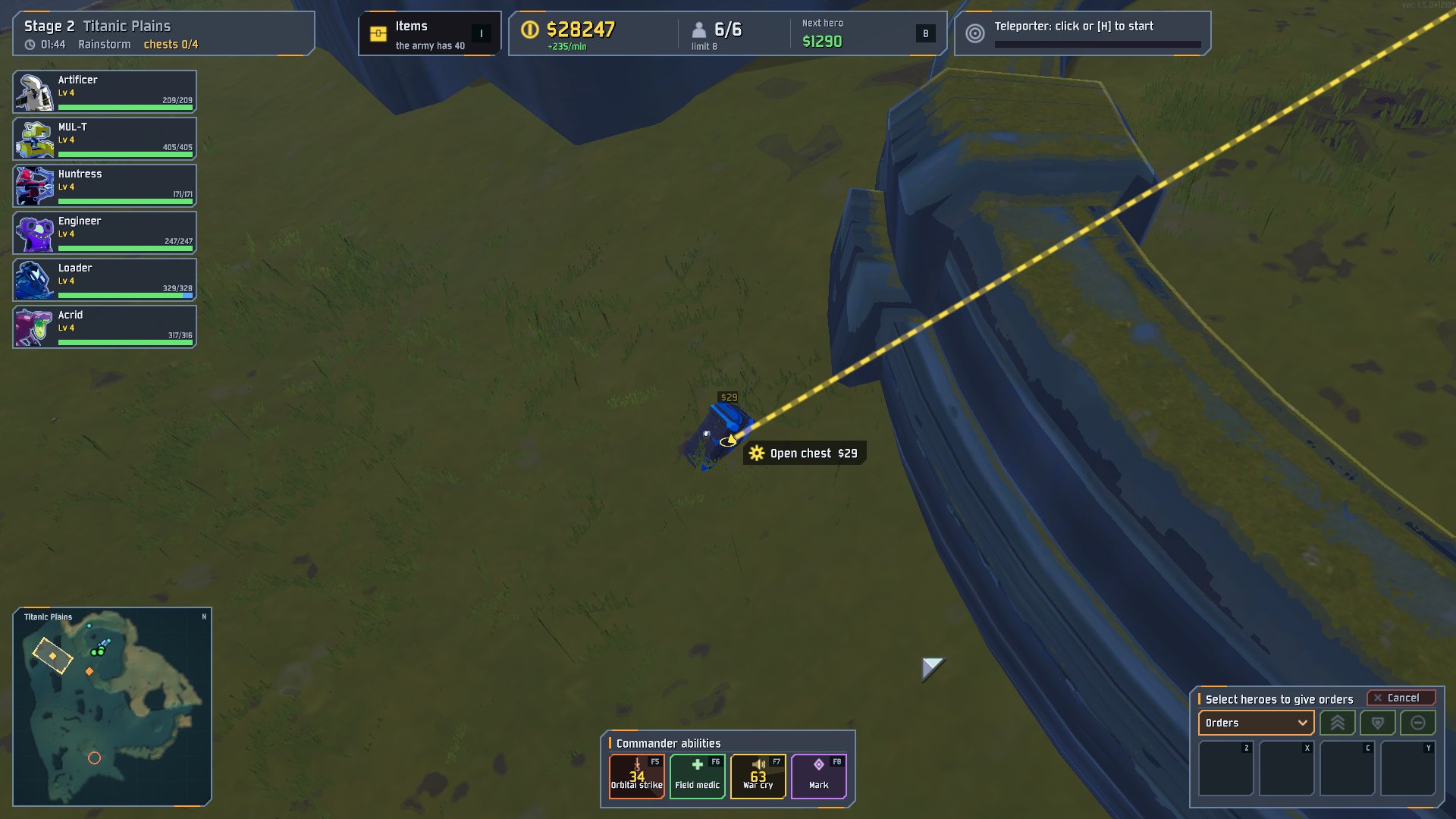
- Chests, shrines, printers and drones across the map. Right-click a chest and the nearest hero walks over and opens it. Idle heroes open nearby chests on their own when it is safe and you can afford it.
- Revivals for fallen heroes.
Share the loot your way
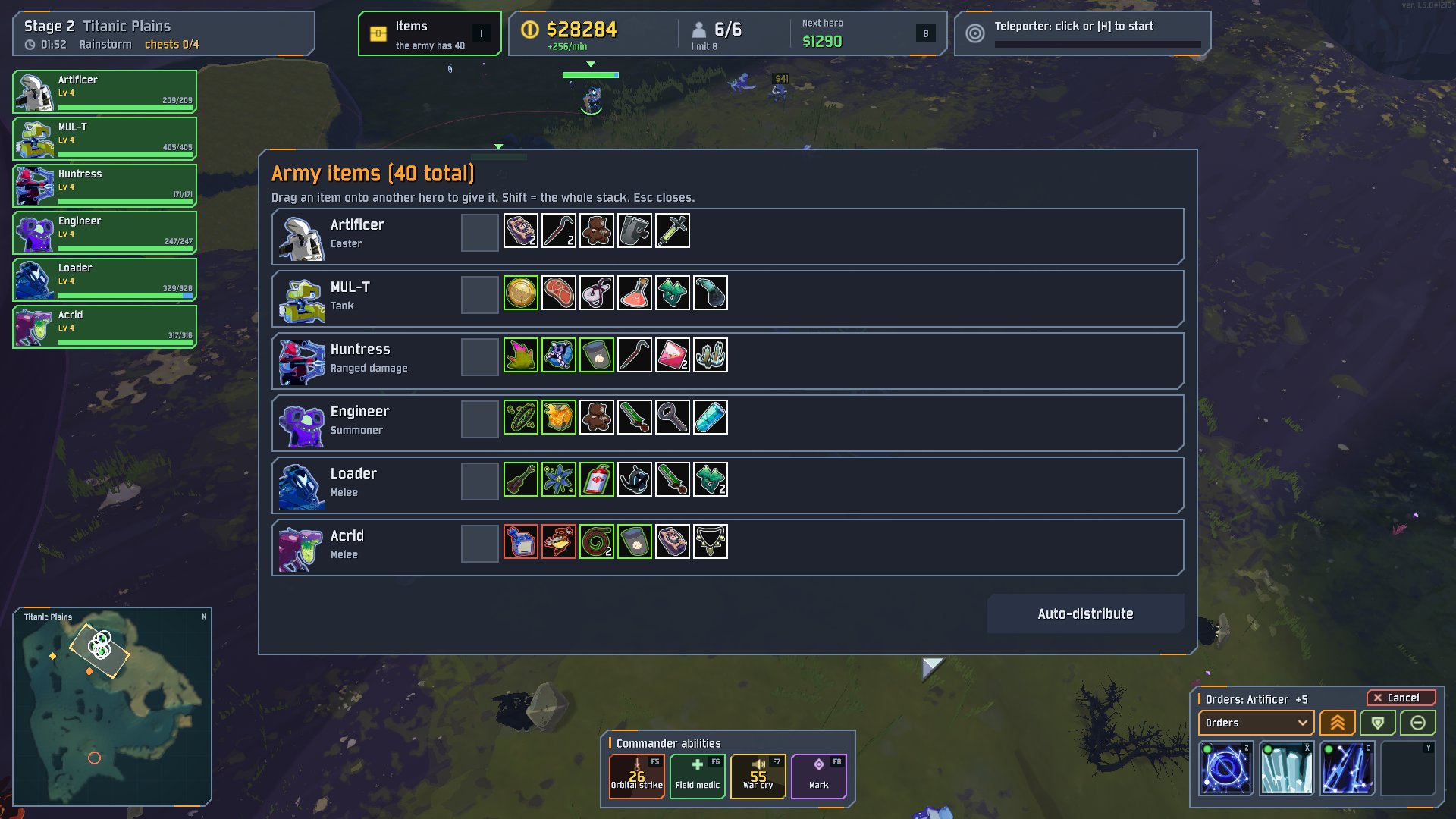
Items go into the army's pool and are handed out to the heroes. Open the item panel (I) to see who carries what, and
drag an item onto another hero to give it.
The commander's own tricks
Four abilities on their own cooldowns: Orbital strike (F5), Field medic (F6), War cry (F7) and
Mark (F8: everyone focuses the target, and it takes more damage). Heroes earn veteran ranks from kills.
The teleporter, the strategic way
One button (H): the nearest hero starts the teleporter, the army gathers in the zone, and when the boss is dead the
same button takes everyone to the next stage.
Installation
You need Risk of Rain 2 (Steam) with BepInEx and RoR2BepInExPack. Risk of Options is optional and gives you an in-game settings window.
The easy way: Thunderstore. Open HighCommand on Thunderstore and press Install with App, or search for "HighCommand" in r2modman / Thunderstore Mod Manager. The manager installs BepInEx with it.
From GitHub with a mod manager
- Download
HighCommand-<version>.zipfrom Releases. - In the manager: Settings → Import local mod and pick the zip.
By hand
- Install BepInEx for Risk of Rain 2.
- Unpack the zip into
Risk of Rain 2\BepInEx\plugins\HighCommand\.
How to play
Main menu → Extra Game Modes → High Command, or pick the mode in the lobby. Choose your survivor and difficulty as usual: that survivor is your first hero, and a second random one joins it.
| Camera | W A S D or the screen edge to pan, wheel to zoom (to the cursor), middle mouse or [ ] to rotate, middle mouse up/down or PgUp PgDn to tilt, Home to reset the view, Space to fly to the selection (twice: follow it), Backspace for the last alert |
| Select | left click, box drag, Shift to add, double click for all of that kind, Ctrl+A for all, Ctrl+1..9 to set a group, 1..9 to recall it, Tab for the next hero |
| Orders | right click (Shift queues), Q attack-move, E stop, R hold, F focus fire, V retreat, T patrol, G rally point, N formation, F2 F3 F4 stances |
| Skills | Z X C secondary / utility / special, Y equipment, Alt + key toggles automatic use |
| Army | B barracks (recruits, upgrades), I items, U revive, H teleporter |
| Commander | F5 orbital strike, F6 field medic, F7 war cry, F8 mark |
| Help | F1 shows every key in game; Esc closes things one by one |
You lose the run when every hero has fallen and there is no gold for a revival.
Settings
- Lobby: a "High Command" rule category (starting gold, hero prices, army limit, how items are shared, ...).
- In game: Settings → Mod Options → HighCommand (with Risk of Options).
- Config file:
BepInEx\config\kantemiir.HighCommand.cfg. Every key, the camera, the loot rules andInterface/UiScaleare in there. - AI per survivor:
profiles\hero_profiles.jsonnext to the dll sets ranges, retreat thresholds and when each skill is used (auto / never / escape / engage / burst). You can edit it without rebuilding.
Known limitations
- Single player only. There is network code from early versions, but multiplayer is not supported or tested now.
- Modded survivors work through a generic profile and may play below their potential.
- Final stages (Commencement, the Planetarium and similar) have not been tested. Their scripted events were made for a player with a body.
- Tested on the current Steam version of the game. If something breaks after a game update, please open an issue.
Feedback and help
This is my first big mod, and I am open to criticism, ideas, feedback and help. If something feels wrong, if a survivor plays badly, if you have an idea for a feature, or if you want to work on the mod with me, please tell me.
- Bugs: open an issue. Attach
BepInEx\LogOutput.logif you can, and say what you did and what happened. - Ideas and suggestions: open an issue with the Idea / suggestion template, or start a thread in Discussions.
- Just want to talk, share feedback or a clip? Write to me on Discord: kantemiir (profile: discord.com/users/327786803891404801).
- Code, balance, AI profiles, translations: pull requests are welcome. Small ones are the easiest to review. See CONTRIBUTING.md.
For developers
- Source:
src\(C#, BepInEx 5, HarmonyX, netstandard2.1). Build:tools\build.ps1(the game must be closed). Package:tools\package.ps1. - The mod tests itself:
tools\qa-run.ps1 <scenario>starts the game, plays a script fromtools\qa\*.txt(synthetic mouse and keys,hc_*console commands, screenshots) and collects the log. - Notes on the design and its history:
CHANGELOG.mdanddocs\dev\(design, roadmap, audits; mostly in Russian).CLAUDE.mdholds the working rules (much of the mod was built together with an AI assistant). - No game code or assets are copied. The interface pictures are drawn in code.
License
MIT © kantemiir. Risk of Rain 2 belongs to Hopoo Games and Gearbox. This is a fan-made mod and is not affiliated with them.
CHANGELOG
Changelog
0.16.0 - heroes' AI rebuilt
Heroes' AI rebuilt (details and measurements: docs\dev\AI.md)
-
Obedient: move orders are done at once and to the point (reaction about 0.4 s; in the test 18 of 18 move orders and 6 of 6 attack-moves reached their point, the old AI 7 of 18 and 1 of 6). Hold position keeps a hero within
AI/HoldRadius(4 m): skills that move it (dashes, leaps, the grapple, Ion Surge) are not used, a hero pushed off walks back (before: up to 40 m away). Formation places next to a cliff no longer snap to its foot; hold no longer takes its point in mid-air; a stuck hero jumps, looks for a new way, sidesteps and as the last resort hops along its path. -
Aggressive: without orders a hero fights what comes near its post and helps friends who fight within
AI/AssistRange; far from its post it fights monsters around it instead of walking past them. Time without attacking while an enemy is in reach went down from 47-60 % to 6-37 %; damage in the test fights 111 % of the old AI, focus fire 157 %. -
Smart targets: the monster hitting this hero or a friend, the commander's mark, Mending elites, bosses, elites, hard hitters and the wounded first; focus fire on what friends shoot (
AI/FocusFireWeight); targets out of reach are left for a while (never a seen one within reach, a boss gets twice the patience). -
Every skill: a forbidden skill (a held-back ultimate, an escape roll) no longer blocks the skills after it; walking-only rules no longer keep Commando from shooting closer than 15 m; a seen enemy within reach always gets the primary; 'burst' skills wait for a group or a boss at most
AI/BurstHoardSeconds; equipment is used by itself (AI/EquipmentInCombat,EquipmentWhenHurt,EquipmentVsBoss,AI/AutoEquipment). -
Melee heroes go straight at a target they see; ranged ones keep their range as the game measures it, back off when rushed and sidestep. Nobody walks off a ledge after its target or dashes over an edge (ground is checked under the whole dash); the game's path jumps no longer pull heroes out of their place.
-
Running away only from a real threat (hurt and being hit or chased), with the get-away skill, and back into the fight as soon as nobody is after it; at most
AI/FleeMaxSeconds. Retreat orders use the get-away skill too. -
New config section
[AI](most also in Mod Options); hero profiles format 2 (mobility: skills that move the hero; an old file is kept as.old). -
Dev:
hc_ai reset|report|trace on,hc_order,hc_spawn_at,hc_hurt,hc_equip,hc_warp tp; scenariosaibase,aiskirmish,aiedge,aitrace,aimelee,aiboss,ailos. -
Fix: items still flying when the stage changed (boss reward, chest drops) broke the item distribution with "Item distribution failed: The Object you want to instantiate is null": the game cannot show a new item on a hero's body while the old stage is being unloaded, and the error stopped the other items until the next pick-up (and the unit that failed was handed out a second time later). Now the items wait for the unload to end (one frame) and go out as usual; an error on one item no longer stops the others. Dev:
hc_drop_random <n> flylaunches the items as droplets, scenariotools\qa\itemstage.txt.
0.15.0 - order marks like the game's ping, camera tilt anywhere
-
Order marks in the look of the game's ping, no more line and ring on the ground after every order:
- the click: a shockwave and a flash on the ground for a moment (also on alerts);
- while the order lasts: a thin beam from the place up to the ping's double chevron and the order's picture — the game's own icons: the running man (move), crossed swords (attack, attack-move), the object's own icon (chest, shrine, drone, teleporter ...); retreat / patrol / follow keep the mode's pictures. Over an enemy, a friend or an object the mark hangs above it, without a beam. It pops in like a ping and fades out when the order ends; heroes sent to one place share one mark (at the clicked point, the middle of their formation);
- the routes and the queued orders (with their dimmer marks) show only while Shift is held; then the line ends in
the ping's chevron. Option
Interface/AlwaysShowRoutes(off) brings the lines back for good. - The colours of a place, an enemy and an object are now the game's ping colours (green, red, yellow).
-
Dev:
hc_dump_asset <addressable key> [save]prints a prefab's renderers, materials and sprites and can save its textures as PNG (scenarioassetdump); scenariobeaconchecks the marks;hc_overlaycounts them. -
Camera tilt: the middle button tilts the view at any zoom and from anywhere, from almost along the ground (2°) to straight down at the map (90°). Before, close up the zoom tilt held the view down near the ground, so the drag did little; now the zoom tilt is a step of the wheel (zooming in lowers the tilt, zooming out brings back the one you set) and the drag always wins. The drag may start over a panel, and it goes on when the pointer reaches the screen edge. Scenario
tools\qa\camtilt.txt.
0.14.0 - free camera, new ability tiles
Camera rebuilt (studied 0 A.D., Spring, StarCraft II, Company of Heroes, Total War; notes in docs\dev\CAMERA.md)
-
Free camera by default: panning never changes the camera's height or tilt, whatever the ground does (hills, steps, trees, rocks, bridges, other floors of the level). Nothing catches it, it never jumps, sinks or tilts by itself.
-
The height is yours: flying to heroes (Space) or an alert, following, the minimap, the wheel (it zooms towards the point under the cursor in all three directions: zoom at a valley to go down into it, at a plateau to go up onto it) and Home (resets the view and puts the camera back onto the ground where it looks).
-
The only thing it does by itself: panned over a plateau higher than the camera itself, it climbs onto it (else you would look from inside the ground). Cliffs, giant roots and cave roofs in its way are seen through.
-
Option
Camera/FollowGround(off): the camera follows a smoothed copy of the walkable ground instead (made once per stage from the heroes' ground graph, more blurred the farther out; no trees, rocks or steps in it) and tilts up a little to stay out of hills. -
Edge scrolling also works where a panel touches the screen edge; a middle-button turn begun in the world goes on over the panels.
-
Dev:
hc_cam infoshows the level,hc_cam audit|spot|lift|rock, sweeps end with the highest height and tilt speeds; scenarioscamfree,camsmooth,camaudit,camxray. -
Commander abilities: a new look for the strip at the bottom. Each ability is a tile of its own colour with its picture lit in a coloured well; new pictures with a meaning: a satellite beaming down on a target (orbital strike), a first aid kit (medic), a war horn (war cry), a skull in a sight (mark). A charge line along the bottom of the tile fills while it recharges, the seconds sit on a clock sweep over the picture, and the tile flashes once when it is ready again. While a target is chosen the tile pulses and the cursor takes the ability's picture and colour. Scenario
tools\qa\abilities.txt; before / after indocs\dev\ui-rework\abilities-*.png.
0.13.0 - order lines along the real way, interface hidden in the pause menu
- The pause menu and its settings: the mode's interface is hidden while they are open (dimmed, it still covered their
tabs and rows). Under the console it is only dimmed, as before. Scenario
tools\qa\pause.txt.
Order routes
- The line of an order (aiming, given orders, the queue, a hero sent to a chest) follows the way the heroes will really walk on the stage's ground graph instead of a straight line through hills and walls, smoothed into a curve.
- Heroes standing together with one order share one line: from their middle to a ring on the ground as wide as their formation (a hero far from the others gets its own line).
- The look: a smooth ribbon with a dark outline and soft light pulses running to the target, a small arrowhead and a ring lying flat on the ground at the end. Everything sits in the world, so moving the camera moves nothing on the line.
- A long way is not drawn across the whole map: its first stretch and its last stretch into the target are shown (longer with the camera far out), the middle fades out.
- A target off the screen gets a mark at the screen edge (pushed out of the panels): the order's picture, an arrow towards it and the walking distance.
- The ways are searched at most ~1 ms a frame and kept for a while (measured: ~0.03 ms a search). Dev:
hc_overlayprints the route counters; scenariotools\qa\route.txt(also shots while the camera pans).
0.12.1
- README: the Discord contact as plain text (Thunderstore hid the link).
0.12.0 - monsters hunt the army, seek orders, no friendly fire, a new look
- README / description: a Discord contact for feedback.
Monsters hunt the army
- A stock monster attacks only what it has seen. In a normal run the director spawns everything next to the one player,
so they all see you and come from all sides; the army is spread out, so many monsters just stood still. Now a monster
with no target goes for the nearest hero (seen or not) within
Run/EnemyHuntRange(250 m) and walks to it with its own path finding.Run/EnemiesHunt(on) switches it off (also in Mod Options). - Dev:
hc_hunt(enemies with a target / idle / distances),hc_spawn <n> [master] [distance],hc_cfg hunt|huntrange; scenariotools\qa\hunt.txt(control with the hunt off, then on).
No friendly fire in the army
- A hero, its turret or drone never hurts another hero or ally, even with the Chaos artifact or an equipment that hits everyone (Glowing Meteorite). Self-damage and falls stay. Before: a direct hero-to-hero hit went through.
- Dev:
hc_ff [chaos on|off] | hit.
New orders: seek enemies (K) and seek chests (L)
- Seek enemies: the selected heroes go after the nearest enemy anywhere on the map, fight on the way, then take the next one (an unreachable one is skipped after 10 s). The order stays until another one is given.
- Seek chests: the selected heroes open every chest of the map the purse can pay for, nearest first, each hero its own; shops, shrines and printers are left alone. The order ends when nothing affordable is left.
- Both are in the Orders list with their own pictures, in the hero list and in the F1 sheet.
Health bars
- New look in the mode's cut-corner style: a dark plate, a slanted fill end, a soft gloss, notches every 100 / 250 / 1000 ... health on heroes and bosses, a pale piece showing the last hit that drains after it. A hero's bar runs green -> amber -> red and pulses when nearly dead. Bosses have a gold frame. Ordinary monsters at full health show no bar.
Interface pass
- One title style for the big windows (accent bar, white title, hairline): barracks, items, F1 sheet.
- Barracks: the purse on the right of the title, survivor cards with a coloured status band (recruit / too dear / in the army / closed), upgrades as name + level + price, the description right under them (no empty band).
- Items: a smaller title, the hint on the right, calmer rows, "no items yet" in dim italics, a smaller button.
- F1 sheet: sections (Camera, Selection, General, Orders, Army and commander), striped rows, a close hint; the K / L line is in it.
- Orders list: quiet rows (a faint outline, the colour in the picture), three groups with a gap and a hairline.
- Health bars: always a dark frame (a selected hero's green frame melted into the fill); notches at 100, 200 ... not at the left edge; the gloss covers the filled part only.
Camera and pointer
- Zoom out up to 220 m (Camera/MaxDistance, up to 500; an old 95 is raised once); tilt down to 89 degrees (straight down).
- The first look at a stage stays about 31 m.
- The pointer shows no "Move" badge over plain ground any more (the other badges stay).
- Dev:
hc_scroll <notches>,hc_cam infoprints the wanted values; scenariosseek.txt,camfar.txt.
0.11.0 - loot from the map, a real strategy camera, first public release
Public release
- The source is on GitHub: https://github.com/kantemiir/RoR2-HighCommand (MIT license), with a new README (English and
Russian) and screenshots, issue templates and CONTRIBUTING.md. Internal working notes moved to
docs/dev/. - The English name of the Void Fiend is printed properly (the game's own text reads "V??oid Fiend").
- The Items button's open frame no longer covers its text.
- Dev:
hc_cam yaw <deg>/hc_cam pitch <deg>; scenariotools\qa\showcase.txttakes the README's screenshots (it switches the game to English for the shots and back).
Camera height
- The camera only follows ground a hero can stand on (the stock node graph): a rock spire, a roof or a decoration high above the play area no longer lifts it into the sky, and its height never leaves the range of the map's walkable ground.
- Standing still above lower ground (after crossing a chasm at its edge's level, beside a path over a void) the camera comes down onto that ground after 1.5 s instead of hanging in the air for good.
- The camera never moves in by itself any more: the distance is only what the wheel set (it used to be pulled in front of obstacles, which put it under roofs and rocks, inside the level, and kept the wheel from zooming out).
- The camera can be laid almost on the ground: the tilt (middle mouse up / down, PageUp / PageDown) now goes down to 4 degrees instead of 25. It tilts up by itself only as far as it must to stay above the ground (a low view on a slope), never to see past a hill.
- A small piece of the level (a rock, a roof, a tree, a bridge, up to 60 m) is hidden only while it hides a hero on screen (the hero walked behind it, or the camera was turned behind it) and comes back half a second later. The floor a hero stands on, big ground and the game's objects are never hidden.
- What other strategy games do, now here too:
- zoom to the cursor (Company of Heroes, Total War): the wheel zooms towards the point under the mouse, which stays
under the mouse (
Camera/ZoomToCursor, on); - zoom tilt (Company of Heroes, Total War): coming close also lowers the view, down to a side view of the heroes at
the nearest zoom; zooming out brings the player's tilt back (
Camera/ZoomTilt, on). The nearest zoom is 6 m instead of 10 (an untouched old value is updated once); - Home resets the camera's turn, tilt and zoom to the start view (Age of Empires IV / Company of Heroes);
- Space twice locks the camera on the selected heroes (or the army) until it is moved by hand or Space is pressed again (the follow camera of Warcraft III / StarCraft II);
- a hero hidden behind a hill or a cliff (too big to hide) is drawn as a flat silhouette where it stands (StarCraft II, Torchlight).
- zoom to the cursor (Company of Heroes, Total War): the wheel zooms towards the point under the mouse, which stays
under the mouse (
- Dev:
hc_cam auditalso tries the lowest tilt at the nearest distance on every point and counts where the camera had to tilt up and where it would stay in the ground; scenariotools\qa\camvillage.txt. - Dev:
hc_cam auditpans along 32 lines across the map the old and the new way and counts the places where the camera climbs or hangs above walkable ground; scenariotools\qa\camheight.txtruns it on ten stages.
The map is the source of items
- Items no longer drop from killed enemies. Chests, shrines, multishops, broken drones, printers, lunar pods and the rest are placed on the stages as in the stock game again, and the army's purse pays for them (gold; lunar coins come from the player). Bosses and the teleporter give items as before.
- A right click on such an object sends ONE hero: the nearest of the selected ones by the walk along the ground (not as the crow flies), or of the whole army when nobody is selected. The others carry on. Afterwards the hero takes up what it was doing (walks back to its hold spot, goes on patrolling ...) or returns to its post.
- Shift + right click on several objects: one hero's route through all of them, drawn on the ground.
- The item flies out of the chest as in the stock game and joins the pool where it lands (the loot feed shows it).
- Price tags over the priced objects in view (gold when the purse can pay, red when not); the pointer badge says what a click does and what it costs ("Open chest $25"). Not enough gold: the click is refused with a message, nobody walks.
- The minimap marks found objects (chests, shops, shrines, drones, printers, portals, the teleporter); an object is found when a hero comes near it or the camera looks at it. The top strip counts the stage's chests (opened / all).
- Idle heroes open barrels (free gold) near their post by themselves (
Loot/AutoOpenBarrels). - Idle heroes also open a chest near their post (within 30 m of it, 35 m of the hero) by themselves when no enemy is
near, they have not been hit lately, there is no zone to hold, and the purse can pay; the gold other heroes are
already walking to spend is kept for them, and a chest that turns out too dear on arrival is left without a message
(
Loot/AutoOpenChests,hc_cfg autochests). Only chests: shops, shrines, printers and drones wait for an order. - A hero that cannot get to an object or pay at the last moment comes back and says why.
- Config:
Loot/ItemDropsEnabledandLoot/RemovePaidInteractablesnow default to false; an existing config file is switched once (Dev/ConfigVersion= 2). Setting them back gives the old way.
Audit of the interface rework (fixes)
- A click beside the open "Orders" list only closes it (it used to deselect the army or send it somewhere).
- The pointer badge and the right click ask one shared function: a selected hero under the pointer showed "Select" while the click moved the army.
- Camera: a ridge or a tree between the camera and the focus first tilts the view further down (up to 30 degrees); ground right behind the focus no longer pulls the camera down onto it. Stacked surfaces of one mesh (a ramp over a passage) are found now.
- The top strip's tooltip text is no longer rebuilt every frame.
- Help sheet (F1): both columns fit inside the panel (the right one ran past its edge), short key names ("СКМ вбок / [ ]", "PgUp PgDn"), a line for the right click on a chest; the sheet shrinks on a big interface scale.
- Commander ability buttons: a smaller picture, the names ("Удар с орбиты", "Боевой клич") read on two lines.
Dev
hc_find <kind:Chest|name>,hc_click_found [button] [shift] [hover],hc_move_found <hero>,hc_loot,hc_invulnerable,hc_gold set <n>,hc_cfg autobarrels; scenariotools\qa\loot.txt.hc_mouse_hero/hc_mouse_enemykeep the pointer on the moving unit (the cursor tests were flaky: units walked out from under a fixed pixel).
Interface
-
A "Cancel" button at the right end of the command card's title: while a target is being chosen it stops choosing (like Esc); otherwise the selected heroes drop their orders (and the queue) and stand where they are (like Stop).
-
An "Items" button in the top strip, left of the purse: how many items the army has; a click opens the item panel (the same as I), and it is framed while the panel is open.
-
The strip of selected-hero cards at the bottom centre is gone (the roster on the left already marks the selected heroes, and the command card's title names them); the commander's abilities moved into its place, so the bottom right holds only the orders card.
-
The red "all heroes have fallen" strip is clickable: a click revives the first fallen hero (the text says so).
-
The teleporter strip no longer claims "Teleporter ready" while the teleporter has not been started: "Teleporter found: click or press [key] to start".
-
Roster cards show the health of a living hero as numbers (current/max) above the bar; hidden for a fallen hero and on the compact cards (15+ heroes).
-
The selection box is a faint tint with a hairline border and corner brackets (was a flat green rectangle). Heroes the box would take light up while it is dragged.
-
A selected hero no longer disappears under a green circle: only the front arc of a thin ring lies on the ground in front of its feet, and a small triangle sits above its health bar. Hover marks of heroes and enemies are arcs too.
-
Camera height: the camera no longer dives into a chasm when panned over it (it keeps the level of the edge; only a long stay over the void takes it down), it stays on its own level where a ramp lies over a passage or a bridge over a pit (the nearest surface to the current level is taken, not the first one below a point 14 m up), and its height moves smoothly at a limited speed. The pull-in in front of walls and ramps is smoothed too (quick in, slow out). Flying to a hero, an alert or a minimap click still goes straight to the height of the target.
-
One look for the whole interface: panels, cards and buttons have two cut corners and a thin steel outline, the big panels carry a short orange tick, the titles of the command card have an orange bar and a hairline.
-
Command card, made short (about 160 px instead of 290): the selected hero's skills, one "Orders" button that opens a list (attack-move, focus, stop, hold, retreat, patrol, rally point, formation: each with a picture, its name and the hotkey; a click on a row or Esc closes it), a three-way stance switch and, above, the commander's abilities. The teleporter button is gone: the strip at the top is clickable and the hotkey stays. The hotkey sits on a small key cap, the cooldown is a radial sweep with the seconds in the middle. The pictures are drawn in code.
-
The pointer shows what a right click would do: a small badge with a picture and a word next to it - Move, Attack, Follow, Use, Select ("(queued)" with Shift). While a targeting mode waits for a click it shows that mode.
-
A line runs from every selected hero (the first six) to what is under the pointer: dashes that flow towards the target on a soft glow, an arrowhead and a breathing ring, in the colour of the action. It shows only over an enemy, a friend or an object, or over bare ground while Shift is held (planning a queue); over plain ground the badge alone is shown. Slanted lines are drawn with soft edges now, so they no longer break into stair steps.
-
The game's own "remote operation" drone picker (a big dark panel that a stray key of the spectator controls opened in the middle of the screen) can no longer appear while the mode runs.
-
Camera tilt: the middle mouse button already turned the view sideways, now dragging it up / down tilts it (up = flatter, down = more from above; 25-85 degrees), also PageUp / PageDown (
Keys/TiltUp,Keys/TiltDown), speedCamera/TiltSpeed, directionCamera/InvertTilt.Camera/Pitchis the starting tilt. The minimap's view box and the marks on the ground follow the tilt. The screen edge no longer pans the camera while the middle button is held. -
The top strip is three panels of one height with pictures: stage (name, clock, difficulty), purse with the income, army (alive / total, limit), the next hero's price (green when affordable) with the barracks key, and the teleporter with its own picture and bar. The teleporter texts are shorter so that they are not shrunk to tiny type.
-
Minimap: a proper frame (cut corners, clipped contents), the picture is now a soft relief of the walkable ground (colour by height, haze, light edge, faint grid) instead of a cloud of dots, the stage name and "N" in the corners, dots have a dark rim, selected heroes get a ring, the camera box is a view finder (tint, hairlines, corner brackets).
-
The red defeat strip and the toast messages sit on a dark plate; toasts are above an open barracks / item panel.
-
Selected-hero cards: the level is a line above the portrait instead of lying over it.
-
The Void Fiend's name is printed properly ("Исчадие Пустоты"): the game's own Russian text for it is damaged.
Dev
hc_cam sweep <dx> <dz> <seconds>pans along a line through the keyboard pan's code and logs the heights (with what the old code would have picked);hc_drag ... holdkeeps the mouse button down untilhc_input_end.- Scenarios
tools\qa\camera.txt,tools\qa\select.txt,tools\qa\uishot.txt(a screenshot per interface state) andtools\qa\cursor.txt(pointer badge, preview line, orders list) andtools\qa\tilt.txt(camera tilt;hc_drag ... middrags with the middle button,hc_cam infoprints the pitch). hc_mouse <x> <y> [shift],hc_mouse_hero <id>,hc_mouse_enemymove the synthetic pointer without clicking;hc_cursorprints what the badge shows.tools\glyph-previewrenders every command-card picture into one PNG without the game (dotnet run --project tools\glyph-preview -- <file.png>).
0.10.0 - army upgrades, veteran ranks, fairer economy
New
- Army upgrades in the barracks (
B): Weapons (+10% damage), Armor (+8), Field medicine (+0.6 HP/s, grows with the hero's level), Logistics (+8% speed). Every hero gets them, recruits too; prices grow per level and with time/stages. - Veteran ranks: 25 / 75 / 175 kills (minions' kills count for their owner) give rank 1-3, each +10% damage and +5 armor. Stars on the roster card, a message on promotion.
- The army starts with 2 heroes: the lobby's survivor and a random unlocked one (
Army/StartingHeroes, 1-4; free). - The whole order queue (Shift orders) is drawn on the ground, leg after leg.
Balance
- Hero prices follow time, stages and the difficulty only. Before, every recruit raised the run's difficulty (heroes count as players), which raised the next price on top of the growth per hero.
- The army counts as fewer extra players: rounded down (+0.25) instead of rounded, so 2 heroes = 1 player, 3 = 2, 4 = 3.
- A revival costs 40% of a FIRST recruit's price: it no longer grows with the number of heroes bought.
- Heroes chase enemies up to 60 m from their post (was 95; Railgunner 75, was 110).
- A ranged hero standing at its post while being hit sidesteps instead of standing still.
Fixes
- Long survivor descriptions no longer spill below the barracks panel.
Dev
hc_upgrade [0-3]buys an upgrade and prints the heroes' stats;hc_veteran <id>promotes a hero.- Single player only (decision of 2026-10-12): new features are not replicated over the network.
0.9.2 - a lone hero no longer loses the run by itself
Fixes
- The starting hero died on its own within 1-2 minutes and the run was lost 45 s later. Causes and fixes:
- The game's AI rules for survivors always close in on the enemy (they were written for Umbras). Ranged heroes now
keep their distance (
standoffper survivor inprofiles\hero_profiles.json): they back off and circle instead of walking into melee. - A fleeing hero ran blind and used no skill at all. It now uses its escape skill (
fleeSlot: Huntress' blink, Commando's roll, Bandit's smoke bomb, Mercenary's dash, Void Fiend's trespass), aimed and moving away from the enemies. - The place to flee to could lie at the foot of a cliff (the hero walked off it and landed at 1 HP). It is now a ground node on the same level, away from the enemies, picked again every 1.5 s; a fleeing hero never steps off an edge.
- An "escape" skill is no longer spent by a rule that runs at the enemy (Huntress' gap-closing blink at low HP).
- The game's AI rules for survivors always close in on the enemy (they were written for Umbras). Ranged heroes now
keep their distance (
- All heroes down while the army can pay for a revival: the first fallen hero is revived automatically after 4 s
(
Run/AutoRevive,Run/AutoReviveDelay); the top bar counts down and names the price. Without gold the run is lost as before. - Void Fields, the Bazaar and other scenes where the game brings no allied AI along: the heroes were missing and the run was lost. The mode now brings them in at the player spawn.
- The rally point moves to the new stage's spawn at once: a revival right after a stage change no longer drops the hero at the previous map's coordinates (from high in the air).
- Recruited and revived heroes no longer land inside each other (all of them used the same nearest node).
- Heroes walking straight at an unreachable point no longer step off ledges; on stub node graphs (the Bazaar has 6 nodes) they walk without path finding instead of filling the log with "ComputePath exception".
Dev
hc_next_stage <scene>goes to a named scene;hc_dump_sceneslists the scenes without allied AI entry.tools\build.ps1installs the hero profiles frompackage\profiles(it looked in aprofilesfolder that does not exist, so edits tohero_profiles.jsonnever reached the game).tools\qa-run.ps1no longer destroys the user'skantemiir.HighCommand.cfg: it is copied aside before the test and put back afterwards, also when the run fails; the scenario file is never left in the config folder.package\profiles\hero_profiles.jsonlistsfleeSlotandstandofffor every survivor, equal to the built-in values.
0.9.1 - QA pass (single player)
Fixes
- The High Command button was not added to the Extra Game Mode menu on a real mouse click (the button switches the screen directly, the old hook never ran). Now added when the screen is opened.
- The camera hands the stock camera rig back when the mode ends; bigger obstruction buffer for the camera.
- A manual cast cut short by another order no longer leaks its timer; a cast is no longer reported "not ready" while held.
- Help sheet (F1): two columns, opaque, no overflow.
- No more "ActivityManager ... unable to determine GameMode" error at every run start.
- Hotkey hints no longer overlap button captions; the money line of the top bar shrinks instead of overflowing.
- Zero compiler warnings (obsolete game API replaced).
Interface and controls
Interface/UiScale(0.6-1.6) scales the whole interface; checked at 1920x1080, 1280x720 and 1024x768.Esccloses the targeting mode / help / item panel / recruiting panel first and does not open the pause menu at the same press; while the pause screen or the console is up the mode ignores clicks and the wheel and dims its interface.Tab(cycle) andCtrl+A(select all) are configurable (Keys/CycleSelection,Keys/SelectAll).- Alerts: a fallen or nearly dead hero gives a message, a sound and a mark;
Backspaceflies the camera there.
Performance
- Interface CPU cost halved (43 -> 20 ms per second with 6 heroes), frame time 6.0 -> 5.5 ms; garbage halved.
Dev
tools\qa-run.ps1, scenarios intools\qa\; consolehc_spawn,hc_ui, frame time and GC inhc_perf.
0.9.0
First complete version of the mode.
- Game mode "High Command" in the lobby and in the Extra Game Modes menu; bodiless commander, AI survivors as the army.
- RTS camera over the stock camera rig, minimap, selection, orders (move, attack-move, attack, focus fire, stop, hold, follow, retreat, patrol, interact, cast), queue, stances, formations, rally point.
- Shared gold purse, recruiting by price that grows with every hero and with the difficulty, paid revival.
- Items drop from enemies straight into the army's pool; shared among the heroes by role, manual redistribution with drag and drop, equipment slots, split / mirror sharing modes.
- Teleporter flow: one button activates it, gathers the army while it charges and leaves the stage; defeat when no hero is alive and nobody can pay for a revival.
- Commander abilities: orbital strike, field medic, war cry, mark.
- Hero AI profiles per survivor (data file), automatic retreat of badly hurt heroes, per-skill usage rules.
- Command card, roster strip, inventory panel, tooltips, ru / en localisation, settings in Mod Options.
- Client -> server command channel for co-op.
- Lobby rules category (starting gold, hero prices, army limit, difficulty per hero, item sharing, drop rate).
