
RUMBLE does not support other mod managers. If you want to use a manager, you must use the RUMBLE Mod Manager, a manager specifically designed for this game.
This package has been marked as deprecated, and it's suggested another
alternative is used.
You are viewing a potentially older version of this package.
View all versions.
| Date uploaded | 2 years ago |
| Version | 1.0.1 |
| Download link | ERRORMODS-SpeedOfLight-1.0.1.zip |
| Downloads | 157 |
| Dependency string | ERRORMODS-SpeedOfLight-1.0.1 |
This mod requires the following mods to function

UlvakSkillz-RumbleModdingAPI
API to Help Modders Get Started and to remove the necessity of GameObject.Find
Preferred version: 3.0.6
Baumritter-RumbleModUI
Adds a pop-up window for centralized management of mod settings
Preferred version: 2.1.2README
Installation Instructions
- Install MelonLoader 0.6.2+
- Run Game
- Drop "Mods" and "UserData" Folder in to Rumble Source Directory
- Run the Game and enjoy the mod
Speed Of Light Mod
Description
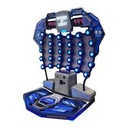
Speed Of Light mod adds an arcade game in Gym next to where you spawn. You can play it by getting coins from winning matches.
Features
- Speed Of Light arcade machine in Gym
- Coin System
- Sound Effects
How to Play
- You can press the "Start Game!" Button next to the machine to start the game, but only if you have coins.
- Once the game has started, there will be a countdown from 3, and once the countdown finishes, you have to try and click the light blue buttons as fast as possible.
- You can get a "Button Streak" by clicking the light blue buttons in a row, but if you click a button that's not lit, your streak will be restarted. You can tell this by the sound effect that plays every button press.
How to get Coins
- You have to win a RUMBLE match in order to get coins. You get one coin per game won.
- Your coin amount will be displayed above the "Start Game!" Button.
Have fun!
CHANGELOG
Version 1.0.5
- Added adjustable height to the game via ModUI
- Made it turn off / on in OnSceneWasLoaded instead so it doesnt appear for a second during matches and parks
Version 1.0.4
- Fixed accidentally leaving in some code that made the whole mod lag your game
- Made it so it doesn't check if the sound file exists everytime its played
Version 1.0.3
- Added Audio dll's to UserLibs folder
Version 1.0.2
- "Marty, my boy, it's a different parallel universe!"
Version 1.0.1
- Skip version 1.0.2 as it was made in another timeline
- Fixed version number
Version 1.0.0
- Created
Help And Other Resources
Get help and find other resources in the Modding Discord: https://discord.gg/fsbcnZgzfa
