
RUMBLE does not support other mod managers. If you want to use a manager, you must use the RUMBLE Mod Manager, a manager specifically designed for this game.
RumbleHud
Adds a HUD to the RUMBLE desktop window for spectator experience.
| Date uploaded | 3 days ago |
| Version | 1.8.1 |
| Download link | Kpaiy-RumbleHud-1.8.1.zip |
| Downloads | 16 |
| Dependency string | Kpaiy-RumbleHud-1.8.1 |
This mod requires the following mods to function

LavaGang-MelonLoader
The World's First Universal Mod Loader for Unity Games compatible with both Il2Cpp and Mono
Preferred version: 0.7.1
README
RUMBLE HUD Mod
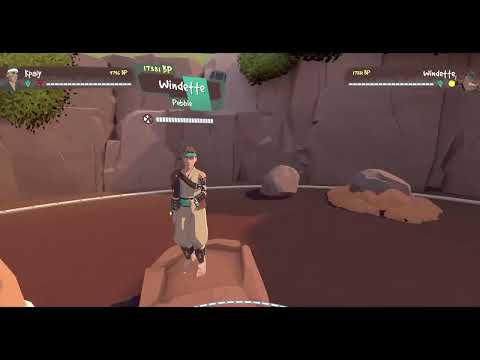
This mod adds a HUD to the RUMBLE display on your monitor, for use in streaming RUMBLE or recording gameplay.
The mod will, for each player, display their:
- Name
- Battle Points
- Current Health
- Equipped Shift Stones
- Player Portrait
- Round scores (if in a match)
- Host status (optional)
Controls
Known Issue: These controls always function (when enabled), e.g. you could type a "-" in a UI text box and the HUD would get smaller.
The mod currently uses the following controls:
Ito toggle HUD on/offOto cycle between host indicator options:- None
- Text only
- Icon only
- Both text and Icon
Pto regenerate player portraits- Your own portrait can only be regenerated while in the gym
-/=(near the backspace key) to decrease/increase HUD scale
The HUD scale currently saves to a settings file: UserData/RumbleHud.xml.
Note: Settings save on game quit, so RUMBLE crashing might mean your settings don't save.
Settings File
Note: This settings file is no longer used. RumbleHud has been migrated to use UIFramework to expose settings. Your settings will be migrated across into the new system.
Demo Footage (Click to View)
Dependencies
This mod requires:
- MelonLoader Nightly
- UIFramework
Installation Instructions
- Extract the
ModsandUserDatafolders into your RUMBLE install directory.
Known Issues
- Keyboard controls are always listening (when enabled), even if you're doing something like typing into a text field.
- People can have their portrait taken while they're in awfully unflattering poses, e.g. full scorpion.
- This is funny as hell, not fixing this
- In parks, if you're unlucky, player portraits can be photobombed
- This is also funny as hell, not fixing this
Future Goals
- Allow deeply customisable HUDs by having element positionings be config values.
- Support for NameBending
- Make shift stone icons pulse/shimmer when triggered/active
- Is it possible to use OSC or host a server? Something that could expose this information outside of RUMBLE, so someone familiar with OBS could make their own elements in OBS instead using this info?
- Gort is working on an OBS HUD!
Support
Reach out to me on Discord (kpaiy) if you have issues or feature requests. I can't guarantee fast response times, but I'll do what I can. ^-^
Thanks
- SDRAWKCABMIAY for providing shift stone graphics.
- Pep for helping me with host in park lunacy. He is why I am sane enough to type this.
- iListen2Sound for single-handedly migrating this project to use UIFramework for settings.
- Testers:
- Jman
- Rhymenocerous
- Savitarian
CHANGELOG
Version 1.8.1
Fix the live portrait mode. It wouldn't follow the player...
Version 1.8.0
iListen2Sound has done incredible work and ported this mod to use UIFramework for mod settings.
The only thing I've done (for my own entertainment) is add a new setting to add live player portraits. That is, they are no longer still images, but continuous video feeds.
Note: This setting could impact performance. Use at own risk.
Version 1.7.0
Update HUD to Support RUMBLE 0.5!
This comes with one other main change: your own portrait is now generated by your character, not the preview character in the rock wardrobe! This means that you and only you are responsible for your portraits now. Strike a dignified pose when you load in. :p
Version 1.6.0
- Implement
LockControlssettings option.- You have to update the settings file manually to use this setting.
I will be waiting for the next big patch to release before I integrate with ModUI, but it's definitely a future goal.
Version 1.5.0
- Add round tracking during matches.
Version 1.4.0
- Update mod to support RUMBLE 0.4.2.1.
Version 1.3.0
- Implement
HideSolosettings option.- You have to update the settings file manually for this one. I didn't want to take up even more keys on the keyboard.
Version 1.2.0
- Implement press
Pto regenerate portraits.- It will only regenerate your own portrait if you are in the gym.
Version 1.1.2
I honestly have so little idea why v1.1.1 was breaking for other players. I was unable to get v1.1.1 to break on my machine, so these are some just precautionary measures to hopefully help it function until I can give it a proper look this weekend.
- Add more null checks and suppress some logs.
Version 1.1.1
- Fix a bug with host text outline specification
- As innocuous as this sounds, this was causing hella performance issues when loading hud elements while the HUD is toggled off. It would error out and retry while leaving vestiges of the first attempt, causing several duplicates to TANK performance.
- Increase logging (not too much, don't worry).
Version 1.1.0
- Add host indicator to parks and matches.
- It is hidden when there is only one player in a scene.
- Press
Oon your keyboard to switch between the display modes for host indicator:- None
- Text
- Icon
- Both
Version 1.0.4
- Switch Text elements from
Texttype toTextMeshProUGUI.- This means that your coloured usernames now show in the HUD!
Version 1.0.3
- Forget to rebuild the mod so no actual progress. >.<
Version 1.0.2
Make text shrink to fit (within reason) to accommodate long usernames.
Version 1.0.1
- Make BP text overflow instead of word wrap.
Version 1.0.0
Initial release. Compared to testing version:
- Implemented config file.
- HUD scale saves to config file on exit.
- Slightly increased BP text size.
